Home
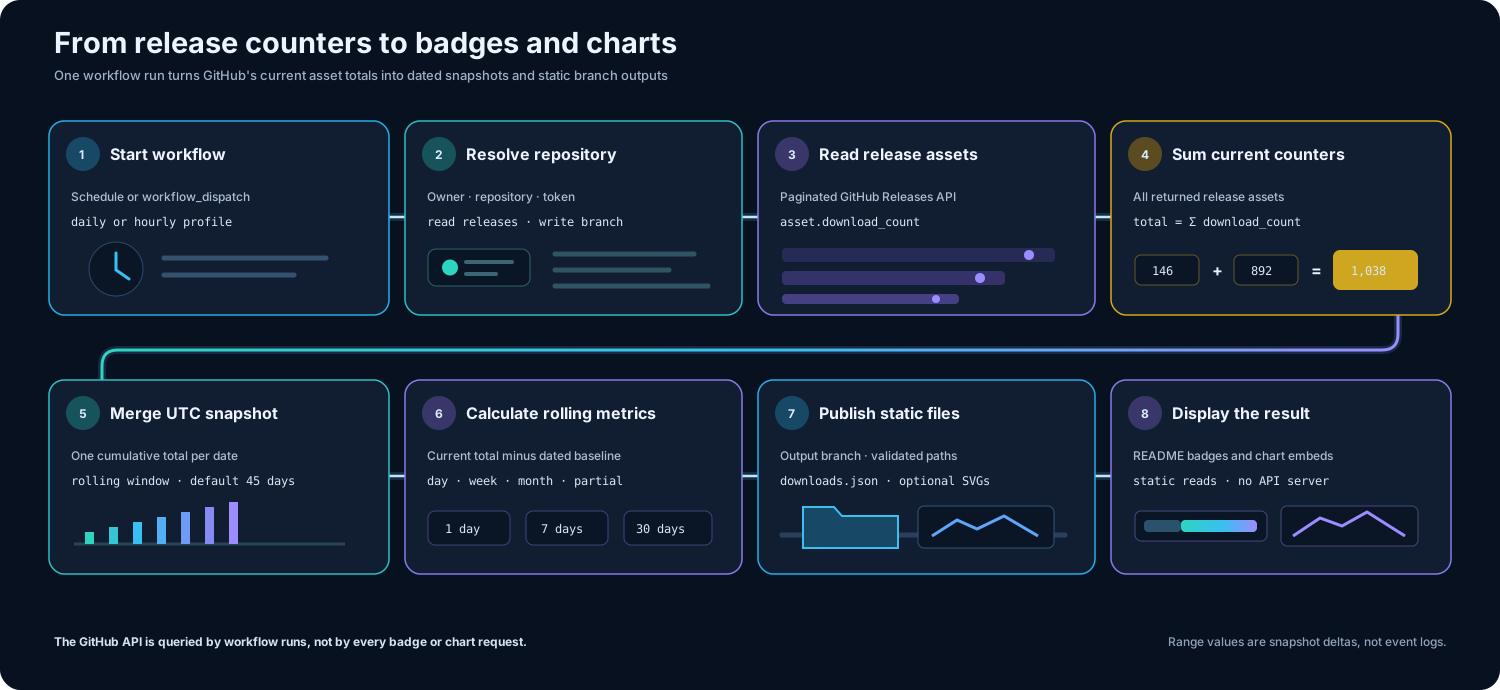
GitHub Downloads Action measures downloads of files attached to GitHub Releases. A scheduled or manually started workflow reads the release asset counters for a repository, stores one cumulative snapshot per UTC date, calculates one-day, seven-day, and thirty-day changes, and publishes static JSON for badges. It can also publish SVG charts from the same snapshot history.
The generated files are normally written to gh-pages, but GitHub Pages hosting is not required. A badge or README image can read the files directly from the branch through GitHub Raw or a compatible content delivery network. No separate statistics server is involved.
| Goal | Guide |
|---|---|
| Add the action and publish the first JSON snapshot | Setup and publishing |
| Understand totals, range deltas, snapshots, and partial flags | Understanding the statistics |
| Create Shields badges or publish SVG charts | Badges and charts |
| Review every input, use outputs, or resolve a failed workflow | Configuration and troubleshooting |
The action sums the download_count value of every release asset returned by the GitHub Releases API. It measures downloads of attached release files, not repository clones, source archive downloads generated automatically by GitHub, page views, stars, or unique users.
Daily, weekly, and monthly values are differences between cumulative snapshots. They are therefore rolling estimates derived from the dates available in downloads.json, not event-level analytics.
gh-pages
└── gh-dl
    ├── downloads.json
    ├── downloads-trend.svg          optional primary chart
    └── charts                       optional chart matrix
        └── <type>--<theme>.svg
The action creates the output branch when it does not already exist. Subsequent workflow runs update only files whose material contents have changed.