PublishModule
the publish module is used to automate the publishing process to modrinth and eventually curseforge too, once they get around to making an actual working API.
to set up the auto publishing automation for your project, create a gradle task in
your build.gradle like this:
tasks.register('autoPublish', JavaExec) {
    mainClass = 'net.kapitencraft.kap_lib.publish.AutoPublisher'
    group = 'publishing'


    classpath = sourceSets.main.runtimeClasspath

    systemProperty('modrinthAuth', getProperty('modrinthAuth'))
    systemProperty('curseforgeAuth', getProperty('curseforgeAuth'))
}furthermore you need to define the gradle properties in your local
gradle.properties file (make sure it isn't published to github or other versioning
services as it contains data to publish versions to modrinth or curseforge in your
name!). you can find the local file under <USER_DIR>/.gradle/gradle.properties.
apart from the gradle setup you also require to provide a configuration under
src/main/resources/publish_config.json. it is stored within the resources folder
to allow for gradle file expansion by extending the processResources configuration:
tasks.named('processResources', ProcessResources).configure {
+   var publishProperties = [
+           mod_id: mod_id, mod_name: mod_name,
+           mod_version: mod_version, minecraft_version: mc_version,
+           neo_version: neo_version
+   ]

+   inputs.properties publishProperties
+   filesMatching(['publish_config.json']) {
+       expand publishProperties
+   }
}
for what goes into the configuration, consider following example:
{
  "modrinth_id": "IrKTRsiH",
  "curseforge_id": "kaplib",
  "author": {
    "name": "Kapitencraft",
    "email": "kapitencraft@gmail.com"
  },
  "mod": {
    "id": "${mod_id}",
    "name": "${mod_name}",
    "version": "${mod_version}",
    "artifact_version": "v${mod_version}-mc${minecraft_version}"
  },
  "mc_version": "${minecraft_version}",
  "loader_version": "${neo_version}",
  "with_sources": true,
  "changelog": {
    "format": "md",
    "style": "none"
  }
}
the modrinth_id and curseforge_id tags refer to the internal ID of the projects
of the matching publication site.
the author information (an alias and the email) are necessary to validate requests made to the publication services. you can leave the example values as I did create this workflow, although it is recommended to use your own.
the mod inforation tells the system the properties the version to be published should
have. those include the id of the mod, (its mod id) the human-readable name, the
mod version and te artifact version (the file extension on the .jar file,
should match the version = "v${mod_version}-mc${mc_version}" in your build.gradle)
furthermore the used minecraft and loader (neoforge) versions are required in their respective json tags.
the with_sources tag defines whether source files (used for jDocs and comments)
should be included in the upload.
the changelog tag provides information about the format & format style of the
changelog to publish. the format tags defines the text format to use (one of
html, md or plain), while the style tag defines the style to use (one of
list or none) the list style will rearrange the order of elements in the log,
in order to sort the content by categories defines in the categories file.
in order to define dependencies for your mod, you can add entries under the
dependencies list tag like so:
    {
      "version_name": "v${kap_lib_version}-mc${minecraft_version}",
      "modrinth_id": "IrKTRsiH",
      "dependency_type": "embedded"
    }
each dependency must declare the version name, the slug of the project on modrinth (and curseforge if specified) as well as the dependency type, one of:
required: the dependency is required for the mod to load properly
optional: the dependency is compatible with the mod, although not required
incompatible: the dependency is not compatible with the mod
embedded: the dependency is embedded, as in JiJed into the mod
moreover you are able to change the file location of different assets required for the publication of the artifacts:
{
  "assets": {
    "source": "build/libs",
    "changelog": "publish/changelog.txt",
    "categories": "publish/categories.json"
  }
}
where source is the path to the jar artifacts of the mod to publish, under normal
circumstances that should always be build/libs, which is the fallback if no value
is specified, changelog is the path to the changelog file that defines where the
text content for the changelog is located and categories is the location of
categories used within the list changelog style.
finally, after making all these configurations the only thing left is to refresh
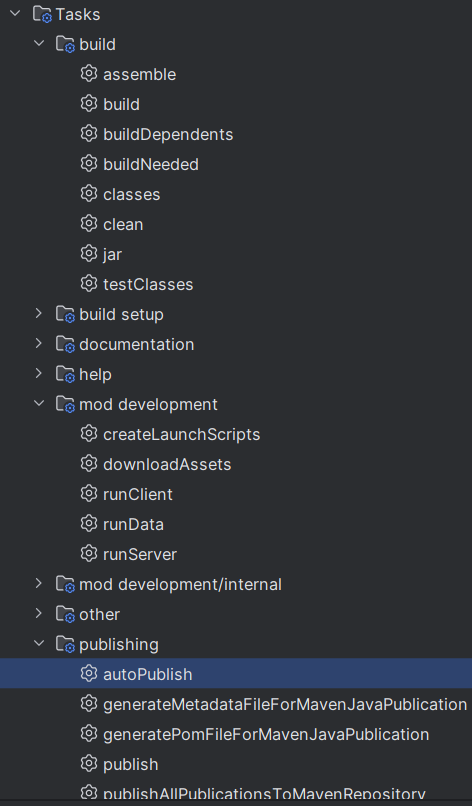
gradle and execute the gradle task configured in the first step. either via the
terminal with /gradlew :autoPublish or the gradle widget in intellij: