Client/attribute ui#427
Conversation


Trying to get the styling and layout setup

Updating some styling

Updated styling a bit and added toggling

Started updating the editor and connecting it to the attributes endpoint

Updating styling and fixing various issues

mend

mend

Electron (#397)

* add electron

* Add missing api methods

* Fix build errors for electron, add to CI

* Address comments

Update deploy to only Thursday

Update base image for girder worker

Fixes FPS issue and image caching (#419)

* fixing fps and modifying cache

* mend

Update docker docs (#379)

Co-authored-by: Brandon Davis <git@subdavis.com>

Update blank.yml (#415)

Upgrade to node LTS

Co-authored-by: Jacob Nesbitt <jjnesbitt2@gmail.com>

Add checkbuild.sh (#425)

Add load and save for JSON annotations (#414)

* Add load and save for JSON annotations

* Relax json file name requirement

* SIP

* Implement settings, sanity checks, separate loading of datasets

* WIP

* remove settings page

Fix deploy.yml

Update day strings (#430)

Fix typo in library README

Allow setting of arbitrary attributes on video player (#435)

* Mute video prop

* Allow setting arbitrary attributes

Downgrade urllib3 (#439)

Fix inverse interpolation (#433)

Run pipelines enabled incorrectly (#441)

Minor fix to attributes

Minor ui fixes

Addressing changes

Enable pinch zoom on mobile (#440)

Co-authored-by: Brandon Davis <git@subdavis.com>

Add dummy generators (#438)

conversion to using api for attributes editing

converted attribute editor and added in additional editing

Updating UI interactions
 BryonLewis
force-pushed
the
client/attribute_ui
branch
from
BryonLewis
force-pushed
the
client/attribute_ui
branch
from
e75f4fc to
6140e47
Compare

 subdavis
left a comment
subdavis
left a comment
subdavis
left a comment
There was a problem hiding this comment.
I was working on this yesterday and lost my comments, so here it goes again
Issues
- Up and down arrows should navigate tracks the same way they do on the other tab, I think. This is useful as the new review mode UI.
- The track list item checkbox should probably be disabled in the attribute pane.
- When you move from the attribute panel back to the track list panel, if a track is selected, it isn't scrolled properly in the track list. If you tap up/down, it's corrected, but it would be nice to have it initialize properly. This is sorta unrelated to this change, but wanted to mention it.
- setting the value of text and number fields I found a bit frustrating, because you have to hit "enter" for the value to save. If you hit
escapeor click off the focused input, the value is lost. IMO, all unfocus events should result in an update. - Changing the attribute name of an attribute that's already set will result in the value being erased for all uses of that attr. Users will find this frustrating.
UI Feedback
This is a complicated thing to get right, and I don't know what users are going to like best.
- I like the ability to edit a single attribute when unused are hidden,
- I'm generally unsure about how this visible/hidden toggle works.
- I've noticed that this toggle serves two somewhat conflicting purposes. 1) as a UI optimization, to hide noise and make the attribute panel look cleaner and 2) as a way of exposing the "management" interface where users can manage existing attributes. I'm concerned that users may be confused by using the same UI for both track/detection-specific editing (setting actual values) and for dataset-general editing of what attributes even exist. The co-location of these features may lead one to believe that the "options" they set for an attribute apply to a particular track. It's entirely possible that a more traditional preferences dialog would be better.
- I think the first purpose is really only a result of vuetify input boxes being so obnoxiously bloated and over-engineered. Perhaps if all these inputs were replaced with their native form equivalents, they wouldn't need to be hidden for this UI to look clean. I think the track list item is a great example of how removing the vuetify input simplified things.
All that being said, I think this represents an excellent step in the right direction. The component is really well written and can be refactored in the future if necessary.
I do have a few aesthetic suggestions, which I'll add in a PR.
|
|
||
| <template> | ||
| <v-dialog | ||
| v-model="show" |
There was a problem hiding this comment.
You can't v-model with a prop, assignment will cause a warning. In general, I find it's best not to include v-dialog at all with reusable components.
There was a problem hiding this comment.
I placed it outside of the component and swapped it to use :value. Don't know why I set it using v-model it was used as value calculated outside of the dialog itself anyways.

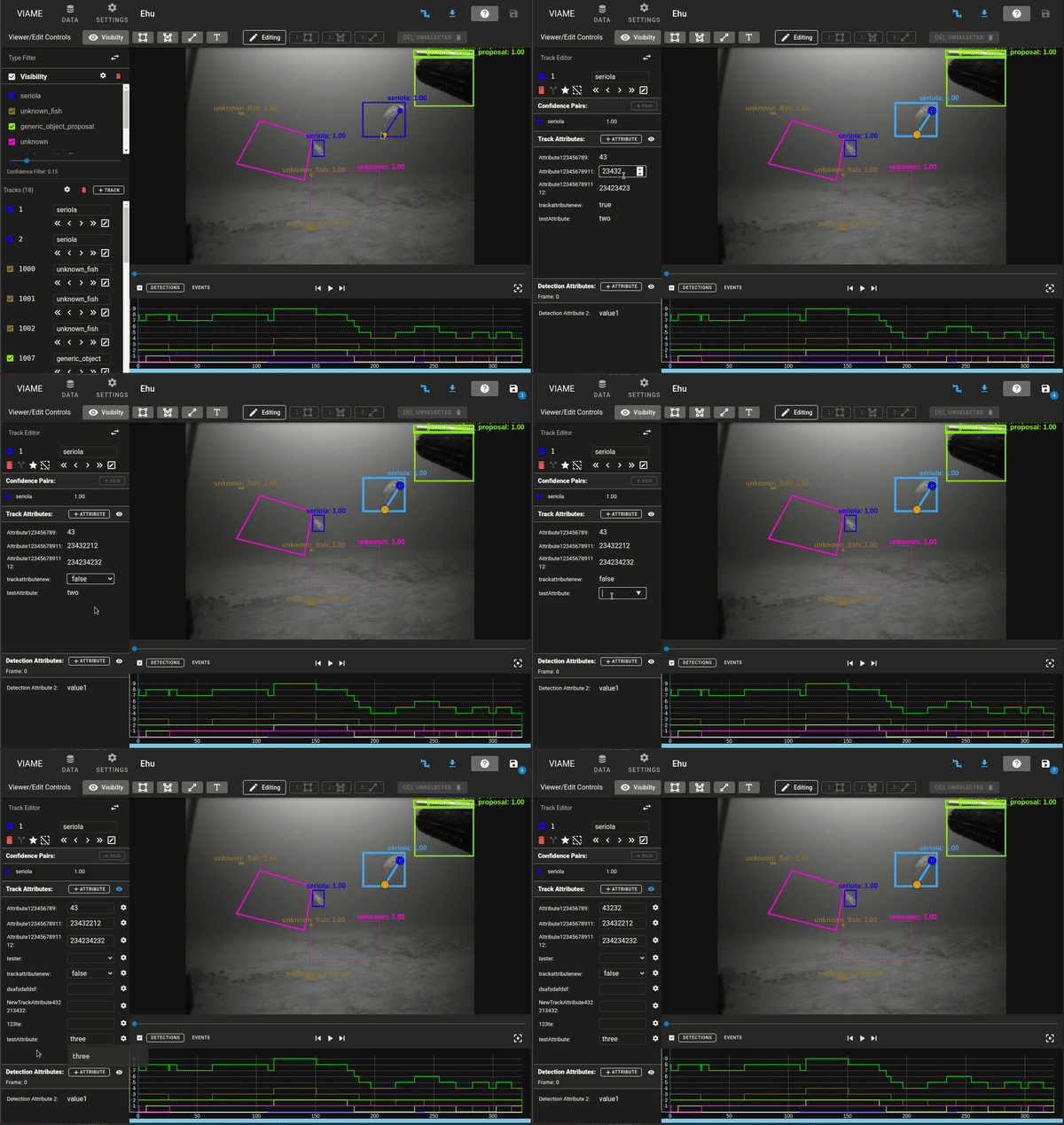
The secondary reason is that you could have a list of disparate things that mean nothing to your specific track. If there are 20 attributes that can be set and you set index 0,1, 15 to values you then have a whole lot of information that isn't relevant for viewing if you can see all unset data at the same time. I also didn't want to resort the list of items each time based on what is set. I think this was a decent middle ground where you have your track level data and you can edit it quickly for set values, but if you want to add more you toggle the visibility (that's why it was a edit icon before). I do like the native HTML elements more and think they look better. A bit more annoying to work with (especially the datalist for each text/value input) but it looks cleaner. The only downside is that the attribute type isn't in there anymore (it used to be the hint for the vuetify input.
|

|
Oh, nice. I like that better too. I think the form type provides enough info about what types are accepted, but that's just me. |
|
Not ready for review, I want to do the following before it's ready
|
BryonLewis
force-pushed
the
client/attribute_ui
branch
from
3d84226 to
986d486
Compare
|
I feel a bit better about this system now. I think this structure is easier to understand and to modify in the future if needed.
|
There was a problem hiding this comment.
Haven't quite finished. Still need to finish understanding TrackDetailsPanel.
Meanwhile, here's some comments.
Also 2 bugs I found best demonstrated by GIF.
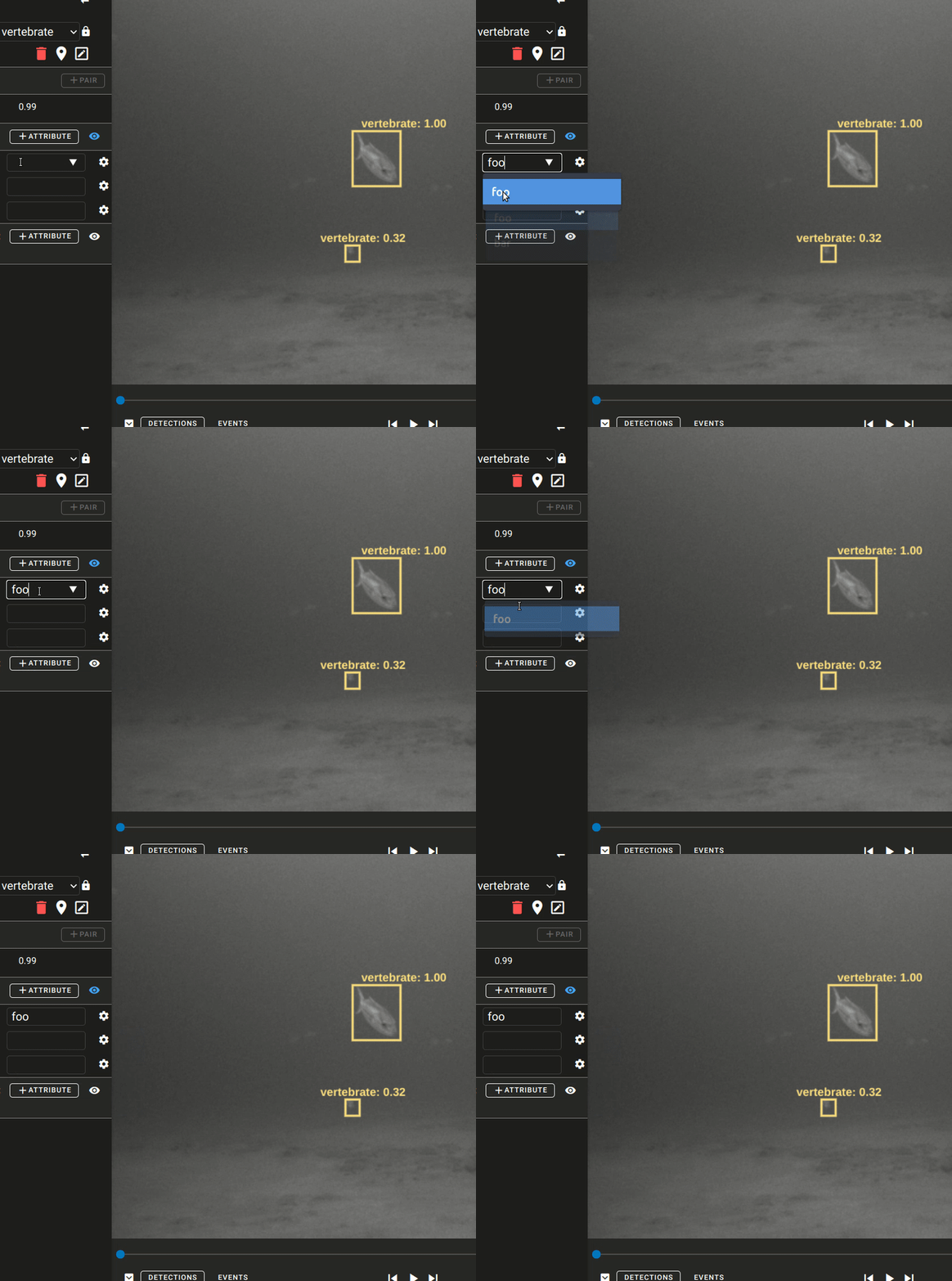
Bug1
Options disappear in dropdown after they've been selected once
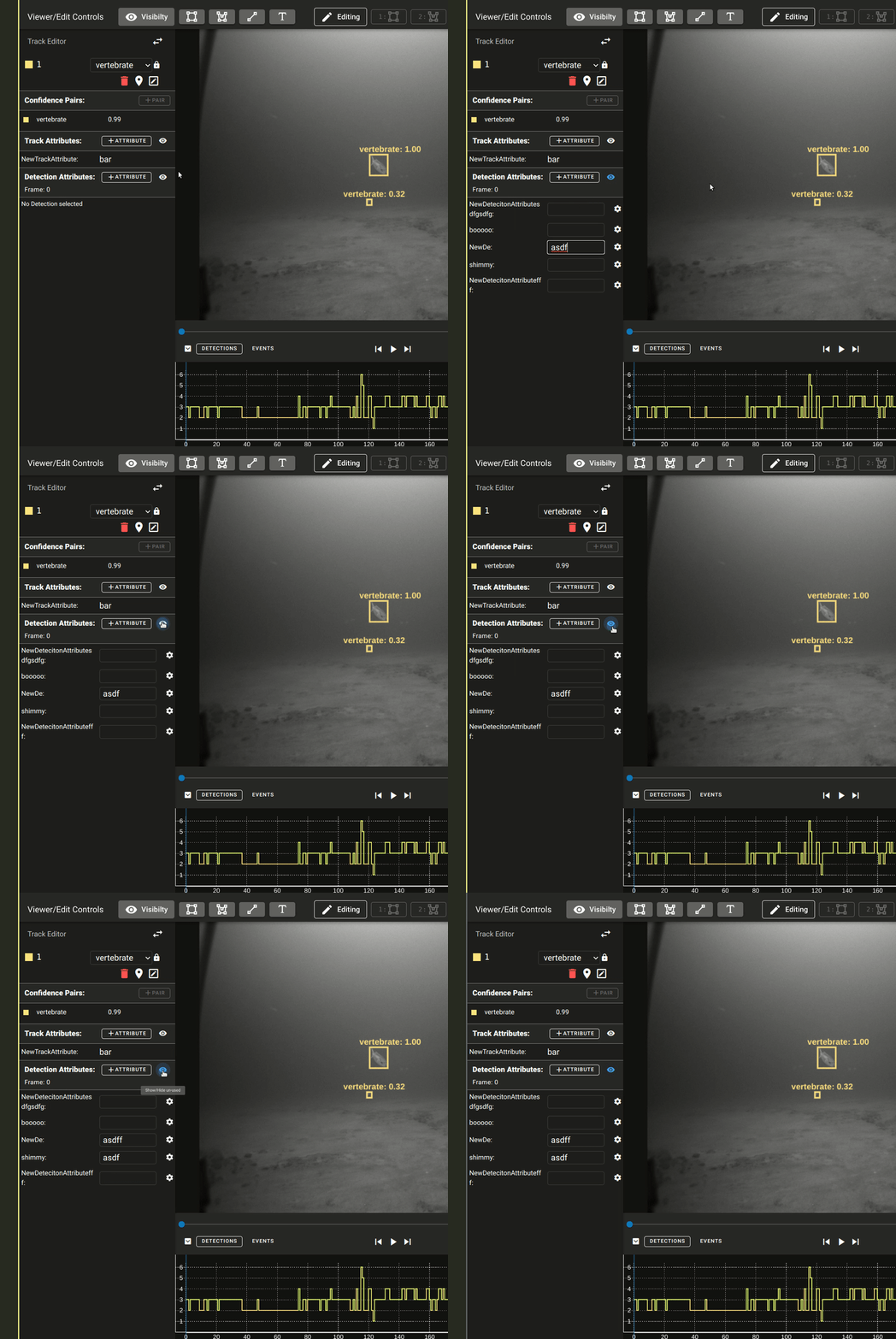
Bug2
Detections don't appear in the "clean" list after they've been saved. Save button counter goes up, but they're still invisible.
| components: { TooltipBtn }, | ||
|
|
||
| props: { | ||
| singleDisplay: { |
There was a problem hiding this comment.
weird nitpick. Could we just call this solo?
singleDisplay is just awkward to me.
| const values: Ref<string[]> = ref( | ||
| props.selectedAttribute.values ? props.selectedAttribute.values : [], | ||
| ); | ||
| const addNew = ref(!props.selectedAttribute._id.length); |
There was a problem hiding this comment.
why bother converting these to refs? You aren't the new variable's reactivity anywhere, and props is already a reactive container object.
| value = undefined; | ||
| break; | ||
| default: | ||
| value = newval; |
There was a problem hiding this comment.
| value = newval; | |
| value = newval.trim(); |
Probably just a good idea.
| switch (newval) { | ||
| case '': | ||
| case ' ': | ||
| case undefined: |
There was a problem hiding this comment.
None of these cases are possible, so this condition is unreachable code. (value evaluates false)
if (target && target.value)
There was a problem hiding this comment.
yup, I added the target && target.value after some refactor afterwards when I was testing Vuetify and HTML inputs together and didn't remove this.
| throw new Error(`Track ${trackId} missing from map`); | ||
| } | ||
| return track; | ||
| } |
There was a problem hiding this comment.
should make this a util or something...
There was a problem hiding this comment.
Maybe it could be hoised from useTrackStore
There was a problem hiding this comment.
I did hesitate on making a change to the API as well in this, but the duplication of the code makes sense to remove. I added it into the provides and changed references to where we were using getTrack function or specifically using trackMap for only the purposes of calling getTrack.
| font-size: 0.8em; | ||
| max-width: 50%; | ||
| min-width: 50%; | ||
| } |
| cursor: pointer; | ||
| font-weight: bold; | ||
| } | ||
| } |
| font-size: 0.9em; | ||
| padding: 4px 10px; | ||
| background-color: #272727; | ||
| } |
There was a problem hiding this comment.
Maybe refactor this to a BorderHighlight.vue with a content slot.
Can probably be a pure functional component.
There was a problem hiding this comment.
I added in a PanelSubsection.vue component for structuring the data elements that need to be placed in the Panel and have a scrolling subsection as well. Used for the ConfidenceEditor.vue and both AttributesSubsection.vue components.
I didn't want to go too far into it, but in the future we could add a settings slot and perhaps replace the TypeList and TrackList so that everything has a standard style with a header, expandable settings section, and then a scroll area. It should help with all these vertical subsections that can independently scrolled.
| <span>Add a new Confidence Pair</span> | ||
| </v-tooltip> | ||
| </v-row> | ||
| </div> |
There was a problem hiding this comment.
Refactor to component maybe.
There was a problem hiding this comment.
I figured that was going to be the eventual plan, didn't know if it should be done here or in a new PR. I can do it here.
Co-authored-by: Brandon Davis <git@subdavis.com>
|
Bug 1
Datalist is garbage in it's default behavior. Once an item is selected it won't display the rest of the options, that is why I need to reset during I can go through and using |
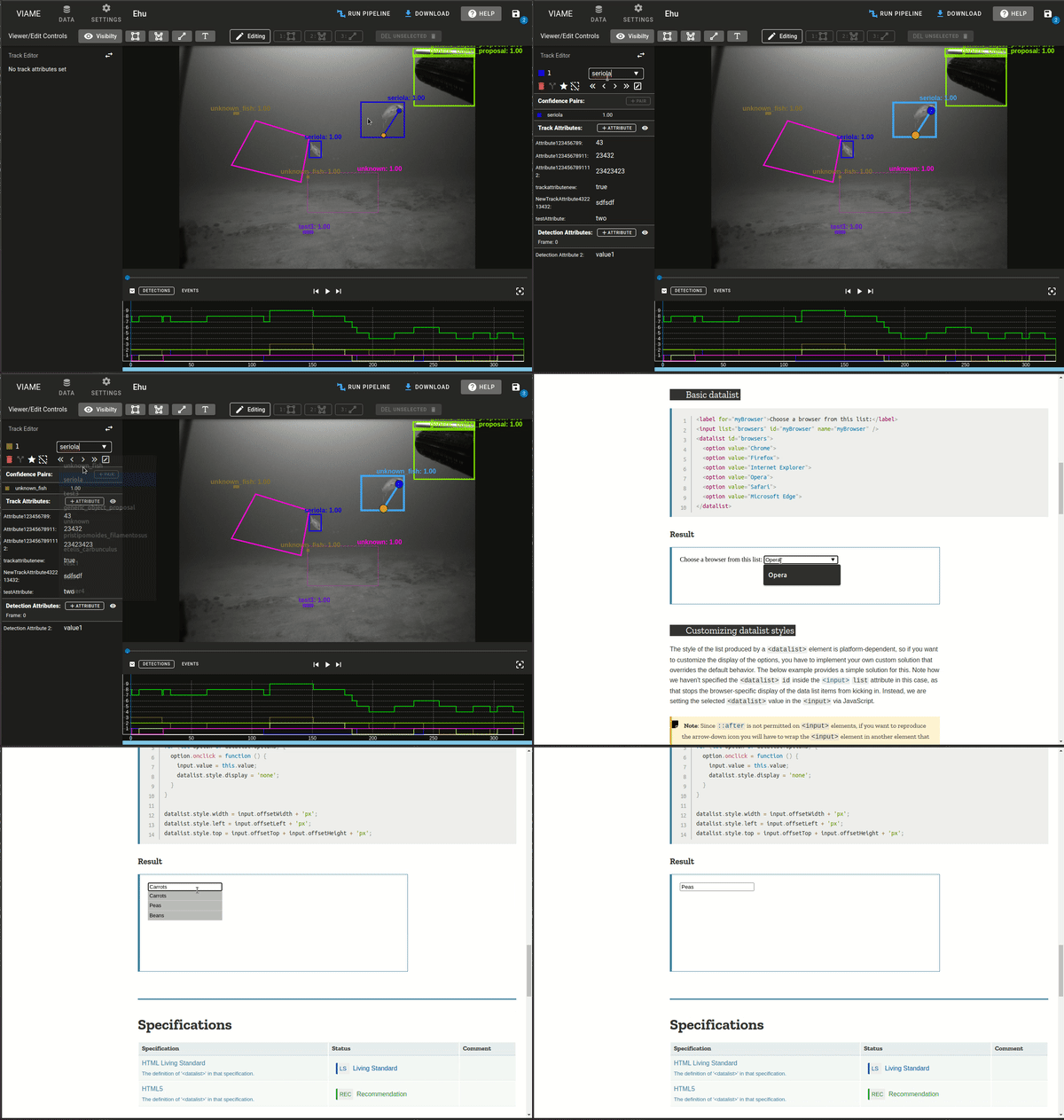
Bummer. I went back and looked again, and this works exactly like the track type dropdown. I'd say don't worry about it for this PR. The problem is larger in scope than I thought. Maybe we could log an issue and build our own select component sometime in the future to replace all of them (since track type should work like the mozilla demo too IMO). Thanks for explaining that. It isn't ideal for users, but we should maybe take a minute to think if we really want to maintain/support our own |
|
First issue was a bug in the datalist input using a copy of the prop because it needs to be set to nothing when the user clicks on the input so that way the list will properly display. The tempVal wasn't being modified on new props being set so I added a watcher. The second issue I feel dumb about. It was the classic 0 TrackId and not properly checking that the |
There was a problem hiding this comment.
Couple more small issues.
- Clicking the configure cog only works once. If you click it, then click anywhere outside the dialog, it won't open anymore. Reproduce by just spam clicking the cog. If you use the cancel button inside the dialog, it works properly.
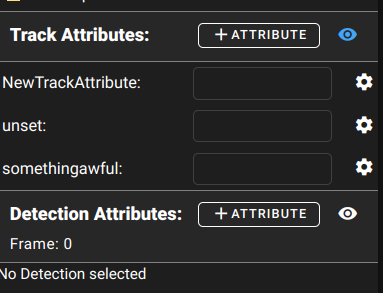
- Setting an attribute then immediately clicking the eye makes the attribute disappear on frame 0.
- Steps to reproduce
- Click a detection.
- Open the track attribute settings eye, enter some text
- Click the eye again
- Text disaappears, but it's still there if you click the eye back on.
- Steps to reproduce
- Detection attributes seems to have the same problem as above on frame 0: detection attributes disappear in when unused are hidden. This issue is described in a gif in my first review.
- "No track selected" text is shown when a track is selected but has no attributes. When no track is actually selected, you see "No track attributes set". These are backward.
|
The cog wheel issue was because I wasn't using a v-model for the dialog and was using a value check. Solved by connecting the The issue with the display not showing up after toggling the visibility was caused by utilizing computed properties and having them update without there being any indication for the computed property to update. Would require something like watch deep or using refs and manually updating them using functions after an attribute update is called. There is another option and that is using the similar style to the It looks like it was a created for a similar reason: Using computed properties derived from a track but the user can edit those tracks and the computed property needs to update properly. In |
subdavis
left a comment
subdavis
left a comment
There was a problem hiding this comment.
Approved! Thanks for humoring all my suggestions.
There's just one other issue I noticed:
- Using
escapekey to close the attribute editor dialog has the same bug as clicking off the dialog: you can't open the dialog again until you open the page. - Also, hitting escape dismisses the dialog and unselects the track, which is kinda jarring because the whole UI changes in an unsuspected way.
I don't know if there's an easy solution to this, or if mousetrap makes it hard. But it might be nice to fix. Could also just log an issue and get to it later.
|
I'll find see what I can find. I imagine it has to do with the v-mousetrap and it's global nature. I know we had that flag used for the global $prompt, may need to make something that prevents it from triggering if dialogs are open. Hopefully without having to directly interact with |
|
This should prevent the escape from getting to the global mousetrap handler. |
There was a problem hiding this comment.
Went through a more exhaustive test and found one more thing.
You can't edit attributes anymore. If you create one, save it, then edit again and try to change its predefined values, you get a message about attribute already exists.
Also, maybe make the window a tad wider or fix the text wrap?
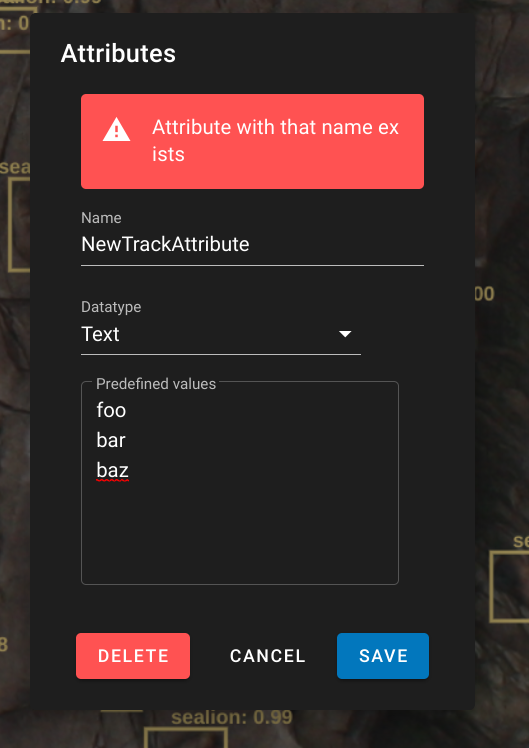
|
I welcome any change or suggestion to the warning text that is displayed. That text is only displayed when the user is editing an existing Attribute. On brand new attributes that won't be displayed. I modified the logic so that you can overwrite or change names of the currently selected Attribute. You aren't allowed to duplicate a name that exists when creating a new attribute or when updating a attribute. I.E. if you have [foo, bar, buzz], you can't name a new attribute to any of them, but you are allowed to edit the current attribute to a different name as long as it isn't one of the existing items. |
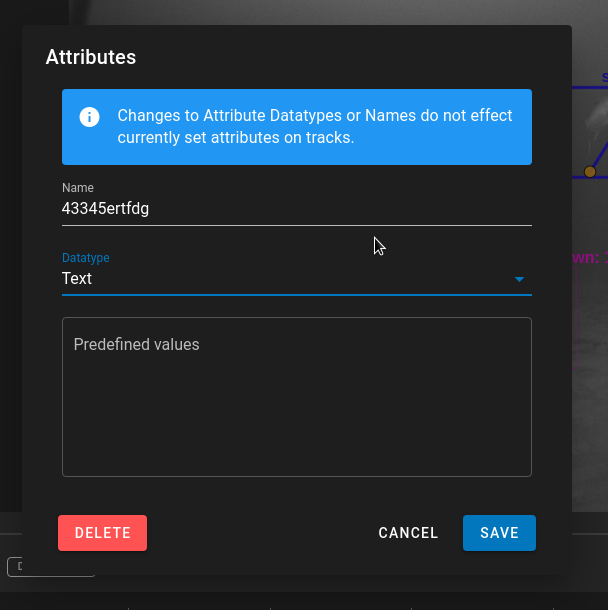
|
Sorry, I noticed discrepancies in how the Type datalist in I also added an issue #477 about fixing whitespace inputs for both the Attributes datalist and the |
| (e.target as HTMLInputElement).blur(); | ||
| const target = (e.target as HTMLInputElement); | ||
| // Datalist needs to reset if we blur on no input | ||
| if (props.values && props.values.length && target.value === '') { |
There was a problem hiding this comment.
target.value will be ' ' not '' for datalist index 0. Does this capture that case?
There was a problem hiding this comment.
Selecting that manually from the datalist in the dropdown immediately sets it to undefined and bypasses this function. This is for only hitting enter after typing, (or specifically not typing anything). Now hitting enter without adding anything will return it to the default initial value (Same as the type dropdown). Adding in only spaces will remove the value (same as datalist index 0).
With the current setup if you select the 0 index item it immediately executes the change, emitting undefined which will hide the data value if you are editing a single attribute. So the dropdown bypasses the blurType function.
These discrepancies and confusion are why I added that other issue about the behavior of the Type dropdown in TrackListItem.

2 participants


This will use the global dataset but set up the initial stage for switching over and making it a smoother transition.
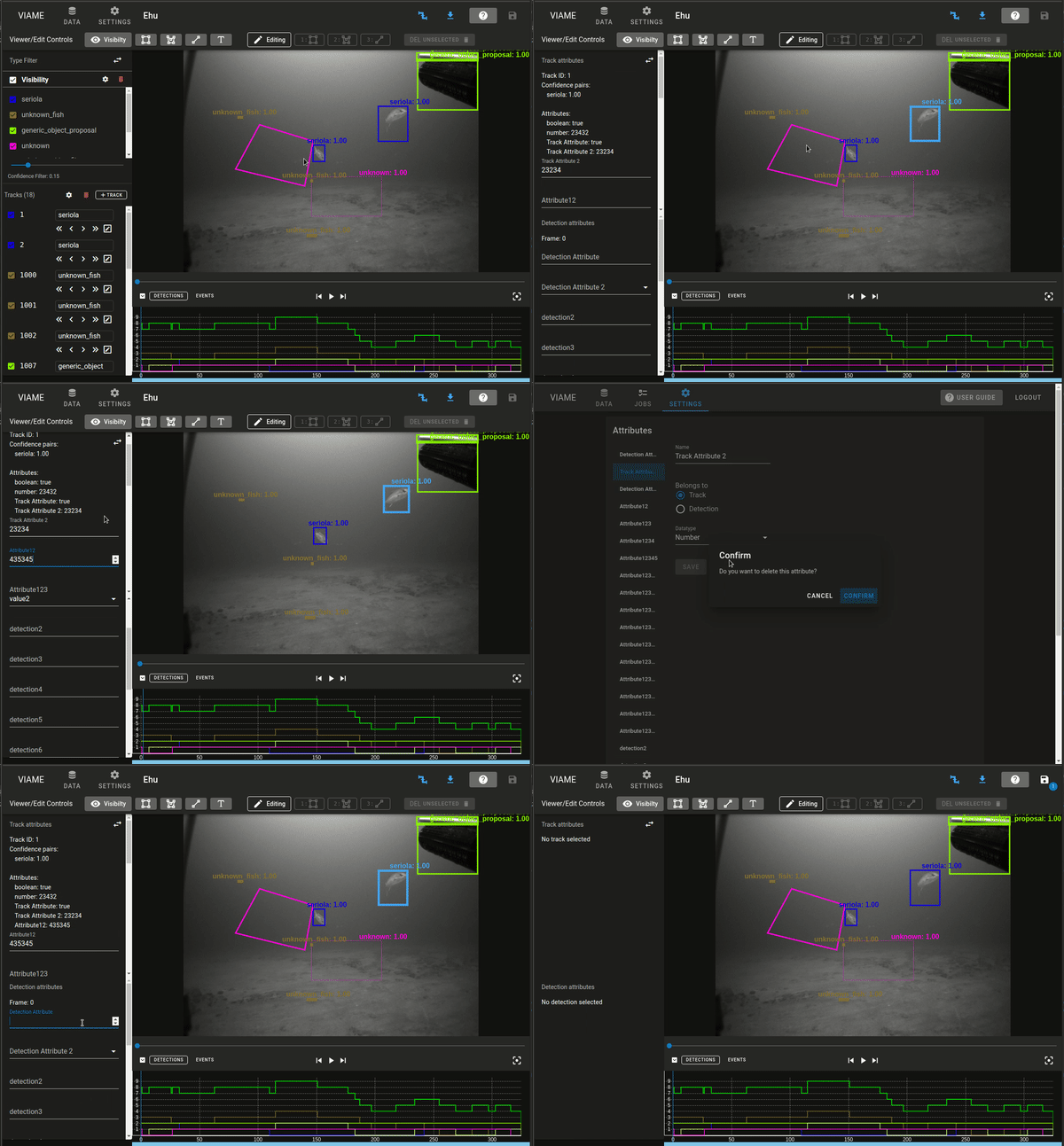
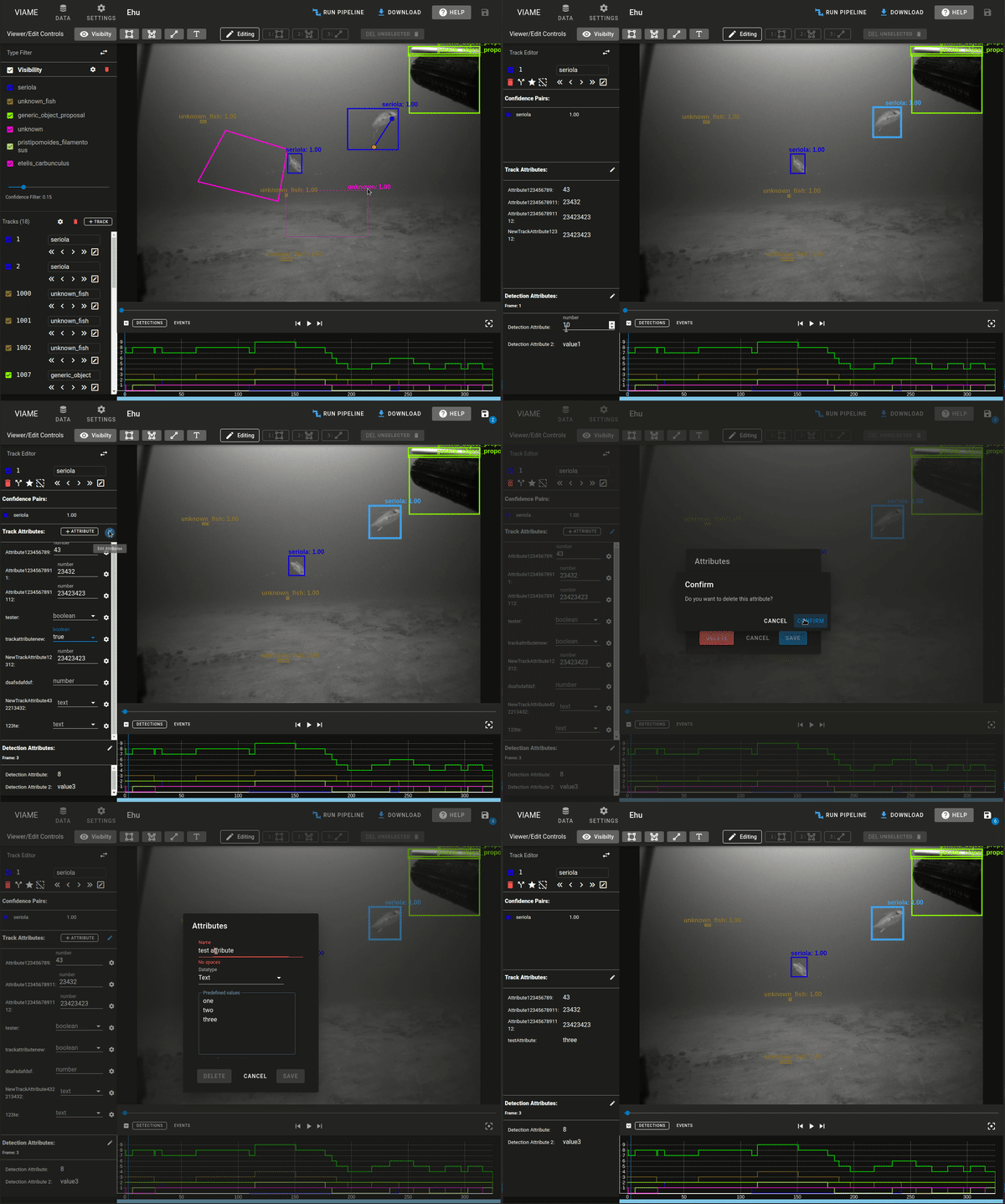
Fixes #437
Old Style:
New Style:
Goals:
TODO:
Possible Questions and some explanations for feedback:
AttributesPanelSection.vuefor tracks/attributes sections because a lot of that is repeated code except for text attribute references and the frame counting.OldAttributesSettingsand items or should we just remove the Settings/Attributes panel from the global settings for now.