Client/training UI#487
Conversation


 subdavis
force-pushed
the
client/training-ui
branch
2 times, most recently
from
subdavis
force-pushed
the
client/training-ui
branch
2 times, most recently
from
eb0b160 to
e3bf1ce
Compare

|
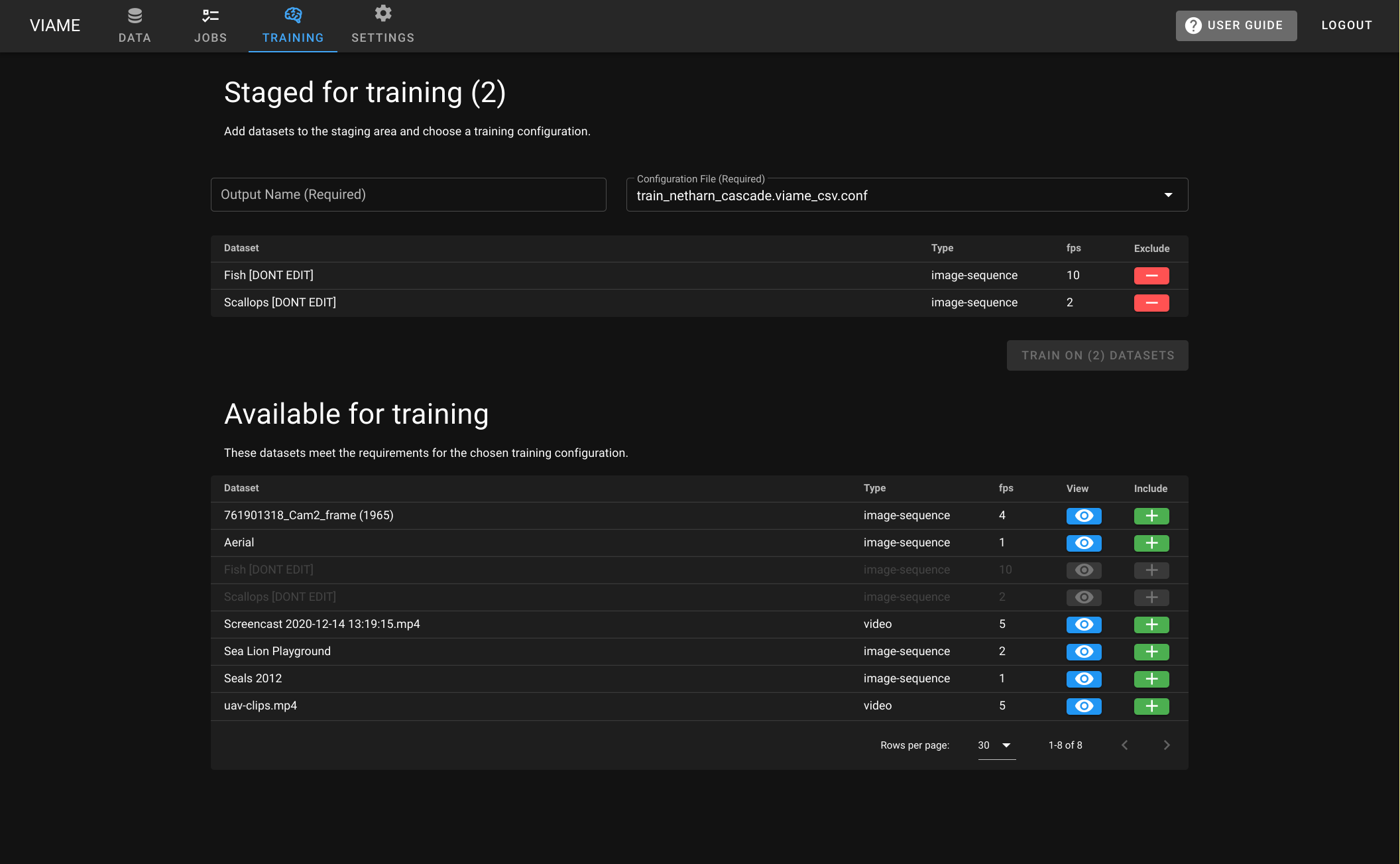
For web, this is done and appears to work. For desktop, the UI is done, and all that remains is to implement the apispec training function. Until then, the router tabs are disabled. Rebased after the major schema change from #516
|
|
FWIW, I'm starting to have doubts that a specific "Training" page is a good idea. I wonder if a general-purpose "CRUD" type data table with checkboxes and then a toolbar with tabs for different actions would be better. The toolbar area would almost be like microsoft office. Tabs like "trainining", "pipelines" and "manage data". Basically it would be just like the current web data tab, with without the folders/heirarchy and moving all the stuff in the right-side of the browser toolbar into a tabbed toolbar. The staging area might still be useful for all purposes. Its' just a more robust way of checking checkboxes when you have multiple pages of results: you can always see the things you've checked. TrainingYou could name a new pipe, select training config, and start a train PipelinesChoose a pipe, run it ManagementImport/export, delete data, manage permissions, other stuff. @BryonLewis ptal, let me know what you think. I believe I'd prefer to merge this first then circle back, but if you really dislike the training UI, I'm willing to scrap it. |

|
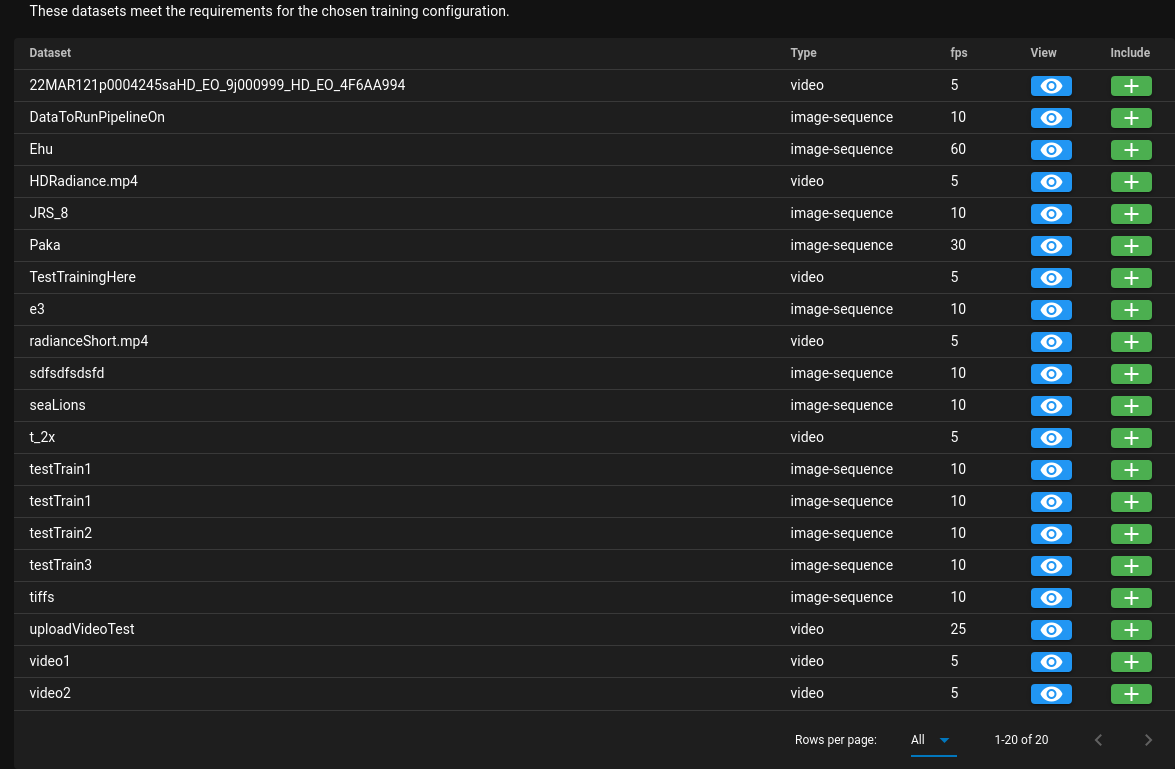
my main worry with this current one is that it may eventually be impossible to get to the dataset you specifically want without the ability to hierarchy down. Using the I do like the idea of having a shared with me/not shared with me toggle to simply, but I kind of feel that a flat list without hierarchy is going to be harder to navigate and discern what data you want to use for training. Like you may want to combine your own data with a specific dataset in a collection on the server like the HABCAM stuff. This could be mitigated but would require implementation of powerful filtering/searching tools. I would see if we could get an indication of how often a user might train on their own data, plus a collection or source dataset either on the server or from another user. I know we added the ability to train on multiple folders, I just don't fully know if one of the use cases is to accentuate your own data with larger ground truth like the JRS or HABCAM data. Additionally to this I think we need to clean up the pipelines/trained pipeline menus as well because they can have the potential again to be an unwieldy list of text that doesn't provide enough information. This is all UI stuff, but trained pipelines could indicate the owner and what they were trained on (we already have all this data). Making it easier to share and prevent issues with naming conflicts. |
|
Yeah, I really had blinders on for this one. All the points you make are valid, particularly about how "you could solve this problem, but only by implementing complicated search/filtering" which is effectively what the hierarchy is. How to proceed?What would you recommend? I like the staging area. I guess we could change the "available" area to be a regular data browser without checkboxes and a Also, for training on desktop, there is no browser (and none of these problems apply) so I guess we just have to keep this page desktop-only. |
|
I think the solution works well for the desktop in which datasets are limited and aren't typically shared. (Might want to implement/add the new I like the idea of a staging area for the web as well. Other features and ease of use are mostly determined by how often it will be used in specific ways. With the web version I would want some questions answered first: I think your |
Through discussion with Matt it looks like access to other folders isn't a frequent thing so it can be left using the basic file browser with additional buttons. |
|
Had another discussion. Going to remove the MultiDatasetTraining tab from web for now while we think about the best way to unify (or separate) the Data tab's data browser with the UI for running training. To have a data browser in multiple places could be confusing, and is likely not a permanent solution. Bryon convinced me that #252 should be closed because the browser is valuable, at least as long as Girder 3 is our platform. Instead, this PR is going to focus on finishing training implementation on desktop. This will become a desktop-only PR and will not change web. |
subdavis
force-pushed
the
client/training-ui
branch
3 times, most recently
from
3e012ef to
edcef31
Compare
 subdavis
force-pushed
the
client/training-ui
branch
from
subdavis
force-pushed
the
client/training-ui
branch
from
c16bee8 to
a1c52a6
Compare
|
Blocked on availability of new VIAME version with manifest training support. Ready for review of code quality, design, and testing on pipeline execution. |
|
After a quick look at this I may want to base some of the ffmpeg/ffprobe stuff on this and the concept of the viame.ts in the native folder. Mostly because I kind of did a similar structure with the calling of different sources and settings depending on what ffmpeg is found for linux. (VIAME with libx264, local with libx264, fallback to Viame nv_enc). A sort of initial first time test on import to figure out what ffmpeg to run, how to run it and where to find it, which then will be used on all subsequent runs. |
|
Only if you think you should. I refactored because the overlap was like 90%. If there's significant difference between linux and windows, just make them separate functions. We can always refactor later. I just had a quick look at your changes and I have no problem with a little bit of duplication. |

 BryonLewis
left a comment
BryonLewis
left a comment
BryonLewis
left a comment
There was a problem hiding this comment.
Couple of very minor things. Obviously I can't test desktop training yet but will once it's available. Basic testing seems that with some small fixes (on windows) everything else works base on my tests.
Test Procedure:
- Linux Desktop: loading [image list & video] -> saving/reloading -> running pipelines [image list & video] -> looking at training general tab -> training behavior when it can't find
kwiver - Windows Desktop: loading [image list & video] -> saving/reloading -> running pipelines [image list & video] -> looking at training general tab -> training behavior when it can't find
kwiver - Web Testing: loading [image list & video] -> saving/reloading -> running pipelines [image list & video] -> running training [image list & video] -> using training output on another dataset
BryonLewis
left a comment
BryonLewis
left a comment
There was a problem hiding this comment.
Just adding some other minor things for windows before I forget.
BryonLewis
left a comment
BryonLewis
left a comment
There was a problem hiding this comment.
Windows version with a modified VIAME Install works. I didn't go through the entire training process each time, but I did have it complete at least once.
I think the final part (displaying trained pipelines for usage) could be added to another PR.

2 participants


Work in progress
fixes #467
fixes #518