1.0.4

Patch notes 1.0.4
- Added volume bar animation on screen (required hardware update)
- Changed font, that has more characters (required hardware update)
- App will show in Programs and Features, so now you can actualy uninstall it
- A little bit fixed software
Hardware Update
- Download Arduino IDE 2
- Open SpotifyKeyboard.ino (download it down bellow)
- Go to File>Preferences and paste
https://github.com/earlephilhower/arduino-pico/releases/download/global/package_rp2040_index.jsonin Additional boards manager URLs: , click OK - Download library U8g2-2.33.15.zip
- Go to Sketch>Include Library>Add .ZIP Library... and select downloaded library
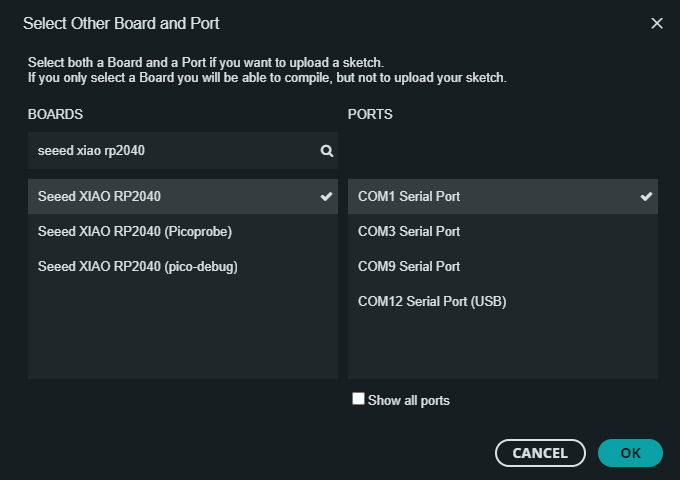
- On top left you will see box Select Board, select your keyboards COM (it will probably the only one, if not check *)

- When you choose it, window will pop up, under BOARDS choose Seeed XIAO RP 2040 and press OK (if another window pops up and asks you to downlaod smth just click YES)
- In Tools>USB Stack select Adafruit TinyUSB
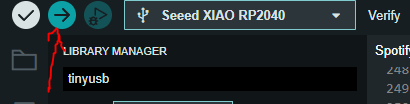
- Then just press Upload and wait for it to finnish process
- Also download latest software for computer
- Thats it have fun :)
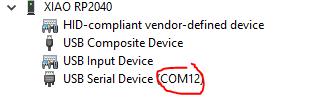
*How to check which COM your keyboard is:
- Open device manager and in View select Devices by container
- At the bottom of the list you should see XIAO RP2040 and expand it
- There should be USB Serial Device and in brackets which COM it is