Repository navigation
Live TV
Watch the TV channels of your own IPTV provider in VLC Redesign, like on a TV box: the channels with their logos and numbers, what is on now and next, a programme guide, channel up and down, and the past programmes when your provider keeps an archive (catch-up).
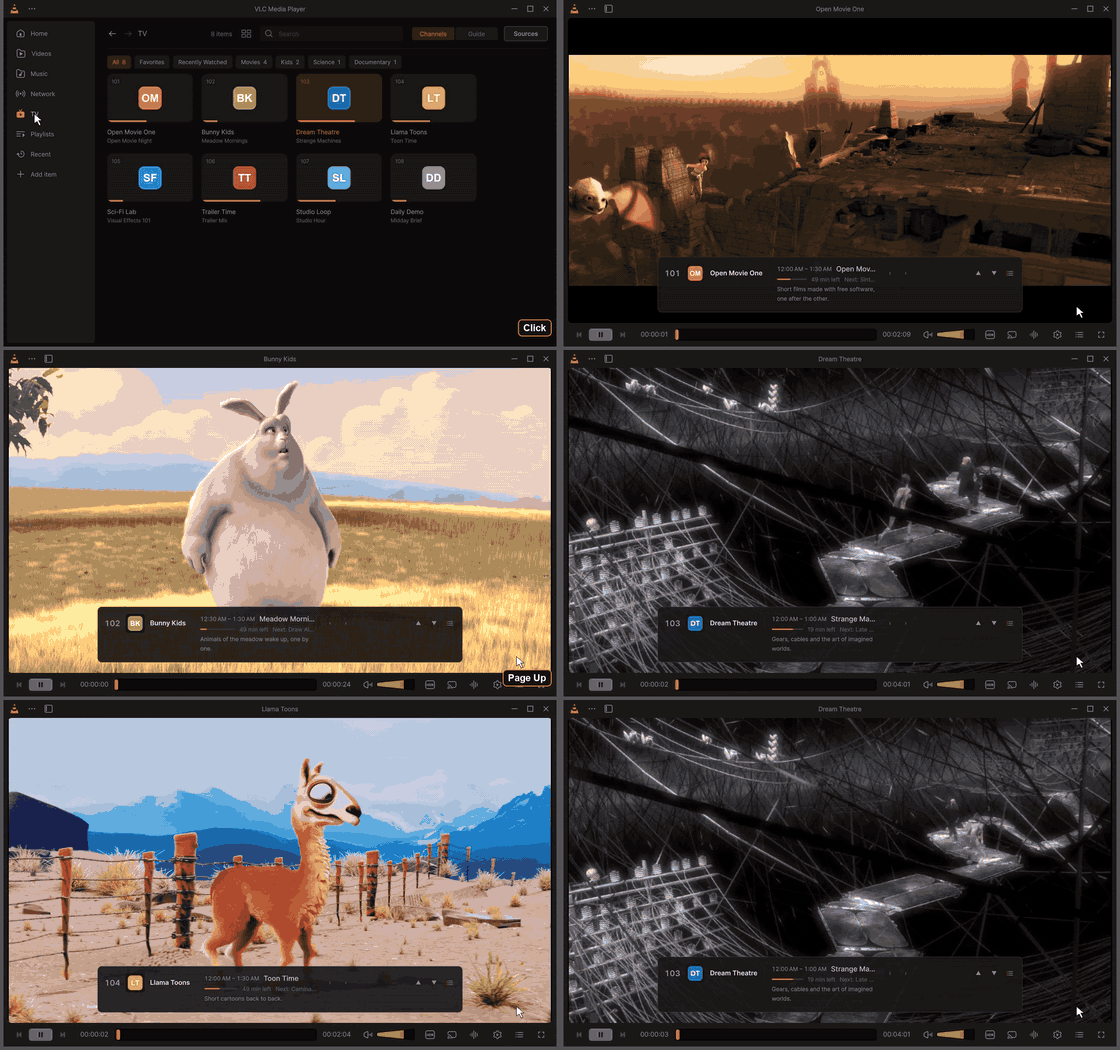
Page Up and Page Down change channel; at every switch the banner shows the number, the programme on now with its progress, and its description. Click for the MP4 · every clip: Feature tour.
Live TV is an add-on: its own plugin, plugins\misc\libiptv_plugin.dll (on Linux and macOS
plugins/misc/libiptv_plugin.so / .dylib). It is on by default. You can turn it off in Settings > General >
Live TV (IPTV) add-on, or leave it out when installing (the installer's Live TV (IPTV) add-on component).
Off or left out, nothing of it is loaded or shown: no TV entry, no TV settings, no TV keys in the player.
VLC does not come with any channels. You add your own link, or one of the free, legal channel lists of the catalog.
Open TV in the sidebar, then Add a Link (or Sources at the top of the TV page, or Settings > TV > Manage Sources).
| Source | What to type |
|---|---|
| Playlist (M3U) | The M3U or M3U8 link your provider gave you, or a playlist file (Browse). The guide it names in its header (url-tvg, x-tvg-url) is used by itself. |
| Xtream Codes | The server (http://host:port), your user name and password. The live channels, the guide of the account, and its films and series. |
| Guide (XMLTV) | A programme guide link (.xml or .xml.gz) for a source added before. |
You can also add guide links of your own to any source, one per line. Several guides are merged; the first ones win when two describe the same channel. The order of the sources (the ▲ button in Your Sources) is the order of their guides.
Links and passwords are kept in VLC's keystore (the Windows credential encryption, the Secret Service or KWallet on Linux, the Keychain on macOS), never written to the log.
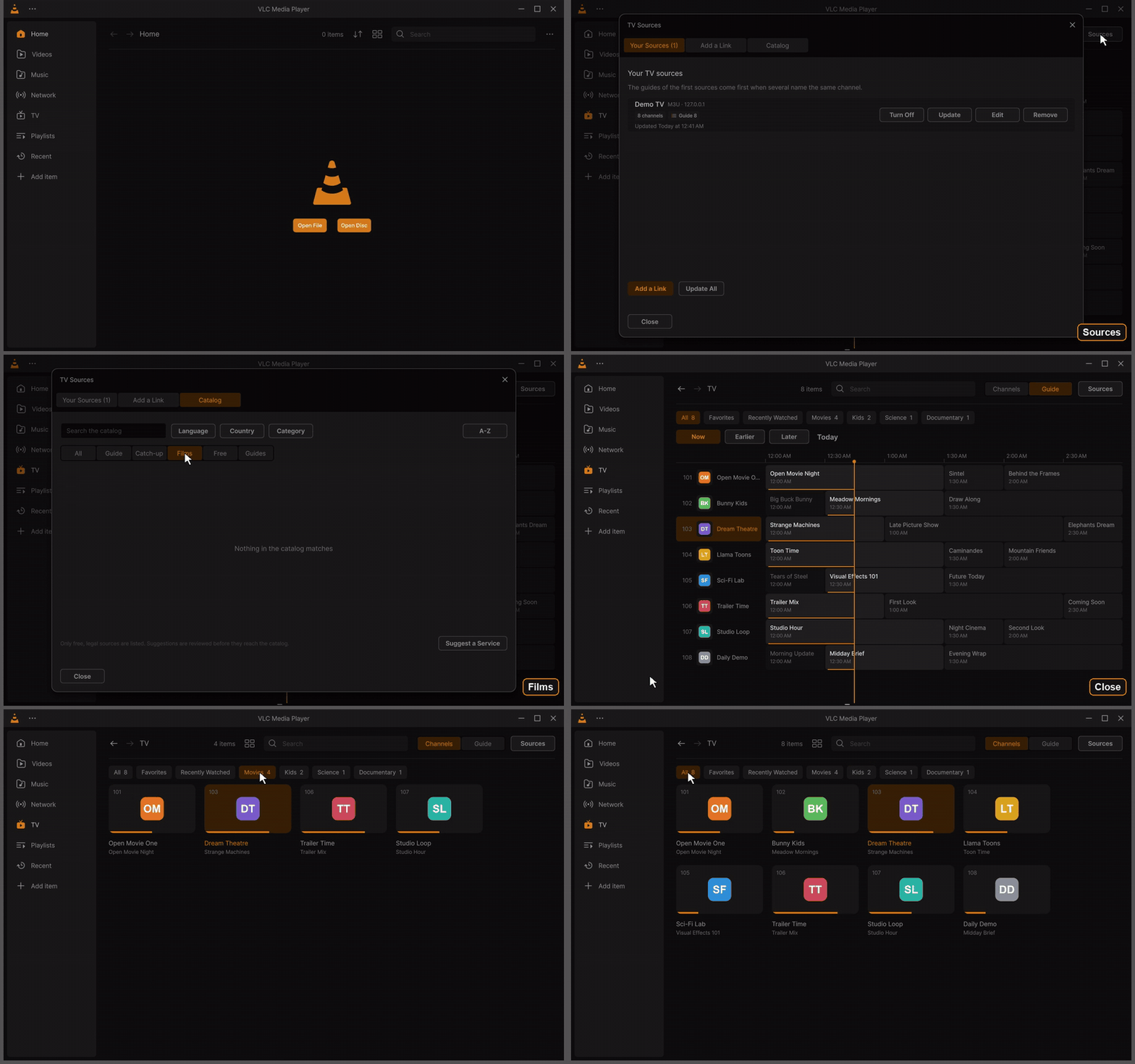
Sources and the catalog of free, legal lists, then the channels of a source with their logos, numbers, groups and what is on (a made-up demo provider). Click for the MP4 · every clip: Feature tour.
Catalog lists free, legal channel lists, with what each one has: the number of channels, a guide, catch-up, films and series, free or paid, its languages and countries. Filter them by language, country, category or what they can do, search, sort, and Add one in a click (with its guide). The catalog of the version is built in; a newer one is downloaded once a day from the project.
Suggest a Service opens a new discussion on the project's GitHub with the form to fill in (its name, website, links, languages, catch-up, films, free or paid, and why). Nothing is sent by VLC. Suggestions are reviewed before they reach the catalog.
- Channels: a row per channel with its number, its logo, its name, what is on with the progress of it and what is next. Or Grid View (the List/Grid button of the header). The search of the header finds a channel by its name or its number.
- The groups of your provider are the chips above the list, with All, Favorites and Recently Watched.
- Right-click a channel: Watch, Watch from the start (with catch-up), Favorite, Show in the Guide, What's On.
- The marks at the end of a row: ↺ 7 d is a channel with an archive of the past 7 days; the heart a favourite.
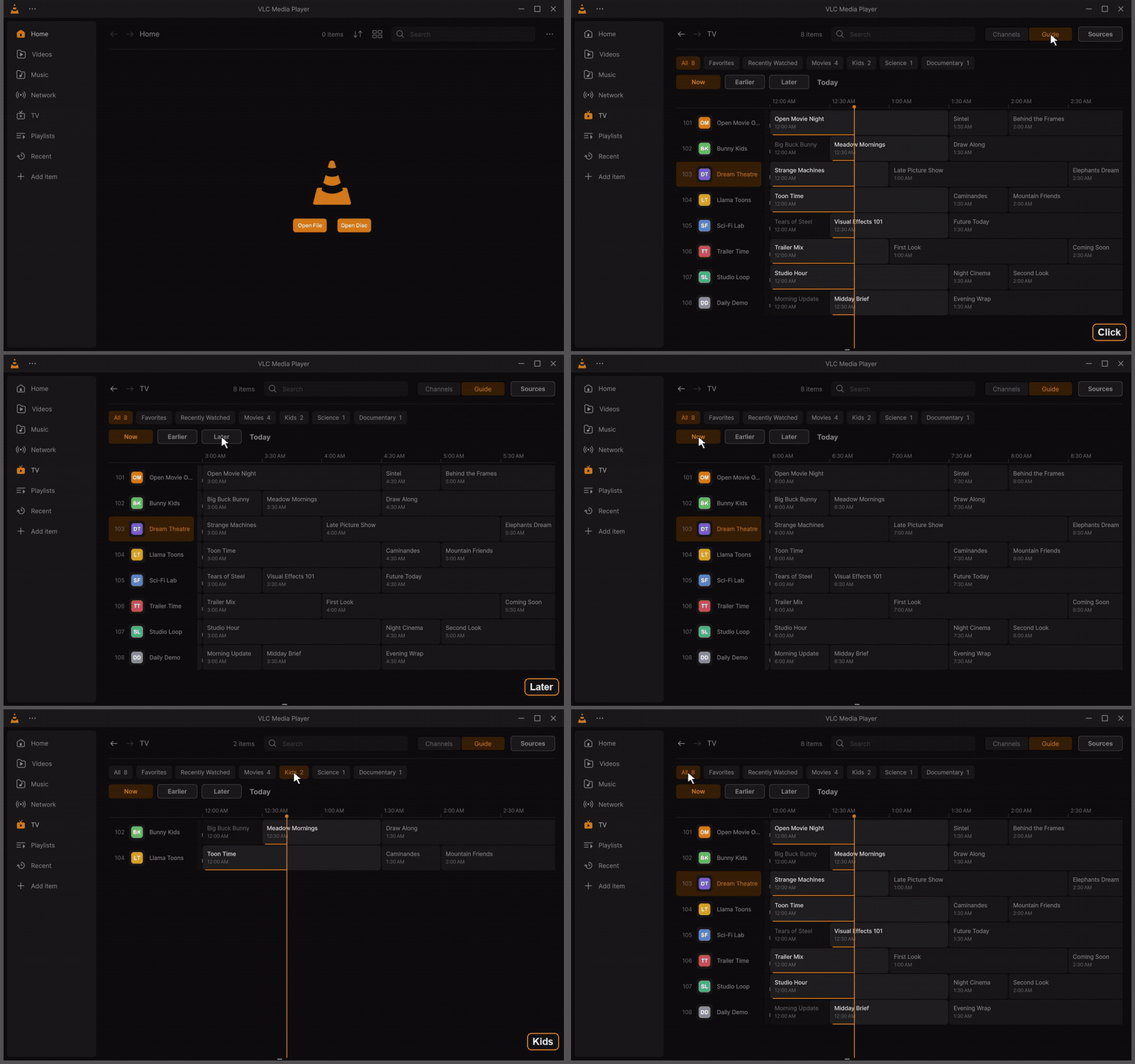
The guide: the line of now and each programme's progress, Later and Now, and the Kids group. Click for the MP4 · every clip: Feature tour.
Guide at the top of the TV page: the channels down, the time across, the accent line at now.
- Now goes back to now; Earlier and Later move by the hours shown; drag the hours, use Shift and the wheel, or Left and Right (half an hour).
- Click a programme for its details (title, episode, time, category, description): Watch (on now), Watch a past one from the archive, Watch from the Start, or Remind Me for one to come. A reminder shows a minute before the start with Watch.
- Double-click a programme to watch it.
A channel plays alone in the queue, as a TV switches channels, and is not added to the library or the history.
| Key | What it does |
|---|---|
| Page Up / Page Down (Channel Up / Down) | the next and the previous channel of the group you chose it in |
| 0 – 9 | type a channel number (it plays after a moment, or with Enter) |
| Backspace | back to the previous channel |
| Enter | the channel list over the video: Up and Down, Enter plays, Left and Right switch the group, Esc closes |
| I | the banner of the channel again |
| Left / Right (banner shown) | the programmes before and after on the channel's guide; Enter watches a past one from the archive or sets a reminder for one to come, Esc goes back to what is on (elsewhere they seek, as always) |
At every switch the banner, a slim bar centred over the video, shows the channel, what is on with its progress and the time left, and what is next; with Show programme descriptions it grows for the episode, the category and three lines of the description. It hides by itself, and stays while you type a number or browse the guide (its ‹ › buttons, or a swipe across a touchpad). Its buttons: the programme on now from its start (with catch-up), the channel up and down, the channel list. While a programme of the archive plays, Back to Live returns. When a channel has no archive, VLC says so.
Subtitles are for films and videos: a live channel (and music) has no subtitle files, online search or sync, and the Languages and tracks button only shows when the stream carries subtitle or audio tracks to choose from. Films and series of an Xtream account have every subtitle feature.
Customize Player has a TV button (while the add-on is on): the channel list over the video while a channel plays, the TV page otherwise. A bar that has it keeps working without the add-on: the button then takes no room.
Edit Sidebar… (right-click the sidebar, or Settings > Interface > Sidebar) puts its pages in your order: drag a page by its handle, or move it with ▲ ▼ (Ctrl+Up and Ctrl+Down), show or hide each one (one at least stays), Reset to Default. TV takes its place after Network while the add-on is on; off, its place is kept for when it comes back.
| Setting | What it does |
|---|---|
| Sources | each source with its channels; Update, Manage Sources, Browse the Catalog |
| Update the channels and the guide | never, every 6 or 12 hours, every day (default), every week, in the background |
| Days of the guide kept | the days before and after today that are kept (1 to 14, default 7) |
| Hours across the guide | the time the guide shows across (1 to 12 hours, default 3) |
| Guide languages | keep only the programmes in these languages when a guide gives several (en, he) |
| Channel banner | channel, now and next / channel and now / channel only / nothing |
| Start on the last channel | when VLC opens with nothing to play |
| Show the progress of what is on, Show what is next, Show programme descriptions | in the lists and the banner |
| Show adult channels | off by default |
The add-on downloads the playlists and the guides with VLC's own network access (its proxy and network
settings), in the background, and keeps them on disk: the channels show at once when VLC starts, and Live TV works
offline with what was downloaded last. A guide of hundreds of megabytes is read as it is inflated, keeping only
the channels of your playlists and the days around today; the descriptions stay on disk until shown. The
channels are matched with the guide by their tvg-id, then by their name (without "HD", country prefixes and the
like), and tvg-shift moves a channel's guide by its hours.
Catch-up uses what the playlist says (catchup, catchup-source, catchup-days, tvg-rec): the default
and append modes, templates ({utc}, {duration}, {Y}{m}{d}...), Flussonic archives and Xtream Codes
timeshift.