A self-hostable GitHub dashboard for developers who care about their projects
Track downloads, traffic, issues, contributors, releases, changelogs and more - all from one clean interface.
Runs free on Cloudflare Workers with zero infrastructure to manage.


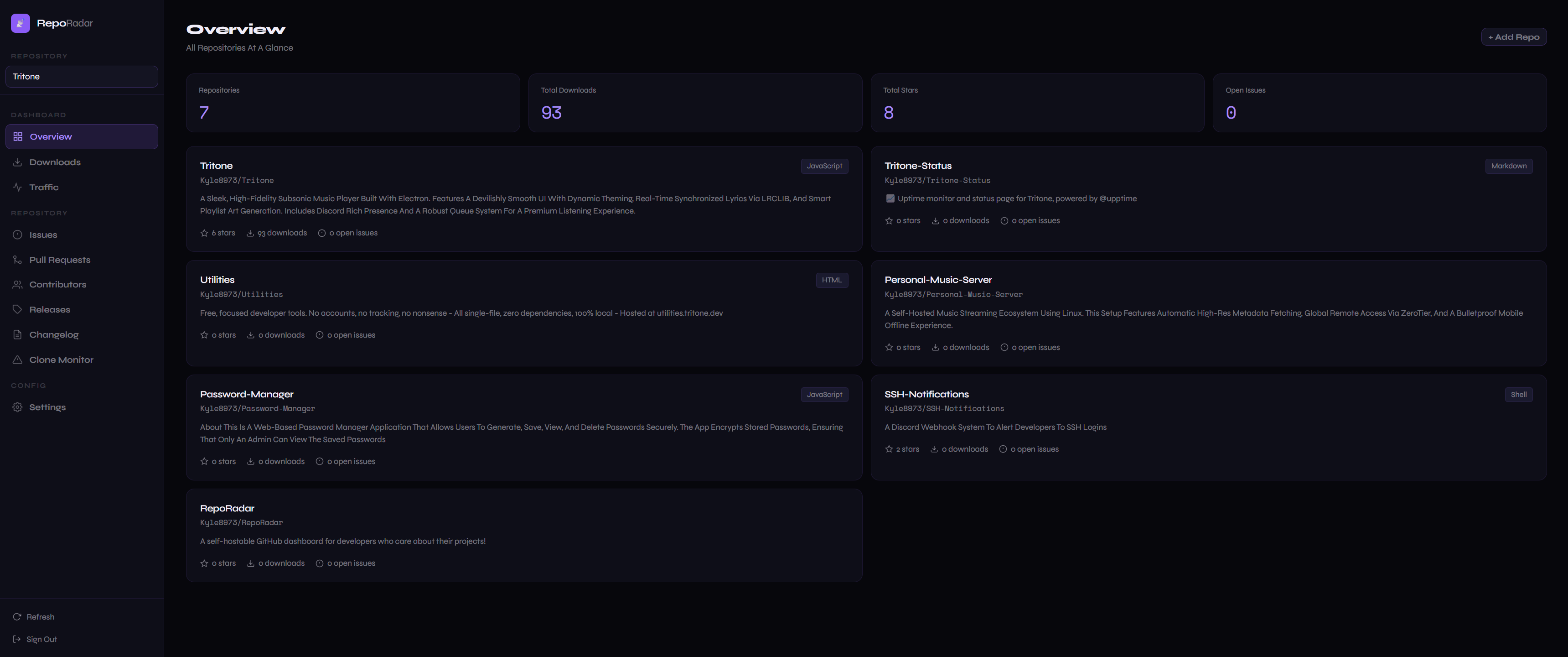
RepoRadar is a personal GitHub analytics dashboard you self-host on Cloudflare Workers - completely free. Your GitHub token lives server-side in Cloudflare secrets and never touches the browser. You get a free *.workers.dev URL out of the box, no domain required.
It's designed for developers who maintain open-source projects and want a single place to see how their work is doing without opening GitHub ten times a day.
A summary of all your monitored repositories at a glance including total downloads, stars, open issues, and a live traffic chart.
Per-release and per-asset download counts across all your releases, with totals and historical breakdown.
14-day views and clone data with an interactive bar chart, day-by-day breakdown, and a top referrers table showing exactly where your visitors are coming from.
Open and recently closed issues and PRs across all your repos, with labels, authors, and status badges.
Ranked contributor list with commit counts and a proportional bar chart.
Full release history with notes and dates.
A structured markdown editor for writing release notes. Comes with toggleable preset sections (New Features, Bug Fixes, Breaking Changes, Installation, etc.), full markdown support, live preview, drag-to-reorder sections, rename and add custom sections, and draft autosave. Outputs clean markdown ready to paste.
Detect unauthorised copies of your code on GitHub. Save your unique watermark strings once then scan them all with one click. Results show exactly which GitHub repo contains each string and whether it's yours or a copy. Includes a quick one-off search for ad-hoc checks.
Six built-in accent colour presets (white, blue, purple, green, orange, red) and five preset themes, plus a custom CSS editor for full control over the look and feel.
RepoRadar runs on Cloudflare Workers + KV - both free for personal use with generous limits.
You do not need a domain. Cloudflare automatically provides a reporadar.yourusername.workers.dev URL. If you have a domain on Cloudflare you can point it at the Worker in one click from the dashboard.
Full Setup Guide:
setup/cloudflare.md
-
Create a Cloudflare account if you don't have one
-
Create a KV namespace named
REPORADAR_KV -
Create a Worker named
reporadarand paste incloudflare/worker.js -
Bind the KV namespace to the Worker as
REPORADAR_KV -
Add the following Worker secrets:
Secret Description ADMIN_USERYour dashboard login username ADMIN_PASSYour dashboard login password GITHUB_TOKENA GitHub personal access token with repoandread:userscope -
Add a KV entry with key
dashboard_htmland the contents ofdashboard/index.htmlas the value -
Visit your Worker URL and sign in
RepoRadar is designed to stay well within Cloudflare's free tier limits indefinitely for personal use.
| Limit | Free allowance | RepoRadar usage |
|---|---|---|
| Requests | 100,000 / day | One request per page load or API call - typical personal use is tens per day |
| CPU time | 10ms per request | RepoRadar requests are lightweight proxies - well within the limit |
| Workers | 100 | Only 1 used |
| Limit | Free allowance | RepoRadar usage |
|---|---|---|
| Reads | 100,000 / day | 3-4 KV reads per dashboard load (see below) |
| Writes | 1,000 / day | Only writes when you change settings, add/remove repos, or save notes |
| Storage | 1 GB | RepoRadar stores only small JSON blobs and the dashboard HTML - total usage is a few KB |
Every time you load the dashboard, RepoRadar makes exactly 3 - 4 KV Reads:
| Read | Key | What it fetches |
|---|---|---|
| 1 | dashboard_html |
The dashboard UI itself |
| 2 | settings |
Your theme preference and custom CSS |
| 3 | repos |
Your list of monitored repositories |
| 4 | watermark_strings |
Your list of strings for clone monitoring |
This means you could load the dashboard ~25,000 - ~33,000 times per day before approaching the 100,000 read limit -practically impossible for personal use.
Importantly, adding more repositories does not increase KV reads. All your repos are stored together in a single repos key as one JSON array, so whether you have 1 repo or 100 repos it is still exactly 1 read. The actual data fetching (downloads, traffic, issues etc) goes directly from your browser to the GitHub API - KV is not involved at all.
Writes only happen when you explicitly change something:
| Action | Writes |
|---|---|
| Add a repository | 1 |
| Remove a repository | 1 |
| Add a string for clone monitoring | 1 |
| Change theme | 1 |
| Save custom CSS | 1 |
Normal day-to-day use of the dashboard (viewing data, switching pages, refreshing) uses zero writes. You would need to make 1,000 config changes in a single day to hit the write limit.
If you somehow hit the KV read or write limit, Cloudflare returns a 429 error and the dashboard will fail to load settings and repos until midnight UTC when limits reset. Nothing is lost or broken, it recovers on its own. Given the limits above, this should never happen in normal personal use.
| Key | Contents |
|---|---|
dashboard_html |
The dashboard UI (the index.html file) |
repos |
Your list of monitored repositories |
settings |
Theme preference and custom CSS |
watermark_strings |
Your list of strings for clone monitoring |
RepoRadar does not cache GitHub API responses in KV, every data fetch goes directly to GitHub. This keeps KV write usage at an absolute minimum and ensures you always see fresh data.
RepoRadar uses your personal GitHub token which has a limit of 5,000 requests per hour. Each dashboard page view makes roughly 4–8 API calls depending on how many repos you have and which page you are viewing. This is nowhere near the limit in normal personal use.
RepoRadar/
├── cloudflare/
│   ├── worker.js          Cloudflare Worker - API, auth, GitHub proxy
│   └── wrangler.toml      Cloudflare deployment config
├── dashboard/
│   └── index.html         Dashboard UI (single file, no build step)
├── setup/
│   └── cloudflare.md      Full setup guide
├── README.md
└── LICENSE
| Accent Colours | Preview |
|---|---|
| Default |  |
| Blue |  |
| Purple |  |
| Green |  |
| Orange |  |
| Red |  |
Default, Terminal, Cyberpunk, Slate, Midnight
Custom CSS is also supported via the Settings page for complete control.
- Your GitHub token is stored as a Cloudflare Worker secret - it is never sent to or stored in the browser
- Dashboard login uses HTTP Basic Auth validated server-side on every request
- All GitHub API calls are proxied through your Worker - no third-party services involved
MIT - see LICENSE for details.