Upgrade NPM and Node to current LTS for compatibility with M1/arm64 CPUs#161
Upgrade NPM and Node to current LTS for compatibility with M1/arm64 CPUs#161labkey-nicka merged 7 commits intodevelopfrom
Conversation


|
@labkey-nicka thanks for the pointer to the NPM/Node pairings. So far I'm the only person I know building LabKey on a M1 chip. I was amazed when everything appeared to just work when I swapped versions so thought we could do a 21.7->21.11->develop workflow but starting in develop is indeed wiser. Hopefully the jbrowse build is happier with the Node update here. |
|
@labkey-nicka @cnathe does the npm failure in BimberLabKeyModules/mcc make any sense to you? If not, I can reach out to Ben and ask him to take a look. https://teamcity.labkey.org/buildConfiguration/bt312/1633193 Error: double-loading config "/mnt/teamcity/work/1a7cac15859b185e/test_secure/npm/npmrc" as "global", previously loaded as "user" |

Hmmm, no. I have not seen the |
|
@cnathe I hadn't tried building the MCC module locally until now, but it succeeded for me. |
|
On a rerun attempt on TeamCity, both the MCC and ELISA modules failed with the same error. I wonder if there's a race condition or shared configuration that's causing problems across parallel NPM builds. |

One thing I would investigate is if we need to rehydrate the package-lock files when migrating from NPM v6 to v8. I know they changed some of the behaviors in terms of what packages get downloaded (e.g. I believe they now download all the "dev dependencies" for each package or some such). This could possibly be something that only breaks certain scenarios (like MCC and ELISA) so could have targeted package-lock updates for this set of PRs. |
 labkey-nicka
left a comment
labkey-nicka
left a comment
labkey-nicka
left a comment
There was a problem hiding this comment.
Here is some of my initial assessments. I still need to more throughly test our hot reloading scenarios (i.e. npm run start-link).
| # The version of npm corresponds to the given version of node | ||
| npmVersion=6.14.13 | ||
| nodeVersion=14.17.1 | ||
| npmVersion=8.1.2 |
There was a problem hiding this comment.
I pulled these changes and ran the following command:
./gradlew cleanBuild && ./gradlew deployApp
For my initial run this failed because our "cleanBuild" command intentionally does not actually clean up node_modules directories in LK modules.
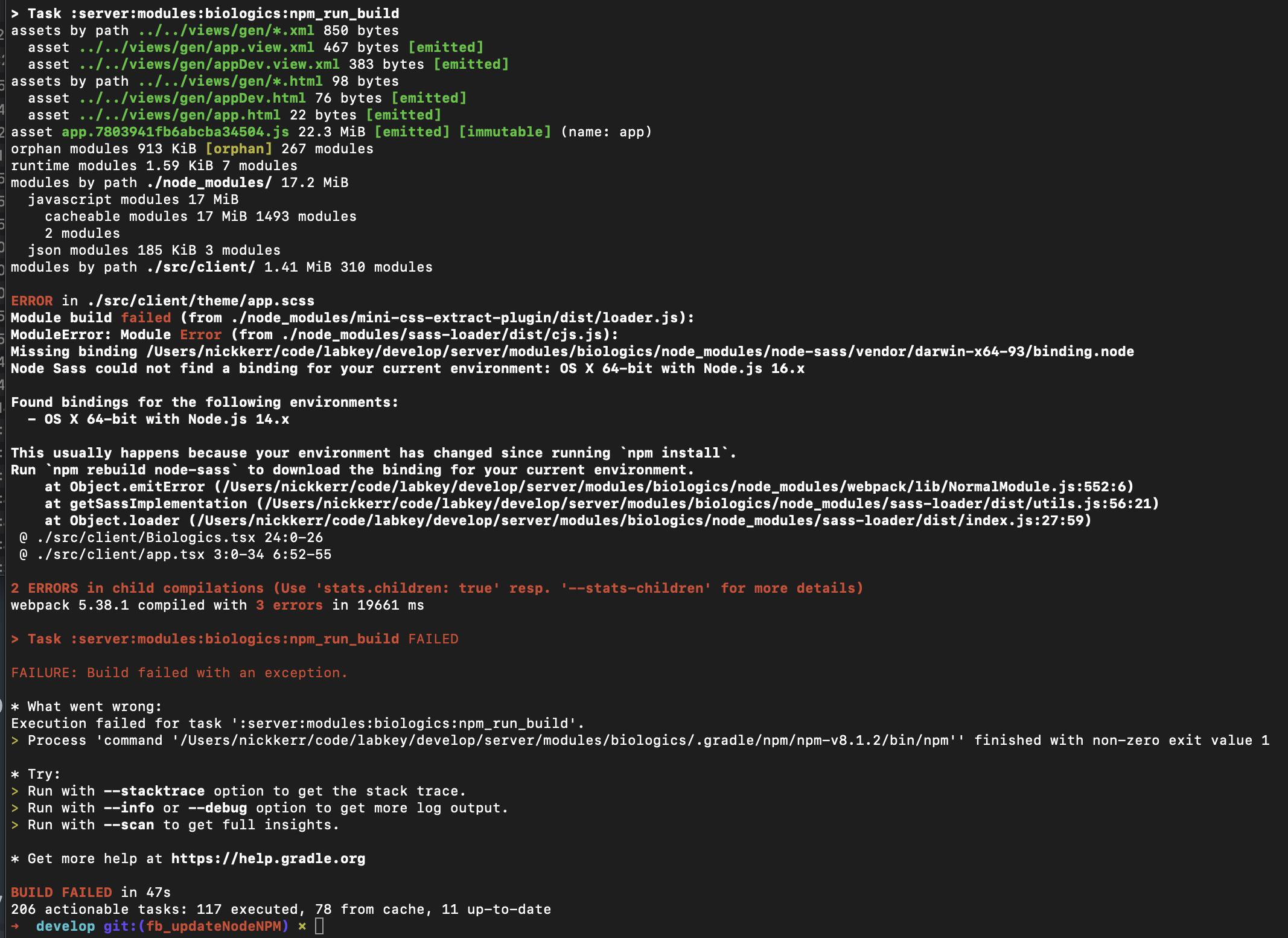
The remedy was to go in and rm -rf node_modules in the biologics module and then reran the build commands. This will only really be an issue for developers who locally pull these changes so we'll want to advise them to take action to clean these up after this is merged. @labkey-susanh may know if there is already a command in Gradle to ask it to clean up the node_modules directories which could be useful for the initial run after pulling.

There was a problem hiding this comment.
The gradle command cleanNodeModules will go through all modules with a package.lock file and remove any node_modules directories it finds.
| npmVersion=6.14.13 | ||
| nodeVersion=14.17.1 | ||
| npmVersion=8.1.2 | ||
| nodeVersion=16.13.1 |
There was a problem hiding this comment.
As I alluded to previously, starting in NPM v7 they changed how it resolves peer dependencies. This doesn't cause a problem for our initial unchanged (NPM v6) package-lock.json files, however, npm does warn about this:

As a result, when I attempted to rehydrate Biologics' package-lock.json with NPM v8 I ran into a common failure mode where there is a collision in our peer dependencies (this actually resulted in an infinite loop where I has to kill -9 the process ... but I digress):
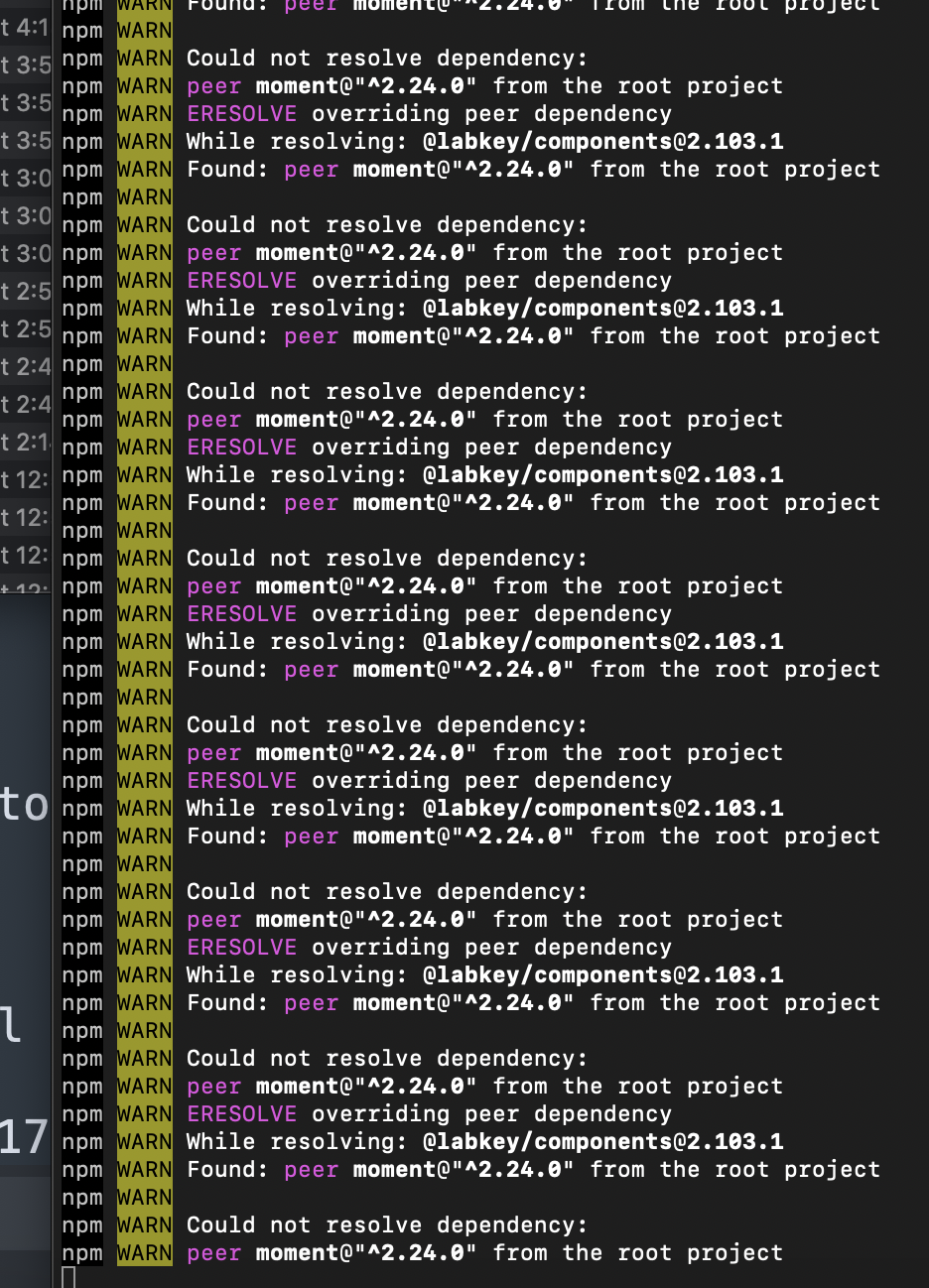
The quick solution is to always use a new flag introduced in npm v7 called legacy-peer-deps (docs here) when rehydrating. Like this:
npm install --legacy-peer-deps
This is not something we will want to be doing for very long -- if at all. We may want to spend some time to see if we can untangle these dependencies by either upgrading and/or removing out-of-date dependencies. That, however, can be a bit time consuming so the flag gives us a chance to keep going and follow up on individual modules when we update them. That said, we'd need to let folks know about this new flag and when/why to use it.
There was a problem hiding this comment.
I recommend we move ahead with informing folks about the --legacy-peer-deps flag when it comes to rehydrating/updating packages.
There was a problem hiding this comment.
I was able to dive a bit deeper today and have several findings to report:
- Although we can specify the
--legacy-peer-depsflag this still produces a v2 package-lock.json file. This means that any subsequent package updates we perform within a module/package will initially result in updating the package-lock.json from v1 (npm 6) to v2 (npm 7+). Due to this behavior, I think we should consider updating all associated package-lock.json's we "actively" maintain in coordinated PRs with these changes. I don't think this needs to be all packages initially as we can do follow-up updates to modules/packages we touch less often. - As a result of this update we'll be updating the version of Node that our unit tests run on. I've seen some failure locally after updating. We will need to coordinate PRs to fix these tests.
There was a problem hiding this comment.
Further update:
I was able to fix issues (e.g. webpack/webpack-cli#2990) seen using npm run start-link by updating @labkey/build to use more recent versions. These changes will be coordinated. Additonally, I've updated the associated package-lock.json to v2 for LKB, LKSM, Inventory, @labkey/workflow, and @labkey/freezermanager. I've opened associated branches on LKB, LKSM, and Inventory so far and will do platform in the next iteration.

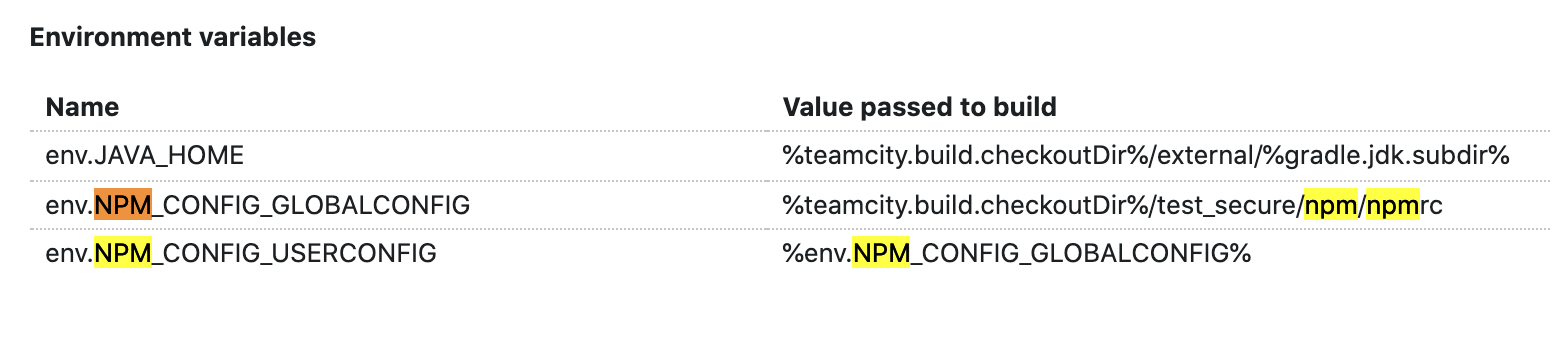
A quick update on minor investigation of the MCC/Elisa module build failures. It looks like these errors are not specifically related to any one module but rather an issue with how TeamCity is passing/configuring the NPM config that is used. I don't have a specific answer here to solve this but these env variables found in the test parameters configuration seem like the right place to look:
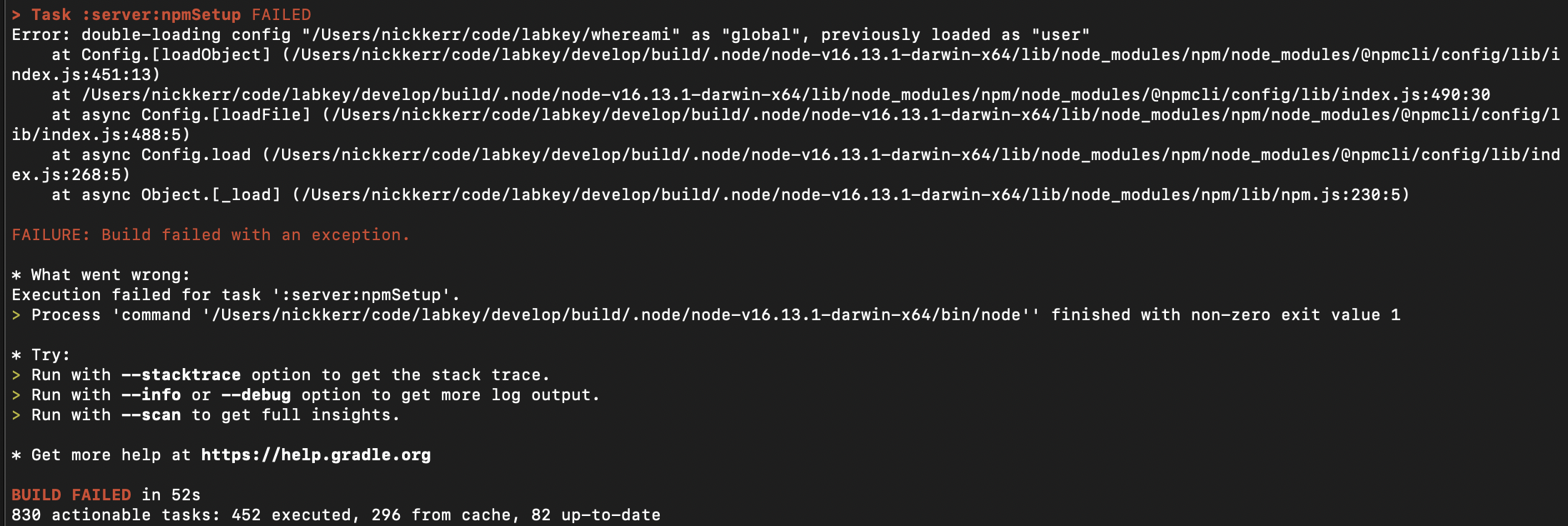
The fact that both of these point to the same place appears to be resulting in a "double loading" that is violation in these versions of node/npm. Might just try removing the "global" config declaration so that only "user" is specified. Configuration of npmrc docs: https://docs.npmjs.com/cli/v8/configuring-npm/npmrc Update I was able to reproduce this locally by specifying the same flags as configured on TC:
This failure went away when I commented either of them out (tried both ways). So, yes, I think removing one of these from the TC configuration should clear this issue up. |

|
I've reached out to @labkey-martyp and @labkey-ians about testing this in Windows & Linux development environments besides OSX. |

Everything worked the same for me on Windows as others noted above. Gradlew cleanbuild then deployapp worked fine. Running start-link required re-populating package-lock.json files with |

|
The new branches worked relatively smoothly for me. Just did a |

Verified the latest changes on Windows. No longer needed to delete node_modules or repopulate package-lock.json with |
6 participants


Rationale
New MacBooks use a new chipset. Node 14.x didn't publish builds that were compiled for the new architecture, but newer versions do. 16.x is their current LTS release, and it pairs with NPM 8.x
Related Pull Requests
Changes