Repository navigation
Releases: LeonVeganMan/opencode-go-meter
Release list
v1.0.8

Full Changelog: v1.0.7...v1.0.8
v1.0.7
v1.0.6
v1.0.5
v1.0.4
v1.0.3
v1.0.2
v1.0.0 — context and OpenCode Go plan in the TUI, with a pace forecast

Built for opencode v2 — the plugin API generation it targets (@opencode/plugin/tui, plugins loaded from ~/.config/opencode/plugins/).
Your session's context usage and your OpenCode Go plan windows, in the opencode TUI sidebar and on the prompt footer, with a forecast of where the current pace lands by each reset.
Sidebar
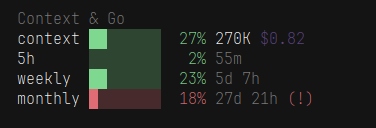
The context row first, then one row per plan window. A window that is only forecasting a breach already takes the alert colour and the (!).
Status line

The same context figures, the plan percentages and the same (!).
Detail dialog
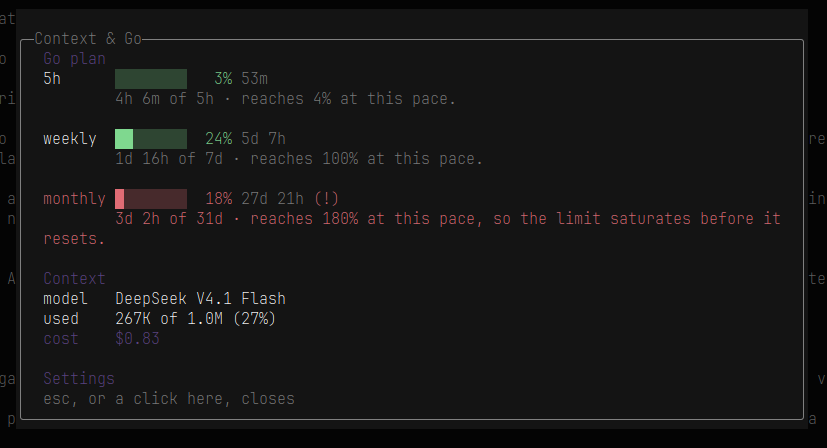
Clicking the title or any row opens one dialog: how much of each window has elapsed, where the pace lands by its reset, the model, the tokens against the context window, the cost, and the Settings row at the bottom that writes config.json on click.
Requirements
An opencode-go subscription: the plugin reads its key from ~/.local/share/opencode/auth.json and calls opencode.ai/zen/go/v1/usage. Without one there is nothing to show.
Install
git clone https://github.com/LeonVeganMan/opencode-go-meter ~/.config/opencode/plugins/opencode-go-meterThen restart opencode. The README documents every option and the troubleshooting notes.
Options panel

Opened from the Settings row inside the dialog. A click moves that row to its next value and writes config.json straight away.