Repository navigation
Releases: Leonezz/quire
Release list
Quire v0.1.0-alpha.5

Changes since v0.1.0-alpha.4
- fix(desktop): bundle sucrase into main so the packaged app starts
- feat(agent): resolve citations in artifacts to numbered references and a Sources list
- feat(ui): motion for the app's remaining states
- feat(ui): motion on the transitions.dev token scale
- fix(inbox): let q/e reach decisions when a list row has focus
Quire v0.1.0-alpha.4
Fourth alpha: report a page that rendered badly in one step, lists that look like lists again, and the agent's conversations kept out of your Codex app.
macOS only. Download the .dmg for your Mac (arm64 for Apple silicon, x64 for Intel) and drag Quire to Applications. If you have an earlier alpha, Settings › About → Check for updates installs this one in place.
First launch. The alpha is signed with a development certificate but not notarized, so macOS refuses it once: right-click Quire → Open → Open again, or System Settings → Privacy & Security → Open Anyway. Or in Terminal: xattr -d com.apple.quarantine /Applications/Quire.app.
New
- Report a rendering problem in one step. Press ⌥⌘R anywhere while reading, or select the broken passage and choose Report in the selection toolbar (the quality badge, the Info panel and the low-quality banner still work too). Picking a problem type and writing a note are optional. Press Report and Quire captures everything — the saved original page (or the PDF), what it extracted, a screenshot of what you see, the whole article, and the original page at the same spot — into one zip. It then opens a prefilled GitHub issue, shows the zip in Finder and puts a side-by-side screenshot on your clipboard: press ⌘V in the issue and drag the zip in. Nothing is uploaded by the app; untick "Include the original page" for private pages. Your reports are listed in Settings › Feedback.
Fixed
- Bulleted and numbered lists show their bullets and numbers again in the reader.
- The selection toolbar sits centred over the selection (it was drawn half its width to the left).
- Settings › About shows the real version number.
- The agent's conversations no longer appear in your Codex app: Quire now runs Codex in its own space. After updating, sign in to ChatGPT once more in Settings › Agent. Threads an earlier alpha left in your Codex app can be removed with
node apps/desktop/scripts/clean-codex-threads.mjsfrom a checkout.
Known problems
We now check extraction against screenshots of every page in our test set; the problems it found are tracked in #8 and grouped by cause in #14–#24 — for example embedded videos and interactive demos leaving no trace (#14), some lazy-loaded images going missing (#15) and note/callout boxes being dropped (#17). If a page you read is affected, ⌥⌘R is the fastest way to tell us.
Quire v0.1.0-alpha.3
Third alpha: the first seven issues reported on alpha.2, plus a text view for PDFs.
macOS only. Download the .dmg for your Mac (arm64 for Apple silicon, x64 for Intel) and drag Quire to Applications. If you have alpha.2, Settings › About → Check for updates installs this one in place.
First launch. The alpha is signed with a development certificate but not notarized, so macOS refuses it once: right-click Quire → Open → Open again, or System Settings → Privacy & Security → Open Anyway. Or in Terminal: xattr -d com.apple.quarantine /Applications/Quire.app.
The agent needs the Codex CLI installed and signed in (codex login); everything else works without it.
Fixed
- #1 Setting a custom Codex path now enables the agent immediately:
~is expanded, a directory or the npm shim is accepted, and every panel re-reads the agent status when the path, model or effort changes. - #2 · #5 The agent no longer prints raw ids. Citations render as titled pills; a pill that follows a quoted passage jumps the reader to that passage (in the article reader and in the PDF reader) and tells you when the passage could not be found.
- #3 The contents rail sits at the edge and stays hidden until you move the pointer to the right edge, focus it, or pin it with
t. It also rebuilds when you switch views. - #4 The agent knows what it can do: it writes documents into the library as artifacts when asked to draft, save or synthesise, and never claims it cannot create files.
- #6 The update check no longer fails with
GitHub answered HTTP 403: it reads the public releases feed first and only falls back to the API, and says when to retry if the rate limit is exhausted. - #7 The selection toolbar no longer covers the line above the selection; it sits 10px above it and flips below when there is no room.
New
- Text view for PDFs. Any PDF gets a reflowed, single-column reading view (
vcycles Web page · PDF · Text): columns merged, headers and footers dropped, headings in the contents rail, figures cropped from the page. Highlights made in the text view are mirrored to the PDF and back. Reflow quality is reported per document; degraded pages are marked. Optional: Settings › Reading can use a small hosted judge model (TypeSafe Jev) to decide what is body text; the default is rules only and fully local.
Please keep reporting: sites that extract badly go straight into the evaluation set, and PDFs that reflow badly into the layout set.
Quire 0.1.0-alpha.2

Second alpha. Fixes alpha.1, which crashed on launch (Cannot find module 'electron-updater'): the updater and its dependencies now ship inside the app. Otherwise the same first alpha: a quiet place to read everything you subscribe to — blogs, newsletters, papers, PDFs — with an agent that reads alongside you and never cites what it did not open.
macOS only. Download the .dmg for your Mac (arm64 for Apple silicon, x64 for Intel) and drag Quire to Applications.
First launch. The alpha is signed with a development certificate but not notarized, so macOS refuses it once: right-click Quire → Open → Open again, or System Settings → Privacy & Security → Open Anyway. Or in Terminal: xattr -d com.apple.quarantine /Applications/Quire.app. After that it opens normally, and later alphas install in place from Settings › About.
The agent needs the Codex CLI installed and signed in (codex login); everything else works without it.
Screenshots
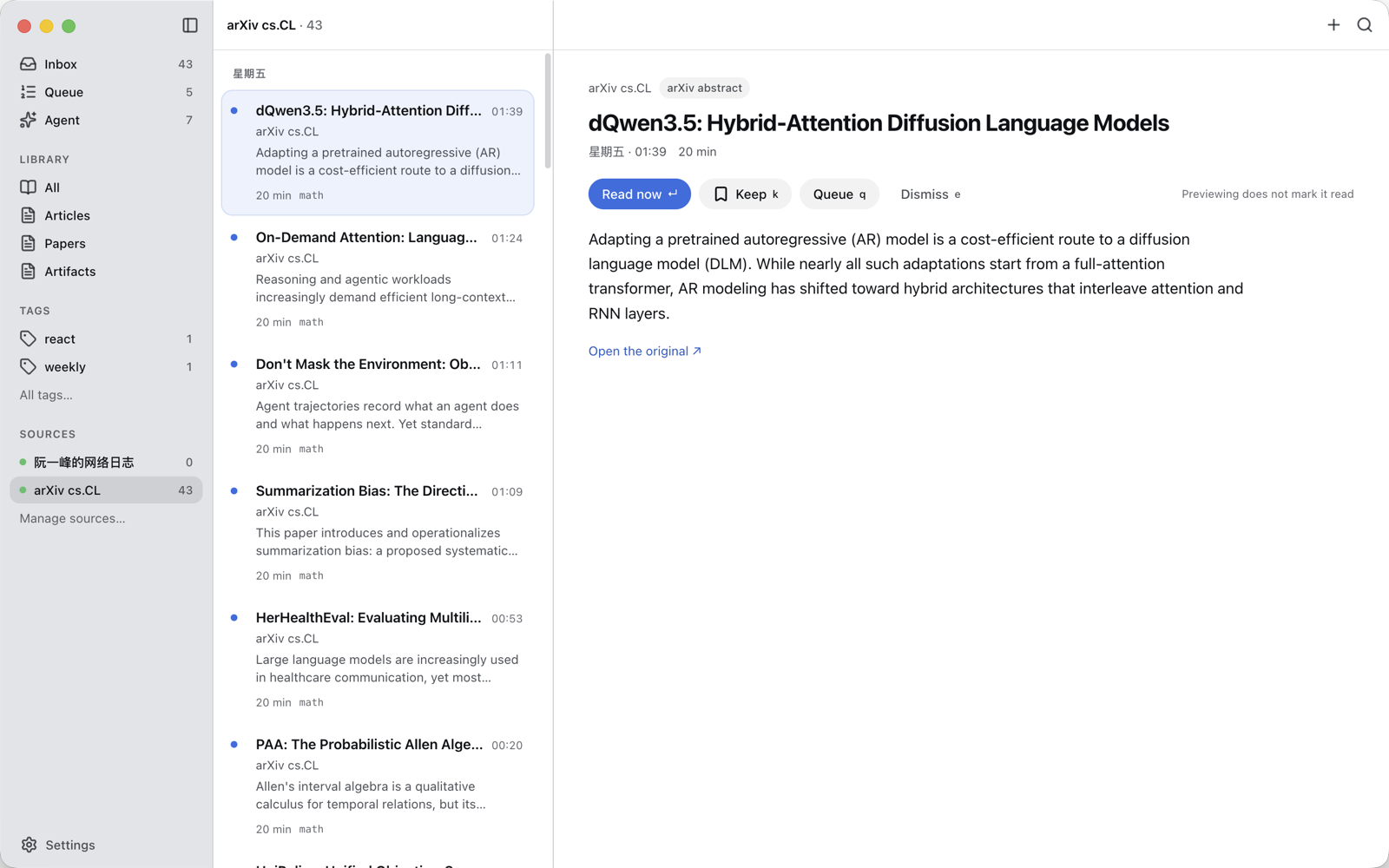
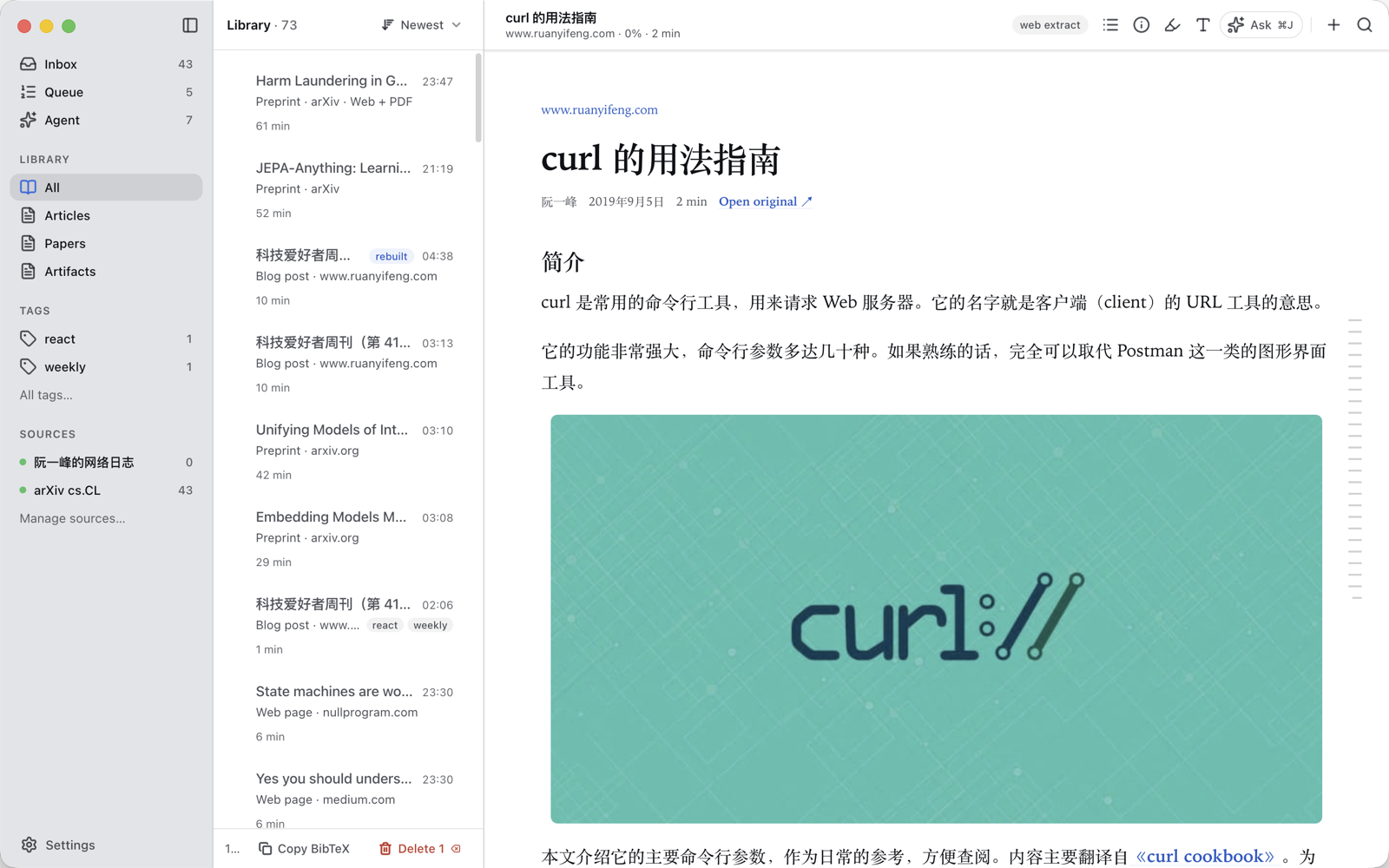
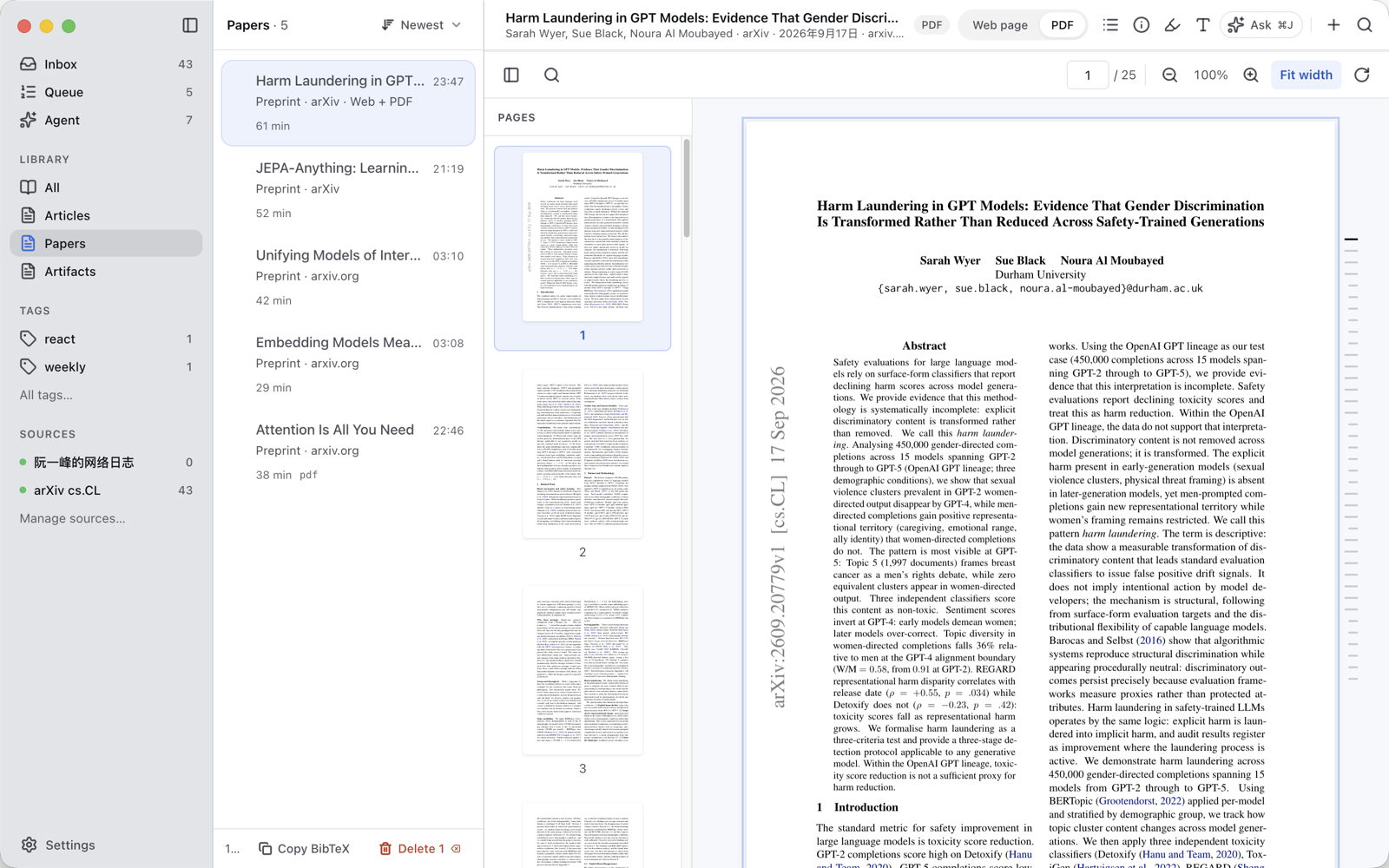
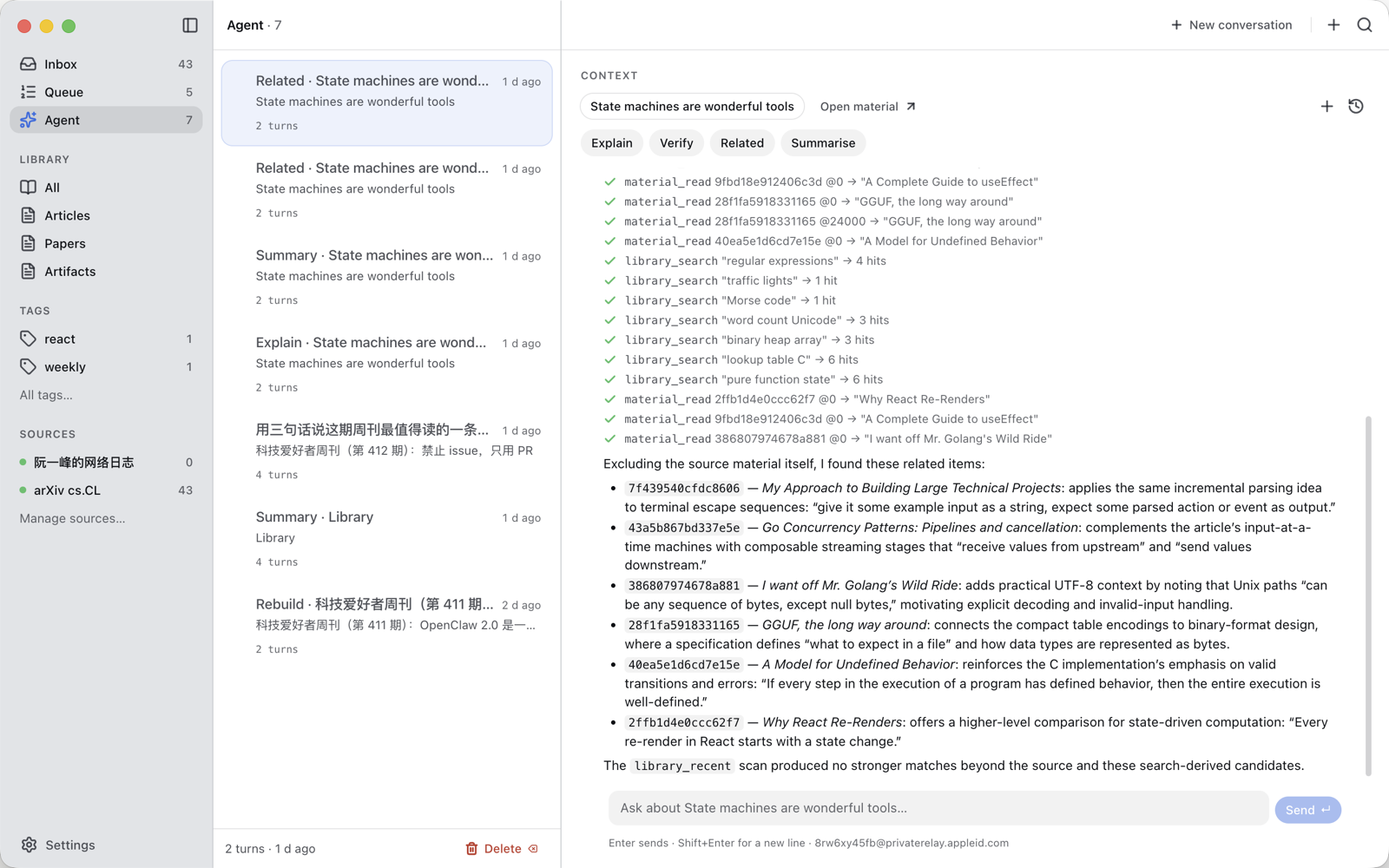
What's in it
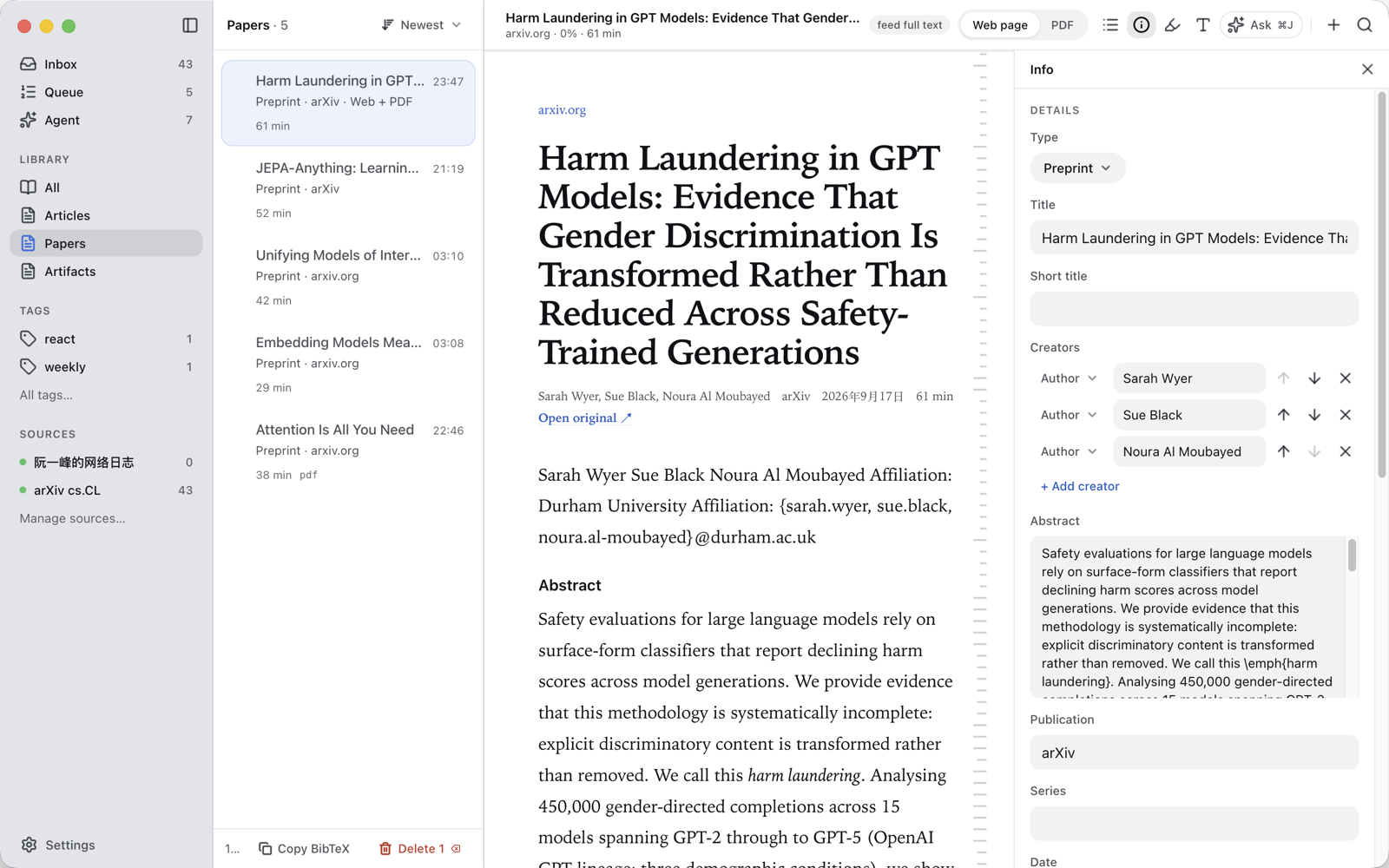
- One reading surface for web pages, Markdown, PDFs; arXiv papers as HTML and PDF, switchable with
v. - Feeds and arXiv categories; an Inbox that asks one question per item: read (↵), queue (q), keep (k), let go (e).
- Highlights and notes on pages and PDFs; citations and BibTeX; Zotero-style metadata.
- The agent (⌘J): explain, verify, related, summarise, synthesise across the library, rebuild a garbled page from the saved original. Citations are limited to what it actually retrieved in that turn.
- Local-first: everything, images included, stays on your Mac.
Please report sites that extract badly — they go straight into the evaluation set.
Quire 0.1.0-alpha.1
This build crashes on launch (
Cannot find module 'electron-updater'). Use v0.1.0-alpha.2 instead.
Quire's first alpha: a quiet place to read everything you subscribe to — blogs, newsletters, papers, PDFs — with an agent that reads alongside you and never cites what it did not open.
macOS only. Download the .dmg for your Mac (arm64 for Apple silicon, x64 for Intel) and drag Quire to Applications.
First launch. The alpha is signed with a development certificate but not notarized, so macOS refuses it once: right-click Quire → Open → Open again, or System Settings → Privacy & Security → Open Anyway. Or in Terminal: xattr -d com.apple.quarantine /Applications/Quire.app. After that it opens normally, and later alphas install in place from Settings › About.
The agent needs the Codex CLI installed and signed in (codex login); everything else works without it.
Screenshots
What's in it
- One reading surface for web pages, Markdown, PDFs; arXiv papers as HTML and PDF, switchable with
v. - Feeds and arXiv categories; an Inbox that asks one question per item: read (↵), queue (q), keep (k), let go (e).
- Highlights and notes on pages and PDFs; citations and BibTeX; Zotero-style metadata.
- The agent (⌘J): explain, verify, related, summarise, synthesise across the library, rebuild a garbled page from the saved original. Citations are limited to what it actually retrieved in that turn.
- Local-first: everything, images included, stays on your Mac.
Please report sites that extract badly — they go straight into the evaluation set.