V2 — datanodes rebuilt, fuckingfast rebuilt, new GUI

V2 — datanodes rebuilt, fuckingfast rebuilt, new GUI
Everything since V1 (tag v14.1). Both providers changed how they hand out links, so both
extraction methods were rewritten from scratch, the interface left tkinter, and the
settings panel was split per method — because the two methods no longer share one.
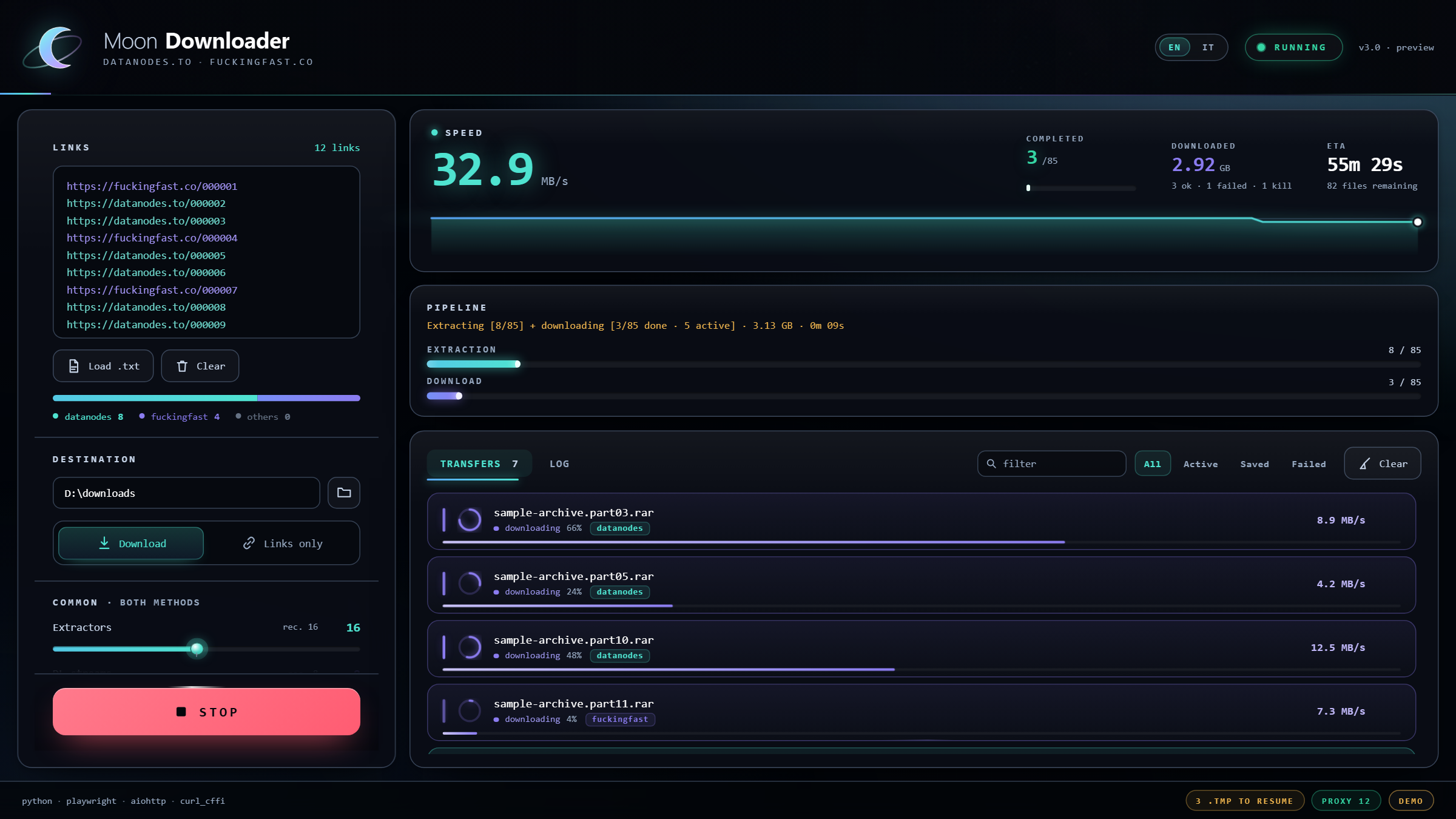
195.7 MB/s · 124 fuckingfast links · 8 DL streams · 12.63 GB in 1m23s · 29 done, 0 failed —
and not one browser window, because no datanodes link was in the batch.
🔧 datanodes.to — rebuilt on real Chrome
The old flow stopped working end to end. It now runs on a real Chrome/Edge the app
spawns itself with --remote-debugging-port and attaches to over CDP, on a persistent
profile.
- Cloudflare Turnstile is handled — auto-solve, with a manual fallback and a
configurable wait. The old blocklist containedchallenges.cloudflare, so the widget
could never even load, and it blocked stylesheets, which collapses every
getBoundingClientRect()to 0×0 and left the button finder blind. - Not Playwright's Chromium any more. Turnstile rejects it — automation switches, not
a Google-branded build, empty profile → Verification failed / Error 600010. It also
issues no token to a headless browser at all (the challenge platform answers 401 on
its/pat/endpoint), so datanodes runs visible on purpose. - The profile is the point: the
cf_clearancecookie survives between links, so
later files get challenged less. Solve one, the session coasts. - One shared window,
Pagestabs on it (1–8). Separate contexts per worker were
tried and measured worse: multiple identities from one IP read as a bot farm and
Turnstile hard-failed. - Exactly one
POST /downloadper link — a second one re-runs SecSave server-side
and invalidates the token the countdown step is holding. The old extractor tripped this
by submitting the form and then click-hunting for "free download". - The form is armed at ~6 s by the site's own Vue scan; submitting at t=0 got nowhere.
- Crash recovery: the shared Chrome used to die after ~80 sequential extractions and
take the whole rest of the session with it. It is now re-validated and respawned
transparently. - Premium API key (optional): extraction becomes a single JSON GET — no browser, no
captcha, no countdown.
⚡ fuckingfast.co — rebuilt on plain HTTP, ~0.25 s per link
- The
/dl/URL is not in the page any more. The landing page is Alpine + htmx and
the direct URL exists only in thehx-redirectresponse header of
POST /f/{id}/go. The old regex was searching for something the server stopped sending. - Cloudflare fingerprints TLS. aiohttp's ClientHello scores as a bot and gets
cf-mitigated: challenge→ 403 on every link, whatever headers you send.
Extraction moved tocurl_cffi, which impersonates Chrome's ClientHello and sails
through. Downloads stay on aiohttp —dl.fuckingfast.coserves the file with full
Range support. - No browser, no captcha, nothing to tune. ~0.25 s per link, measured against live
FitGirl parts. - Fragment filenames fixed: links carry the name as a URL fragment
(.../abc123#Game.part01.rar), which a naive split turned into a bogus file id. curl_cffi>=0.7is now required for this provider.
🖥️ New GUI — Edge WebView2, not tkinter
tkinter's canvas has no anti-aliasing and no alpha channel: arcs and rounded corners came
out as steps, glows as opaque bands. Its type was absolute, so on a 2560×1440 screen the
text measured ~8 px of ink and a third of the window sat empty.
- Renders in Edge WebView2 — the same Chromium already on Windows 10/11. Real
anti-aliasing, real alpha, gradients, blur, GPU transitions. start.batstarts a loopback server and opens Edge or Chrome with--app: a window
with no tabs and no address bar. No native GUI dependency, nothing to install.- Live transfer rows — one per file: progress ring, state, percentage, instantaneous
speed. Active transfers sort above the finished tail. - Stats — 3 s rolling speed with sparkline, completed count, downloaded bytes,
byte-based ETA. Extraction and download are tracked separately, because they run at the
same time. - Link editor — per-host colouring while you paste, live count,
datanodes / fuckingfast / otherssplit. - English / Italian, switchable at runtime.
- Type scales with the window (
clamp()), so a big monitor gets a big interface.
⚙️ Settings — split per method, and out of the environment
One "Browsers" slider described an architecture that no longer exists. Three panels now:
| Panel | Settings |
|---|---|
| Common | Extractors (2–32) · DL streams (2–48) · Retries (0–5) |
| datanodes | Pages (1–8) · Captcha wait (30–600 s) · Chrome path · API key |
| fuckingfast | nothing to tune — it declares it |
- The datanodes knobs used to be environment variables needing
setxand a restart.
They are in the GUI now and pushed into the extraction layer on every run. - Defaults retuned: captcha wait 240 s → 30 s, pages 3 → 8.
- Settings and pasted links persist across restarts in
settings.json(atomic write). - Every value the page sends is coerced and clamped before it reaches a semaphore.
🚫 Chrome no longer opens for links that don't need it
Every front-end used to open a browser per worker at the top of a run, before reading
a single URL. A batch of nothing but fuckingfast links — pure HTTP, no browser needed —
still put a Chrome window on screen and paid ~1.5 s of Playwright driver boot.
The launch now lives in one place and fires on the first datanodes link: no datanodes
link, no Chrome, no driver, not even the node process. One shared instance no matter how
many extractors race for it. Same behaviour in the GUI and the CLI, asserted by
python test_no_chrome.py on every push.
🐛 Also fixed
- Transfer count showed the row cap (40) instead of transfers in flight — a 124-file
session reported "40 active" - The Log tab rendered the transfer list on top of the log
- Progress rings always rendered empty — a CSS declaration outranks an SVG presentation
attribute, so settingstroke-dasharrayin JS lost to the stylesheet - The loopback API replied 403 without draining the request body, so the next keep-alive
request on that connection was parsed as garbage and answered 501 - The whole repository is English — launcher output, engine warnings, Tk labels, OS dialog
titles, module docstrings and test assertions. The GUI keeps its runtime EN/IT switch. --browsers/Extractorsis documented as what it is: parallel extraction workers,
not one browser each
📦 What's in the box
start.bat          the GUI            moon_engine.py    the engine, no GUI attached
moon_bridge.py     window host + API  moon_extract.py   both extraction methods
web/               the interface      moon_cli.py       headless CLI
2 Python files in V1 → 8 modules and a web interface, ~4.1k lines of Python.
Renamed — every filename is English and says what it is: avvia.bat → start.bat,
gen_cli.py → moon_cli.py, shots.py → render_gui.py.
Removed:
- The tkinter GUI and the generator that fed on it (
gen_1.py/moon_tk.py,
avvia_tk.bat,apply_web_v16.py). It was a second interface to maintain for the same
engine — and it was the filemoon_engine.pywas generated from, which made the legacy
GUI the source of truth for the modern engine.moon_engine.pynow stands on its own;
pillowleaves the requirements with it. apply_patch.py, the v14.1 → v14.8 migration patcher: against the current tree it
half-applies instead of failing.prep_assets.py, a one-shot asset builder whose inputs were never committed.
📚 Documentation
| Page | Contents |
|---|---|
| Quick start | install, first run, what each setting does |
| Configuration | every setting, every environment variable, the Chrome profile |
| Providers | how each host is extracted, and how to add another |
| Architecture | how V2 is built, feature by feature |
| Engineering notes | the measurements behind the design decisions |
| Troubleshooting | 403s, Turnstile failures, CDP conflicts, stalls |
📊 Benchmark
| Metric | Value |
|---|---|
| Peak | ~250 MB/s |
| Measured run (screenshot) | 195.7 MB/s · 124 fuckingfast links · 12.63 GB in 1m23s · 0 failed |
| Connection | 2.5 Gbps fiber |
| Session | 23.5 GB across 47 files in ~3 minutes |
| Settings | 16 extractors / 8 DL streams / 3 retries |
| Providers | datanodes.to · fuckingfast.co |
🚀 Quick start
- Install Python 3.10+ — tick Add Python to PATH
- Download Source code (zip) below and extract it
- Double-click
start.bat - Done — the first run installs the dependencies and the Chromium build
Requirements: Windows 10/11 (the GUI needs Edge or Chrome, both ship with Chromium) ·
Python 3.10+ · aiohttp, playwright, curl_cffi · ~150 MB of disk for the Playwright
Chromium, which is only the datanodes fallback.