Deployment Notes
Living document for real-world gotchas, edge cases, and seams that aren't obvious from the main README. Add to this as you operate the stack and find things that surprise you.
Each entry follows the same shape: Symptom, Cause, Fix.
Symptom
You have multiple machines on the same physical LAN (say 192.168.1.0/24), all running the Tailscale client, with one of them also acting as a subnet router advertising that same 192.168.1.0/24 to the tailnet. Before the subnet router is enabled, the LAN machines can ping each other normally. The moment the route is approved and the other LAN clients accept it, those clients lose direct connectivity to other LAN machines. Pings to local IPs fail. Apps that hard-code LAN IPs (database clients, NAS shares, MS SQL Server hostnames pointing at a 192.168.x.x address) stop working.
Turning the subnet router off restores connectivity immediately.
Cause IPv4 routing uses longest-prefix-match. When a client has TWO routes for the exact same destination prefix:
- The native LAN interface — direct,
192.168.1.0/24viaeth0or similar - The Tailscale-injected subnet route — also
192.168.1.0/24, via thetailscale0interface, leading to the subnet router
Both routes have identical prefix lengths (/24 vs /24), so longest-prefix-match can't decide. The OS picks based on interface metric, route priority, or routing-daemon idiosyncrasies — which is non-deterministic across platforms and Tailscale versions. When the Tailscale route wins, "local" traffic for 192.168.1.x gets shoved out the tailscale0 interface, encrypted, sent to the subnet router (which is sitting right next to the originating machine on the same LAN), forwarded out the router's LAN interface, and finally reaches the destination. Latency goes up, and depending on the subnet router platform (looking at you, mobile-OS subnet routers), forwarding may silently drop or NAT the traffic in ways the application can't handle.
This is a documented known issue: tailscale/tailscale#1227. It catches people because the standard subnet router quick-start doesn't warn about the same-LAN case.
Visualizing the routing conflict
Before (broken). The subnet router advertises the same /24 as the native LAN. The client's routing table has two /24 entries pointing at the same destination via different interfaces. The OS often picks the Tailscale interface, so local traffic round-trips out through the tailnet, back through the subnet router, then onto the LAN to the server:
flowchart LR
    subgraph LAN["LAN: 192.168.1.0/24"]
        Client["Client<br/>192.168.1.10"]
        Server["Server<br/>192.168.1.20"]
        Router["Subnet Router<br/>192.168.1.5<br/>advertises 192.168.1.0/24"]
    end

    Tailnet(("Tailnet<br/>WireGuard"))

    Client -. "direct path<br/>not chosen by OS" .-> Server
    Client == "1. encrypted via tailscale0" ==> Tailnet
    Tailnet == "2. arrives at router" ==> Router
    Router == "3. forwards onto LAN" ==> Server

    classDef bad fill:#fee2e2,stroke:#c00,color:#222
    class Client,Server,Router bad
After the /23 workaround. The subnet router advertises 192.168.0.0/23, a superset that's strictly less specific than the LAN's /24. Longest-prefix-match cleanly prefers the native LAN route for local traffic. The Tailscale route still exists in the table, but it only wins for destinations in the /23 that aren't also in the /24 (i.e., never, in a single-LAN setup):
flowchart LR
    subgraph LAN["LAN: 192.168.1.0/24"]
        Client["Client<br/>192.168.1.10"]
        Server["Server<br/>192.168.1.20"]
        Router["Subnet Router<br/>192.168.1.5<br/>advertises 192.168.0.0/23"]
    end

    Tailnet(("Tailnet<br/>WireGuard"))

    Client == "direct via eth0<br/>(/24 wins over /23)" ==> Server
    Router -. "unused for LAN-local traffic" .- Tailnet

    classDef good fill:#dcfce7,stroke:#0a0,color:#222
    class Client,Server,Router good
Why doesn't the broken loop just work?
Reading the "before" diagram literally, the packet eventually reaches the server, so it looks like everything should function (slowly). In practice the loop breaks at one of several places, which is why this gotcha is so confusing — different setups fail in different ways:
-
The subnet router can't forward the decrypted packet back to the LAN. The router decrypts the WireGuard payload, sees
dst = 192.168.1.20, and tries to send it back out the same physical interface the encrypted packet just arrived on. A few common reasons that drops:- Non-Linux subnet routers (Android, iOS, some appliances) often don't have full IP forwarding enabled. The decrypted packet gets silently dropped.
-
Reverse-path filtering (
net.ipv4.conf.all.rp_filter) drops packets where the source IP "should be" reachable via a different interface than the one the packet arrived on. The decrypted inner packet claimssrc = 192.168.1.10but arrived viatailscale0, not the LAN interface that the kernel knows owns192.168.1.0/24. Strict rp_filter is the default in many Linux distros. - Hairpin NAT (forwarding traffic back out the interface it would normally arrive on) is handled inconsistently across networking stacks.
-
Asymmetric return path. Even if the request makes it to the server, the server's reply doesn't necessarily come back the same way. If the server is also a tailnet client that accepted the conflicting route, the reply goes out its
tailscale0, through the subnet router, back to the original client — but the client's stateful connection tracking expected a reply via the same interface (or vice versa). TCP connections often stall or RST. ICMP echo sometimes survives, sometimes doesn't, depending on conntrack behavior. -
The decision is non-deterministic and can flip mid-session. With two equal-prefix routes installed, the OS picks one based on interface metric or routing-table order at the moment of lookup. DHCP renewals, Tailscale reconnects, NIC bounces, or even a
tailscale setcommand can flip which route is preferred, and connections that were working start failing (or vice versa).
The net effect is "ping sometimes works, TCP fails more often than ICMP, the symptoms change every time you touch the network, and the diagnostic logs don't point at any single component." A brittle architecture that occasionally happens to function, not a clean break.
The fix isn't to make the loop work better. It's to remove the route conflict so the loop doesn't form in the first place.
Fix
Three options, in order from cleanest to hackiest:
Option 1 (recommended): don't run the Tailscale client on machines that share a LAN with the subnet router
The subnet router pattern was designed for clients that aren't on the LAN. For LAN clients that need to reach tailnet-only services (machines at other locations, cloud VMs, etc.), give them a static route for 100.64.0.0/10 pointing at the subnet router's LAN IP. Then:
- Local LAN traffic uses the native interface (direct, fast)
- Tailnet-bound traffic transits the subnet router
- No route conflict ever exists
Concretely on a LAN client:
# Replace 192.168.1.5 with your subnet router's LAN IP
sudo ip route add 100.64.0.0/10 via 192.168.1.5
(Make it persistent in your distro's standard way, or set it on your LAN DHCP/router as a pushed route.)
If you want the LAN clients on the tailnet for other reasons (you want them addressable by their 100.x.x.x Tailscale IPs from remote devices), have them join the tailnet but skip route acceptance:
sudo tailscale set --accept-routes=falseNow the client is on the tailnet, can be reached directly by other tailnet members, but doesn't accept the conflicting subnet route. Local LAN traffic stays on the native interface.
If your LAN is 192.168.1.0/24, change the subnet router to advertise 192.168.0.0/23 instead. Now there's no prefix tie:
- Native LAN route:
192.168.1.0/24(more specific, /24) - Tailscale-injected route:
192.168.0.0/23(less specific, /23)
Longest-prefix-match cleanly prefers the /24 for local traffic. The Tailscale route only kicks in for IPs that fall in the /23 but not the /24 (which is the empty set if your real LAN is only the /24).
This works, but it's leaning on a routing-table technicality to avoid the conflict rather than removing it. If you ever add a second LAN segment in the /23 range, the workaround stops being innocuous. Use this only if Options 1 and 2 aren't possible.
Why this is so easy to hit Subnet router quick-start guides walk you through setting up the router but don't typically warn about the LAN-client routing conflict. Users add the Tailscale client to every machine they own (it's free, why wouldn't you?), then enable subnet routing for the use case it's actually meant for (remote access), and the same-LAN clients break in a way that looks like a Tailscale bug but is really an IPv4 routing-table consequence. The fix is almost always "don't accept the route on the same-LAN clients" — which Option 1 enforces architecturally, Option 2 toggles per-client, and Option 3 sidesteps via prefix length.
Symptom A device connects to Plex over the tailnet and Plex treats it as a remote client: prompting for the Remote Pass, applying the Remote Streaming bitrate cap, or refusing direct play. Same client is on the same physical LAN as the Plex server. Frustrating.
Cause Plex decides local-vs-remote by comparing the client's source IP against two things:
- Plex's auto-detected LAN interface
- The
LAN Networkssetting in Plex's Network configuration (a CIDR list of additional ranges to treat as local)
When a tailnet client connects to Plex via Tailscale, Plex sees the
source IP as something in 100.64.0.0/10 (Tailscale's CGNAT range).
That range isn't in Plex's LAN Networks list by default, so Plex
flags the connection as remote.
This isn't a Tailscale bug, it's a Plex configuration default. Plex doesn't know what Tailscale is. From its perspective, an unfamiliar private IP range showed up and it played it safe.
Fix
There are two paths depending on whether you have Plex Pass.
Lean on the subnet router's default SNAT behavior. By default, Tailscale subnet routers source-NAT outbound traffic, so tailnet clients appear to Plex as coming from the subnet router's LAN-side IP — which is already in Plex's auto-detected LAN range.
- Run the subnet router on the same LAN as the Plex server (already true if both are on the same Docker host)
- Leave
--snat-subnet-routesat its default oftrue(don't set it tofalse) - Verify Plex's auto-detected LAN includes the subnet router's LAN IP (Settings → Network in the Plex admin UI)
Trade-off: Plex loses visibility into the original client IP — every tailnet connection appears to come from the subnet router. Fine for a homelab; matters for customers who need per-client audit logging.
If your Plex Pass status allows access to the LAN Networks setting:
-
Settings → Network → LAN Networks Add
100.64.0.0/10. This is the full Tailscale CGNAT range. Any connection from a tailnet device will now be treated as local.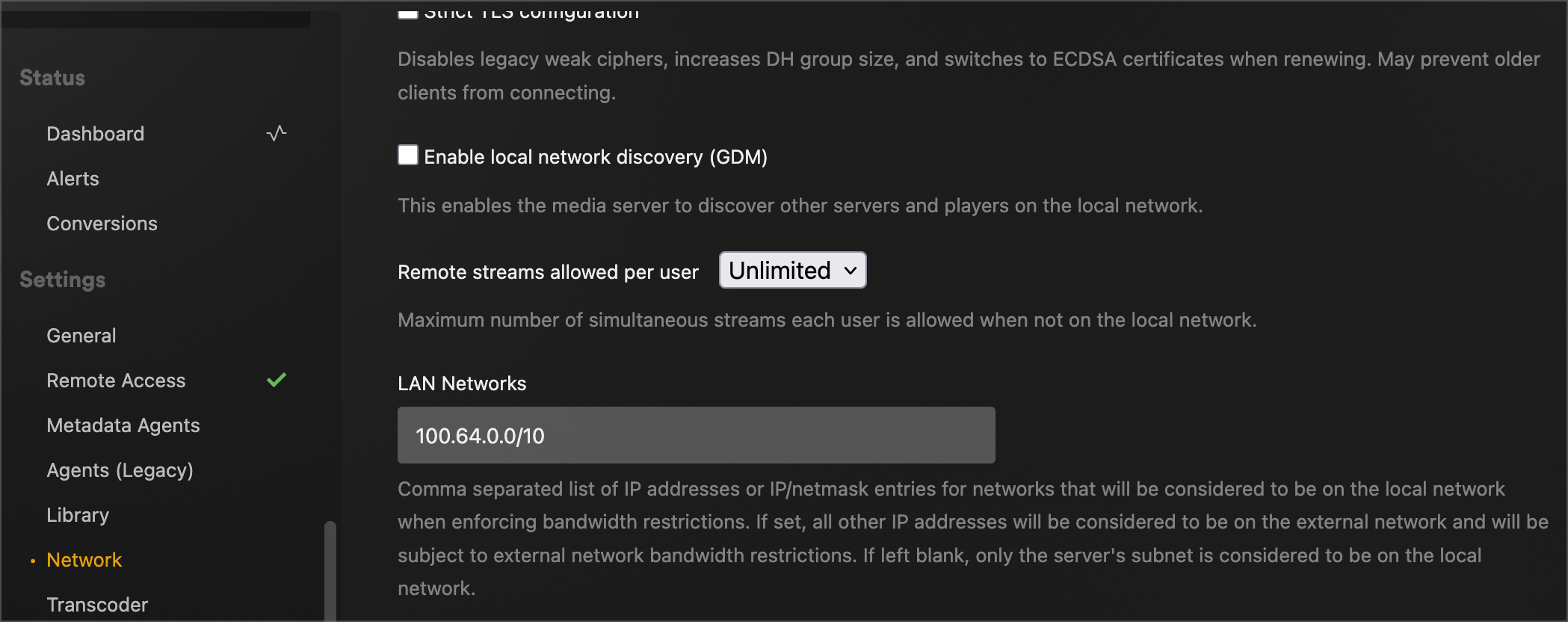
-
Settings → Network → Custom server access URLs (optional but recommended) Add
http://<plex-server-tailnet-ip>:32400. Get the tailnet IP withtailscale statuson the Plex host. This makes plex.tv hand out the tailnet path explicitly to clients, so they can find Plex via Tailscale even when LAN discovery fails. -
Set
--snat-subnet-routes=falseon the subnet router so Plex sees the original tailnet client IP (which is now in its LAN Networks list)
Restart Plex Media Server after the change. On mobile clients, sign out and back in to force fresh server discovery.
Why this matters beyond Plex The same pattern shows up with any application that has its own notion of "local network" enforcement: bandwidth caps, auth bypass, direct-play behavior, multicast-only features. Tailscale moves these clients onto a private mesh, but the application still has to be told that the new IP range counts as local. The seam between Tailscale and the applications it secures is where most of the real-world configuration friction lives.
Symptom
You've set up Tailscale Funnel to expose Plex publicly so people without
Tailscale can stream from your CGNAT'd home server. Funnel reports
running, the *.ts.net URL resolves, but Plex clients can't connect
remotely. The Custom server access URLs field keeps "going back" to
:32400 after you save it as something else, or the field just doesn't
work and you can't tell why.
Cause
Funnel terminates the public HTTPS connection on port 443, then
proxies internally to Plex on 32400 on the local host. Plex's
"Custom server access URLs" field needs the EXTERNAL URL that clients
will hit (:443), not the INTERNAL port that Plex itself listens on
(:32400). Putting :32400 in the field sends external Plex clients
to a port that the Funnel relay isn't listening on, and the connection
fails silently.
The reason Plex appears to "reset" the field to :32400 is that
Plex's Remote Access feature, if enabled, periodically overwrites the
URL with what it thinks your server is reachable at — usually using
the actual Plex port. As long as Remote Access is enabled, your manual
edits get clobbered.
Fix
- Disable Plex's built-in Remote Access (Settings → Remote Access → Disable). Funnel becomes the sole remote-access path; you don't want Plex fighting it.
-
Set Custom server access URLs to
https://<host>.<tailnet>.ts.net:443(explicit:443, even though it's the default HTTPS port — Plex's URL handling sometimes requires the explicit port). - Save and restart Plex Media Server. The field should now stick.
Common adjacent failure: two-hop Funnel config
If tailscale funnel status shows something like this:
https://host.tailnet.ts.net:10000 (tailnet only)
|-- / proxy http://localhost:32400

https://host.tailnet.ts.net (Funnel on)
|-- / proxy https+insecure://localhost:10000
That's a broken two-hop configuration: Funnel on 443 → an intermediate
Serve port (10000 here) → localhost:32400. It can happen if you ran
both tailscale serve and tailscale funnel commands at different
times and the configs got layered. Reset and re-do:
tailscale serve reset
tailscale funnel --bg --https=443 localhost:32400
tailscale funnel status
After the reset, tailscale funnel status should show ONE handler
going directly from Funnel to http://localhost:32400:
https://host.tailnet.ts.net (Funnel on)
|-- / proxy http://localhost:32400
That's the shape that works.
Symptom
You configure a Serve handler like
"/sonarr/": { "Proxy": "http://sonarr:8989" } and pointing a
browser at https://app.<tailnet>.ts.net/sonarr/ results in an
infinite redirect loop. Browser shows ERR_TOO_MANY_REDIRECTS.
Direct access to Sonarr (bypassing Serve) at
http://127.0.0.1:8989/sonarr/ works fine.
Cause
Serve's Proxy handler matches the prefix, then strips it before
forwarding to the backend. With the match /sonarr/ and a proxy
target of http://sonarr:8989 (no path), the backend receives the
request at /, not /sonarr/. Sonarr (with URL Base = /sonarr)
sees a request at / and generates a redirect to /sonarr/.
Serve strips the prefix again. Loop forever.
Fix Include the same path in the proxy target URL:
"/sonarr/": { "Proxy": "http://sonarr:8989/sonarr/" }Now Serve preserves the path, the backend matches its URL Base, and the request resolves on first hop.
When this applies Any backend that runs under a URL base or path prefix:
- *arr apps with URL Base set
- Jellyfin behind a sub-path
- Any self-hosted app with "base URL" or "HTTP root" configuration
For vanilla web apps that live at root, the proxy target without a path works fine.
This behavior isn't covered in Tailscale's quick-start examples, which all use single-app setups where path preservation doesn't matter. It only surfaces once you have more than one path-prefixed service behind a single Serve hostname.
Symptom
You set up a landing page using a Text handler with inline HTML,
expecting it to render in the browser. Instead, the browser shows
the raw HTML source as plain text.
Cause
Tailscale Serve's Text handler sets Content-Type: text/plain and
provides no way to override it. The handler is intended for simple
string responses (health checks, debug info, "Hello world"-style
endpoints), not styled HTML pages.
Fix
Use a Path handler pointing at an actual HTML file. The Path
handler auto-detects MIME type based on the file extension.
- Create
index.htmlwith the desired markup - Mount it into the container alongside
serve.json:volumes: - ./index.html:/config/index.html:ro
- Reference it in
serve.json:"/": { "Path": "/config/index.html" }
For a richer landing page (multiple assets, JS, etc.), Path can
also point at a directory to serve static files from.
Symptom
You enabled HTTPS Certificates in the admin console after the Serve
container was already running. Curl to https://app.<tailnet>.ts.net/
still returns "Couldn't connect to server" / connection refused on
port 443. Container logs show
serve proxy: ... not able to issue TLS certs, so this will likely not work from boot.
Cause Tailscale Serve evaluates whether HTTPS cert provisioning is available at container startup. If the tailnet's HTTPS Certificates feature was off when the container booted, Serve gives up on TLS initialization and doesn't retry even after the feature is later enabled. The Serve config sits loaded but inactive.
Fix Restart the container so it re-runs the Serve initialization with the new tailnet capability:
docker compose -p <project> restart appCert provisioning takes 5-30 seconds on first start; watch the container logs for "certificate obtained" before testing.
Prevention Enable HTTPS Certificates BEFORE first-time container startup. It's a one-time tailnet-wide toggle and benign to leave on; turn it on during Phase 1 of the deployment rather than discovering you need it during Phase 4.
Symptom
You want Tailscale Serve to proxy to *arr apps that are already
running in production on a different Docker network (e.g., your
existing nginx/swag stack on NGINX_Network), not to fresh demo
containers. Default docker compose up puts the app container on
its own private network where the existing apps aren't reachable.
Cause
Containers can only resolve each other by DNS name within the same
Docker network. The app container starts on plex-private (the
network defined in compose.yml), so it can't see your real sonarr
or radarr containers that live on NGINX_Network.
Fix
Add a docker-compose.override.yml that declares the existing
network as external and attaches the app service to it (in
addition to the private network):
networks:
  nginx-net:
    external: true
    name: NGINX_Network  # your real existing network name

services:
  app:
    networks:
      plex-private:
        ipv4_address: 172.30.0.2
      nginx-net:
Then update serve.json to use container names instead of IPs:
"/sonarr/": { "Proxy": "http://sonarr:8989/sonarr/" }Docker's built-in DNS resolves sonarr to the container's IP on
whichever network it shares with the app container.
docker-compose.override.yml is the canonical pattern for
host-specific config; it's automatically merged on top of
docker-compose.yml. Add it to .gitignore if it contains
infrastructure details you don't want in a public template repo.
Why this is useful Production demo with real apps and real data is more impressive than a fresh demo with empty containers. The override pattern lets you keep the public repo as a clean template (anyone can clone and run with fresh containers) while running a real bridged deployment locally for your own use.