Repository navigation
Releases: LoonixTools/face-unlock
Release list
v2.1.0

🚀 face-unlock v2.1.0
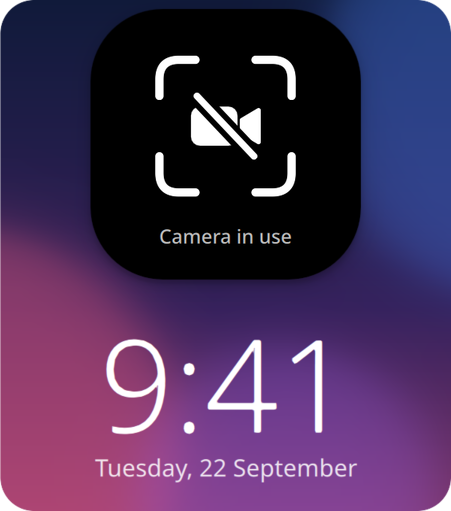
Welcome to face-unlock v2.1.0! It now gets out of the way during video calls: when another app uses the camera, you type your password right away. sudo and admin prompts take your face from the start.
Highlights
- A crossed-out camera when another app uses it
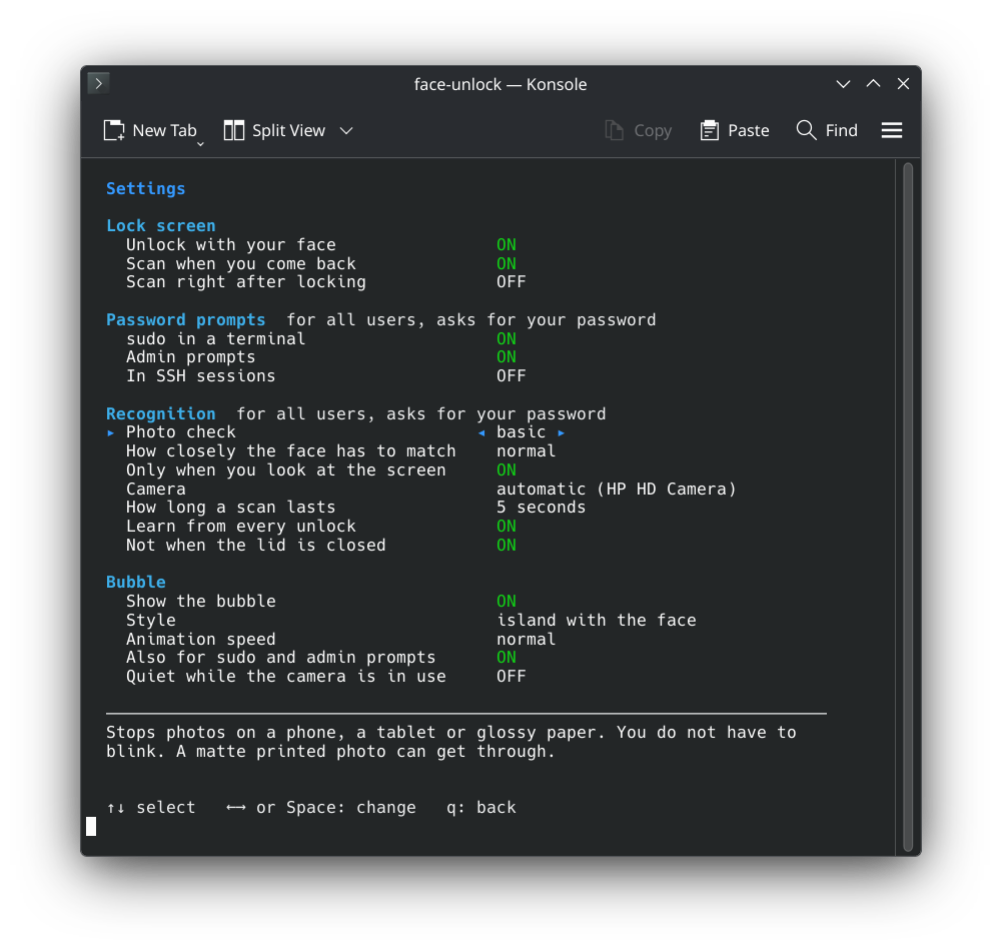
- A setting to stay quiet while the camera is in use
- sudo and admin prompts are on by default
- A setting for sudo over SSH, off by default
☕ Support face-unlock
If face-unlock is useful to you, you can buy me a coffee. It keeps these tools going. Found a bug or have an idea? Tell me in the issues.

What's Changed
🚀 Features
- feat: show a crossed-out camera when another app uses it by @Felitendo in 5eb9ea7
- feat: add a setting to stay quiet while the camera is in use by @Felitendo in 658adb7
- feat: add a setting for sudo over ssh by @Felitendo in d8bbefe
- feat: turn on sudo and admin prompts by default by @Felitendo in c1cf6cd
🐛 Bug fixes
- fix: enter no longer switches settings and faces by @Felitendo in c94a94a
📚 Documentation
- docs: update the settings screenshot by @Felitendo in da532e7
🧰 Maintenance (3)
- ci: add an arch tarball with static opencv by @Felitendo in fd8449e
- chore: revert 2.0.1 by @Felitendo in a6f6d1f
- ci: build the arch tarball with arch's flags by @Felitendo in ac38638
Full Changelog: v2.0.0...v2.1.0
Contributors

Assets 8
v2.0.0
🚀 face-unlock v2.0.0
Welcome to face-unlock v2.0.0! plasma-face-unlock has a new name, because it no longer needs Plasma: it now works on GNOME, Hyprland and Niri too.
🚨 Breaking changes
- plasma-face-unlock is now called face-unlock, and so is the command. Your faces and settings move over on their own.
- On Arch,
yay -S face-unlockreplaces the old package. - On Fedora, Debian and Ubuntu the repository moved too. Remove the old
plasma-face-unlockrepository file and add the new one from the install steps.
Highlights
- Works on GNOME, Hyprland and Niri
- Unlock hyprlock, swaylock, gtklock and waylock with your face
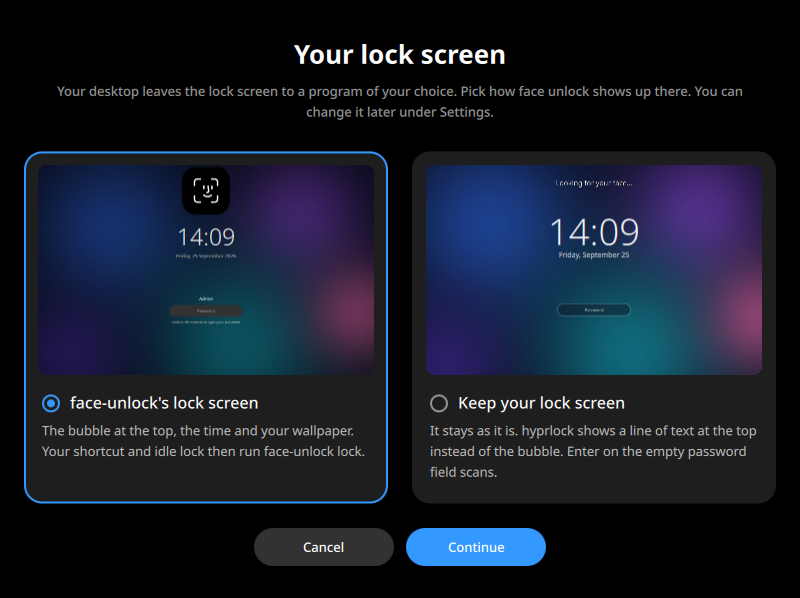
- A lock screen of its own, with the bubble and your wallpaper
- 12 new languages
- A warning when no polkit agent runs
☕ Support face-unlock
If face-unlock is useful to you, you can buy me a coffee. It keeps these tools going. Found a bug or have an idea? Tell me in the issues.
What's Changed
🚨 Breaking Changes
- refactor!: rename to face-unlock by @Felitendo in 6e6a6e6
🚀 Features
- feat: add 12 translations by @Felitendo in 7f6ac32
- feat: support gnome, hyprland and niri by @Felitendo in eaec932
- feat: take over faces and settings from plasma-face-unlock by @Felitendo in def3084
- feat: show the bubble on gnome by @Felitendo in 2a9b0d3
- feat: take the face in the lock screens of hyprland and niri by @Felitendo in c693ca2
- feat: add an own lock screen with the bubble and your wallpaper by @Felitendo in c228291
- feat: open gtklock from outside once it can by @Felitendo in 5699158
- feat: ask which lock screen to use on hyprland and niri by @Felitendo in 1da82f2
- feat: warn when no polkit agent runs and offer to install one by @Felitendo in 8224b6f
🐛 Bug fixes
- fix: translate messages in admin prompts by @Felitendo in 8d11676
- fix: keep temp paths out of the translation template by @Felitendo in a8e962f
- fix: fail make check on shellcheck findings by @Felitendo in bccd1f5
- fix: notice somebody coming back on hyprland by @Felitendo in 9586f4c
- fix: show the autostart lines in lua on hyprland 0.56 by @Felitendo in 0824c18
- fix: signal a lock screen only once it handles the signal by @Felitendo in f232f79
- fix: switch the daemon on after moving over from plasma-face-unlock by @Felitendo in b24703e
- fix: build on debian 13, without the own lock screen there by @Felitendo in f572dfb
📚 Documentation
- docs: cut the readme down, fold the install steps by @Felitendo in c972ce3
- docs: say which video gets past the photo check by @Felitendo in 72e8231
- docs: commit and push only after a local check by @Felitendo in b9c3b32
- docs: drop the note on the old name by @Felitendo in b37996d
- docs: shorten the readme by @Felitendo in b8cdd25
- docs: shorten the desktop part of the readme by @Felitendo in ff00689
- docs: tidy the hyprland and niri note by @Felitendo in 9dbd224
- docs: write the safety part as plain text by @Felitendo in 7317990
- docs: fix typos in the safety part by @Felitendo in 31b223d
🧰 Maintenance (8)
- chore: file old readme commits under documentation by @Felitendo in 75a4943
- chore: add issue templates by @Felitendo in 0d5a7e9
- chore: switch to ko-fi by @Felitendo in 44449f1
- build: use one compiler per core by @Felitendo in b75c286
- chore: commit different topics separately by @Felitendo in a6542de
- chore: update readme by @Felitendo in 39e8a7a
- chore: update readme by @Felitendo in c057bd1
- chore: show feature requests before bug reports by @Felitendo in 9ce9d77
Full Changelog: v1.0.1...v2.0.0
Contributors
Assets 7
v1.0.1
A small update that makes everyday use smoother. You no longer have to blink: the basic photo check is now the default, and it still stops a photo on a phone, a tablet or glossy paper. If you want the blink back, set Photo check to strict in the settings.
The settings are now grouped and explain the selected one, the animations are a little calmer, and the lock screen unlocks as soon as your face matches.
What's Changed
🚀 Features
- feat: make the basic photo check the default, no blink needed by @Felitendo in 10b4d91
- feat: close the bubble sooner after the tick by @Felitendo in e371fff
- feat: group the settings and explain the selected one by @Felitendo in bcbaaf7
- feat: make the animation speeds a little calmer by @Felitendo in 080c1cd
🐛 Bug fixes
- fix: show a camera's name once, not as device: function by @Felitendo in 4db3bce
- fix: unlock as soon as the face matches by @Felitendo in 31dae60
- fix: say 1 minute ago, not 1 minutes ago by @Felitendo in af72762
📚 Documentation
- docs: rerender the readme animation at normal speed, lossless at 60 fps by @Felitendo in 91dbb6f
- docs: add a changelog and the release notes flow by @Felitendo in 3e0084a
- docs: drop the distribution versions from the install steps by @Felitendo in 6e79670
- docs: show the menu and settings as konsole screenshots by @Felitendo in 1411944
🧰 Maintenance (3)
- chore: drop the aur copy, PKGBUILDS has the real one by @Felitendo in 49a1a23
- ci: take the release notes from the changelog by @Felitendo in 4bb15d9
- chore: keep only buy me a coffee in funding by @Felitendo in 01aa5db
Full Changelog: v1.0.0...v1.0.1
Contributors
Assets 7
v1.0.0
🚀 plasma-face-unlock v1.0.0
Welcome to the very first release of plasma-face-unlock! It brings Face ID to KDE Plasma: look at the screen and it unlocks. The lock screen, sudo and admin prompts can all take your face instead of a password.
Highlights

- Unlock the lock screen with your face
- sudo and admin prompts
- A bubble like Face ID
- Photos do not get in
- Packages for Arch, Fedora, Debian and Kubuntu
☕ Support plasma-face-unlock
If plasma-face-unlock is useful to you, you can buy me a coffee. It keeps these tools going. Found a bug or have an idea? Tell me in the issues.
What's Changed
🚀 Features
- feat: add plasma-face-unlock by @Felitendo in f671acc
- feat: animate the bubble like face id by @Felitendo in 51d29d8
- feat: show messages under the menu instead of waiting for a key by @Felitendo in dc0f680
- feat: add an animation speed setting by @Felitendo in 71d01cd
- feat: swing the pill's padlock open when it unlocks by @Felitendo in aeb9aa8
🐛 Bug fixes
- fix: load qml from /qt/qml so the installed agent finds its types by @Felitendo in 08a18ce
- fix: keep systemd's socket file when the daemon exits idle by @Felitendo in 2ff2716
- fix: reset faillock after a face unlock of the lock screen by @Felitendo in 7c87adb
- fix: notice input on the lock screen despite idle inhibitors by @Felitendo in 77ae883
- fix: smooth the bubble's open and close by @Felitendo in d1a590b
- fix: drop the shadow layer before the island slides away by @Felitendo in 46178a7
- fix: show the bubble as an on-screen display so kwin does not blur a box behind it by @Felitendo in c26eef9
📚 Documentation
- docs: new icon and screenshots of the new animation by @Felitendo in 2ab4122
🧰 Maintenance (1)
- build: build on debian 13 and kubuntu 26.04, one apt repository each by @Felitendo in 8129215
Full Changelog: https://github.com/LoonixTools/plasma-face-unlock/commits/v1.0.0