Repository navigation
Releases: Mantux775/NVAI-open
Release list
NVAI-open 0.5.8: from a photo to a video, LTX-2.5 fully built in

NVAI-open 0.5.8 for Windows and 0.4.5 for the Mac. NV-AI is now called NVAI-open. Deutsch weiter unten.
From a photo to a video
Pick a photo of a person, describe a role, and NVAI-open puts the person into that role and makes a video with speech and sound. In the video tab, "Person from a photo" lets FLUX 3 keep the face and create four start images in that role; LTX-2.5 brings the one you pick to life. Step by step with screenshots: docs/PHOTO_TO_VIDEO.md.


The example photo is generated as well; this man does not exist. Measured on an RTX 5060 Ti 16 GB: four start images in 96 s, the 7-second video in 144 s. MP4 with sound
LTX-2.5, fully built in
LTX-2.5 by Lightricks is now the recommended video model, with its ways: text or a start image, a start and an end image, a seamless loop, a sound you give it (the picture follows it), automatic length, several shots with cuts, up to 20 s and 1920 × 1088. Measured: 5 s at 1280 × 704 in 93 s (first run with loading 122 s), with a start image 109 s, 1920 × 1088 in 251 s.
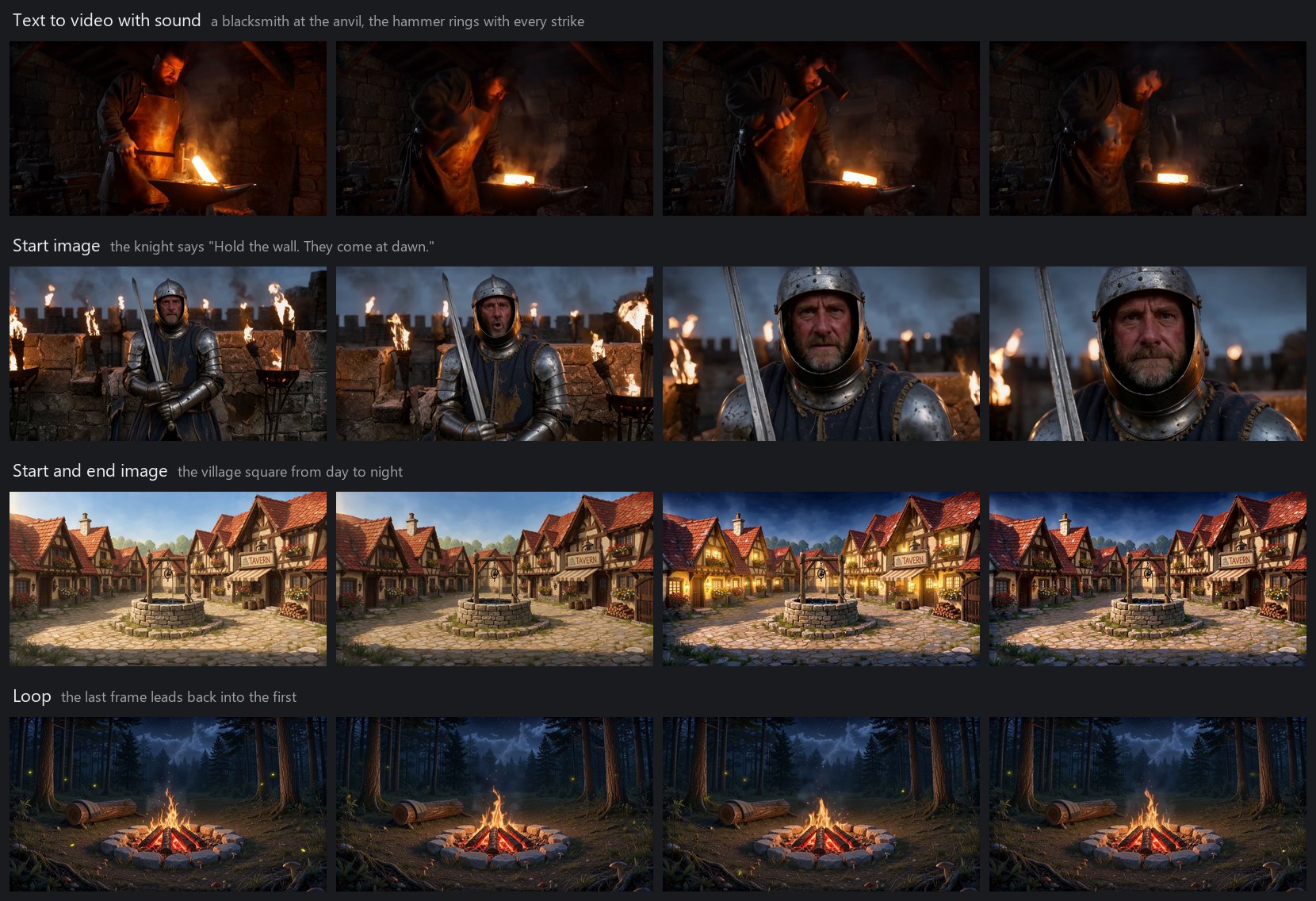
Under the video model, "Recommended LoRAs" lists LoRAs that fit LTX-2.5, one click to download, the tested ones with a note on how they did. Painted fantasy and anime show clearly; most style LoRAs were trained for LTX-2.3, and some only show at a higher strength.

Lightricks' cinemagraph and slow-motion LoRAs and the DFR detail mode are built in too; they need their license accepted on Hugging Face first and are not tested yet.
Also new
- Mac app 0.4.5 (added on 24 October): now called NVAI-open as well. A running FLUX.2 image stops after the current step instead of after the whole image; measured on a Mac mini M1 at 1024 × 1024: 25 s after the request, one step of four.
- NV-AI is now called NVAI-open, with "NVAI" in the banner. Program folder, data, models and settings stay where they are; the update moves the Start menu entries and the desktop shortcut to the new name.
- Video sound now goes through the limiter at −2.5 dB. AAC overshot the old −1 dB on loud, dense sound: a shout with a cheering crowd peaked at +0.07 dBFS, now at −0.58 dBFS with the same seed.
- "5 seconds" now gives 121 frames (5.0 s) instead of 113 (4.7 s). At 30 fps the length stops at 16 s instead of failing.
- The German interface writes decimal numbers with a comma; source links in the LoRA list are readable.
Tested: Windows update from the installed version in 28 s, all 23 end-to-end tests pass (new: LTX-2.5 video with sound, its sound below −0.3 dBFS, loop, automatic length), all catalog graphs checked against ComfyUI.
Downloads
NVAI-open-Setup-0.5.8.exe(Windows 10/11, with the PhotoCraft add-on 0.4.5). Install it over an older version; settings, models and LoRAs stay. Not code-signed: if Windows shows "Windows protected your PC", click "More info", then "Run anyway".
SHA-256:9BCB93B6BF2C93A9361DE20FEAB62AA3908D35866A728D15DEC2093DDCD2D5C6NVAI-open-0.4.5.dmg(macOS 15+ on Apple Silicon, with the PhotoCraft add-on app), signed and notarized.
SHA-256:F098D9807C26813838829214A2908B046806763C86F386E77CD5EEC6295DBF81
NVAI-open 0.5.8 für Windows und 0.4.5 für den Mac. NV-AI heißt jetzt NVAI-open.
Vom Foto zum Video
Ein Foto einer Person wählen, eine Rolle beschreiben, und NVAI-open versetzt die Person in diese Rolle und macht ein Video mit Sprache und Ton. Im Video-Reiter übernimmt FLUX 3 unter „Person aus einem Foto“ das Gesicht und erzeugt vier Startbilder in dieser Rolle; LTX-2.5 belebt das gewählte. Schritt für Schritt mit Screenshots: docs/de/FOTO_ZU_VIDEO.md.

Auch das Beispielfoto ist erzeugt; diesen Mann gibt es nicht. Gemessen auf einer RTX 5060 Ti 16 GB: vier Startbilder in 96 s, das 7-Sekunden-Video in 144 s.
LTX-2.5 voll ausgebaut
LTX-2.5 von Lightricks ist jetzt das empfohlene Videomodell, mit seinen Wegen: Text oder Startbild, Start- und Endbild, nahtlose Schleife, vorgegebener Ton (das Bild folgt ihm), Länge automatisch, mehrere Einstellungen mit Schnitten, bis 20 s und 1920 × 1088. Gemessen: 5 s bei 1280 × 704 in 93 s (erster Lauf mit Laden 122 s), mit Startbild 109 s, 1920 × 1088 in 251 s.
Unter dem Videomodell listet „Empfohlene LoRAs“ passende LoRAs, mit einem Klick geladen, die getesteten mit einem Hinweis, wie sie abschnitten. Gemalte Fantasy und Anime wirken deutlich; die meisten Stil-LoRAs sind für LTX-2.3 trainiert, manche zeigen sich erst bei höherer Stärke. Die Cinemagraph- und Zeitlupen-LoRAs von Lightricks und der Detailmodus DFR sind ebenfalls eingebaut; für sie muss erst die Lizenz auf Hugging Face akzeptiert werden, getestet sind sie noch nicht.
Außerdem
- Mac-App 0.4.5 (nachgereicht am 24. Oktober): heißt jetzt ebenfalls NVAI-open. Ein laufendes FLUX.2-Bild endet nach dem aktuellen Schritt statt erst nach dem ganzen Bild; gemessen auf einem Mac mini M1 bei 1024 × 1024: 25 s nach der Anfrage, ein Schritt von vier.
- NV-AI heißt jetzt NVAI-open, im Banner „NVAI“. Programmordner, Daten, Modelle und Einstellungen bleiben, wo sie sind; das Update stellt Startmenü und Desktop-Verknüpfung auf den neuen Namen um.
- Videoton läuft jetzt durch den Limiter bei −2,5 dB. Bei lautem, dichtem Ton schwang AAC über die alte Grenze von −1 dB: Ein Schrei mit jubelnder Menge lag bei +0,07 dBFS, mit gleichem Seed jetzt bei −0,58 dBFS.
- „5 Sekunden“ ergibt jetzt 121 Frames (5,0 s) statt 113 (4,7 s). Bei 30 fps endet die Länge bei 16 s statt mit einem Fehler.
- Die deutsche Oberfläche schreibt Dezimalzahlen mit Komma; die Quelle-Links in der LoRA-Liste sind lesbar.
Getestet: Windows-Update der installierten Fassung in 28 s, alle 23 Funktionstests bestanden (neu: LTX-2.5-Video mit Ton, sein Ton unter −0,3 dBFS, Schleife, Länge automatisch), alle Katalog-Graphen gegen ComfyUI geprüft.
Downloads
NVAI-open-Setup-0.5.8.exe(Windows 10/11, mit dem PhotoCraft-Add-on 0.4.5). Über eine ältere Fassung installieren; Einstellungen, Modelle und LoRAs bleiben. Nicht signiert: Zeigt Windows „Der Computer wurde durch Windows geschützt“, auf „Weitere Informationen“ und dann „Trotzdem ausführen“ klicken.
SHA-256:9BCB93B6BF2C93A9361DE20FEAB62AA3908D35866A728D15DEC2093DDCD2D5C6NVAI-open-0.4.5.dmg(macOS 15+ auf Apple Silicon, mit der App für das PhotoCraft-Add-on), signiert und notarisiert.
SHA-256:F098D9807C26813838829214A2908B046806763C86F386E77CD5EEC6295DBF81
NV-AI 0.5.7 (Windows): music without clipping, Stable Audio 3 Medium
NV-AI 0.5.7 for Windows. The Mac app stays at 0.4.4 (attached again). Deutsch weiter unten.
What's new
Music without distortion. Music from ACE-Step 1.5 sounded harsh. There were two causes:
- NV-AI ran ACE-Step 1.5 Turbo with 12 steps and CFG 2, without the shift the model is made for. Now it runs like ComfyUI's template (8 steps, CFG 1, shift 3). With the same seed, a 60 s march came out at −13.6 instead of −11.0 LUFS, and a 20 s brass band took 10.0 instead of 13.1 s.
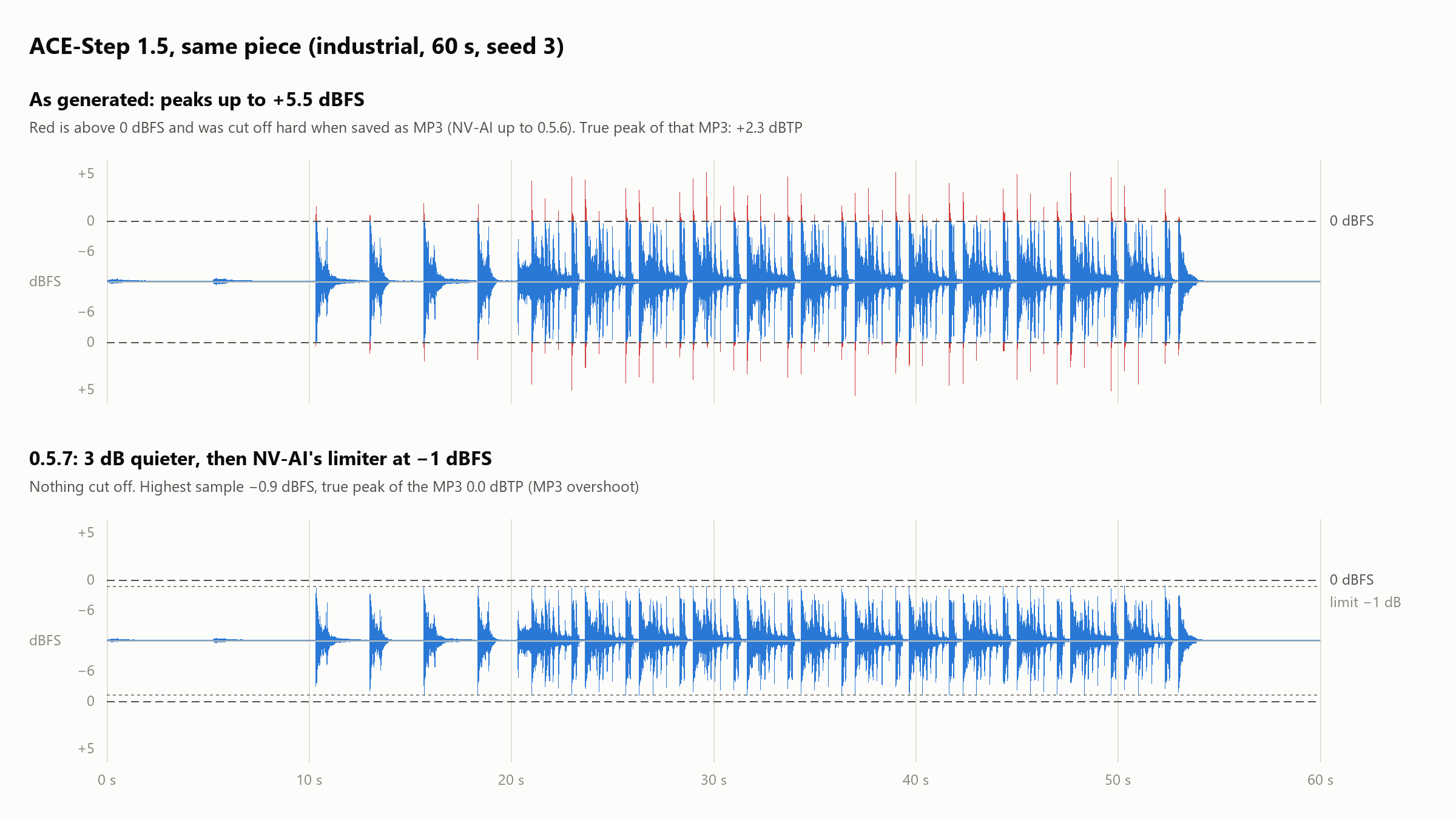
- Its raw output has peaks of up to +5.5 dBFS, and the MP3 encoder cut everything above 0 dB off hard. Now NV-AI lowers ACE-Step by 3 dB and runs every audio output, for all audio models, through its own limiter before saving. The limiter looks 5 ms ahead and lowers only the peaks above −1 dBFS; everything below passes unchanged.
Measured with the same seeds:
| Piece | Without level control | 0.5.7 |
|---|---|---|
| ACE-Step, industrial, 60 s | +2.3 dBTP, −10.2 LUFS | 0.0 dBTP, −13.9 LUFS |
| ACE-Step, brass band, 20 s | +2.0 dBTP, −12.0 LUFS | +0.2 dBTP, −15.4 LUFS |
| ACE-Step, march, 60 s | +0.3 dBTP, −13.6 LUFS | −2.2 dBTP, −16.6 LUFS |
| Stable Audio 3, the same three pieces | −0.2 to +0.7 dBTP | −0.5 to −0.8 dBTP |
What is left above −1 dB is MP3 overshoot.
New: Stable Audio 3 Medium (Stability AI, 10.4 GB download) for instrumental music. It sings nothing; a choir comes through only without words. In NV-AI it makes up to 5 minutes per piece. Measured: 60 s in 9–12 s with up to 9.7 GB of graphics memory, 300 s in 64 s, but then the 16 GB card was almost full. Write the prompt as one sentence: genre with the main instruments, the mood, then "BPM: 100.". "Expand prompt" writes exactly this form when Stable Audio 3 is selected. License: Stability AI Community License, commercial use below US$1 million annual revenue.
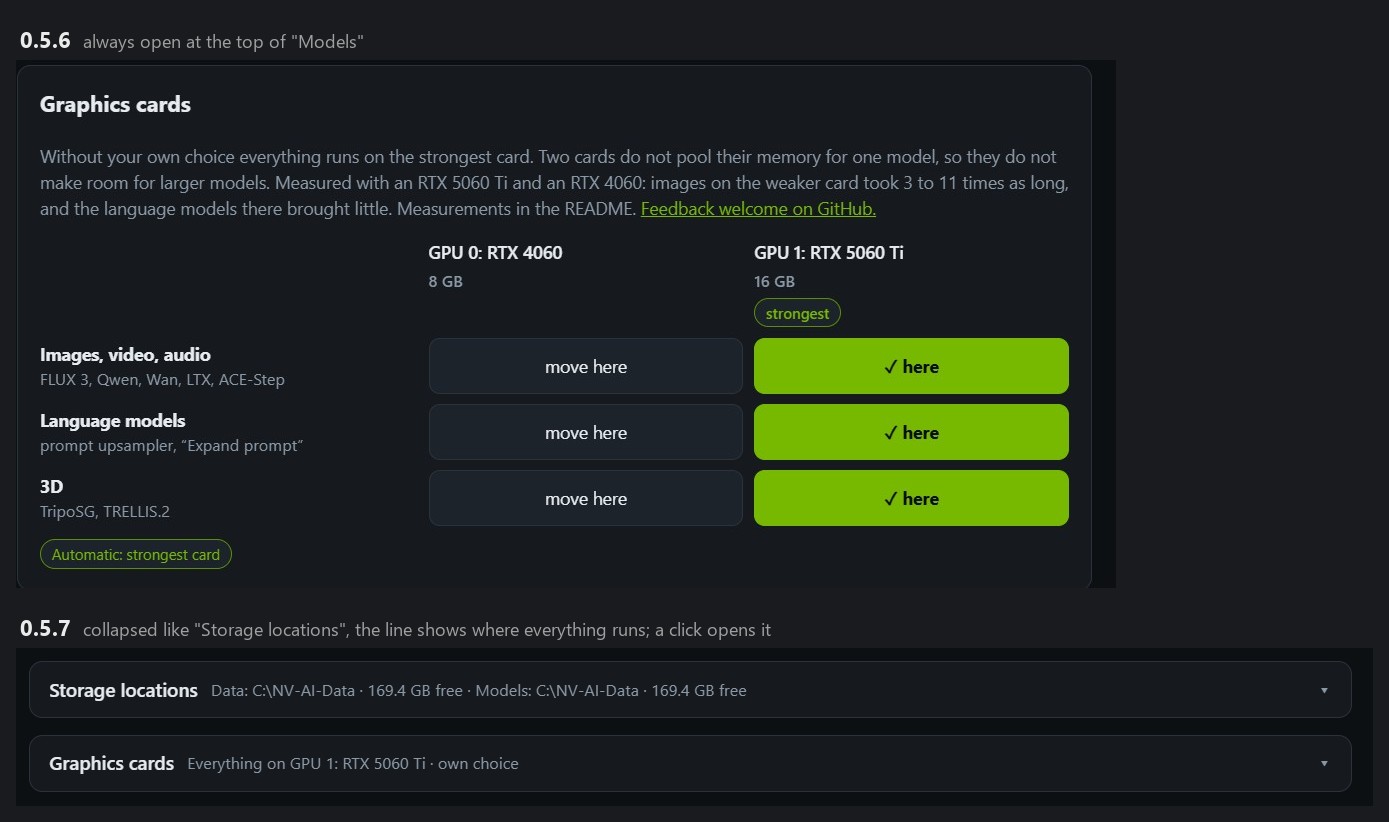
Tidier "Models" page. "Graphics cards" is now collapsed like "Storage locations". The line shows where everything runs, for example "Everything on GPU 1: RTX 5060 Ti · automatic", and a ⚠ when a warning is active. The hint inside links the measurements in issue #1.
Fixed:
- Quitting NV-AI with the web interface open left the server and ComfyUI running in the background, with the graphics memory taken; on my PC five of them had piled up. The server waited forever for the open connection of the web interface. Now it closes open connections after 5 s. Measured with the web interface open: NV-AI quit in 5.6 s.
- The catalog listed ACE-Step 1.5 under Apache-2.0; its license is MIT.
- The English names of the HiDream-O1 image sizes were missing.
Tested: Windows update from 0.5.6, all 19 end-to-end tests pass (new: Stable Audio 3, expand prompt for it, the limiter keeps ACE-Step and Stable Audio 3 below −0.3 dBFS); quitting with the web interface open; all catalog graphs checked against ComfyUI; 100 add-on tests.
Downloads
NV-AI-Setup-0.5.7.exe(Windows 10/11, with the PhotoCraft add-on 0.4.4). Install it over an older version; settings, models and LoRAs stay. Not code-signed: if Windows shows "Windows protected your PC", click "More info", then "Run anyway".
SHA-256:3292E08482F139ACF24E2507FEBFEAC948FF60D88B2C884150D2AB50D86530EANV-AI-0.4.4.dmg(macOS 15+ on Apple Silicon, unchanged since 0.5.5), signed and notarized.
SHA-256:0D6858FA4E03225A4DE6E22FF120A7A166042B970200656C87F6BD2B375C7057
NV-AI 0.5.7 für Windows. Die Mac-App bleibt bei 0.4.4 (wieder angehängt).
Was gibt's Neues
Musik ohne Übersteuern. Musik von ACE-Step 1.5 klang hart. Dafür gab es zwei Ursachen:
- NV-AI rechnete ACE-Step 1.5 Turbo mit 12 Schritten und CFG 2, ohne den shift, für den das Modell gemacht ist. Jetzt läuft es wie in ComfyUIs Vorlage (8 Schritte, CFG 1, shift 3). Mit gleichem Seed kam ein 60-s-Marsch mit −13,6 statt −11,0 LUFS heraus, eine 20-s-Blaskapelle brauchte 10,0 statt 13,1 s.
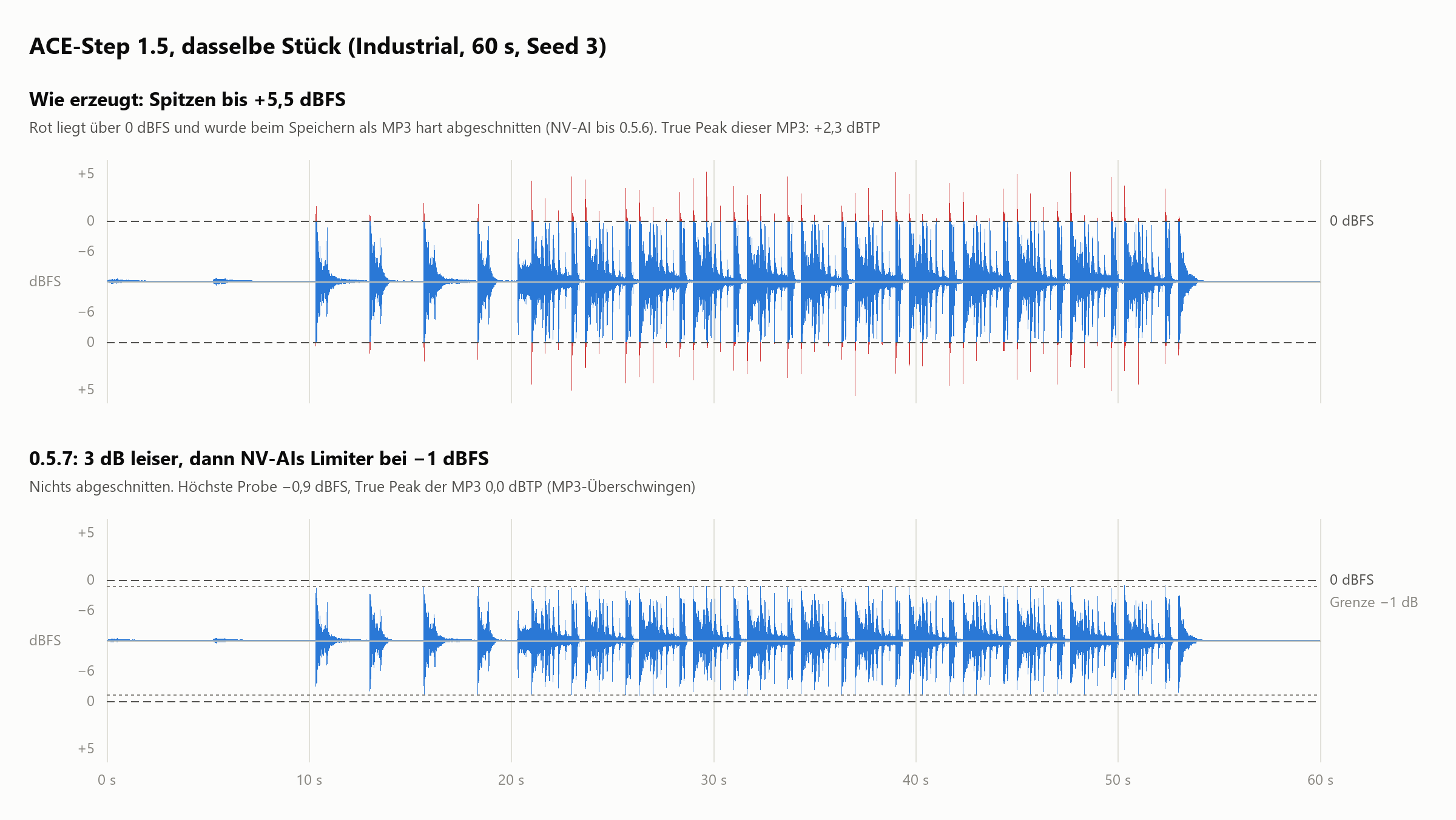
- Seine rohe Ausgabe hat Spitzen bis +5,5 dBFS, und der MP3-Encoder schnitt alles über 0 dB hart ab. Jetzt senkt NV-AI ACE-Step um 3 dB und schickt jede Audioausgabe, bei allen Audiomodellen, vor dem Speichern durch einen eigenen Limiter. Er schaut 5 ms voraus und senkt nur die Spitzen über −1 dBFS; alles darunter bleibt unverändert.
Gemessen mit gleichen Seeds:
| Stück | Ohne Pegelregelung | 0.5.7 |
|---|---|---|
| ACE-Step, Industrial, 60 s | +2,3 dBTP, −10,2 LUFS | 0,0 dBTP, −13,9 LUFS |
| ACE-Step, Blaskapelle, 20 s | +2,0 dBTP, −12,0 LUFS | +0,2 dBTP, −15,4 LUFS |
| ACE-Step, Marsch, 60 s | +0,3 dBTP, −13,6 LUFS | −2,2 dBTP, −16,6 LUFS |
| Stable Audio 3, dieselben drei Stücke | −0,2 bis +0,7 dBTP | −0,5 bis −0,8 dBTP |
Was über −1 dB bleibt, ist MP3-Überschwingen.
Neu: Stable Audio 3 Medium (Stability AI, 10,4 GB Download) für instrumentale Musik. Es singt nichts, ein Chor kommt nur ohne Worte. In NV-AI macht es bis zu 5 Minuten am Stück. Gemessen: 60 s in 9–12 s mit bis zu 9,7 GB Grafikspeicher, 300 s in 64 s, dabei war die 16-GB-Karte allerdings fast voll. Den Prompt als einen Satz schreiben: Gattung mit den Hauptinstrumenten, die Stimmung, dann „BPM: 100.“. „Prompt ausbauen“ schreibt genau diese Form, wenn Stable Audio 3 gewählt ist. Lizenz: Stability AI Community License, kommerziell unter 1 Mio. US-$ Jahresumsatz.
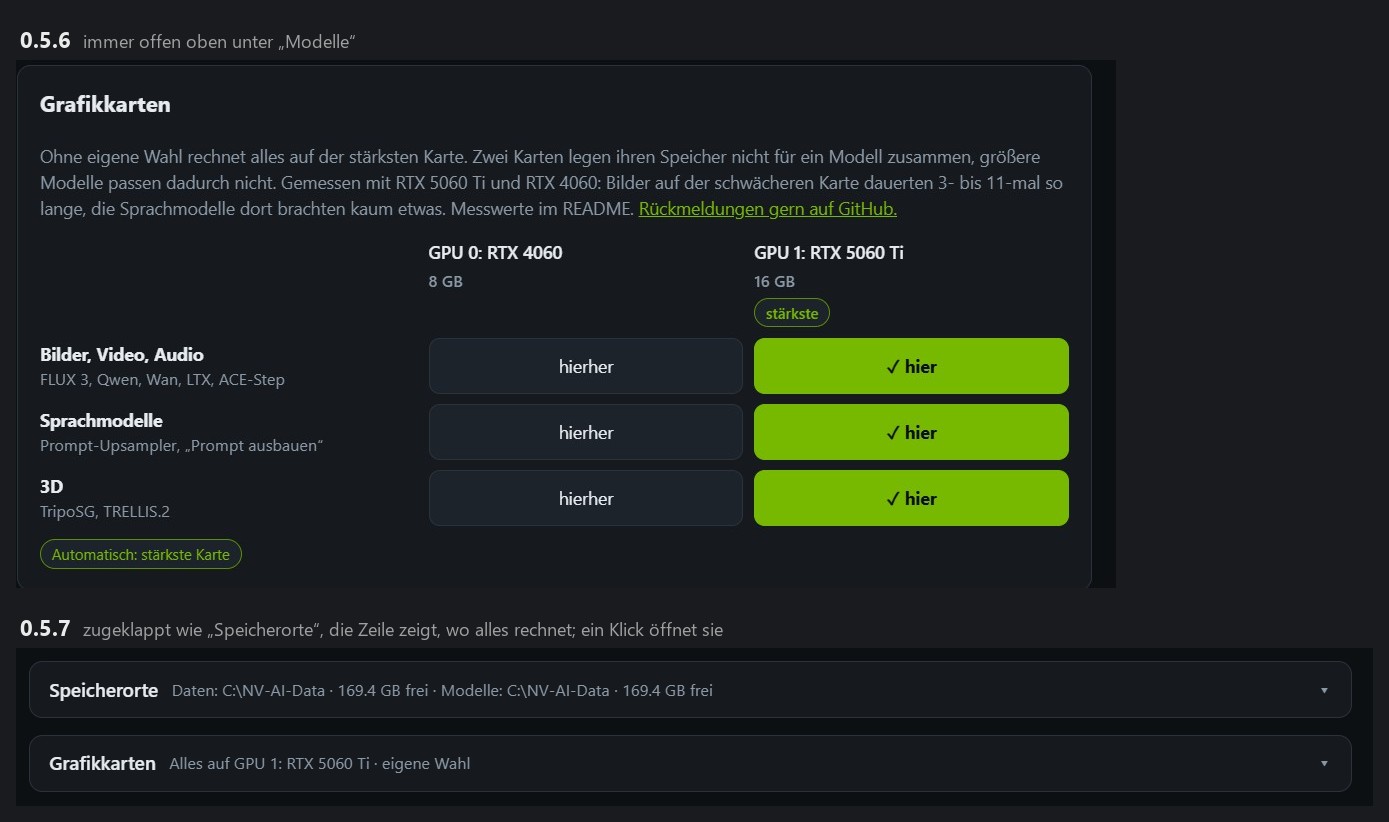
Aufgeräumte Seite „Modelle“. „Grafikkarten“ ist jetzt zugeklappt wie „Speicherorte“. Die Zeile zeigt, wo alles rechnet, etwa „Alles auf GPU 1: RTX 5060 Ti · automatisch“, und ein ⚠, wenn eine Warnung aktiv ist. Der Hinweis darin verlinkt die Messwerte in Issue #1.
Behoben:
- Wer NV-AI mit offener Weboberfläche beendete, ließ Server und ComfyUI im Hintergrund weiterlaufen, mit belegtem Grafikspeicher; bei mir hatten sich fünf davon angesammelt. Der Server wartete endlos auf die offene Verbindung der Weboberfläche. Jetzt trennt er offene Verbindungen nach 5 s. Gemessen mit offener Weboberfläche: NV-AI war nach 5,6 s beendet.
- Der Katalog führte ACE-Step 1.5 unter Apache-2.0; die Lizenz ist MIT.
- Die englischen Namen der Bildformate von HiDream-O1 fehlten.
Getestet: Windows-Update von 0.5.6, alle 19 Ende-zu-Ende-Tests bestanden (neu: Stable Audio 3, Prompt ausbauen dafür, der Limiter hält ACE-Step und Stable Audio 3 unter −0,3 dBFS); Beenden mit offener Weboberfläche; alle Katalog-Graphen gegen ComfyUI geprüft; 100 Add-on-Tests.
Downloads
NV-AI-Setup-0.5.7.exe(Windows 10/11, mit PhotoCraft-Add-on 0.4.4). Über eine ältere Version installieren; Einstellungen, Modelle und LoRAs bleiben. Nicht signiert: Zeigt Windows „Der Computer wurde durch Windows geschützt“, auf „Weitere Informationen“ und dann „Trotzdem ausführen“ klicken.
SHA-256:3292E08482F139ACF24E2507FEBFEAC948FF60D88B2C884150D2AB50D86530EANV-AI-0.4.4.dmg(macOS 15+ auf Apple Silicon, unverändert seit 0.5.5), signiert und notarisiert.
SHA-256:0D6858FA4E03225A4DE6E22FF120A7A166042B970200656C87F6BD2B375C7057
NV-AI 0.5.6 (Windows): strongest graphics card by itself, fill with FLUX 3
NV-AI 0.5.6 for Windows. The Mac app stays at 0.4.4 (attached again). Deutsch weiter unten.
What's new
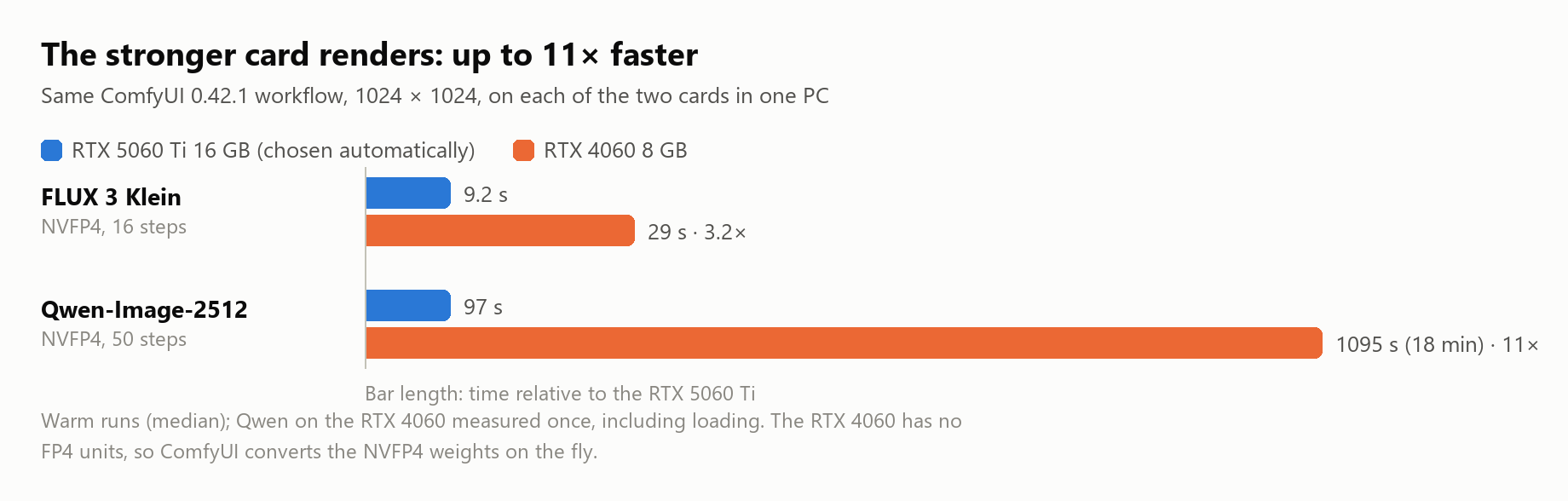
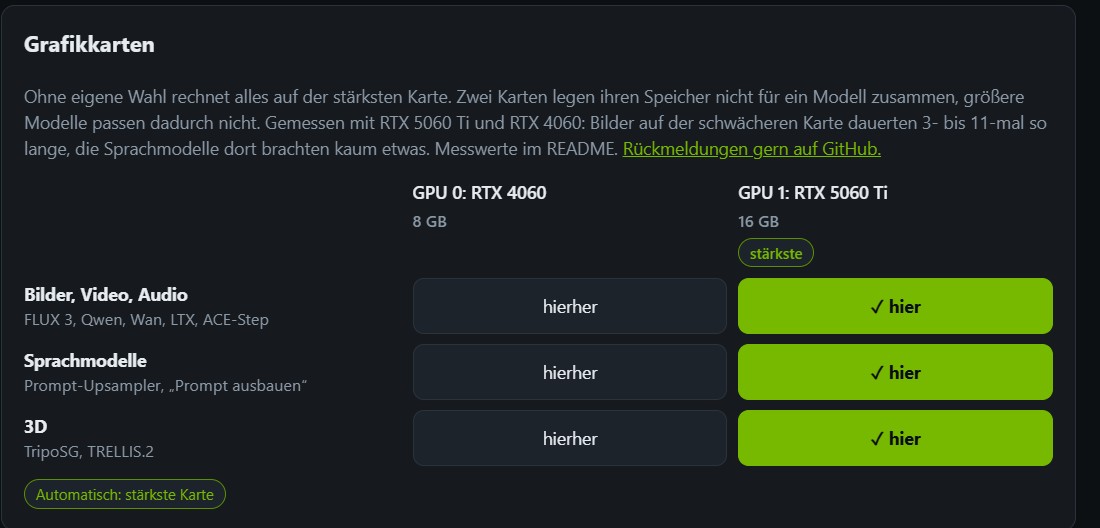
The strongest graphics card computes by itself. With two cards, NV-AI used to put everything on card 0 unless you chose otherwise; in my PC that is the slower one. Now it picks the card with the most memory (then the newest generation) and marks it "strongest". Measured with an RTX 5060 Ti 16 GB and an RTX 4060 8 GB in one PC:
- FLUX 3: 9.2 s instead of 29 s per image. Qwen-Image-2512: 97 s instead of 18 minutes.
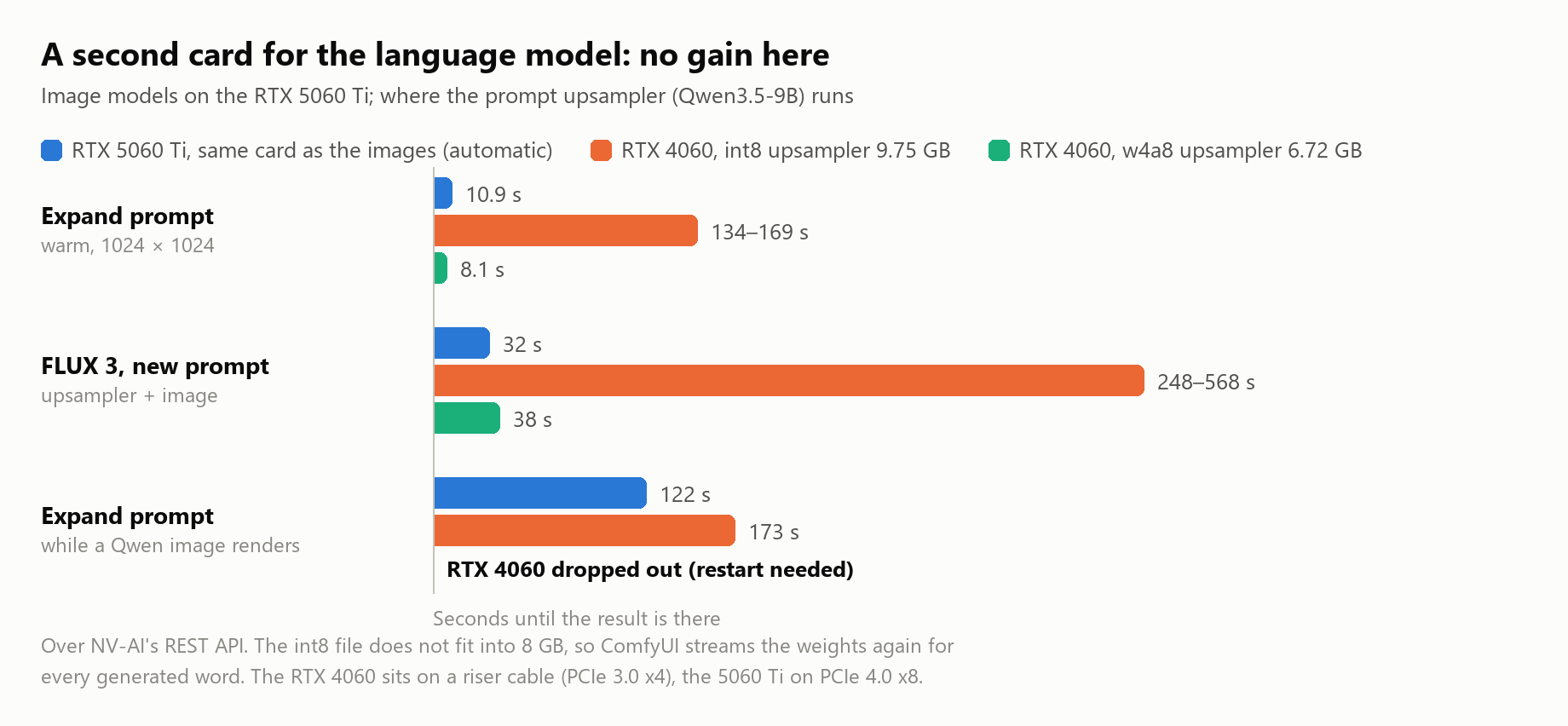
- A second card does not make room for larger models: two cards do not pool their memory for one model. Larger models already run on one card because ComfyUI streams what does not fit from system RAM.
- Moving the text encoder to the second card brought nothing (FLUX 3 9 → 13 s, Qwen 97 → 99 s, LTX-2.3 79 → 81 s).
- The language model on the 8 GB card: the default upsampler (int8, 9.75 GB) does not fit, "Expand prompt" took 134–203 s. NV-AI now takes the smaller w4a8 version (6.72 GB) when it is installed: 7.5–8.6 s, but FLUX 3 with a new prompt then took 35–41 instead of 31–34 s.
- With both cards at full load at the same time, the RTX 4060 (on a riser cable, PCIe 3.0 x4) dropped off the bus once ("BusReset TDR"), only a restart brought it back. Ollama ran on both cards at full load in the same PC without problems, so the cause is open. The settings page now warns when tasks are split over two cards.
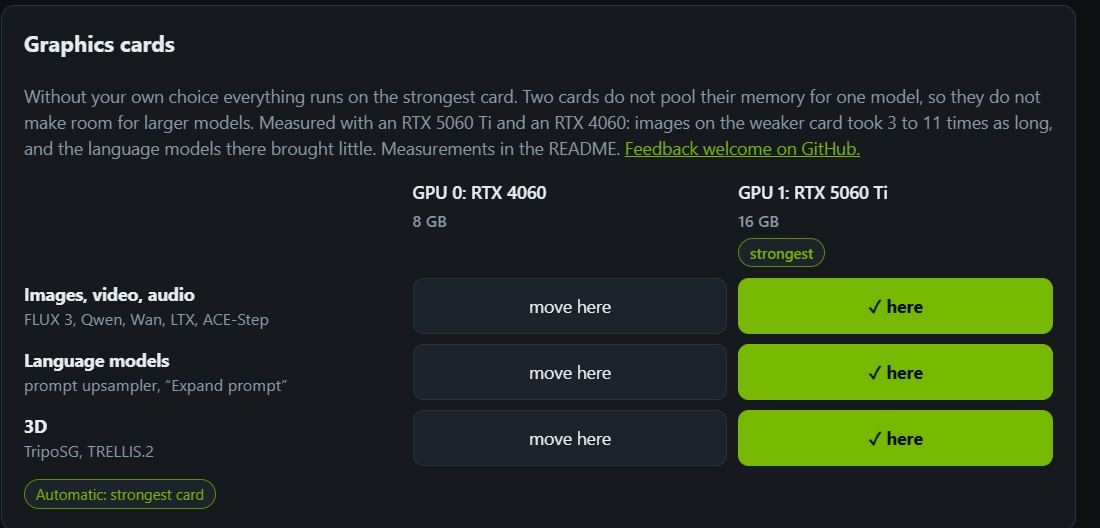
Clearer card choice. Which card computes images, language models and 3D is now a table of buttons ("✓ here" / "move here") instead of small checkboxes, in the header popover and under "Models" → "Graphics cards". "Distribute automatically" goes back to the strongest card. The page warns when the upsampler does not fit the card of the language models.
Fill with FLUX 3. FLUX 3 takes no mask, so filling a selection with it was not possible. Now NV-AI does what it does for extending: it cuts out the area with 35 % surroundings, greys it, lets FLUX 3 paint it from the prompt, measures FLUX's small offset (to half a pixel) and puts back only the area. Outside the mask the picture stays pixel for pixel. About 60–70 s. Good for removing things and adding new ones. To change something that is already there, such as the lettering on a sign, use "Refine": there FLUX 3 sees the original and keeps its angle, while filling with Qwen-Image-2512 painted the new sign flat over the hand.
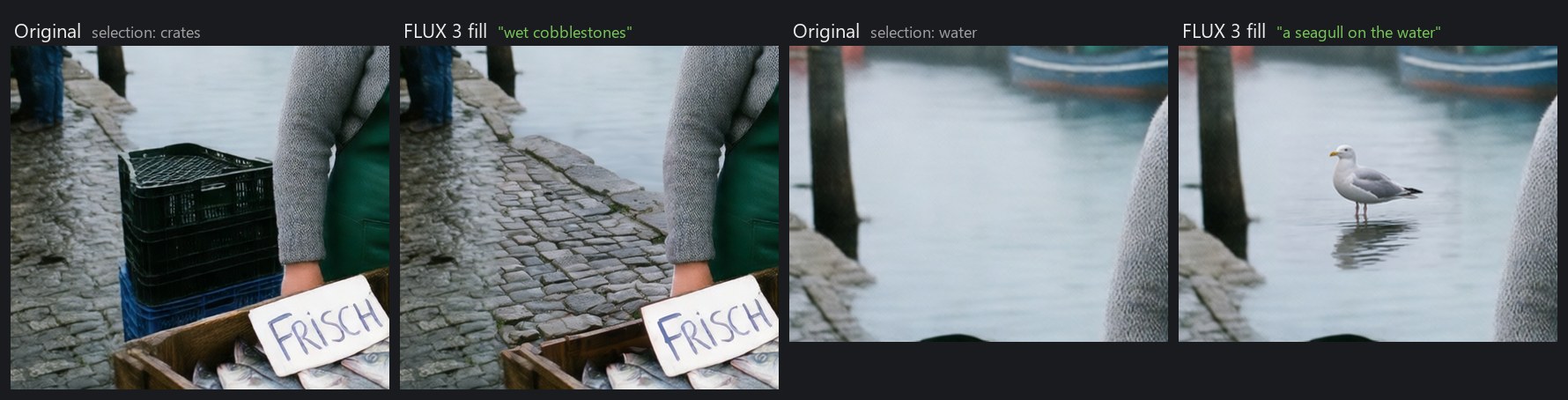
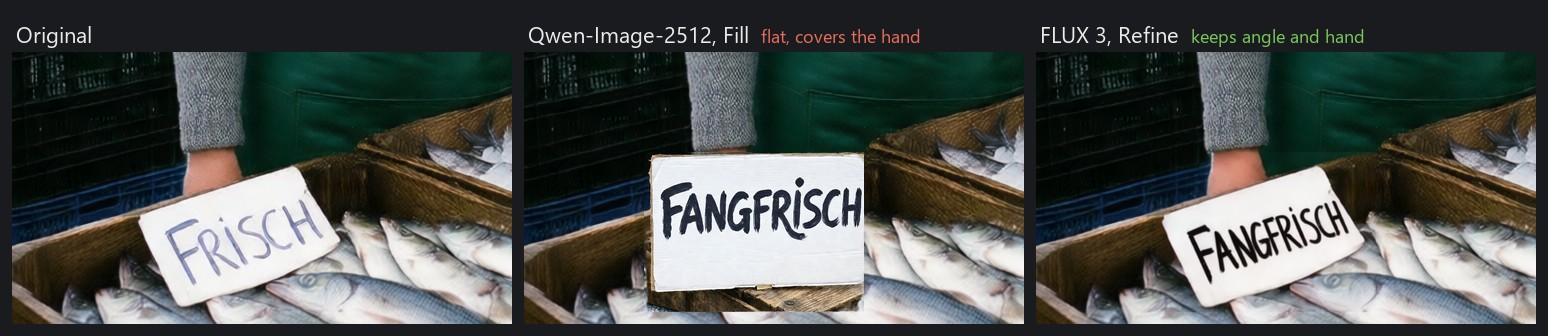
PhotoCraft add-on 0.4.4: "Fill" chooses FLUX 3 unless you pick another model, with a hint to use "Refine" for changing what is already there. The Mac add-on app (0.4.3) fills with FLUX 3 too as soon as it talks to NV-AI 0.5.6.
Tested: Windows update from 0.5.5, all 16 end-to-end tests pass (new: strongest card chosen, FLUX 3 fill with a mask); the add-on with two cards in PhotoCraft 0.10 (expand prompt, extend, fill with Qwen and with FLUX 3, refine with FLUX 3); 100 add-on tests.
Downloads
NV-AI-Setup-0.5.6.exe(Windows 10/11, with the PhotoCraft add-on 0.4.4). Install it over an older version; settings, models and LoRAs stay. Not code-signed: if Windows shows "Windows protected your PC", click "More info", then "Run anyway".
SHA-256:67A86BB9493F54A3FAFE926511EB4B5382EC62A228B699C6C477B9CC89FA8FFENV-AI-0.4.4.dmg(macOS 15+ on Apple Silicon, unchanged from 0.5.5), signed and notarized.
SHA-256:0D6858FA4E03225A4DE6E22FF120A7A166042B970200656C87F6BD2B375C7057
NV-AI 0.5.6 für Windows. Die Mac-App bleibt bei 0.4.4 (wieder angehängt).
Was gibt's Neues
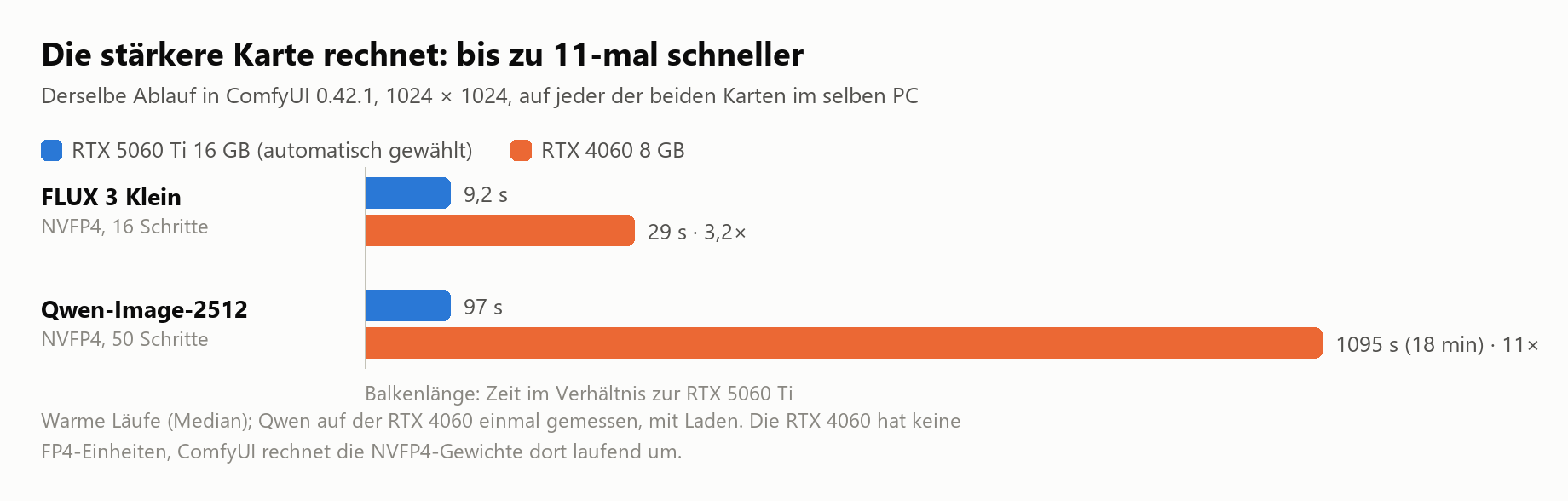
Die stärkste Grafikkarte rechnet von selbst. Mit zwei Karten legte NV-AI ohne eigene Wahl alles auf Karte 0, bei mir die langsamere. Jetzt nimmt es die Karte mit dem meisten Speicher (danach die neueste Generation) und markiert sie als „stärkste“. Gemessen mit einer RTX 5060 Ti 16 GB und einer RTX 4060 8 GB im selben PC:
- FLUX 3: 9,2 s statt 29 s je Bild. Qwen-Image-2512: 97 s statt 18 Minuten.
- Eine zweite Karte schafft keinen Platz für größere Modelle: Zwei Karten legen ihren Speicher nicht für ein Modell zusammen. Größere Modelle laufen ohnehin auf einer Karte, weil ComfyUI nachlädt, was nicht passt.
- Den Text-Encoder auf die zweite Karte zu legen brachte nichts (FLUX 3 9 → 13 s, Qwen 97 → 99 s, LTX-2.3 79 → 81 s).
- Das Sprachmodell auf der 8-GB-Karte: Der Standard-Upsampler (int8, 9,75 GB) passt nicht, „Prompt ausbauen“ dauerte 134–203 s. NV-AI nimmt jetzt die kleinere Fassung w4a8 (6,72 GB), wenn sie geladen ist: 7,5–8,6 s, dafür brauchte FLUX 3 mit neuem Prompt 35–41 statt 31–34 s.
- Mit beiden Karten gleichzeitig unter Volllast fiel die RTX 4060 (am Riser-Kabel, PCIe 3.0 x4) einmal vom Bus („BusReset TDR“), erst ein Neustart brachte sie zurück. Ollama lief im selben PC mit beiden Karten unter Volllast ohne Probleme, die Ursache ist also offen. Die Einstellungsseite warnt jetzt, wenn Aufgaben auf zwei Karten verteilt sind.
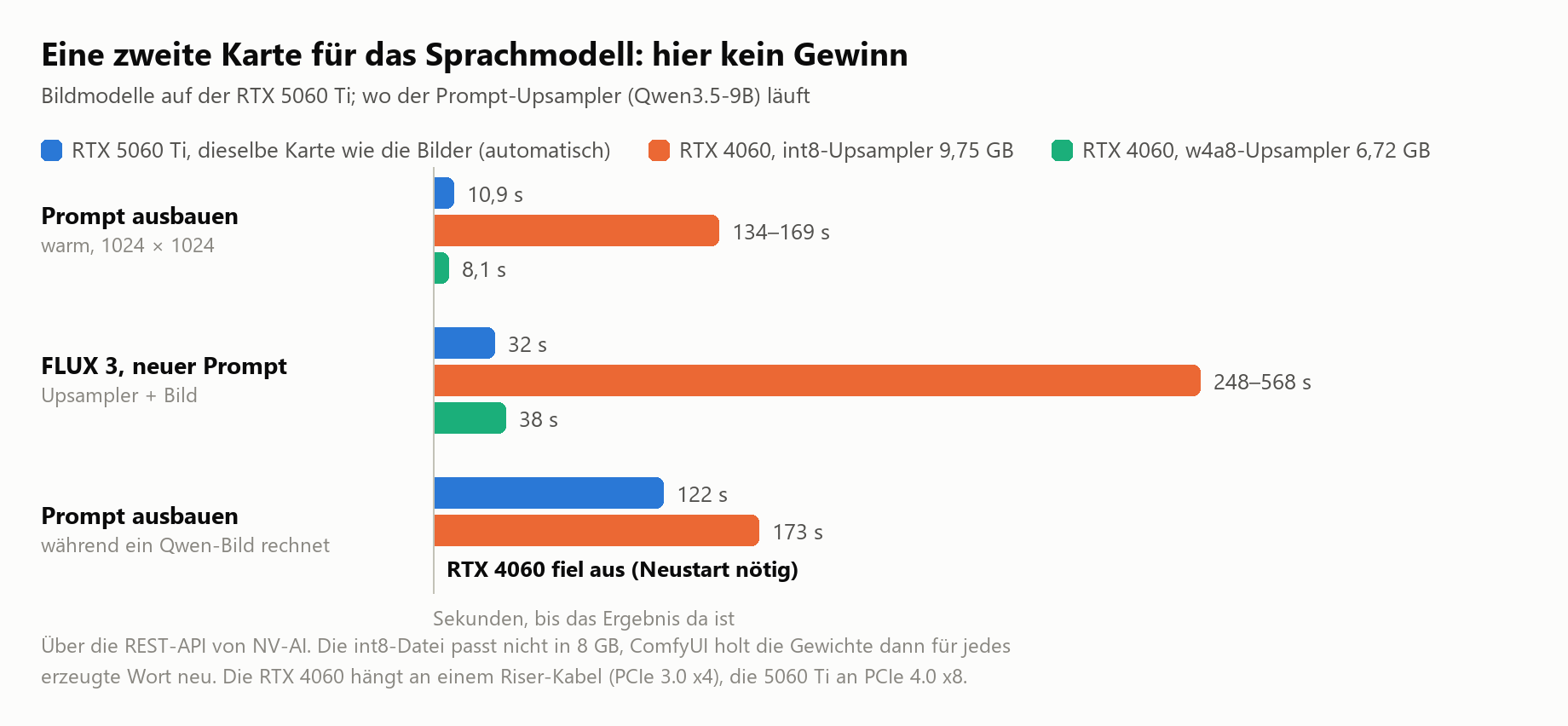
Klarere Kartenwahl. Welche Karte Bilder, Sprachmodelle und 3D rechnet, ist jetzt eine Tabelle aus Schaltflächen („✓ hier“ / „hierher“) statt kleiner Häkchen, in der Kopfleiste und unter „Modelle“ → „Grafikkarten“. „Automatisch verteilen“ legt alles zurück auf die stärkste Karte. Die Seite warnt, wenn der Upsampler nicht in die Karte der Sprachmodelle passt.
Füllen mit FLUX 3. FLUX 3 nimmt keine Maske, eine Auswahl damit zu füllen ging deshalb nicht. Jetzt macht NV-AI dasselbe wie beim Erweitern: Es schneidet den Bereich mit 35 % Umgebung aus, färbt ihn grau, lässt FLUX 3 nach dem Prompt malen, misst den kleinen Versatz von FLUX (auf einen halben Pixel) und setzt nur den Bereich zurück. Außerhalb der Maske bleibt das Bild pixelgleich. Rund 60–70 s. Gut zum Entfernen und zum Hinzufügen. Um etwas zu ändern, das schon da ist, etwa die Schrift auf einem Schild, „Überarbeiten“ nehmen: Dort sieht FLUX 3 das Original und hält seine Neigung, während Füllen mit Qwen-Image-2512 das neue Schild flach über die Hand malte.
PhotoCraft-Add-on 0.4.4: „Füllen“ nimmt FLUX 3, wenn kein anderes Modell gewählt ist, mit dem Hinweis, Vorhandenes besser über „Überarbeiten“ zu ändern. Die Mac-Add-on-App (0.4.3) füllt ebenfalls mit FLUX 3, sobald sie mit NV-AI 0.5.6 spricht.
Getestet: Windows-Update von 0.5.5, alle 16 Ende-zu-Ende-Tests bestanden (neu: stärkste Karte gewählt, FLUX-3-Füllen mit Maske); das Add-on mit zwei Karten in PhotoCraft 0.10 (Prompt ausbauen, Erweitern, Füllen mit Qwen und mit FLUX 3, Überarbeiten mit FLUX 3); 100 Add-on-Tests.
Downloads
NV-AI-Setup-0.5.6.exe(Windows 10/11, mit PhotoCraft-Add-on 0.4.4). Über eine ältere Version installieren; Einstellungen, Modelle und LoRAs bleiben. Nicht signiert: Zeigt Windows „Der Computer wurde durch Windows geschützt“, auf „Weitere Informationen“ und dann „Trotzdem ausführen“ klicken.
SHA-256:67A86BB9493F54A3FAFE926511EB4B5382EC62A228B699C6C477B9CC89FA8FFENV-AI-0.4.4.dmg(macOS 15+ auf Apple Silicon, unverändert seit 0.5.5), signiert und notarisiert.
SHA-256:0D6858FA4E03225A4DE6E22FF120A7A166042B970200656C87F6BD2B375C7057
NV-AI 0.5.5 (Windows) and 0.4.4 (Mac): outpainting done properly, Extend tab
NV-AI 0.5.5 for Windows and NV-AI 0.4.4 for Mac. Deutsch weiter unten.
What's new
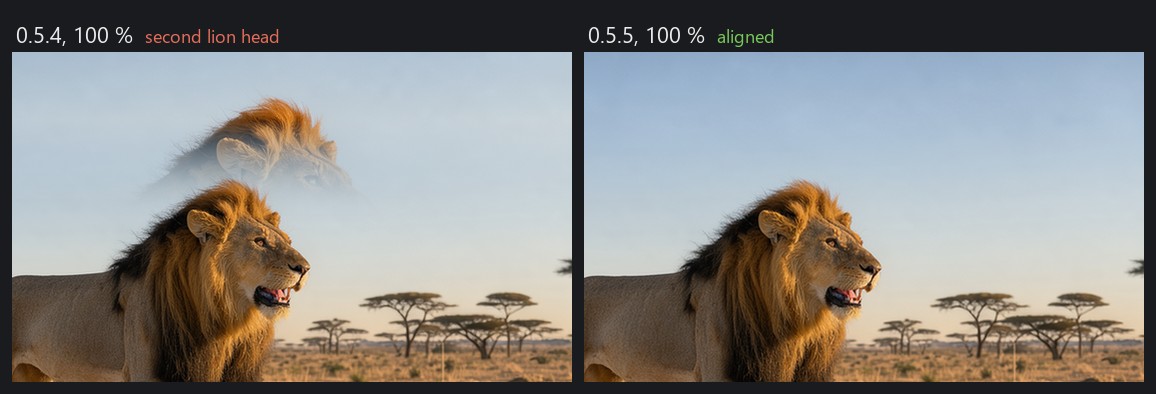
Outpainting, done properly. In 0.5.4, extending a picture all around could leave a ghost of the subject and broken edges at the old border. The cause, measured: FLUX 3 re-renders the whole picture and never returns it exactly in place, with up to 43 px offset per side. With a border on all four sides it zoomed into the picture by 25 to 42 % instead of filling the frame. NV-AI then put the original back without checking.
- Now NV-AI extends one axis at a time (first left and right, then top and bottom). After each pass it measures how FLUX shifted and scaled the picture, moves the result back, and only then puts the original in with a soft transition.
- It computes 8 % more border than asked for and cuts it off afterwards, so the shift leaves no smeared stripes at the edge.
- If FLUX rebuilt a variant instead of only shifting it, NV-AI computes that variant once more with another seed.
- Measured on a lion scene extended on all sides: two variants in 147 s, seams clean at full resolution.

PhotoCraft add-on 0.4.3: "Extend" is its own tab (Windows and Mac). In 0.4.2 extending was hidden under "Fill", where FLUX 3 could not be picked. Now there are four modes; "Extend" offers every model that can extend, FLUX 3 preselected. The layer is called "NV-AI Extend: …". "Fill" is only filling again.
Mac (NV-AI 0.4.4): FLUX.2 Klein left the grey border as it was when extending all around through a reference image. On the Mac NV-AI now fills the border through a mask in one pass (lion scene all around 116–120 s on an M1). The transition stays softer than with FLUX 3 on Windows and can remain visible as a blurred strip at the old border (measured in a sky and in a market scene).
Fixed: "Clean up incomplete" under "Models" reported the same models as cleaned every time. They were not broken downloads but models that share files (text encoders, VAE) with installed ones; those files must stay. Now only models with their own leftovers count as incomplete, and the message names only what was really deleted.
Tested: Windows update from 0.5.4, all 14 end-to-end tests pass (including outpainting); outpainting and the "Extend" tab end to end in PhotoCraft 0.10; Mac: the add-on app's "Extend" end to end in PhotoCraft 0.10 against NV-AI 0.4.4 (132 s on an M1), 55 Swift and 98 Python tests.
Downloads
NV-AI-Setup-0.5.5.exe(Windows 10/11, with the PhotoCraft add-on 0.4.3). Install it over an older version; settings, models and LoRAs stay. Not code-signed: if Windows shows "Windows protected your PC", click "More info", then "Run anyway".
SHA-256:056EAA736DC0F65C63337F14A04D354EB18E8314E75683AFF62C5795FF4C8065NV-AI-0.4.4.dmg(macOS 15+ on Apple Silicon, NV-AI 0.4.4 and NV-AI for PhotoCraft 0.4.3), signed and notarized.
SHA-256:0D6858FA4E03225A4DE6E22FF120A7A166042B970200656C87F6BD2B375C7057
NV-AI 0.5.5 für Windows und NV-AI 0.4.4 für Mac.
Was gibt's Neues
Outpainting, jetzt sauber. In 0.5.4 konnte rundum Erweitern ein Geisterbild des Motivs und verbaute Kanten an der alten Bildgrenze hinterlassen. Die Ursache, gemessen: FLUX 3 rechnet das ganze Bild neu und gibt es nie genau an derselben Stelle wieder, mit bis zu 43 px Versatz je Seite. Bei Rand auf allen vier Seiten zoomte es um 25 bis 42 % ins Bild, statt den Rahmen zu füllen. NV-AI hat das Original danach ungeprüft darübergelegt.
- Jetzt erweitert NV-AI Achse für Achse (erst links und rechts, dann oben und unten). Nach jedem Durchgang misst es, wie FLUX das Bild verschoben und skaliert hat, rückt das Ergebnis zurück und setzt erst dann das Original mit weichem Übergang ein.
- Es rechnet 8 % mehr Rand als angefordert und schneidet ihn danach ab, damit der Versatz keine verschmierten Streifen am Rand hinterlässt.
- Hat FLUX eine Variante umgebaut statt nur verschoben, rechnet NV-AI sie einmal mit anderem Seed neu.
- Gemessen an einer rundum erweiterten Löwenszene: zwei Varianten in 147 s, Nähte in voller Auflösung sauber.
PhotoCraft-Add-on 0.4.3: „Erweitern“ als eigener Reiter (Windows und Mac). In 0.4.2 steckte Erweitern unter „Füllen“, wo FLUX 3 nicht wählbar war. Jetzt gibt es vier Modi; „Erweitern“ bietet jedes Modell an, das erweitern kann, FLUX 3 ist voreingestellt. Die Ebene heißt „NV-AI Erweitern: …“. „Füllen“ ist wieder nur Füllen.
Mac (NV-AI 0.4.4): FLUX.2 Klein ließ den grauen Rand beim Erweitern per Referenzbild rundum einfach stehen. Auf dem Mac füllt NV-AI den Rand jetzt per Maske in einem Durchgang (Löwenszene rundum 116–120 s auf einem M1). Der Übergang bleibt weicher als mit FLUX 3 unter Windows und kann an der alten Bildkante als unscharfer Streifen sichtbar bleiben (gemessen im Himmel und in einer Marktszene).
Behoben: „Unfertiges aufräumen“ unter „Modelle“ meldete jedes Mal dieselben Modelle als aufgeräumt. Das waren keine abgebrochenen Downloads, sondern Modelle, die Dateien (Text-Encoder, VAE) mit installierten teilen; die müssen bleiben. Jetzt gelten nur Modelle mit eigenen Resten als unvollständig, und die Meldung nennt nur, was wirklich gelöscht wurde.
Getestet: Windows-Update von 0.5.4, alle 14 Ende-zu-Ende-Tests bestanden (mit Outpainting); Outpainting und der Reiter „Erweitern“ komplett in PhotoCraft 0.10; Mac: „Erweitern“ der Add-on-App komplett in PhotoCraft 0.10 gegen NV-AI 0.4.4 (132 s auf einem M1), 55 Swift- und 98 Python-Tests.
Downloads
NV-AI-Setup-0.5.5.exe(Windows 10/11, mit PhotoCraft-Add-on 0.4.3). Über eine ältere Version installieren; Einstellungen, Modelle und LoRAs bleiben. Nicht signiert: Zeigt Windows „Der Computer wurde durch Windows geschützt“, auf „Weitere Informationen“ und dann „Trotzdem ausführen“ klicken.
SHA-256:056EAA736DC0F65C63337F14A04D354EB18E8314E75683AFF62C5795FF4C8065NV-AI-0.4.4.dmg(macOS 15+ auf Apple Silicon, NV-AI 0.4.4 und NV-AI für PhotoCraft 0.4.3), signiert und notarisiert.
SHA-256:0D6858FA4E03225A4DE6E22FF120A7A166042B970200656C87F6BD2B375C7057
NV-AI 0.5.4 (Windows) and 0.4.3 (Mac): outpainting, shorter expand prompt, realism LoRAs
NV-AI 0.5.4 for Windows and NV-AI 0.4.3 for Mac. Deutsch weiter unten.
What's new
Outpainting: extend an image beyond its edges (asked for on Reddit)
- "Generate" → "Rework an existing image" → "Extend beyond the edges": enter left, top, right, bottom in pixels or pick "wider", "taller", "downwards", "all around". The size follows from image plus border; the prompt describes the whole extended picture.
- With FLUX 3 (and other models with reference images) the model gets the image on a grey border and continues the scene; afterwards NV-AI puts the original back. Measured on a harbour scene (+384 px): seamless, the old part unchanged (0.0 out of 255), two variants in 66 s.
- With Qwen-Image-2512 it works through a mask, but in testing the model often painted the border as a separate scene with a hard edge, even with a wide transition and 50 steps. The interface says so and points to FLUX 3.
- REST and MCP:
outpaint=[left, top, right, bottom]withimage_asset_id; each model reports infeatures.outpainthow it extends.
On the Mac (NV-AI 0.4.3): outpainting with FLUX.2 Klein, the same way: "Start image" → "Extend beyond the edges". FLUX.2 Klein only continues the scene at small sizes (measured on an M1: 768 × 512 seamless in 86 s; at 1248 × 832 it pasted in an unrelated picture), so the Mac computes outpainting at no more than 0.4 megapixels and scales the new border up. If grey stays in the border, it computes once more with the next seed.
PhotoCraft add-on 0.4.2 (Windows and Mac): "Fill" now has "Extend the canvas". The add-on enlarges the canvas in PhotoCraft (transparent, one undo step per side) and fills the new border, picking FLUX 3 (Mac: FLUX.2 Klein) when nothing else is chosen. Tested end to end in PhotoCraft 0.10 on both systems.
Shorter "Expand prompt": 60 to 80 words instead of 116 to 260, so there is little to delete. The language model ignores length limits, so NV-AI shortens sentence by sentence afterwards and always keeps style and subject, quoted text and the closing sentence with light and background. Sound effects come as tags again.
Realism LoRAs, tested on Qwen-Image-2512 (same seed, 100 % crops; table in the install guide)
| LoRA | Result |
|---|---|
| Boreal (Civitai, images may be sold) | looks most like a real photo, natural skin |
| Lenovo UltraReal (Apache-2.0) | natural and closest to the prompt |
| Wuli Turbo (Apache-2.0) | 4 steps, cfg 1: an image in 18 s instead of 100 s at almost the same quality |
| Wan 2.2 Lightning I2V (Apache-2.0) | 4 steps, cfg 1: video in 90 s instead of 585 s, camera moves a bit weaker |
Also: the LoRA list on "Generate" folds away ("8 available" / "2 active"); "Models" explains what LoRAs are for; Civitai LoRAs that allow selling images and Apache/MIT LoRAs no longer show as "non-commercial"; the Civitai file check no longer fails at random (their CDN sometimes ignores Range requests); model IDs from Civitai names without emoji leftovers.
Tested: Windows update from 0.5.3, all 14 end-to-end tests pass (new: FLUX 3 outpainting).
Downloads
NV-AI-Setup-0.5.4.exe(Windows 10/11, with the PhotoCraft add-on 0.4.2). Install it over an older version; settings, models and LoRAs stay. Not code-signed: if Windows shows "Windows protected your PC", click "More info", then "Run anyway".
SHA-256:E116BF5F8721EEE8D9B18EFCB0FA691A489F1424F713245677EA79B353EDC771NV-AI-0.4.3.dmg(macOS 15+ on Apple Silicon, NV-AI 0.4.3 and NV-AI for PhotoCraft 0.4.2), signed and notarized.
SHA-256:ECF674188B3D9C4A12F67D5068574302679087881CBE13DC2D2A9465EAD19389
NV-AI 0.5.4 für Windows und NV-AI 0.4.3 für Mac.
Was gibt's Neues
Outpainting: ein Bild über den Rand hinaus erweitern (Wunsch aus Reddit)
- „Generieren“ → „Vorhandenes Bild überarbeiten“ → „Über den Rand hinaus erweitern“: links, oben, rechts, unten in Pixeln eingeben oder „breiter“, „höher“, „nach unten“, „rundum“ wählen. Das Format ergibt sich aus Bild plus Rand, der Prompt beschreibt das ganze erweiterte Bild.
- Mit FLUX 3 (und anderen Modellen mit Referenzbildern) bekommt das Modell das Bild auf grauem Rand und führt die Szene weiter, danach legt NV-AI das Original zurück. Gemessen an einer Hafenszene (+384 px): nahtlos, der alte Teil unverändert (0,0 von 255), zwei Varianten in 66 s.
- Mit Qwen-Image-2512 geht es über eine Maske, im Test malte das Modell den Rand aber oft als eigene Szene mit harter Kante, auch mit breitem Übergang und 50 Schritten. Die Oberfläche sagt das und verweist auf FLUX 3.
- REST und MCP:
outpaint=[links, oben, rechts, unten]mitimage_asset_id; jedes Modell meldet infeatures.outpaint, wie es erweitert.
Auf dem Mac (NV-AI 0.4.3): Outpainting mit FLUX.2 Klein auf demselben Weg: „Ausgangsbild“ → „Über den Rand hinaus erweitern“. FLUX.2 Klein führt die Szene nur bei kleiner Bildgröße weiter (gemessen auf einem M1: 768 × 512 nahtlos in 86 s; bei 1248 × 832 klebte es ein fremdes Bild ein), deshalb rechnet der Mac beim Erweitern höchstens 0,4 Megapixel und skaliert den neuen Rand hoch. Bleibt Grau im Rand stehen, rechnet er einmal mit dem nächsten Seed nach.
PhotoCraft-Add-on 0.4.2 (Windows und Mac): „Füllen“ hat jetzt „Arbeitsfläche erweitern“. Das Add-on vergrößert die Arbeitsfläche in PhotoCraft (transparent, je Seite ein Rückgängig-Schritt) und füllt den neuen Rand, ohne eigene Wahl mit FLUX 3 (Mac: FLUX.2 Klein). Auf beiden Systemen in PhotoCraft 0.10 komplett durchgetestet.
Kürzeres „Prompt ausbauen“: 60 bis 80 Wörter statt 116 bis 260, es bleibt kaum etwas zu streichen. Das Sprachmodell ignoriert Längenvorgaben, deshalb kürzt NV-AI danach satzweise und behält immer Stil und Motiv, wörtlichen Text und den Schlusssatz mit Licht und Hintergrund. Soundeffekte kommen wieder als Tags.
Realismus-LoRAs, getestet an Qwen-Image-2512 (gleicher Seed, 100-%-Ausschnitte; Tabelle in der Installationsanleitung)
| LoRA | Ergebnis |
|---|---|
| Boreal (Civitai, Bilder dürfen verkauft werden) | wirkt am ehesten wie ein echtes Foto, natürliche Haut |
| Lenovo UltraReal (Apache-2.0) | natürlich und am nächsten am Prompt |
| Wuli Turbo (Apache-2.0) | 4 Schritte, cfg 1: ein Bild in 18 statt 100 s bei fast gleicher Qualität |
| Wan 2.2 Lightning I2V (Apache-2.0) | 4 Schritte, cfg 1: Video in 90 statt 585 s, Kamerafahrt etwas schwächer |
Außerdem: Die LoRA-Liste beim Generieren klappt ein („8 verfügbar“ / „2 aktiv“); „Modelle“ erklärt, wozu LoRAs gut sind; Civitai-LoRAs mit Verkaufserlaubnis und Apache/MIT-LoRAs stehen nicht mehr als „nicht kommerziell“ da; die Civitai-Dateiprüfung scheitert nicht mehr zufällig (deren CDN ignoriert manchmal Range-Anfragen); Modell-IDs aus Civitai-Namen ohne Emoji-Reste.
Getestet: Windows-Update von 0.5.3, alle 14 Ende-zu-Ende-Tests bestanden (neu: FLUX-3-Outpainting).
Downloads
NV-AI-Setup-0.5.4.exe(Windows 10/11, mit PhotoCraft-Add-on 0.4.2). Über eine ältere Version installieren; Einstellungen, Modelle und LoRAs bleiben. Nicht signiert: Zeigt Windows „Der Computer wurde durch Windows geschützt“, auf „Weitere Informationen“ und dann „Trotzdem ausführen“ klicken.
SHA-256:E116BF5F8721EEE8D9B18EFCB0FA691A489F1424F713245677EA79B353EDC771NV-AI-0.4.3.dmg(macOS 15+ auf Apple Silicon, NV-AI 0.4.3 und NV-AI für PhotoCraft 0.4.2), signiert und notarisiert.
SHA-256:ECF674188B3D9C4A12F67D5068574302679087881CBE13DC2D2A9465EAD19389
NV-AI 0.5.3: LoRAs, LTX-2.3, Mochi, Kandinsky 5, expand prompt for video/audio/3D
NV-AI 0.5.3 for Windows. The Mac app stays at 0.4.2 (same DMG as in 0.5.2). Deutsch weiter unten.
What's new
LoRAs from Hugging Face and Civitai
- "Models" → "Search models and LoRAs": a "LoRAs" switch for Hugging Face and a Civitai box below.
- Before downloading, NV-AI reads only the file header and tells you which model the LoRA fits: SDXL (Pony, Illustrious, NoobAI …), SD 1.5, Qwen-Image, Z-Image, FLUX.1/Chroma, Wan 1.3B/5B/14B and LTX-2/2.3. Tested on 79 LoRAs from Hugging Face, all recognized correctly.
- When generating, matching LoRAs show up under the selected image or video model, with a strength slider and a "+ trigger" button. Wan 2.2 A14B LoRAs come as high-noise and low-noise files; NV-AI applies each one to its own expert.
- Measured: a pixel-art LoRA on Qwen-Image-2512 changed the style clearly at the same seed (168 s instead of 102 s); an orbit LoRA pair on Wan 2.2 I2V A14B turned a slight turn into a full camera orbit.
- Civitai downloads need your own API key (civitai.com → Settings → API Keys). REST and MCP:
loras=[{"model_id": "…", "strength": 0.8}].
New video models, measured on an RTX 5060 Ti 16 GB
| Model | What for | Time | License |
|---|---|---|---|
| LTX-2.3 (NVFP4) | Video with sound; the base most community LTX LoRAs are made for | 4 s at 1280 × 704 in 101 s; image to video 448 × 832 in 65 s | LTX-2 Community (free below US$10M revenue) |
| Mochi 1 preview (fp8) | Text to video with smooth motion | 49 frames at 848 × 480 in 351 s | Apache-2.0 |
| Kandinsky 5.0 Video Lite, distilled | Small video model, 5 s | 768 × 512 in about 300 s | MIT; the VAE comes from HunyuanVideo (Tencent license, not valid in the EU) |
| Kandinsky 5.0 Video Lite T2V / I2V (50 steps) | Same with more steps; I2V reliable only in landscape 768 × 512 | about 26–27 minutes | as above |
Expand prompt everywhere — now also on the Video tab (motion, camera move; with LTX also the sound; with a start image only the motion), the Audio tab (sound tags for Stable Audio, genre tags for ACE-Step) and the 3D tab ("Object from text" creates a source image without floor or shadow). 3–12 s each.
Also: the hint text now sits inside the empty prompt field instead of taking space below it; the start image picker now appears for LTX-2.5 and LTX-2.3 too (image to video was only reachable through the API before).
Tested: Windows update from 0.5.2, all 13 end-to-end tests pass; LoRA generation and expand prompt (video, sound) checked on the installed version.
Downloads
NV-AI-Setup-0.5.3.exe(Windows 10/11). Install it over an older version; settings and models stay. Not code-signed: if Windows shows "Windows protected your PC", click "More info", then "Run anyway".
SHA-256:652DCA1CA6A15379EBCCD47E8053A037F9ADA06EC68B794C81D12E827215595BNV-AI-0.4.2.dmg(macOS 15+ on Apple Silicon), unchanged from 0.5.2, signed and notarized.
SHA-256:DD9C4687DA3B490C5A501745F1F6E8C4EDA1E335E64E6C2999C9ECC55BD93215
NV-AI 0.5.3 für Windows. Die Mac-App bleibt bei 0.4.2 (dieselbe DMG wie in 0.5.2).
Was gibt's Neues
LoRAs von Hugging Face und Civitai
- „Modelle“ → „Modelle und LoRAs suchen“: Umschalter „LoRAs“ für Hugging Face und ein Civitai-Kasten darunter.
- Vor dem Laden liest NV-AI nur den Dateikopf und sagt, zu welchem Modell die LoRA passt: SDXL (Pony, Illustrious, NoobAI …), SD 1.5, Qwen-Image, Z-Image, FLUX.1/Chroma, Wan 1.3B/5B/14B und LTX-2/2.3. Getestet an 79 LoRAs von Hugging Face, alle richtig erkannt.
- Beim Generieren stehen passende LoRAs unter dem gewählten Bild- oder Videomodell, mit Stärke-Regler und Knopf „+ Trigger“. LoRAs für Wan 2.2 A14B kommen als High- und Low-Noise-Datei; NV-AI hängt jede an ihren Experten.
- Gemessen: Eine Pixel-Art-LoRA an Qwen-Image-2512 änderte bei gleichem Seed deutlich den Stil (168 statt 102 s); ein Orbit-LoRA-Paar an Wan 2.2 I2V A14B machte aus einer leichten Drehung eine ganze Kamerafahrt.
- Civitai-Downloads brauchen einen eigenen API-Schlüssel (civitai.com → Settings → API Keys). REST und MCP:
loras=[{"model_id": "…", "strength": 0.8}].
Neue Videomodelle, gemessen auf einer RTX 5060 Ti 16 GB
| Modell | Wofür | Zeit | Lizenz |
|---|---|---|---|
| LTX-2.3 (NVFP4) | Video mit Ton; Basis der meisten Community-LoRAs für LTX | 4 s in 1280 × 704 in 101 s; Bild zu Video 448 × 832 in 65 s | LTX-2 Community (kostenlos unter 10 Mio. US-$ Umsatz) |
| Mochi 1 preview (fp8) | Text zu Video mit flüssiger Bewegung | 49 Frames in 848 × 480 in 351 s | Apache-2.0 |
| Kandinsky 5.0 Video Lite, destilliert | Kleines Videomodell, 5 s | 768 × 512 in rund 300 s | MIT; der VAE stammt von HunyuanVideo (Tencent-Lizenz, gilt nicht in der EU) |
| Kandinsky 5.0 Video Lite T2V / I2V (50 Schritte) | Dasselbe mit mehr Schritten; I2V nur im Querformat 768 × 512 verlässlich | rund 26–27 Minuten | wie oben |
Prompt ausbauen überall — jetzt auch im Reiter Video (Bewegung, Kamerafahrt; bei LTX auch der Ton; mit Startbild nur die Bewegung), Audio (Klang-Tags für Stable Audio, Genre-Tags für ACE-Step) und 3D („Objekt aus Text“ erzeugt ein Quellbild ohne Boden und Schatten). Je 3–12 s.
Außerdem: Der Hinweistext steht jetzt im leeren Prompt-Feld statt darunter; die Startbild-Auswahl erscheint jetzt auch bei LTX-2.5 und LTX-2.3 (Bild zu Video ging vorher nur über die API).
Getestet: Windows-Update von 0.5.2, alle 13 End-to-End-Tests bestanden; LoRA-Generierung und Prompt ausbauen (Video, Ton) am installierten Stand geprüft.
Downloads
NV-AI-Setup-0.5.3.exe(Windows 10/11). Über eine ältere Version installieren; Einstellungen und Modelle bleiben. Nicht code-signiert: Zeigt Windows „Der Computer wurde durch Windows geschützt“, auf „Weitere Informationen“ und dann „Trotzdem ausführen“ klicken.NV-AI-0.4.2.dmg(macOS 15+ auf Apple Silicon), unverändert aus 0.5.2, signiert und beglaubigt.
NV-AI 0.5.2 (Windows) · 0.4.2 (Mac): LTX-2.5 with sound, Boogu-Image, HiDream-O1, cancel, content labels
NV-AI 0.5.2 for Windows and NV-AI 0.4.2 for Mac. Deutsch weiter unten.
What's new
New models (Windows), measured on an RTX 5060 Ti 16 GB
| Model | What for | Time | License |
|---|---|---|---|
| LTX-2.5 | Video with matching sound, from text or a start image | 4 s at 1280 × 704 in 72 s; image to video 448 × 832 in 45 s | LTX-2 Community (free below US$10M revenue; gated, accept on Hugging Face) |
| Boogu-Image 0.1 Turbo / Base / Edit | Fast drafts, full quality, and editing by instruction (in the test only the hat changed, everything else stayed) | Turbo 10 s, Base 66 s, Edit 147 s at 832 × 1216 | Apache-2.0 |
| HiDream-O1-Image Dev / full | Large images, trained at 4 megapixels | Dev 41 s, full 142 s at 1728 × 2304 | MIT |
Removed from the catalog (installed files stay): SD 3.5, FLUX.1 dev, Chroma v37, HunyuanVideo 1.5.
Censored or uncensored — every image and video model is labelled uncensored, partly censored, censored or filtering unknown, with the evidence and source in the tooltip. NV-AI itself has no content filter.
Cancel — each download stops within seconds (finished parts stay so it can resume), each queued or running job can be cancelled. Buttons in the download bar on every page, on the Models and Generate pages; the PhotoCraft add-on (Windows and Mac) shows running NV-AI downloads with a cancel button. NV-AI for Mac cancels downloads at once.
Storage locations (Windows) — "Models" → "Storage locations": choose the data and model folders, NV-AI restarts itself with them.
Also: NV-AI and ComfyUI version next to the logo; images up to 2560 px per side.
Tested: Windows update from 0.5.1, all 13 end-to-end tests pass; folder change and restart tested on the installed version. Mac app and add-on app notarized by Apple.
Downloads
NV-AI-Setup-0.5.2.exe(Windows 10/11). Install it over an older version; settings and models stay. Not code-signed: if Windows shows "Windows protected your PC", click "More info", then "Run anyway".
SHA-256:3249450991A06FF8AC8477ED3297B7B3EB568B37B80946EF92A149ED21B4F20DNV-AI-0.4.2.dmg(macOS 15+ on Apple Silicon), signed and notarized: NV-AI for Mac 0.4.2 and "NV-AI for PhotoCraft" 0.4.1.
SHA-256:DD9C4687DA3B490C5A501745F1F6E8C4EDA1E335E64E6C2999C9ECC55BD93215
NV-AI 0.5.2 für Windows und NV-AI 0.4.2 für Mac.
Was gibt's Neues
Neue Modelle (Windows), gemessen auf einer RTX 5060 Ti 16 GB
| Modell | Wofür | Zeit | Lizenz |
|---|---|---|---|
| LTX-2.5 | Video mit passendem Ton, aus Text oder Startbild | 4 s in 1280 × 704 in 72 s; Bild zu Video 448 × 832 in 45 s | LTX-2 Community (kostenlos unter 10 Mio. US-$ Umsatz; gated, auf Hugging Face akzeptieren) |
| Boogu-Image 0.1 Turbo / Base / Edit | Schnelle Entwürfe, volle Qualität und Bearbeiten nach Anweisung (im Test änderte sich nur der Hut, alles andere blieb) | Turbo 10 s, Base 66 s, Edit 147 s bei 832 × 1216 | Apache-2.0 |
| HiDream-O1-Image Dev / voll | Große Bilder, auf 4 Megapixel trainiert | Dev 41 s, voll 142 s bei 1728 × 2304 | MIT |
Aus dem Katalog genommen (installierte Dateien bleiben): SD 3.5, FLUX.1 dev, Chroma v37, HunyuanVideo 1.5.
Zensiert oder unzensiert — jedes Bild- und Videomodell trägt ein Abzeichen unzensiert, teilweise zensiert, zensiert oder Zensur unbekannt, mit Beleg und Quelle im Tooltip. NV-AI selbst filtert nichts.
Abbrechen — jeder Download stoppt innerhalb von Sekunden (fertige Teile bleiben zum Fortsetzen), jeder wartende oder laufende Auftrag lässt sich abbrechen. Knöpfe in der Download-Leiste auf jeder Seite, auf der Modell- und der Generieren-Seite; das PhotoCraft-Add-on (Windows und Mac) zeigt laufende NV-AI-Downloads mit Abbrechen. NV-AI für Mac bricht Downloads sofort ab.
Speicherorte (Windows) — „Modelle“ → „Speicherorte“: Daten- und Modellordner wählen, NV-AI startet damit selbst neu.
Außerdem: Versionen von NV-AI und ComfyUI neben dem Logo; Bilder bis 2560 Pixel je Seite.
Getestet: Windows-Update von 0.5.1, alle 13 Funktionstests bestehen; Ordnerwechsel und Neustart an der installierten Fassung getestet. Mac-App und Add-on-App von Apple notarisiert.
Downloads
NV-AI-Setup-0.5.2.exe(Windows 10/11). Über eine ältere Version installieren; Einstellungen und Modelle bleiben. Nicht signiert: Zeigt Windows „Der Computer wurde durch Windows geschützt“, auf „Weitere Informationen“ und dann „Trotzdem ausführen“ klicken.NV-AI-0.4.2.dmg(macOS 15+ auf Apple Silicon), signiert und notarisiert: NV-AI für Mac 0.4.2 und „NV-AI für PhotoCraft“ 0.4.1.
NV-AI 0.5.1 (Windows) · 0.4.1 (Mac): report a problem, graphics cards in the header
NV-AI 0.5.1 for Windows and NV-AI 0.4.1 for Mac. Deutsch weiter unten.
What's new
Report a problem (Windows and Mac)
Something went wrong? On Windows click "Report a problem" at the top right, on the Mac go to Settings → "Report a problem". Describe in a sentence or two what happened. NV-AI creates a text report with a timestamp, system details (version, OS, graphics card and driver, installed models), the recent jobs and the ends of the logs, and shows it to you first. "Report on GitHub" saves the file and opens a prefilled issue; drag the file into it and submit (needs a GitHub account).
The report is anonymized: user and computer name, folder paths, e-mail, IP and MAC addresses and tokens are replaced. Prompts and images are not included. Nothing is uploaded by itself.
Graphics cards in the header (Windows, experimental)
With several graphics cards, click a card at the top and tick what it should do: image models, language models or 3D.
Tested
- Windows: update from 0.5.0, all 13 end-to-end tests pass; the report of the installed version contains no user or computer name.
- Mac: report generated on a Mac mini M1, no names left; both apps and the DMG notarized by Apple.
Downloads
NV-AI-Setup-0.5.1.exe(Windows 10/11). Install it over an older version; settings and models stay. Not code-signed: if Windows shows "Windows protected your PC", click "More info", then "Run anyway".
SHA-256:0C0D3E6C56E18EB1FBC996E17C13D6BCF33E05DFE4C819FCFD31939C3BF2A49ANV-AI-0.4.1.dmg(macOS 15+ on Apple Silicon), signed and notarized. NV-AI for Mac 0.4.1 and "NV-AI for PhotoCraft" 0.4.0.
SHA-256:66A6EB7DC2261762225C779D42762DBAD6E745BCB88F0BAF235058FB023BD0D1
NV-AI 0.5.1 für Windows und NV-AI 0.4.1 für Mac.
Was gibt's Neues
Problem melden (Windows und Mac)
Etwas ist schiefgegangen? Unter Windows oben rechts auf „Problem melden“ klicken, auf dem Mac unter Einstellungen → „Problem melden“. In ein, zwei Sätzen beschreiben, was passiert ist. NV-AI erstellt daraus einen Textbericht mit Zeitstempel, Systemangaben (Version, Betriebssystem, Grafikkarte und Treiber, installierte Modelle), den letzten Aufträgen und den Enden der Protokolle und zeigt ihn vorher an. „Auf GitHub melden“ speichert die Datei und öffnet ein vorausgefülltes Issue; die Datei dort hineinziehen und absenden (braucht ein GitHub-Konto).
Der Bericht ist anonymisiert: Benutzer- und Rechnername, Ordnerpfade, E-Mail-, IP- und MAC-Adressen und Token werden ersetzt. Prompts und Bilder sind nicht enthalten. Von selbst wird nichts hochgeladen.
Grafikkarten in der Kopfleiste (Windows, experimentell)
Mit mehreren Grafikkarten oben eine Karte anklicken und anhaken, was sie machen soll: Bildmodelle, Sprachmodelle oder 3D.
Getestet
- Windows: Update von 0.5.0, alle 13 Funktionstests bestehen; der Bericht der installierten Fassung enthält keinen Benutzer- und keinen Rechnernamen.
- Mac: Bericht auf einem Mac mini M1 erzeugt, keine Namen mehr drin; beide Apps und die DMG von Apple notarisiert.
Downloads
NV-AI-Setup-0.5.1.exe(Windows 10/11). Über eine ältere Version installieren; Einstellungen und Modelle bleiben. Nicht signiert: Zeigt Windows „Der Computer wurde durch Windows geschützt“, auf „Weitere Informationen“ und dann „Trotzdem ausführen“ klicken.NV-AI-0.4.1.dmg(macOS 15+ auf Apple Silicon), signiert und notarisiert. NV-AI für Mac 0.4.1 und „NV-AI für PhotoCraft“ 0.4.0.
NV-AI 0.5.0 (Windows) · 0.4.0 (Mac): expand prompt on the Mac, several GPUs, AMD Radeon
NV-AI 0.5.0 for Windows and NV-AI 0.4.0 for Mac. Deutsch weiter unten.
What's new
Mac (NV-AI 0.4.0 and the PhotoCraft add-on app)
- ✨ Expand prompt now also on the Mac: type a few words, click the button, and NV-AI writes a full image description from them. It uses the Qwen3-4B text encoder that comes with FLUX.2 Klein, with Black Forest Labs' instructions for expanding prompts, so there is nothing extra to download. Measured on a Mac mini M1 with 8 GB: 22 to 25 seconds, 35 the first time after starting. Read the text, delete what was invented; "Back to my prompt" restores yours.
- The same button in the Mac app "NV-AI for PhotoCraft". Scripts can use
POST /api/prompt/expand, the same route as on Windows. - The menu bar now follows the app's language setting (after a restart).
Windows (NV-AI 0.5.0)
- Several graphics cards (experimental): under "Models" → "Graphics cards", image models, language models (prompt upsampler, "Expand prompt") and 3D each get their own card. With the language models on a second card, "Expand prompt" runs while an image renders. Tested here only with one card that simulates two: testers wanted (#1).
- AMD Radeon (experimental): the setup detects a Radeon and installs PyTorch with ROCm 7.2.1 from AMD instead of CUDA. Needs AMD driver 26.2.2 or newer. Image models in INT8 or FP8; 3D needs NVIDIA for now. The installation is tested, generating on a Radeon is not: testers wanted (#2).
- With one NVIDIA card nothing changes: all 13 end-to-end tests pass (update from 0.5.0 beta 1 tested).
Downloads
NV-AI-Setup-0.5.0.exe(Windows 10/11). Already installed? Just run the new setup over it; settings and models stay. The setup is not code-signed, so Windows may show "Windows protected your PC": click "More info", then "Run anyway".
SHA-256:397975C7E637AEB55D717CBBFF1DDC3E236A5FC9D0201327116F7DA95ADF04AANV-AI-0.4.0.dmg(macOS 15+ on Apple Silicon), signed and notarized by Apple. Contains NV-AI for Mac 0.4.0 and the app "NV-AI for PhotoCraft" 0.4.0.
SHA-256:0350D9529C0621B00C32C70CCC32B1DA251135B2F9238F337A4F6DFD82FFC2AC
NV-AI 0.5.0 für Windows und NV-AI 0.4.0 für Mac.
Was gibt's Neues
Mac (NV-AI 0.4.0 und die PhotoCraft-Add-on-App)
- ✨ Prompt ausbauen jetzt auch auf dem Mac: ein paar Worte eintippen, auf den Knopf klicken, und NV-AI schreibt daraus eine volle Bildbeschreibung. Dafür arbeitet der Text-Encoder Qwen3-4B, der mit FLUX.2 Klein kommt, mit den Anweisungen von Black Forest Labs zum Ausbauen von Prompts. Zusätzlich laden muss man nichts. Gemessen auf einem Mac mini M1 mit 8 GB: 22 bis 25 Sekunden, beim ersten Mal nach dem Start 35. Text lesen, Erfundenes streichen; „Zurück zum eigenen Prompt“ holt den eigenen Text zurück.
- Derselbe Knopf in der Mac-App „NV-AI für PhotoCraft“. Skripte nutzen
POST /api/prompt/expand, dieselbe Route wie unter Windows. - Die Menüleiste folgt jetzt der Spracheinstellung der App (nach einem Neustart).
Windows (NV-AI 0.5.0)
- Mehrere Grafikkarten (experimentell): Unter „Modelle“ → „Grafikkarten“ bekommen Bildmodelle, Sprachmodelle (Prompt-Upsampler, „Prompt ausbauen“) und 3D je eine eigene Karte. Liegen die Sprachmodelle auf einer zweiten Karte, läuft „Prompt ausbauen“, während ein Bild rechnet. Hier nur mit einer Karte getestet, die zwei simuliert: Tester gesucht (#1).
- AMD Radeon (experimentell): Das Setup erkennt eine Radeon und installiert statt CUDA das PyTorch mit ROCm 7.2.1 von AMD. Nötig ist der AMD-Treiber 26.2.2 oder neuer. Bildmodelle in INT8 oder FP8; 3D braucht vorerst NVIDIA. Die Installation ist getestet, das Generieren auf einer Radeon nicht: Tester gesucht (#2).
- Mit einer NVIDIA-Karte ändert sich nichts: Alle 13 Funktionstests bestehen (Update von der 0.5.0-Beta 1 getestet).
Downloads
NV-AI-Setup-0.5.0.exe(Windows 10/11). Schon installiert? Einfach das neue Setup darüber installieren; Einstellungen und Modelle bleiben erhalten. Das Setup ist nicht signiert, Windows zeigt deshalb eventuell „Der Computer wurde durch Windows geschützt“: auf „Weitere Informationen“ und dann „Trotzdem ausführen“ klicken.NV-AI-0.4.0.dmg(macOS 15+ auf Apple Silicon), signiert und von Apple notarisiert. Enthält NV-AI für Mac 0.4.0 und die App „NV-AI für PhotoCraft“ 0.4.0.
NV-AI 0.5.0 beta 1: two GPUs and AMD Radeon (testers wanted)
Beta for testers. For everyday use, stay with 0.4.0. This beta adds two experimental features that I cannot fully test on my own PC (one NVIDIA card). If you have the hardware, please try them and report in the issues: your card(s), driver version, what you tried, and the end of nvai-server.log and comfyui.log from your data folder.
1. Several graphics cards (NVIDIA)
Under "Models" → "Graphics cards", give each task its own card: image models, language models (the prompt upsampler and "✨ Expand prompt") and 3D. If the language models get their own card, NV-AI runs a second ComfyUI for them: nothing has to be swapped out any more, and "Expand prompt" runs while an image is rendering. The header shows each card with its tasks and memory.
Tested here: with one card that simulates two. Expand prompt finished while an image was rendering. The real speed-up with two cards still needs to be measured.
2. AMD Radeon (ROCm)
The setup detects a Radeon (and no NVIDIA card) and installs PyTorch 2.9.1 with ROCm 7.2.1 from AMD instead of CUDA. All packages are pinned with sha256 hashes. Requires AMD driver 26.2.2 or newer and a card on AMD's compatibility list. Image models in INT8 or FP8 should run; the model list says what fits. NVFP4 models are an NVIDIA format. 3D (TripoSG, TRELLIS.2) is skipped on AMD because it needs CUDA.
Tested here: the setup path installs and ComfyUI starts with the ROCm build, but I have no Radeon to generate on.
Unchanged on a single NVIDIA card: all 13 end-to-end tests from 0.4.0 pass with this beta (update from 0.4.0 tested).
The setup is not code-signed, so Windows may show "Windows protected your PC": click "More info", then "Run anyway".
SHA-256 of NV-AI-Setup-0.5.0b1.exe:
220D0C5837A03B9FD35D8B143DE47553442CF18C3AA28770DA7D8E66C28DEE18
Beta für Tester. Für den Alltag bitte bei 0.4.0 bleiben. Diese Beta bringt zwei experimentelle Funktionen, die ich auf meinem eigenen PC (eine NVIDIA-Karte) nicht vollständig testen kann. Wer die Hardware hat: bitte ausprobieren und in den Issues berichten, mit Grafikkarte(n), Treiberversion, was du probiert hast, und dem Ende von nvai-server.log und comfyui.log aus deinem Datenordner.
1. Mehrere Grafikkarten (NVIDIA)
Unter „Modelle“ → „Grafikkarten“ bekommt jede Aufgabe ihre eigene Karte: Bildmodelle, Sprachmodelle (der Prompt-Upsampler und „✨ Prompt ausbauen“) und 3D. Bekommen die Sprachmodelle eine eigene Karte, startet NV-AI dafür ein zweites ComfyUI: Nichts muss mehr umgeladen werden, und „Prompt ausbauen“ läuft, während ein Bild rechnet. Die Kopfzeile zeigt jede Karte mit ihren Aufgaben und ihrem Speicher.
Hier getestet: mit einer Karte, die zwei simuliert. „Prompt ausbauen“ war fertig, während ein Bild noch rechnete. Den echten Gewinn mit zwei Karten muss noch jemand messen.
2. AMD Radeon (ROCm)
Das Setup erkennt eine Radeon (und keine NVIDIA-Karte) und installiert statt CUDA das PyTorch 2.9.1 mit ROCm 7.2.1 von AMD. Alle Pakete sind mit SHA-256-Hashes festgelegt. Nötig sind der AMD-Treiber 26.2.2 oder neuer und eine Karte auf AMDs Kompatibilitätsliste. Bildmodelle in INT8 oder FP8 sollten laufen; die Modellliste sagt, was passt. NVFP4-Modelle sind ein NVIDIA-Format. 3D (TripoSG, TRELLIS.2) wird auf AMD übersprungen, weil es CUDA braucht.
Hier getestet: Der Setup-Weg installiert, und ComfyUI startet mit der ROCm-Fassung; zum Generieren fehlt mir aber eine Radeon.
Unverändert mit einer NVIDIA-Karte: Alle 13 Funktionstests aus 0.4.0 bestehen auch mit dieser Beta (Update von 0.4.0 getestet).
Das Setup ist nicht signiert, Windows zeigt deshalb eventuell „Der Computer wurde durch Windows geschützt“: auf „Weitere Informationen“ und dann „Trotzdem ausführen“ klicken.