Repository navigation
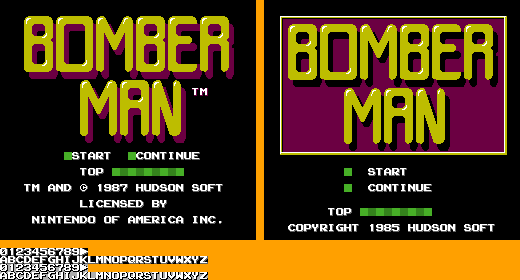
USA version 1987 (Menu shown on the left)
Japan version 1985 (Menu shown on the right)
-
Score: Located at the top-left corner, this displays your current score. Points are earned by defeating enemies and destroying blocks.
-
Lives: Represented by small Bomberman icons, this shows how many lives you have left. It's usually found near the score.
-
Stage Number: This indicates the current stage or level you are on. It's typically displayed at the top-center of the screen.
-
Timer: Found at the top-right corner, the timer counts down the time you have to complete the level.
-
Bomb Count: This shows how many bombs you can place at one time. It's usually displayed near the bottom of the screen.
-
Power-Ups: Icons representing the power-ups you've collected, such as increased bomb range or extra bombs, are displayed at the bottom of the screen.
-
Enemy Count: This shows the number of enemies remaining in the level. It's usually found near the timer.