
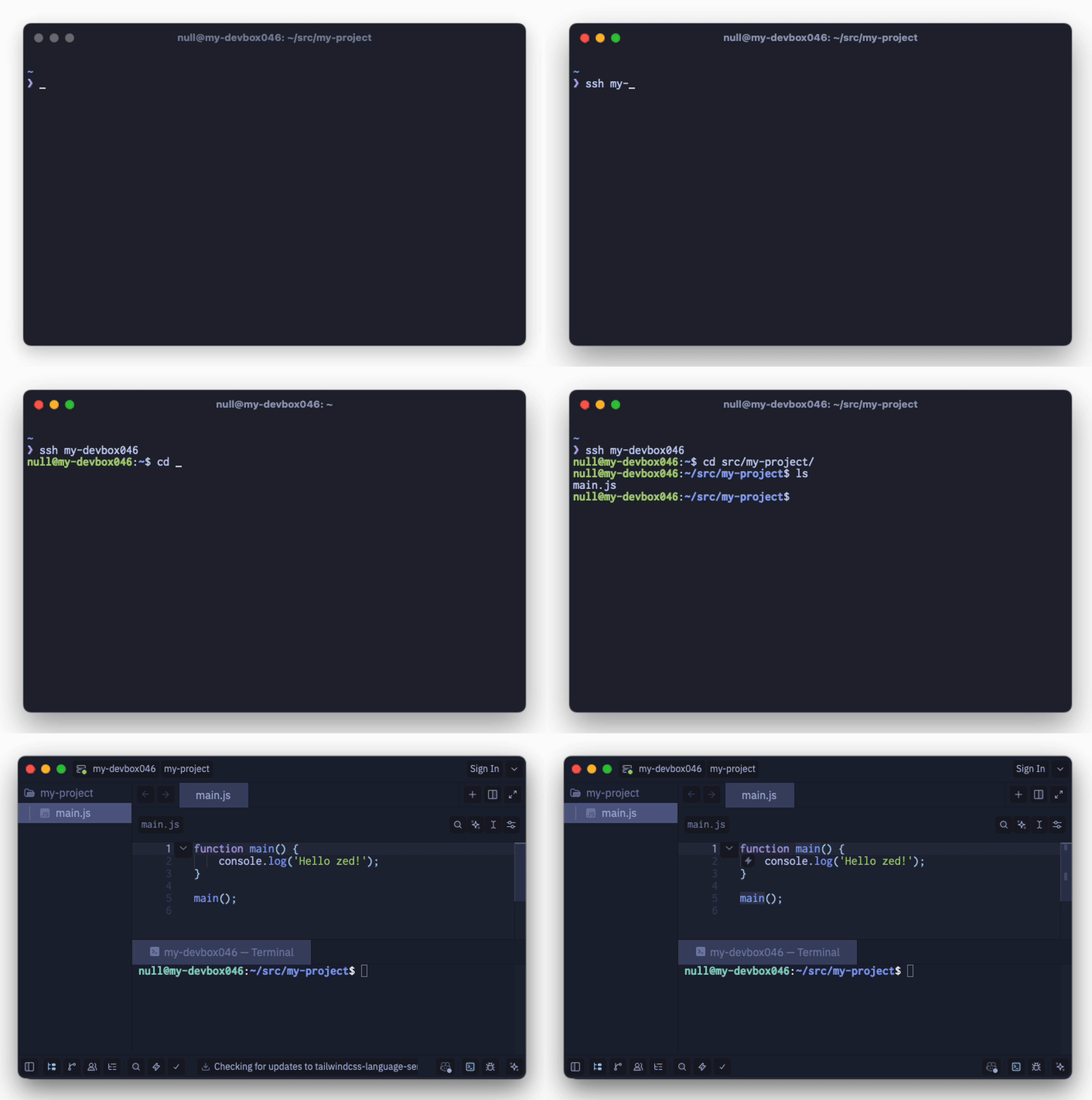
ssh myhost
cd /some/project
zed-open .
A small tool to open Zed from a remote SSH session, similar to VS Code's remote terminal open flow.
It runs a localhost REST service on your local machine, receives a request through SSH reverse forwarding, and launches Zed locally with a native ssh://... URL.
This is a workaround for the VS Code-style remote-terminal-open flow, not a Zed extension and not a replacement for Zed's built-in remote development.
Install via the provided script:
curl -fsSL https://raw.githubusercontent.com/McNull/zed-remote-open/main/scripts/install.sh | bashIf you already have Go installed, build and install it directly:
go install github.com/mcnull/zed-remote-open/cmd/zed-remote-open@latestThen make sure your Go bin directory is on PATH, for example:
export PATH="$(go env GOPATH)/bin:$PATH"Or run it without installing globally:
go run github.com/mcnull/zed-remote-open/cmd/zed-remote-open@latest --help- A local user service runs
zed-remote-open serveon127.0.0.1:17342by default. - Your SSH config adds a
RemoteForwardback to that local port. - A remote shell function named
zed-open()posts JSON tohttp://127.0.0.1:17342/api/openthrough the tunnel. - The local service validates the request and runs Zed with the requested
ssh://user@host/abs/pathURL.
zed-remote-open serve [--host/-H <host>] [--port/-p <port>] [--ssh-config <path>] [--zed <path-or-command>]
zed-remote-open add [--port/-p <port>] [--ssh-config <path>] <remote-ssh>
zed-remote-open install [--host/-H <host>] [--port/-p <port>] [--ssh-config <path>] [--zed <path-or-command>]
zed-remote-open uninstall [--ssh-config <path>]
zed-remote-open print-shell [--host/-H <host>] [--port/-p <port>]
Help is shown for -h, --help, missing commands, unknown commands, and invalid args.
The service resolves Zed at startup unless --zed is supplied.
Supported lookup order:
- explicit
--zed <path-or-command> zedzeditorzed.exeon Windows
If nothing is found, the service fails fast with a clear error.
The SSH config manager lives in internal/sshcfg and is intentionally small.
It uses a conservative line-based rewrite strategy:
- preserves unrelated config as much as practical
- adds a managed block with clear markers
- updates only the managed forward for the target host
- removes only blocks it owns
- is idempotent
Example managed config:
Host myhost
  User me
  # zed-remote-open: begin
  # zed-remote-open: reverse forward for local REST opener
  RemoteForward 127.0.0.1:17342 127.0.0.1:17342
# zed-remote-open: endI looked at the common Go SSH config parsers first, including:
github.com/kevinburke/ssh_configgithub.com/petems/go-sshconfiggithub.com/jamesits/sshconf
For this tool, a tiny purpose-built editor was the lazy choice:
- the task needs conservative writes, comments preserved, and idempotent updates
- a full parser/normalizer is more code than needed here
- the managed block format is simple and easy to test
So the implementation uses a small internal package instead of an extra dependency.
install writes a user-level startup artifact for the current platform.
Writes a LaunchAgent plist under:
~/Library/LaunchAgents/com.mcnull.zed-remote-open.plist
Example generated command:
zed-remote-open serve --host 127.0.0.1 --port 17342Writes a user systemd unit under:
~/.config/systemd/user/zed-remote-open.service
Example unit:
[Unit]
Description=zed-remote-open
After=network.target

[Service]
ExecStart=/path/to/zed-remote-open serve --host 127.0.0.1 --port 17342
Restart=on-failure

[Install]
WantedBy=default.targetWrites a user Startup-folder .cmd file under the roaming AppData Startup path.
Example:
@echo off
start "zed-remote-open" /min "C:\path\to\zed-remote-open.exe" serve --host 127.0.0.1 --port 17342print-shell prints snippets for bash, zsh, and PowerShell.
Example bash/zsh flow:
zed-open() {
  local target="${1:-.}"
  local abs=""
  if command -v realpath >/dev/null 2>&1; then
    abs="$(realpath "$target" 2>/dev/null || realpath -m "$target" 2>/dev/null)"
  fi
  if [ -z "$abs" ]; then
    if [ -d "$target" ]; then
      abs="$(cd "$target" 2>/dev/null && pwd -P)"
    else
      abs="$(cd "$(dirname "$target")" 2>/dev/null && printf '%s/%s' "$(pwd -P)" "$(basename "$target")")"
    fi
  fi
  local ssh_host="${ZED_SSH_HOST:-}"
  if [ -z "$ssh_host" ]; then
    ssh_host="$(hostname -f 2>/dev/null || hostname 2>/dev/null || printf '%s' "$HOSTNAME")"
  fi
  local ssh_user="${ZED_SSH_USER:-$(whoami)}"
  local url="ssh://${ssh_user}@${ssh_host}${abs}"
  url=${url//\\/\\\\}
  url=${url//\"/\\\"}
  curl -fsS -H 'Content-Type: application/json' --data "{\"url\":\"$url\"}" "http://127.0.0.1:17342/api/open"
}zed-remote-open installzed-remote-open add myhost
# or: zed-remote-open add me@myhostzed-remote-open print-shellssh myhost
cd ~/src/project
zed-open .All endpoints are under /api.
{ "ok": true }Request:
{ "url": "ssh://user@host/abs/path" }Success:
{ "ok": true, "message": "opened", "url": "ssh://user@host/abs/path" }Errors use structured codes such as:
invalid_jsonmissing_urlinvalid_url_schemezed_not_foundlaunch_failedinternal_error
- binds to
127.0.0.1by default - accepts only
ssh://URLs - limits request size
- uses direct process execution, not
sh -c - logs invalid requests conservatively
- No Zed executable found: install Zed or pass
--zed /full/path/to/zed - Remote shell cannot reach the API: check the SSH
RemoteForward - Open fails with launch error: verify the local Zed command works from a terminal
- Config not updated: use
--ssh-config <path>to point at a test file first
- This is intentionally a small workaround, not a full remote-development system.
- SSH include-tree rewriting is conservative and does not try to normalize arbitrary config layouts.
- Windows startup support is user-scoped and intentionally simple.
Tests are written and run with the standard library only.
go test ./...Not set in this repo yet.