








Important
收藏项目,你将从 GitHub 上无延迟地接收所有发布通知~⭐️
| 平台 | 触发的消息形态 | 视频 | 图集 | 音频 |
|---|---|---|---|---|
| B站 | BV号/链接(包含短链,BV,av)/卡片/小程序 | ✅ | ✅ | ✅ |
| 抖音 | 链接(分享链接,兼容电脑端链接) | ✅ | ✅ | ❌️ |
| 微博 | 链接(博文,视频,show) | ✅ | ✅ | ❌️ |
| 小红书 | 链接(含短链)/卡片 | ✅ | ✅ | ❌️ |
| 快手 | 链接(包含标准链接和短链) | ✅ | ✅ | ❌️ |
| acfun | 链接 | ✅ | ❌️ | ❌️ |
| youtube | 链接(含短链) | ✅ | ❌️ | ✅ |
| tiktok | 链接 | ✅ | ❌️ | ❌️ |
| 链接 | ✅ | ✅ | ❌️ |
支持的链接,可参考 测试链接
插件默认启用 PIL 实现的通用媒体卡片渲染,效果图如下

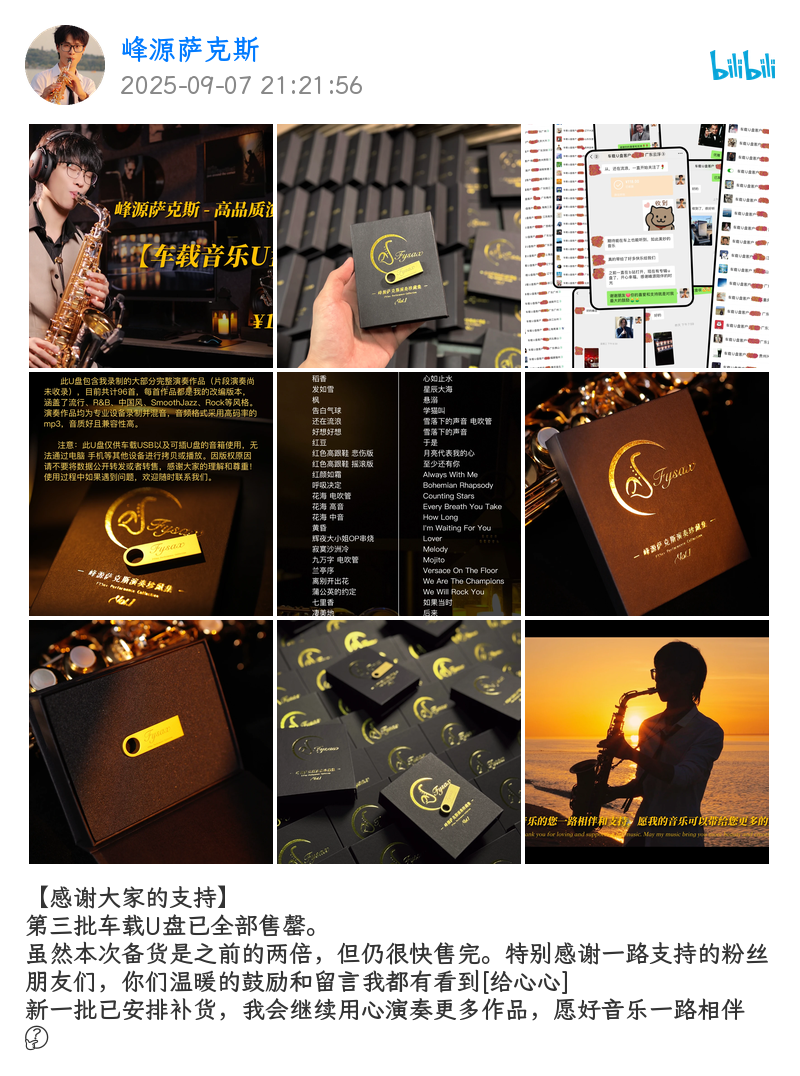
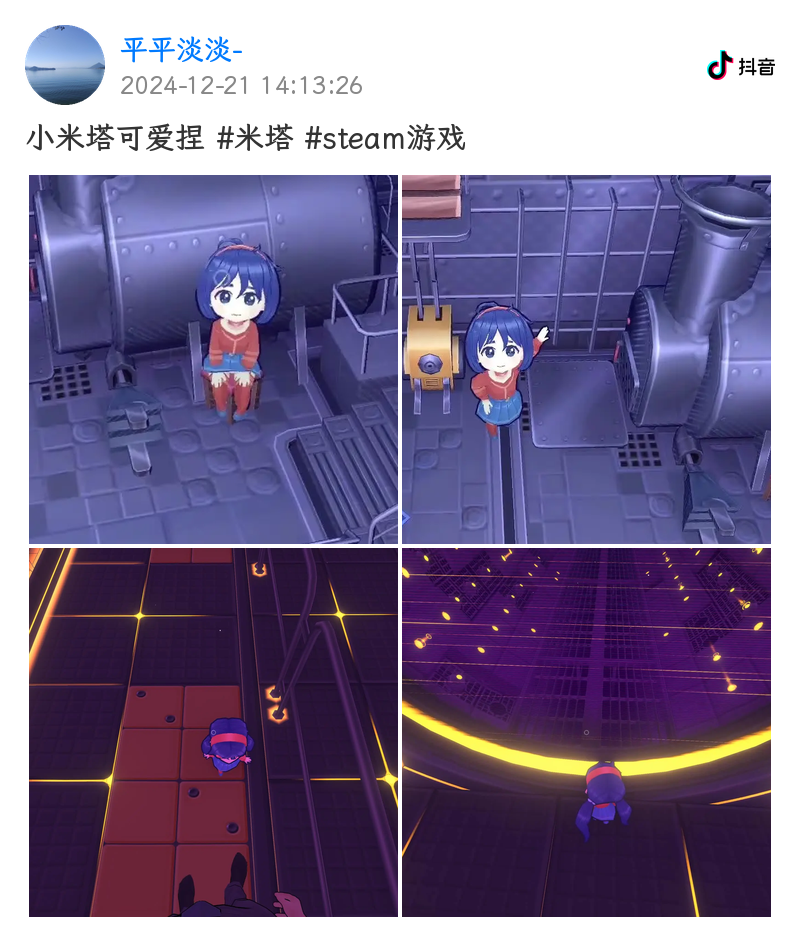
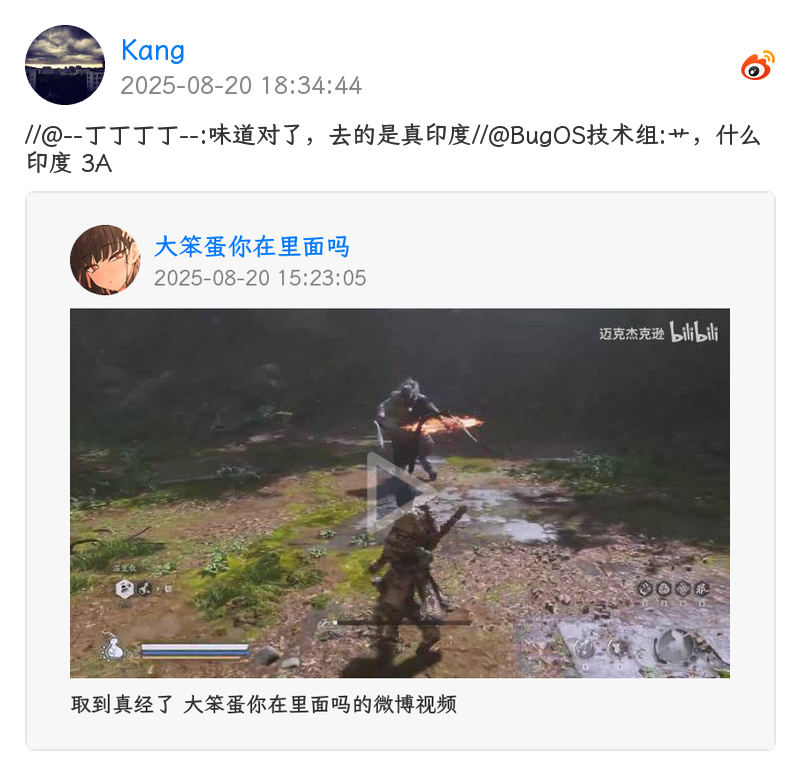
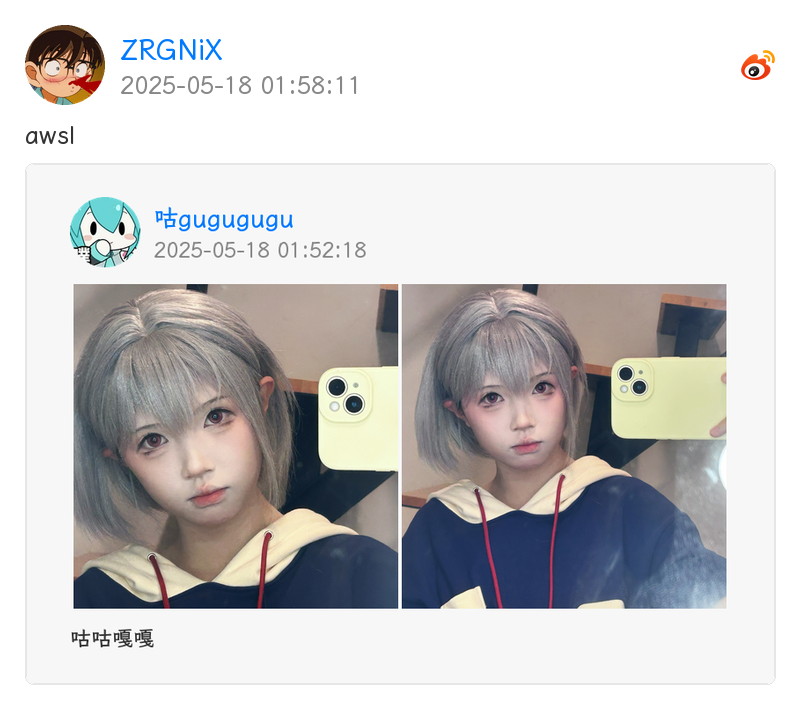
Warning
如果你已经在使用 nonebot-plugin-resolver[2],请在安装此插件前卸载
Important
插件可选依赖 htmlkit, ytdlp, all,分别用于 htmlkit 渲染和 youtube / tiktok 解析,如果需要使用,请在安装时指定,如 nb plugin install nonebot-plugin-parser[ytdlp]
使用 nb-cli 安装/更新
在 nonebot2 项目的根目录下打开命令行, 输入以下指令即可安装nb plugin install nonebot-plugin-parser --upgrade
使用 pypi 源更新
nb plugin install nonebot-plugin-parser --upgrade -i https://pypi.org/simple
安装仓库 dev 分支
uv pip install git+https://github.com/fllesser/nonebot-plugin-parser.git@dev
使用包管理器安装
在 nonebot2 项目的插件目录下, 打开命令行, 根据你使用的包管理器, 输入相应的安装命令uv
使用 uv 安装uv add nonebot-plugin-parser
安装仓库 dev 分支
uv add git+https://github.com/fllesser/nonebot-plugin-parser.git@master
pip
pip install --upgrade nonebot-plugin-parser
pdm
pdm add nonebot-plugin-parser
poetry
poetry add nonebot-plugin-parser
打开 nonebot2 项目根目录下的 pyproject.toml 文件, 在 [tool.nonebot] 部分追加写入
plugins = ["nonebot_plugin_parser"]
使用 nbr 安装(使用 uv 管理依赖可用)
nbr 是一个基于 uv 的 nb-cli,可以方便地管理 nonebot2
nbr plugin install nonebot-plugin-parser
使用 pypi 源安装
nbr plugin install nonebot-plugin-parser -i "https://pypi.org/simple"
使用清华源安装
nbr plugin install nonebot-plugin-parser -i "https://pypi.tuna.tsinghua.edu.cn/simple"
安装必要组件
部分解析依赖于 ffmpegubuntu/debian
sudo apt-get install ffmpeg
其他 linux 参考(原项目推荐): https://gitee.com/baihu433/ffmpeg
Windows 参考(原项目推荐): https://www.jianshu.com/p/5015a477de3c
配置项
# [可选] nonebot2 内置配置,若服务器上传带宽太低,建议调高,防止超时
API_TIMEOUT=30.0

# [可选] B 站 cookie, 必须含有 SESSDATA 项,可附加 B 站 AI 总结功能
# 如果需要长期使用此凭据则不应该在浏览器登录账户导致 cookie 被刷新,建议注册个小号获取
# 各项获取方式 https://nemo2011.github.io/bilibili-api/#/get-credential
# ac_time_value 相对特殊,仅用于刷新 Cookies
# B站网页打开开发者工具,进入控制台,输入 window.localStorage.ac_time_value 即可获取其值。
parser_bili_ck="SESSDATA=xxxxxxxxxx;ac_time_value=131231241231241"

# [可选] 允许的 B 站视频编码,越靠前的编码优先级越高
# 可选 "avc"(H.264,体积较大), "hev"(HEVC), "av01"(AV1)
# 后两项在不同设备可能有兼容性问题,如需完全避免,可只填一项,如 '["avc"]'
parser_bili_video_codes='["avc", "av01", "hev"]'

# [可选] Youtube Cookie, Youtube 视频因人机检测下载失败,需填
parser_ytb_ck=""

# [可选] 代理, 仅作用于 youtube, tiktok 解析
# 推特解析会自动读取环境变量中的 http_proxy / https_proxy(代理软件通常会自动设置)
parser_proxy=None

# [可选] 音频解析,是否需要上传群文件
parser_need_upload=False

# [可选] 视频,图片,音频是否使用 base64 发送
# 注意:编解码和传输 base64 会占用更多的内存,性能和带宽, 甚至可能会使 websocket 连接崩溃
# 因此该配置项仅推荐 nonebot 和 协议端不在同一机器的用户配置
parser_use_base64=False

# [可选] 视频最大解析时长,单位:秒
parser_duration_maximum=480

# [可选] 音视频下载最大文件大小,单位 MB,超过该配置将阻断下载
parser_max_size=90

# [可选] 全局禁止的解析
# 示例 parser_disabled_platforms=["bilibili", "douyin"] 表示禁止了哔哩哔哩和抖音
# 可选值: ["bilibili", "douyin", "kuaishou", "twitter", "youtube", "acfun", "tiktok", "weibo", "xiaohongshu"]
parser_disabled_platforms='["twitter"]'

# [可选] 渲染器类型
# 可选 "default"(无图片渲染), "common"(PIL 通用图片渲染), "htmlkit"(htmlkit, 暂不可用)
parser_render_type="common"

# [可选] 是否在解析结果中附加原始URL
parser_append_url=False

# [可选] 自定义渲染字体
# 配置字体文件名,并将字体文件放置于 localstore 生成的插件 data 目录下
# 例如: ./data/nonebot_plugin_parser/
parser_custom_font="LXGWZhenKaiGB-Regular.ttf"

# [可选] 是否需要转发媒体内容(超过 4 项时始终使用合并转发)
parser_need_forward_contents=True| 指令 | 权限 | 需要@ | 范围 | 说明 |
|---|---|---|---|---|
| 开启解析 | SUPERUSER/OWNER/ADMIN | 是 | 群聊 | 开启解析 |
| 关闭解析 | SUPERUSER/OWNER/ADMIN | 是 | 群聊 | 关闭解析 |
Important
插件自 v2.1.1 版本开始支持自定义解析器,通过继承 BaseParser 类并实现 platform, patterns, parse 即可
完整示例
from re import Match
from typing import ClassVar

from httpx import AsyncClient
from nonebot import require

require("nonebot_plugin_parser")
from nonebot_plugin_parser.parsers import BaseParser, ParseResult
from nonebot_plugin_parser.parsers.base import Platform


class ExampleParser(BaseParser):
    """示例视频网站解析器"""

    platform: ClassVar[Platform] = Platform(name="example", display_name="示例网站")

    patterns: ClassVar[list[tuple[str, str]]] = [
        ("example.com", r"example\.com/video/(?P<video_id>\w+)"),
        ("ex.short", r"ex\.short/(?P<short_id>\w+)"),
    ]

    async def parse(self, keyword: str, searched: Match[str]) -> ParseResult:
        # 1. 提取视频 ID
        if keyword == "ex.short":
            # 处理短链接
            short_id = searched.group("short_id")
            full_url = await self.get_redirect_url(f"https://ex.short/{short_id}")
            video_id = full_url.split("/")[-1]
        else:
            video_id = searched.group("video_id")

        # 2. 请求 API 获取视频信息
        async with AsyncClient(headers=self.headers, timeout=self.timeout) as client:
            resp = await client.get(f"https://api.example.com/video/{video_id}")
            resp.raise_for_status()
            data = resp.json()

        # 3. 提取数据
        title = data["title"]
        author_name = data["author"]["name"]
        avatar_url = data["author"]["avatar"]
        video_url = data["video_url"]
        cover_url = data["cover_url"]
        duration = data["duration"]
        timestamp = data["publish_time"]
        description = data.get("description", "")

        # 4. 视频内容
        author = self.create_author(author_name, avatar_url)
        video = self.create_video_content(video_url, cover_url, duration)

        # 5. 图集内容
        image_urls = data.get("images")
        images = self.create_image_contents(image_urls)

        # 6. 返回解析结果
        return self.result(
            title=title,
            text=description,
            author=author,
            contents=[video, *images],
            timestamp=timestamp,
            url=f"https://example.com/video/{video_id}",
        )
辅助函数
构建作者信息
author = self.create_author(
    name="作者名",
    avatar_url="https://example.com/avatar.jpg",   # 可选,会自动下载
    description="个性签名"                          # 可选
)
构建视频内容
# 方式1:传入 URL,自动下载
video = self.create_video_content(
    url_or_task="https://example.com/video.mp4",
    cover_url="https://example.com/cover.jpg",  # 可选
    duration=120.5                               # 可选,单位:秒
)

# 方式2:传入已创建的下载任务
from nonebot_plugin_parser.download import DOWNLOADER
video_task = DOWNLOADER.download_video(url, ext_headers=self.headers)
video = self.create_video_content(
    url_or_task=video_task,
    cover_url=cover_url,
    duration=duration
)
构建图集内容
# 并发下载图集内容
images = self.create_image_contents([
    "https://example.com/img1.jpg",
    "https://example.com/img2.jpg",
])
构建图文内容(适用于类似 Bilibili 动态图文混排)
graphics = self.create_graphics_content(
    image_url="https://example.com/image.jpg",
    text="图片前的文字说明",  # 可选
    alt="图片描述"            # 可选,居中显示
)
创建动图内容(GIF),平台一般只提供视频(后续插件会做自动转为 gif 的处理)
dynamics = self.create_dynamic_contents([
    "https://example.com/dynamic1.mp4",
    "https://example.com/dynamic2.mp4",
])
重定向 url
real_url = await self.get_redirect_url(
    url="https://short.url/abc",
    headers=self.headers  # 可选
)