Repository navigation
Releases: Miabeyefendi/Vantagraph-Custom
Release list
Vantagraph Custom v1.1.1 - Spotify 1.3.4 support

Spotify 1.3.4 support
Spotify 1.3.4 removed more class names, this time from the player bar, the root grid and the top bar. Same method as the last release: the elements are found again through markup Spotify keeps. It needs Spotify 1.3.3 or newer (tested on 1.3.4.258) and Spicetify 2.45.2 or newer.
🐛 Fixes
- The player bar lost its layout. Spotify fixes its box at 72px, so the progress row pushed the controls against the bottom edge. The bar has its height back, with the progress row on top and the controls centred.
- The three panel areas were no longer found because the root grid lost its class name. They are found from the left sidebar's position now.
- The top bar buttons of the theme (Vantagraph Custom, Lyric Miniplayer) were not added at all, because Spicetify looks for two boxes by class names Spotify removed.
- The fill of the progress and volume bars fell back to Spotify's light colour.
- Shuffle, previous, next and repeat sat higher than play, and the progress row left a gap under them. All six controls share one centre line now.
- The left panel was painted 2px shorter than the main view, and the main view carried a 5px inset of its own inside its box. Left, main and right share the same top and bottom edge.
🎨 Changes
- The player bar is a card inset like the panels: the same 8px from both window edges. The gap above and below the panels equals the gap between them (8px, 10px with Comfortable density).
Important Note: On Spotify 1.3 with Spicetify 2.45.x a page reload (Ctrl+R) can end on "Something went wrong" and the Marketplace does not load the theme again. Fully close and reopen Spotify instead. This is on the Spotify / Spicetify side, not the theme.
Full Changelog: 1.1.0...1.1.1
Vantagraph Custom v1.1.0 - Spotify 1.3.3 support
Spotify 1.3.3 support
Spotify 1.3.3 renamed its CSS classes again and Spicetify's class map does not know the new names yet, so a lot of the theme's rules quietly stopped applying. This release finds the same elements through markup Spotify keeps stable. It needs Spotify 1.3.3 or newer and Spicetify 2.45.2 or newer. On Spotify 1.3.1 or older use Vantagraph Custom 1.0.0 (Outdated).
✨ What's new
- Cards, shelves, track rows, the entity header, the player bar and the three panels are styled again. 62 legacy class names and the three panel areas are mapped onto the current markup through
data-testid, roles, encore ids, structure and exact grid areas. - Volume+ settings open from a right-click on the
%button and from the quick volume panel. Spicetify menu items no longer show up in Spotify 1.3.3. - The lyric miniplayer settings open in a Spotify modal. Spotify 1.3.3 answers
window.openwithnull. - A QA harness in
src/utils/qa/that drives a real Spotify.
⚡ Performance
- The wave bars animate in CSS on the compositor instead of being redrawn from JavaScript. The main thread while music plays went from 79-83% busy to 21-22%.
- Scrolling Home: the play buttons of about 90 cards are hidden with
visibilityinstead of each holding a compositor layer.
🐛 Fixes
- A saved track did not use the heart colour. Spotify 1.3.3 labels its button "Add to playlist", which no rule matched.
- The left panel, the main view and the right panel now share the same top and bottom edges at every density, with and without a background image.
- The "Vantagraph Settings" link in the lyric miniplayer settings did nothing.
- The lyrics highlight follows the accent colour again.
- The 60px glow behind the header artwork, the "next track" card and the card hover behave as designed again.
Important Note: On Spotify 1.3 with Spicetify 2.45.x a page reload (Ctrl+R) can end on "Something went wrong" and the Marketplace does not load the theme again. Fully close and reopen Spotify instead. This is on the Spotify / Spicetify side, not the theme.
Full Changelog: 1.0.0...1.1.0
Vantagraph Custom 1.0.0 (Outdated)
Outdated. Made for Spotify 1.3.1 and earlier. Spotify 1.3.3 and newer need Vantagraph Custom 1.1.0 or newer. For older Spotify download Vantagraph-Custom-1.0.0-OUTDATED-for-Spotify-1.3.1-and-earlier.rar below: a snapshot of main at commit 21b7900, which is 1.0.0 plus the CSS wave-bar fix made after the tag, with the files laid out like the Spicetify folders and an INSTALL-LEGACY.txt. Made with git archive and WinRAR, nothing is built or minified. SHA-256: 160ac3c4171a0781fcee60eaa7ee9a7936d8742d3865804eed1b609c31b81ad6. The original Vantagraph-Custom-1.0.0.zip is unchanged.
First release. Vantagraph Custom is the lite edition of Vantagraph: no preset palettes and no custom icon set. Every colour the theme paints is set by you, from an editor inside Spotify.
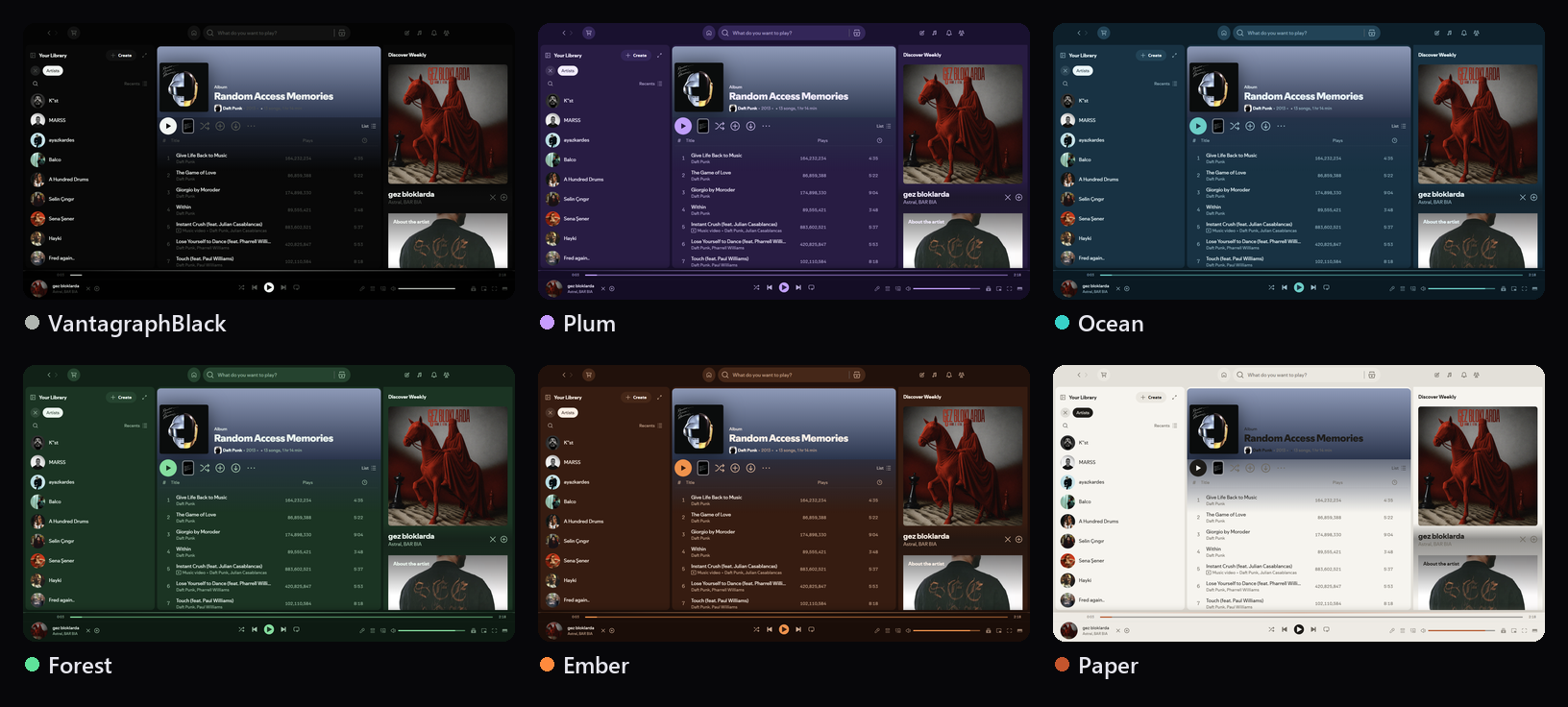
Install
Spicetify Marketplace: search for Vantagraph Custom and press Install.
By hand: download Vantagraph-Custom-1.0.0.zip below and unzip it into your Spicetify folder (spicetify config-dir). Themes/vantagraph-custom and Extensions/ land where they belong. Then:
spicetify config inject_css 1 replace_colors 1 overwrite_assets 1 inject_theme_js 1
spicetify config current_theme vantagraph-custom
spicetify config extensions vantagraph-custom-settings.js
spicetify apply
The optional extensions and the way back to stock Spotify are in the installation guide.
What is in it
- Colour editor. Thirty-six colours in seven groups. A colour field, hue and opacity strips, an eyedropper, R G B A fields, and a value box that takes HEX (3, 4, 6 or 8 digits),
rgb(),rgba(),hsl()andhsla(). - Colours that follow others. Menu Text, Icons, Icon Hover and Play Icon follow Text, Subtext, Accent and Panel until given a value of their own.
- Find. Blinks a colour, and everything following it, inside Spotify.
- Undo and redo, 100 steps,
Ctrl+ZandCtrl+Y. - Palette sharing. Copy the whole palette as text, load one back from that text or from
color.inilines. The panel opens with a ready example to copy or try. - Movable settings window. Drag the title bar, double-click to centre it, hold the eye button to look through it.
- Background image glass tinted by its own colours instead of a preset palette.
- Lighter by design. No custom icon set, two font presets (Inter, JetBrains Mono) next to Spotify's own and any custom font.
- Lyric Miniplayer, Taskbar Player, Volume+ and LoopyLoop included.
Full notes: CHANGELOG