Add browser PID to BrowserProcessExitedEventArgs#826
Conversation


|
|
||
| // Save PID of the browser process serving last WebView created from our | ||
| // CoreWebView2Environment. | ||
| CHECK_FAILURE(m_webView->get_BrowserProcessId(&m_newestBrowserPid)); |

There was a problem hiding this comment.
What happens if you call get_BrowserProcessId too soon (before the WebView browser process has been created) or too late (after it crashed)?
There was a problem hiding this comment.
If the creation completed handler (ICoreWebView2CreateCoreWebView2ControllerCompletedHandler) was called with an S_OK HRESULT, the connection has already been established to a running browser process. The full sample app has an S_OK check before this call, I'll update to reflect that here.
On browser process crash, the webview moves to its closed state and the call will fail. In this case, there will be a ProcessFailed event raised for the crash.
There was a problem hiding this comment.
Is the transition to the Closed state synchronous or asynchronous? In other words, is it possible for the app to observe the Closed state before it receives the ProcessFailed event? If synchronous, then the "too late" failure is avoidable. if asynchronous, then apps cannot protect against the "too-late" case.

There was a problem hiding this comment.
Sounds good. Please make this clear in the documentation as appropriate.
There was a problem hiding this comment.
Since this is about get_BrowserProcessId which is from a different interface, I don't think this API is the right place to document that. I added a comment to the sample code, though.
| // Watch for graceful browser process exit. Let ProcessFailed event | ||
| // handler take care of failed browser process termination. | ||
| if (kind == COREWEBVIEW2_BROWSER_PROCESS_EXIT_KIND_NORMAL) | ||
| CHECK_FAILURE(args->get_BrowserProcessId(&pid)); |
There was a problem hiding this comment.
Does the system keep the process handle open for the lifetime of this event (to prevent PID recycling)? Otherwise, we cannot guarantee that "the PID of the new browser process will be different to the PID of the older process".
There was a problem hiding this comment.
Sorry, I marked an earlier discussion around this as resolved, but it's still relevant here:
The new browser process can't start with the same PID because the environment instance tracking the old process keeps a handle open and so the process object stays valid; its PID can't be taken until the environment instance observing it closes the handle, which happens only after the queued event gets processed. [...]
| CleanupUserDataFolder(); | ||
| // The exiting process is not the last in use. Do not attempt cleanup | ||
| // as we might still have a webview open over the user data folder. | ||
| MessageBox( |
There was a problem hiding this comment.
⟦boilerplate comment about blocking calls inside event handlers⟧
Note also that a real program probably shouldn't annoy the user by displaying messages about things the user doesn't care about.
There was a problem hiding this comment.
This sample was originally written before the broader discussion around blocking calls inside event handlers. I will update.
In this case, the user data folder cleanup is only ever attempted upon user action (menu item selection).
There was a problem hiding this comment.
Updated to post as async task.
| { | ||
| CHECK_FAILURE( | ||
| m_webViewEnvironment->remove_BrowserProcessExited(m_browserExitedEventToken)); | ||
| // Release the environment only after the handler is invoked. |
There was a problem hiding this comment.
If multiple apps are sharing a user data folder, and the first app shuts down its WebView, the first app will never receive a BrowserProcessExited (since the browser process is still being used by other apps). How does it know when it's safe to proceed with shutdown? Is it the apps' responsibility to coordinate among themselves to keep track of "Will the last one out the door please turn off the lights (i.e., wait for BrowserProcessExited)?"
There was a problem hiding this comment.
Yes. The app can either coordinate with other processes sharing the user data folder or set a timer.
There was a problem hiding this comment.
Do we already note this in the documentation? If not please do.
There was a problem hiding this comment.
We had something about app processes coordination but not explicitly for waits, I added a comment about that.

|
|
||
| This event is raised for both expected and unexpected termination of the | ||
| collection of processes, after all resources, including the user data folder, | ||
| collection of processes, after all resources, including the user data folder, |

There was a problem hiding this comment.
The plural vs singular of "process" is confusing. I think ProcessFailed is one process (rendering), and ProcessExited is a set of processes (more than just the rendering process). But for that collection, only one ProcessId is provided in the args.
Should this be BrowserProcessesExited (plural)? Or is that an implementation detail I shouldn't worry about? If the latter, then maybe remove "collection of processes" from the various pieces of text.
There was a problem hiding this comment.
My interpretation: There is one browser process and N render processes. The browser process is the last one to exit, so you can assume that when it exits, the render processes have also already exited. (In the case where the browser process crashes, we kill all the render processes before raising this event, so as to preserve the illusion that the browser process exited last.)
There was a problem hiding this comment.
Do we have a diagram somewhere that shows the processes?
There was a problem hiding this comment.
Number one search hit for "Webview2 process" is Process Model which has diagrams.
There was a problem hiding this comment.
Oh, thanks, that was a good idea. There's also a link to that page in this spec :(
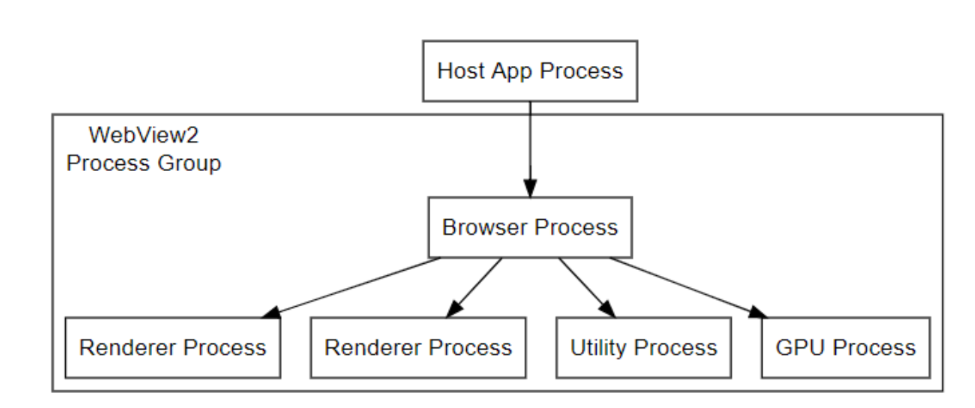
So BrowserProcessExited is raised when everything goes away, ProcessFailed is raised when any process fails (including the Browser process). BrowserProcessExited isn't on the WebView object alongside ProcessFailed, because the Environment object is fundamentally associated with the Browser.
Makes sense, thanks.
There was a problem hiding this comment.
The WebView2 Runtime has the same process model as Edge/Chromium. We document that here: Process model. The "browser process" is in charge of all other processes. The "BrowserProcess" part in BrowserProcessExited refers to that "browser process" in charge, and this is the PID being provided.
ProcessFailed indicates failure of one process of any kind (browser, render, GPU, etc.). BrowserProcessExited indicates exit of the "browser process" by crash or normal exit. The "browser process" is last to exit most of the times, but there are some cases in which some descendants might outlive it; the BrowserProcessExited event will only be raised upon those have exited too. This is the reason "collection of processes" was introduced during the earlier review.
I'll try to make this clearer in the documentation.
There was a problem hiding this comment.
Sounds good. Please update documentation.
 david-risney
added
the
review completed
david-risney
added
the
review completed
5 participants


Adding
BrowserProcessIdproperty toCoreWebView2BrowserProcessExitedEventArgs.CoreWebView2Environment can attach to multiple browser processes throughout its lifetime. When repeatedly creating and closing a single WebView from the same environment, a new browser process could be created each time. The
BrowserProcessIdlets apps tracking the browser exit know the PID of the browser process for which theBrowserProcessExitedevent was raised.