Repository navigation
Releases: MistaMin/TubeChannel
Release list
Tube Channel 1.2.1 — Offline Bounce

Tube Channel 1.2.1
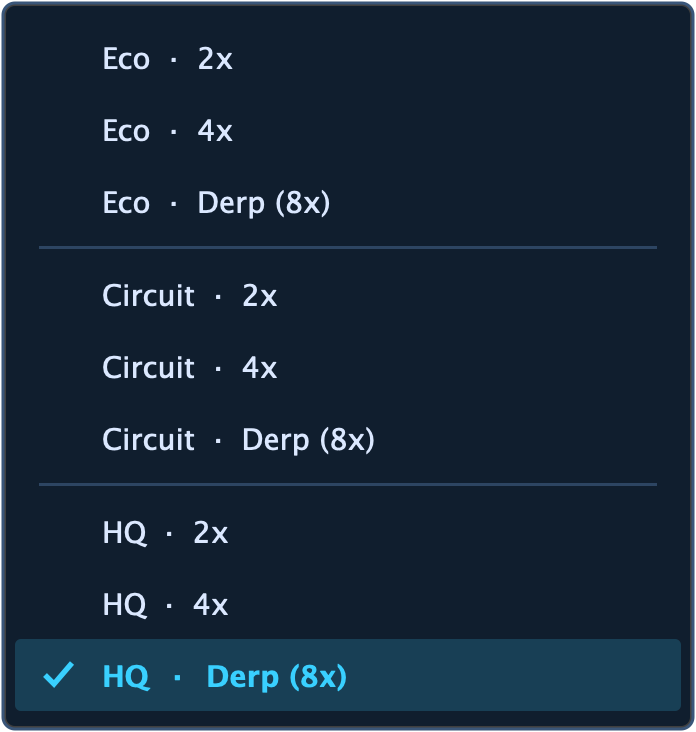
Adds the Offline Bounce dropdown between Redo and System, with all nine
combinations of Eco / Circuit / HQ and 2x / 4x / Derp (8x).
- New instances use Eco/1x for playback and HQ/8x for host-reported offline rendering.
- Playback, recording and realtime exports use the normal playback settings.
- Earlier saved projects retain their bounce behavior until an offline choice is made.
- Offline processing starts with the selected engine on the first audio block, without
the live mode-change fade; repeated bounces restart consistently. - Playback history and its automation remain separate. Callback preparation and
destruction stay outside realtime processing. - Linear-phase processing uses a fixed, compensated latency budget across profiles.
- The menu is available in both skins and on both pages. Dual Mono channel tabs
adapt around the dropdown without overlapping it.
Includes universal macOS VST3, AU, CLAP, LV2 and Standalone builds, the refreshed guide
and screenshots, project license and applicable dependency license texts. No AAX
binary is included. Source is MIT licensed; supplied binaries are freeware.
The Eco sound/performance model is unchanged from 1.2.0. Its measured speedups apply
to Eco at 1x; high-drive sound differences remain documented. Automated processor
verification is not a claim of listening acceptance or testing every DAW's offline flag.
See the User Guide.
Tube Channel 1.2.0 — Eco mode
Tube Channel 1.2.0
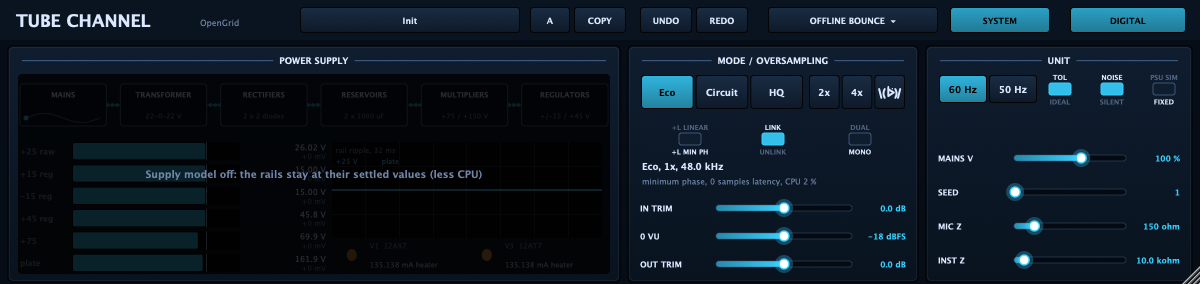
Tube Channel 1.2.0 adds the reduced Eco engine as the default for new instances. The System page orders the engine buttons Eco · Circuit · HQ. Circuit is the renamed Default mode. The original circuit implementation remains available.
This release now includes both the existing macOS installer and a new Windows installer.
Downloads
| Platform | Installer | Formats |
|---|---|---|
| Windows 10/11 (64-bit) | TubeChannel-1.2.0-win.exe | VST3, CLAP, LV2, Standalone |
| macOS (Apple silicon & Intel) | TubeChannel-1.2.0.pkg | VST3, Audio Unit, CLAP, LV2, Standalone |
Both installers include the user guide, screenshots, project license, and applicable third-party license texts.
Windows installer notes
- Double-click the downloaded
.exeand follow the steps. You can choose which formats to install. - The installer is not yet code-signed, so Windows may show a blue "Windows protected your PC" dialog. Click More info → Run anyway. The file is safe.
What changed in 1.2.0
- Eco engine: measured filters and asymmetric nonlinear maps without runtime circuit solves.
- Independent oversampling: 2x, 4x, and 8x (the Derp symbol) work with any engine at any sample rate. Click the selected factor to return to 1x.
- Performance: local measured workload reached 26–35x at 48 kHz and 14–19x at 96 kHz versus v1.1.4 Default.
- PSU simulation remains off for new instances.
Important notes
- Eco is a measured approximation. Heavy-drive harmonics, aliasing, tube memory, supply dynamics, and component variation can differ from Circuit/HQ.
- Older sessions retain their original engine and automation.
- No AAX binary is included in either installer.
Licenses
- Source code is MIT licensed.
- Provided binaries are freeware.
- Builds use JUCE 9.0.3 under a commercial JUCE Developer license.
- Full third-party licenses are bundled in each installer.
Verification
SHA-256 for TubeChannel-1.2.0-win.exe:
397049332B395652DD349DE3ABE910EB4CE0368B9D011388AE9E5338BBFEA350
See the README, User Guide, and measurement report.
Tube Channel 1.1.4
Tube Channel 1.1.4 is a universal macOS release for Apple silicon and Intel Macs.
The installer offers VST3, Audio Unit, CLAP, LV2, and the standalone app. It includes the user guide and applicable third-party license texts. No AAX binary is included.
This version starts new instances with power-supply simulation off to reduce CPU use. Saved sessions keep their stored setting. Default uses the lower-CPU prototype compressor detector at 2x oversampling at 44.1/48 kHz; HQ uses the original modeled detector curve at 2x; Derp mode uses it at 4x. The modeled equalizer and other modeled audio stages remain in HQ.
Tube Channel source code is MIT licensed. The provided plugin binaries are freeware.
See the README for screenshots and the User Guide for the complete control reference and signal-flow diagrams.
Tube Channel 1.0.0
Tube Channel 1.0.0
Analogue-modelled tube channel strip by OpenGrid: discrete mic/instrument preamp, 12AX7 tube stage, opto compressor with its detector circuit, four-band parametric EQ and output stage. Every stage, and the power supply, is solved as a circuit at the oversampled rate.
Formats: VST3, Audio Unit, CLAP, LV2 and a standalone app. macOS, universal (Apple silicon and Intel). Signed with a Developer ID and notarized by Apple.
Highlights
- Two skins: an analogue hardware-style front panel and a flat digital one (spectrum EQ and compressor curve you can drag).
- Default 2x oversampling, HQ 4x, and
\( ᐖ)/ - Derp mode16x; optional linear-phase variants. - Optional power-supply simulation (PSU SIM / FIXED) to save CPU.
- Click the RATIO knob to swap the compressor for a brickwall limiter.
- Stereo, linked stereo or dual mono, internal or external sidechain.
Install: download TubeChannel-1.0.0.pkg, open it, and choose the formats you want.
The plugin binaries are freeware. The source code is MIT licensed; see LICENSE and THIRD_PARTY_LICENSES.md.