Feature guide: Belowname
- About
- Configuration
- Additional info
- Compatibility with other plugins
- Limitations
- Examples
- Tips & Tricks
This features gives you control over Minecraft's scoreboard objective feature with BELOW_NAME slot. This line is displayed below the nametags of all player entities in game. It is not possible to explicitly disable this feature for NPCs, however, this goal can be achieved (see below for more info). It is only visible when within an 8-block range of the player (the range is hardcoded in the client and cannot be changed with a plugin).
Example visual effect:
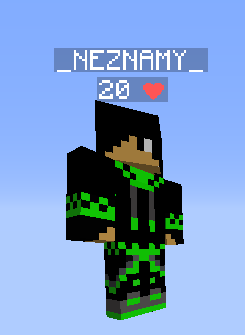
The feature can be configured in config.yml under belowname-objective section.
This is how the default configuration looks:
belowname-objective:
  enabled: false
  value: "%health%"
  title: "&cHealth"
  fancy-value: "&c%health%"
  fancy-value-default: "NPC"
  disable-condition: '%world%=disabledworld'
The displayed line is not one continuous configurable text. It consists of 2 parts (score and title) joined with a space.
The exact format is [score] + space + title (no, the space cannot be removed), where [score] is:
-
valuefor 1.20.2- (will show0on NPCs), which only supports numbers -
fancy-valuefor 1.20.3+ (will showfancy-value-defaulton NPCs), which supports any text
As you can see, the feature still has limits, even on 1.20.3+. If you are below this version or still don't like the forced space, you are out of luck and cannot use this feature the way you would like to. If you have seen this feature seemingly limitless, it could be a feature that was a part of TAB, but removed later. This feature hid the original nametag and placed invisible armor stands instead. If you are interested in this kind of solution, you'll need to look into other plugins.
| Option name | Default value | Description |
|---|---|---|
| enabled | true | Enables / Disables the feature |
| value | %health% | [1.20.2-] An integer from -2147483648 to 2147483647, doesn't support decimal values. The number is always white. Supports placeholders with player-specific output, such as player health. Only visible on 1.20.2 and lower. Note: Even if you only support 1.20.3+, you still need to configure this value to properly evaluate to a number, because the value is still sent to the client (just not displayed). You can set it to 0 for simplicity. |
| fancy-value | &c%health% | [1.20.3+] Any text, supports placeholders with per-player output. Only visible on 1.20.3+. |
| fancy-value-default | NPC | [1.20.3+] Default display for all player entities. Plugin uses the value above for every real player, therefore this default value will only appear on player entities which are not actual players, a.k.a. NPCs. Only visible on 1.20.3+. |
| title | Health | Shared label shown after the score for every player entity. Everyone sees the same text (placeholders are parsed for the viewer). Use the value/fancy-value fields for per‑player data; use title only for static labels like Health or placeholders which are supposed to be parsed for the viewing player. |
| disable-condition | %world%=disabledworld | A condition that must be met for disabling the feature for players. Set to empty for not disabling the feature ever. |
The minecraft feature is programmed to be affected by nametag visibility rule. This means that when the nametag is set to invisible, belowname will be invisible as well.
Additional note 2 - Hidden on sneak on 1.8
Belowname is not visible on 1.8.x clients when player is sneaking. This is client-sided behavior and cannot be changed by the server.
Belowname objective is automatically attached to all entities of player type with the default value of
0 (<1.20.3) or value configured as fancy-value-default (1.20.3+).
This includes player NPCs.
There is currently only one way to make them not visible on NPCs. From Additional note 1 - Copying nametag visibility rule we know that belowname is not visible if player's nametag is invisible. NPC plugin can take advantage of this by using teams to hide the original name and display a hologram instead.
This is how you can achieve it using the following popular NPC plugins:
-
Citizens:
- 1 - Select the NPC (
/npc select <ID>or/npc selectto select the nearest NPC) - 2 - Hide its original nametag (which also hides belowname) using
/npc name - 3 - Display your desired text using
/npc hologram add <text>(more info)
- 1 - Select the NPC (
TAB does not contain any sort of compatibility functionality for this feature. It will not try to prevent other plugins from apply the feature and neither will it detect it to re-add back once the other plugin removes it. Therefore, if another plugin also sends belowname objective, TAB's may not show anymore (depending on who sends it first). Make sure you do not have any other plugin sending it to ensure the feature works properly.
- [1.5 - 1.12.2] Title length is limited to 32 characters (including color codes).
- [1.5 - 1.20.2]
valueis limited to a white number. - [Bedrock] Doesn't support 1.20.3+ features (
fancy-value),valuewill be displayed instead, just like on <1.20.3 - The format is a [score] + space + shared title. No, the space cannot be removed.
- The title is the same on all players, therefore, it cannot be personalized (such as player's faction). Only [score] can be per-player.
- It appears on all entities of player type. This includes player NPCs.
This feature doesn't directly support per-world values or similar.
However, this can be achieved with conditions.
Let's make fancy-value conditional based on player's world.
Let's make an example with 3 worlds.
Check if player is in world world1, then show one text.
If not, check if player is in world world2, then show another text.
If not, show the final text.
This can be achieved by chaining 2 conditions:
conditions:
  belowname1:
    conditions:
    - "%world%=world1"
    true: "Text to display in world world1" # Player is in world world1, display the text
    false: "%condition:belowname2%" # Player is not in world world1, check another condition
  belowname2:
    conditions:
    - "%world%=world2"
    true: "Text to display in world world2" # Player is in world world2, display the text
    false: "Text to display in other worlds" # Player is not in any of the 2 worlds
Warning
DO NOT JUST RANDOMLY PASTE THIS ENTIRE "CONDITIONS" SECTION INTO YOUR CONFIG! INSTEAD, EDIT YOUR EXISTING CONDITIONS SECTION TO PREVENT HAVING THE SECTION TWICE, HAVING SECOND ONE COMPLETELY OVERRIDE THE FIRST ONE!
Finally, use this condition as value in fancy-value:
belowname-objective:
  fancy-value: "%condition:belowname1%"
If you are under 1.20.3 and want to make value and title conditional,
create two condition chains, one for each value and use them.
Note
This is just an example, the plugin is not limited to displaying different values only per world. If you want per server values on BungeeCord, use %server% with server names. If you want WorldGuard regions, use %worldguard_region_name% with region names. This works for any placeholder offered by the plugin or by PlaceholderAPI.
1.20.3 has replaced value field,
which is limited to a white number with value configurable as fancy-value, which has no limits.
However, title field is still visible on 1.20.3+.
If you support both version ranges and want to make the best out of the new functionality,
you might want to not show title to 1.20.3+ players anymore,
since you can fully customize the text you want to display in fancy-value.
First, let's remind ourselves what title actually is.
It is actually called scoreboard title.
Yes, just like the one on top of sidebar, just displayed elsewhere.
This is why it displays on all players and placeholders are parsed for the viewing player.
With this knowledge, all we need to do is check for player's version and only show something for <1.20.3.
For this, we will use %player-version-id% placeholder,
which returns the network protocol version of player's game version, which can then be compared to.
conditions:
  version:
    - "%player-version-id%>=765" # 1.20.3 is 765
  true: "" # Show empty value for 1.20.3+
  false: "Some text to display"
Warning
DO NOT JUST RANDOMLY PASTE THIS ENTIRE "CONDITIONS" SECTION INTO YOUR CONFIG! INSTEAD, EDIT YOUR EXISTING CONDITIONS SECTION TO PREVENT HAVING THE SECTION TWICE, HAVING SECOND ONE COMPLETELY OVERRIDE THE FIRST ONE!
belowname-objective:
  title: "%condition:version%"
Unfortunately, due to the limitations of this feature,
there is a forced space between value/fancy-value and title,
even if the title is empty.
You'll either need to live with it, or put some shared text there to avoid having a space at the end.
If you want health to display health as 0-10 instead of 0-20, you can achieve it with PlaceholderAPI:
-
%math_0_{player_health}/2%for 0-10 -
%math_0_{player_health}*5%for 0-100 In order to use these placeholders, make sure PlaceholderAPI is installed and itsmathandplayerexpansions are downloaded.
If you want to show health of players and display a heart symbol instead of text saying "Health", you can use this one: ❤.
belowname-objective:
  title: "&4❤"
Important
Make sure your config is saved in UTF-8 encoding to properly read the heart symbol.