Feature guide: Belowname
The scoreboard objective with BELOW_NAME display slot that adds another line of text below nametag of players.
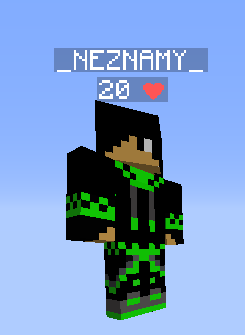
This line automatically appears on all player entities when enabled. Therefore, it is not possible to only display it on some players or not display it on NPCs.
The line is formatted as white number + space + text, where the text must be same on all players. Therefore, text doesn't support placeholders with player-specific output such as a faction. Only the number can be per-player.
To enable this feature, open config.yml and set
classic-vanilla-belowname:
  enabled: true
To disable this feature, set it to false.
number: "%health%"
An integer from -2147483648 to 2147483647, doesn't support decimal values. The number is always white. Supports placeholders with player-specific output, such as player health.
text: "Health"
Shared text that is displayed on all players, doesn't support placeholders with player-specific output.
The feature is affected by nametag visibility rule. This means that when nametag is set to invisible, belowname will be invisible as well. This is important to know, especially when enabling unlimited nametag mode which makes nametags invisible so it can display armor stands instead. To make it visible again, configure belowname property for your groups again (for example by running /tab group _OTHER_ belowname &c%health% &fHealth).
If you want to show health of players and display a heart symbol as text, you can use this one: ❤. Make sure you save config in UTF-8 encoding so it's loaded correctly.
If you want health to display health as 0-10 instead of 0-20, you can achieve it with PlaceholderAPI:
- Install PlaceholderAPI
- Run
/papi ecloud download math - Run
/papi ecloud download player - Run
/papi reload - Set
numberto"%math_0_{player_health}/2%"
Follow Tip 2, except set the placeholder to %math_0_{player_health}*5%. Health with now display from 0 to 100(%).
- The format is a white number + space + shared text.
- The text is same on all players, therefore cannot be personalized (such as player's faction). Only the number can be per-player.
- Color of the number doesn't seem to be configurable.
- It appears on all entites of player type. This includes player NPCs.
- Text length is limited to 32 characters on <1.13
All of these limits can be bypassed by enabling unlimited nametag mode and configuring belowname property for your groups (for example by running /tab group _OTHER_ belowname &c%health% &fHealth).