Feature guide: Header & Footer
Minecraft feature introduced in 1.8 showing text above and below playerlist. It cannot be displayed on 1.7 clients in any way.
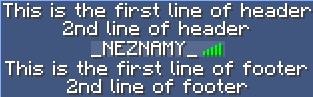
To enable this feature, open config.yml and set
header-footer:
  enabled: true
The example above is using this configuration:
header-footer:
  header:
  - "This is the first line of header"
  - "2nd line of header"
  footer:
  - "This is the first line of footer"
  - "2nd line of footer"
It is the default header/footer for everyone, unless overridden in some way.
You can configure per-user, per-group and per-world (and combination of those) header/footer.
An example of per-group header and footer could look like this:
Groups:
  example:
    header:
      - "This is a header for example group"
    footer:
      - "This is a footer for example group"