Feature guide: Header & Footer
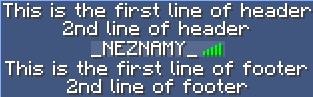
Minecraft feature introduced in 1.8 showing text above and below playerlist. It cannot be displayed on 1.7 clients in any way.
| Option name | Default value | Description |
|---|---|---|
| enabled | true | Enables / Disables the feature |
| designs | Map | Designs to display based on conditions (see below for more info). |
A header/footer design has 3 options:
-
display-condition(optional) - Condition that must be met for the design to be displayed. If not defined, design will be displayed without any required condition. If player does not meet condition, another design may be displayed based on chaining (see below for more info). -
header- List of lines to display in the header. -
footer- List of lines to display in the footer.
Example:
header-footer:
  enabled: true
  designs:
    MyDesign:
      display-condition: "%world%=world"  # Delete the line for no condition requirement
      header:
        - "Header for world %world%"
      footer:
        - "Footer for world %world%"
When defining more than 1 design in config, the plugin will display the correct design based on conditions. The plugin goes through all defined designs, starting with the design on top. If the design's condition is met or not set, it is displayed. If not, the next defined design is checked and so on. If no suitable design is found (the last one has a condition requirement which wasn't met), none is displayed. Example:
header-footer:
  enabled: true
  designs:
    per-world:
      display-condition: "%world%=world"
      header:
        - "Header for world %world%"
      footer:
        - "Footer for world %world%"
    default:  # No display condition
      header:
        - "Header for every world except %world%"
      footer:
        - "Footer for every world except %world%"
Design per-world is checked first. If condition is not met, default is displayed.
If a chaining 3 or more and player meets 2 or more conditions for 2 (or more) different designs, the first one defined in the config will be displayed. You can swap order of designs based on your priority needs.
When under a BungeeCord network and having TAB installed on backend server and switching to another server, the header/footer will not reset. This is because BungeeCord makes it look like a world switch to the client. To avoid this, you have 2 options:
- Install TAB on BungeeCord and disable header/footer on the server.
- Install a plugin that sends some, or even empty header/footer on join.
Velocity sends reset packet, so it isn't a problem there.
The entire header is just a single character sequence that allows newline symbol (\n) for new lines. It is only being split into multiple lines in config for convenience to make it readable when configuring and editing. Same for footer.
If using a placeholder that returns the newline symbol, it will create a new line. You can use this to your advantage and create a conditional placeholder or an animation that includes newline in some frames.
Example
animations.yml
MyAnimation:
  change-interval: 1000
  texts:
    - "First frame with only 1 line"
    - "Second frame\nconsisting of 2 lines"
config.yml
header-footer:
  designs:
    DesignName:
      header:
        - "%animation:MyAnimation%"
To get started with the API, see Developer API page.
To access this feature, you'll need to obtain HeaderFooterManager instance. Get it using TabAPI.getInstance().getHeaderFooterManager(). If this feature is disabled, the method will return null.
To set the header and/or footer for a player, use the following:
HeaderFooterManager#setHeader(TabPlayer, String)HeaderFooterManager#setFooter(TabPlayer, String)HeaderFooterManager#setHeaderAndFooter(TabPlayer, String, String)
To reset the header and/or footer for a player back to their original values, use null as argument.