Feature guide: Header & Footer
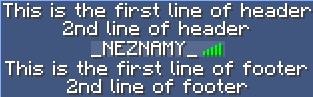
Minecraft feature introduced in 1.8 showing text above and below playerlist. It cannot be displayed on 1.7 clients in any way.
The feature can be enabled in config.yml:
enable-header-footer: true
Enabling this option enables the feature.
The example above is using this configuration:
header:
- "This is the first line of header"
- "2nd line of header"
footer:
- "This is the first line of footer"
- "2nd line of footer"
It is the default header/footer for everyone, unless overridden in some way.
You can configure per-user, per-group and per-world (and combination of those) header/footer.
An example of per-group header and footer could look like this:
Groups:
  example:
    header:
      - "This is a header for example group"
    footer:
      - "This is a footer for example group"
Since you may not want the same header and footer for everyone on your server, you can configure some per group, player or world.
List of all possible ways you can use as well as their priority order can be seen on the following example:
header:
  - "Header with priority 6"
Groups:
  Admin:
    header:
      - "Header with priority 5"
Users:
  _NEZNAMY_:
    tagprefix: '&6&lTAB&f &a'
  Test:
    header:
      - "Header with priority 2"

per-world-settings:
  world:
    Users:
      Test:
        header:
          - "Header with priority 1"
    Groups:
      Admin:
        header:
          - "Header with priority 3"
    header:
      - "Header with priority 4"
Where priority 1 is highest and 6 lowest.
Note that these properties (header and footer) are taken independently from each other. That means you can use per-world header for example, but keep the same footer everywhere without needing to copypaste footer everywhere with the same content as default footer has. This is intentional to avoid unnecessary duplicated lines of config.