Feature guide: Header & Footer
Minecraft feature introduced in 1.8 showing text above and below playerlist. It cannot be displayed on 1.7 clients in any way.
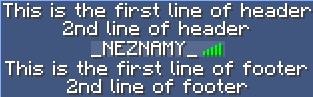
To enable this feature, open config.yml and set
header-footer:
  enabled: true
The example above is using this configuration:
header-footer:
  header:
  - "This is the first line of header"
  - "2nd line of header"
  footer:
  - "This is the first line of footer"
  - "2nd line of footer"
It is the default header/footer for everyone, unless overridden in some way.
header-footer:
  per-world:
    <your world>:
      header:
        - "Header in specified world"
      footer:
        - "Footer in specified world"
  per-server:
    <your server>:
      header:
        - "Header in specified server"
      footer:
        - "Footer in specified server"
Note: Per-server is BungeeCord only. To make per-world work on bungeecord, install TAB-Bridge plugin on backend servers.
groups.yml
MyGroup:
  header:
    - "This is a header for MyGroup group"
  footer:
    - "This is a footer for MyGroup group"
per-world:
  MyWorld:
    TestGroup:
      header:
        - "Header for group TestGroup in world MyWorld"
Same for users, which can be configured in users.yml.