Feature guide: Playerlist Objective
The scoreboard objective with PLAYER_LIST display slot. It supports 2 display types:
- yellow number
- hearts
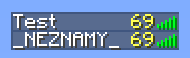

This feature can be configured in config.yml under yellow-number-in-tablist section.
| Option name | Default value | Description |
|---|---|---|
| enabled | true | Enables / Disables the feature |
| value | "%ping%" | Defines value displayed. You can set this to any placeholder that outputs a number. Setting value to %health%, %player_health% or %player_health_rounded% will result in the display type being changed to hearts instead of number. If you want to display health but as a number and not hearts, set value to 0%health% for example. |
| disable-condition | %world%=disabledworld | A condition that must be met for disabling the feature for players. Set to empty for not disabling the feature ever. |
Only 2 display types are supported - number and hearts. As the name implies, number's color is yellow and cannot be changed.
This can be bypassed with Aligned Tabsuffix feature.
The feature will not be visible on players with spectator gamemode. To resolve this, check out Spectator fix feature.
The feature does not allow you to display both hearts and ping at the same time.
However, you can put ping into tabsuffix (/tab group _DEFAULT_ tabsuffix " &e%ping%"). Alternatively, you can use healthbar expansion from PlaceholderAPI and use %healthbar_default% in tabsuffix (but it won't look as good).
You can also enable Aligned tabsuffix for alignment.