
What's new
- Linux support (beta). YTubic now ships
.deb,.rpm, and.AppImagebuilds. Based on #1 by @ameenalasady - thank you! - macOS support (beta). A universal build for both Apple Silicon and Intel Macs. Based on #33 by @yuvrajangadsingh - thank you!
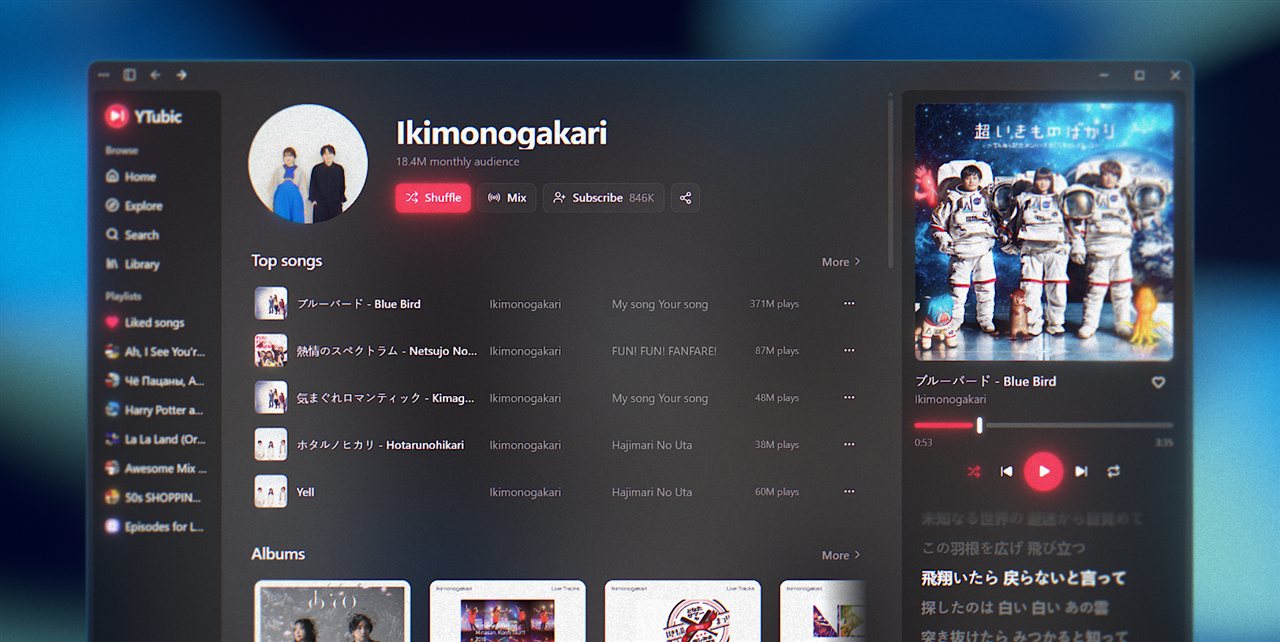
- Artist pages, redesigned. A Subscribe button, reworked scrolling and header behavior across the app, and full track, album, and release lists behind every More link.
- Resizable layout. Drag to resize the sidebar and the player panel.
- What's New timeline. The in-app What's New window now shows the full release history.
What's fixed
- Playlist suggestions. Suggested tracks are no longer mixed into your playlists - they live in their own Suggestions section at the end, with a Refresh button.
- True shuffle. Shuffling a playlist now uses YouTube Music's server-side shuffle across every track, not just the ones that had loaded.
- Remove from playlist. Take tracks out of your own playlists straight from the track menu.
- Last.fm avatar. Your profile picture now shows up in the Integrations tab.
- Collapsed sidebar. Fixed clicks not landing on the Library button and the Sign in button sitting off-center.
About the Linux and macOS betas
These builds are put together from community pull requests. I don't have a Mac or a Linux machine to test them on, so they may be rough or broken in places - that's why they're marked beta. If something doesn't work, please open an issue or join the new Discord server where we discuss fixes, suggestions, and improvements.
Install
Windows: download YTubic_0.4.0_Windows_x64_Setup.exe and run it. SmartScreen may warn that the app is unrecognized - the installer is not code-signed (certificates are expensive for a free project). Click More info → Run anyway.
macOS: download YTubic_0.4.0_macOS_Universal.dmg, open it, and drag YTubic to Applications. The app is not notarized, so on first launch macOS may claim it is "damaged" or block it:
- Try System Settings → Privacy & Security, scroll down, and click Open Anyway.
- If macOS says the app is "damaged", run this in Terminal instead - it removes the quarantine flag, the app is fine:
xattr -cr /Applications/YTubic.app
Linux: pick your format - .deb (Debian/Ubuntu), .rpm (Fedora/openSUSE), or the distro-agnostic .AppImage (chmod +x it and run).
YTubic is an unofficial client - not affiliated with, endorsed by, or sponsored by Google or YouTube. See the README for the full disclaimer and FAQ.