Repository navigation
Releases: Nekuzaky/Hindsight
Release list
Hindsight 1.2.0

Record bugs where they happen: in development builds, on your testers' machines, and open the file in the editor to rewind it.
Added
- Recording in development builds. A development player records from its first scene and saves a
.hindsightfile withF10orHindsight.SaveRecording(); the editor opens it on the same scene. 30 seconds in a 64 MB ring buffer by default, tunable withHindsight.ConfigurePlayerRecording()or-hindsight-*command-line arguments. Release builds still contain no recording code. - Debug shapes.
Hindsight.DrawLine,DrawRay,DrawSphere,DrawBoxandDrawTextrecord shapes on the current frame, like Unreal's Visual Logger, and the Scene view draws them at the displayed frame. Removed from release builds likeHindsight.Bookmark, no allocation. - Animators. The current state of each layer and every parameter of each recorded Animator, in the panel, the graph and Find when.
- Messages from other threads. Errors and warnings from jobs, threads and async code become timeline markers.
Changed
- A scene that stands still costs less than half as much to record: 10,000 quiet objects take 0.010 ms per frame.
- The recorder moved to its own assembly,
Nekuzaky.Hindsight.Recording, compiled only in the editor and in development builds. Recordings are saved in format 2; format 1 files still open. - In the graph list, a Rigidbody's speed is now called Rigidbody speed.
Fixed
- An object reusing the slot of a destroyed one no longer shows the destroyed object's past.
- Damaged
.hindsightfiles are refused with a clear message instead of crashing the Open command or reserving gigabytes. - Find when
Speed > 4searches a tracked field or Animator parameter namedSpeedbefore the Rigidbody velocity. - In development builds, the command line has the last word over
ConfigurePlayerRecording.
Install
https://github.com/Nekuzaky/Hindsight.git?path=Packages/com.nekuzaky.hindsight#v1.2.0
Unity 6000.3 or newer. Full notes in the CHANGELOG.
Hindsight 1.1.0
Find the moment a bug happened, save it, share it, and replay from it.
Added
- Find when. Type a condition such as
y < -5,speed > 20,Health <= 0orany y < -10and jump to the frame where it becomes true.Enterfor the next match,Shift+Enterfor the previous one,Ctrl+Fto focus.anysearches every recorded object and selects the one it finds. - Save and open recordings. The Save button writes the recording to a
.hindsightfile. Open shows it again outside Play Mode, with the timeline, events, graphs and Find when, and rewinds the objects of the open scene found at the same place in the hierarchy. The scene is never left modified. - Resume here. While rewinding in Play Mode, carry the game on from the displayed frame: objects stay there, Rigidbody and Rigidbody2D velocities are restored, and the recording forgets what came after. Scripts keep their current state.
- Lifecycle markers. Frames where objects appear or are destroyed, and scene loads, are marked on the timeline, with their own filter.
Changed
- Recordings take about half the memory. Only the transform values that changed are stored, bit for bit: 12 to 24 bytes per moving object and frame instead of 44. The benchmark scene with 1,000 moving objects went from 80.8 MB to 36.9 MB for 30 seconds.
- Softer colors and visual polish.
Install
https://github.com/Nekuzaky/Hindsight.git?path=Packages/com.nekuzaky.hindsight#v1.1.0
Unity 6000.3 or newer. Editor only: your builds get a 5 KB assembly whose calls are removed. Full notes in the CHANGELOG.
Hindsight 1.0.2
Two fixes found in a visible play session in a real HDRP game on Unity 6000.5.
Fixed
- Selecting an object while the game runs threw an
InvalidOperationExceptionon every refresh of the window: the panel read the recording while the capture job of that frame still owned it. Every read from the window, the graph and the Scene view now finishes the pending capture first. Covered by a new test (26 in total). - Editor messages on the timeline: exceptions logged by editor windows between two frames could appear as game errors. A frame now ends with Hindsight's end-of-frame system or the editor update, whichever comes first.
Verified
Same HDRP game on Unity 6000.5.9f1, player driven around, the player selected while recording, then paused and rewound: no exception, 0 bytes of managed allocation, the UI renders correctly, and rewinding, jumping to a bookmark and going live all work.
Install or update
https://github.com/Nekuzaky/Hindsight.git?path=Packages/com.nekuzaky.hindsight#v1.0.2
Hindsight 1.0.1
Compatibility fix found by testing Hindsight in a real game.
Fixed
- Unity 6000.5 and newer: the package did not compile there, because
Object.GetInstanceID()is obsolete as an error since 6000.5. Hindsight now identifies objects withEntityId, which exists since 6000.3.
Changed
- The package no longer turns compiler warnings into errors in your project, so a deprecation in a future Unity version can never stop your project from compiling. Hindsight itself is still developed with zero warnings.
Verified in a real game
First-person HDRP horror game in production, Unity 6000.5.9f1, installed from this tag:
| Measure | Result |
|---|---|
| Objects recorded | 1,803 |
| Hindsight per frame | 0.018 ms average, 0.022 ms 95th percentile |
| Managed allocation | 0 bytes over 53,885 frames |
| Rewind to a random frame | 0.10 ms average (200 tries) |
| Back to live | every transform and renderer restored exactly |
Install or update
https://github.com/Nekuzaky/Hindsight.git?path=Packages/com.nekuzaky.hindsight#v1.0.1
Hindsight 1.0.0
The first release of Hindsight, the rewind debugger for Unity.
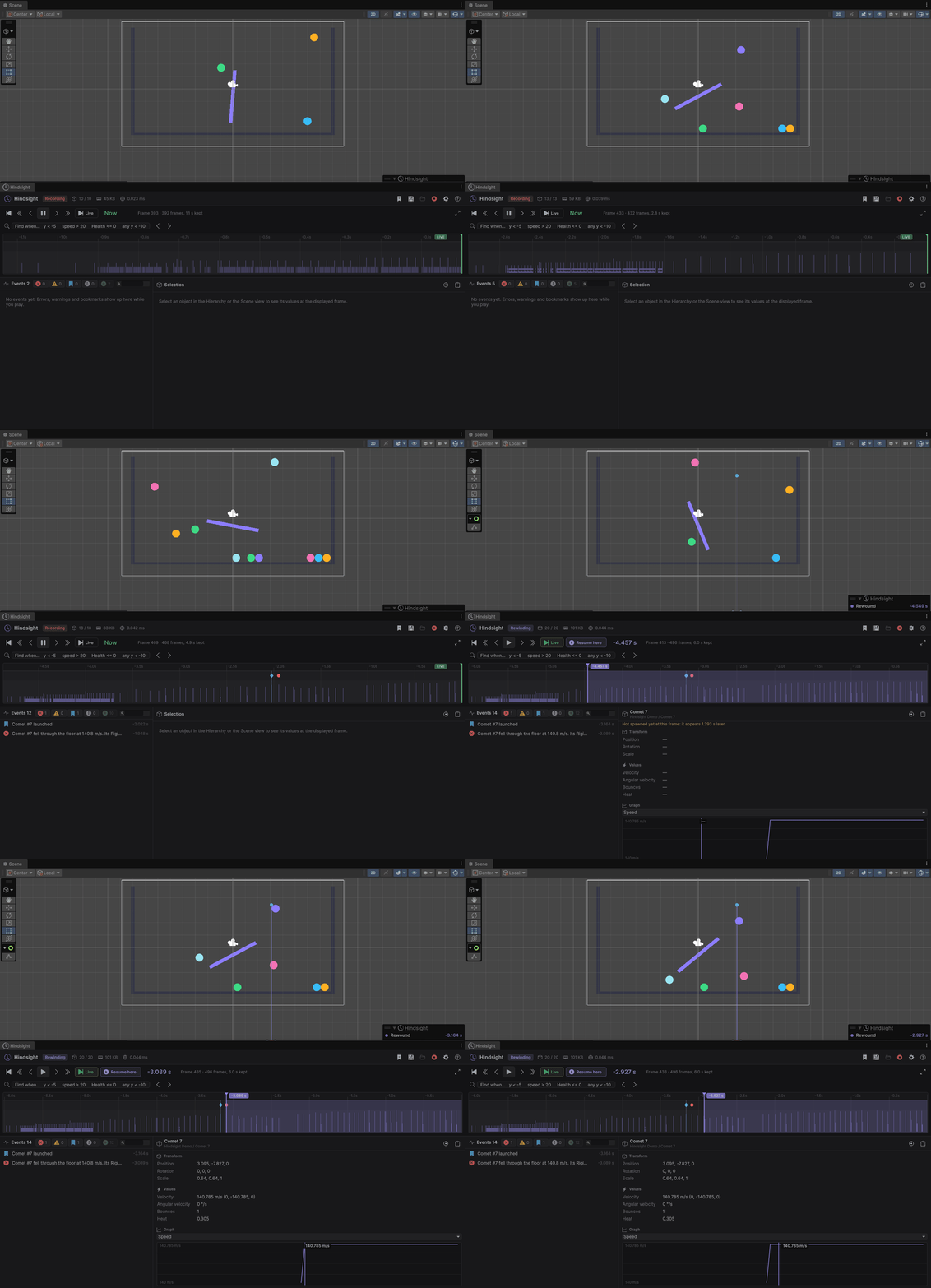
Hindsight records your scene while you play. When something goes wrong, pause, drag the timeline back, and every object is exactly where it was, with the Console errors, your bookmarks, the velocities and your own variables on the same timeline.
Install
Unity 6000.3 or newer. Window > Package Manager > + > Install package from git URL...
https://github.com/Nekuzaky/Hindsight.git?path=Packages/com.nekuzaky.hindsight#v1.0.0
What is in 1.0.0
- Automatic recording in Play Mode with Burst jobs: about 0.01 to 0.05 ms of main-thread time per frame for 10,000 objects, and no garbage collection once warmed up.
- Rewinding in place while paused: the real objects move back, objects not spawned yet are hidden, ghosts mark destroyed ones, and everything returns live before the game runs again.
- Timeline with error, warning, log and bookmark markers and a per-frame activity lane; zoom, pan, step frame by frame, jump event to event.
- Event list with filters, search and clickable stack trace lines.
- Selected object panel: transform, Rigidbody and Rigidbody2D velocities and tracked fields at the displayed frame, with a min/max graph over the whole recording.
[HindsightTrack]fields, Inspector pins,Hindsight.Bookmark()and the F9 shortcut, all compiled out of player builds.- Scene view motion trails and an overlay with frame controls.
- Preferences for every option, saved per user.
- Bouncing Balls Demo sample.
Full documentation: Documentation · Changelog