Repository navigation
Releases: Nekuzaky/Resonance
Release list
Resonance 0.6.0

Effects on every bus without an Audio Mixer, a faster engine, and a SoundStarted event so other systems can react to what is heard.
Added
- Bus effects. An ordered chain on every bus with Low Pass, High Pass, Reverb (send or insert), Delay, Distortion and a Compressor, edited in the Mixer tab and the bus inspector, driven by Parameters through curves and faded by Mix Snapshots. Delay and reverb tails ring out after a sound ends.
ResonanceEngine.SoundStarted, raised once for every play the engine admits, with the handle, event, emitter, position, start volume and attenuation range. It allocates nothing. Horror AI Manager uses it so enemies hear your game's real sounds.
Changed
- The engine only writes the audio source, filter and transform values that changed: 400 sounds cost about 0.18 ms per frame in the demo player.
- The Studio Profiler reuses its rows: one refresh with 100 sounds went from about 5 ms to 0.07 ms.
Fixed
- A refused play no longer steals or stops other sounds.
- Virtual voices resume at the right place.
- Unloading a Sound Bank no longer cuts the clips that are still playing, and releases exactly what it loaded.
- Music is never scheduled in the past after a stall.
- A Snapshot Trigger removes its snapshot when its scene unloads.
- The remote Profiler ignores truncated frames instead of throwing.
- The bus inspector's "+" no longer duplicates the last effect, and Remove deletes the effect of its own card.
Verified
Allocation free with every effect, a parameter curve, a snapshot, the compressor and ringing tails; the real output recorded at the Audio Listener; 180 EditMode tests; the demo player on Windows, and Android and WebGL scripts compiled.
Install: https://github.com/Nekuzaky/Resonance.git?path=Packages/com.nekuzaky.resonance#v0.6.0
Full notes: CHANGELOG
Resonance 0.5.1
Loudness in LUFS and end-to-end verification of the features that were only unit tested.
Changed
- Loudness is measured in LUFS as defined by ITU-R BS.1770. It matches the EBU Tech 3341 reference signals within 0.1 LU and ffmpeg's EBU R128 meter within 0.2 LU on the demo clips.
- The demo's Master bus leaves 6 dB of headroom, and the narrator lines fade out instead of clicking.
Verified
- In a Windows player: a Timeline played by a PlayableDirector, the demo bank loaded through Addressables, 400 sounds at once (0.17 ms per frame).
- The real mix of the player, recorded from the Audio Listener: no clipping, no unexpected silence.
- Studio preview audio in Edit Mode and the Scene view gizmos.
Install: https://github.com/Nekuzaky/Resonance.git?path=Packages/com.nekuzaky.resonance#v0.5.1
Resonance 0.5.0: accessibility, music layers, markers, loudness and audit fixes
Install or update
https://github.com/Nekuzaky/Resonance.git?path=Packages/com.nekuzaky.resonance#v0.5.0
New
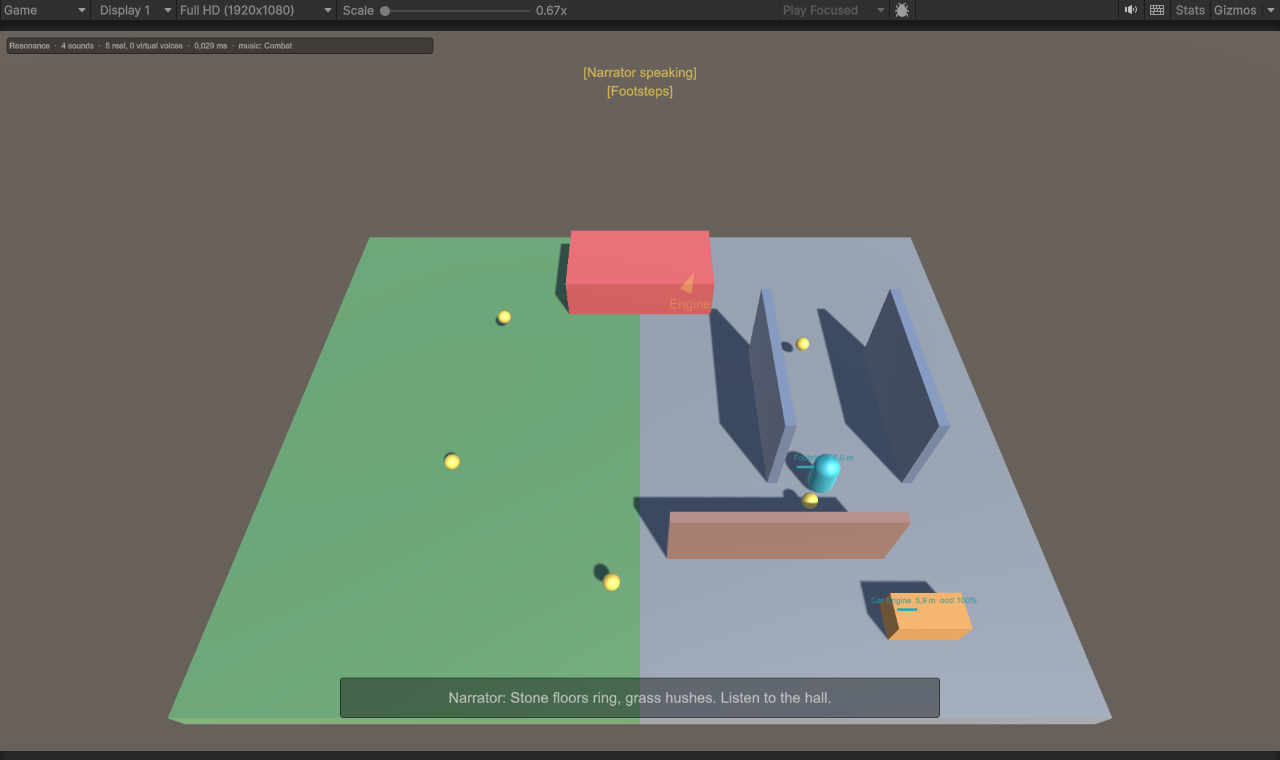
- Accessibility. Give a Sound Event a caption and tick Visual Indicator: the Sound Indicators component shows an arrow toward 3D sounds and captions for 2D sounds, for players who are deaf or hard of hearing.
- Music layers. Stems that play in sync with a segment and fade with a parameter such as intensity.
- Beat events.
MusicBeatandMusicSegmentStarted, and the Music Beat Events component for Unity Events on beats and bars. - Clip markers. Named points on clips, drawn on the waveform, with
MarkerReached,SoundEndedand the Sound Callbacks component. - Volume Setting. Connect an options menu slider to a bus; the volume is saved between sessions.
- Debug Overlay. Every playing sound drawn in the Game view with distance, occlusion and level.
- Scene view gizmos. Attenuation spheres, an occlusion line in Play Mode, labeled state zones.
- Loudness. Gated RMS loudness per clip and a Balance button in the Audit tab that evens out variations.
- Addressables. An Addressable Bank Loader, compiled only when Addressables is installed.
Fixed
An independent code review found 15 defects. All are fixed and covered by regression tests, among them:
- Engine events are queued, so a handler can play a sound without corrupting the engine.
- Stolen sounds raise
SoundEnded; destroyed emitters no longer mean "every object" inStopAll. - Cooldowns are per engine, Fade In starts after Delay, each dialogue line in a sequence gets its subtitle.
- Music: stopping during a transition fades out, going back cancels the pending change, bridges and stingers behave.
- No more allocation for binaural voices and no more hitch when meters first read a long clip.
- No API deprecated in Unity 6000.5.
Verified
- 103 EditMode tests, zero warnings; 99 of them also in URP (6000.3) and HDRP (6000.5) projects.
- The Windows player passes 14 smoke checks, including beats, markers and music layers.
- A development player streams snapshots to the editor Profiler.
- Player scripts compile for Android and WebGL.
Full list in the changelog. Still a pre-release until the audio is reviewed by ear.
Resonance 0.4.0: inspectors for people who do not code
Resonance is made for sound designers, not only programmers. 0.4.0 gives every component an inspector that never asks you to type a name or guess what is wrong.
Install or update
https://github.com/Nekuzaky/Resonance.git?path=Packages/com.nekuzaky.resonance#v0.4.0
New
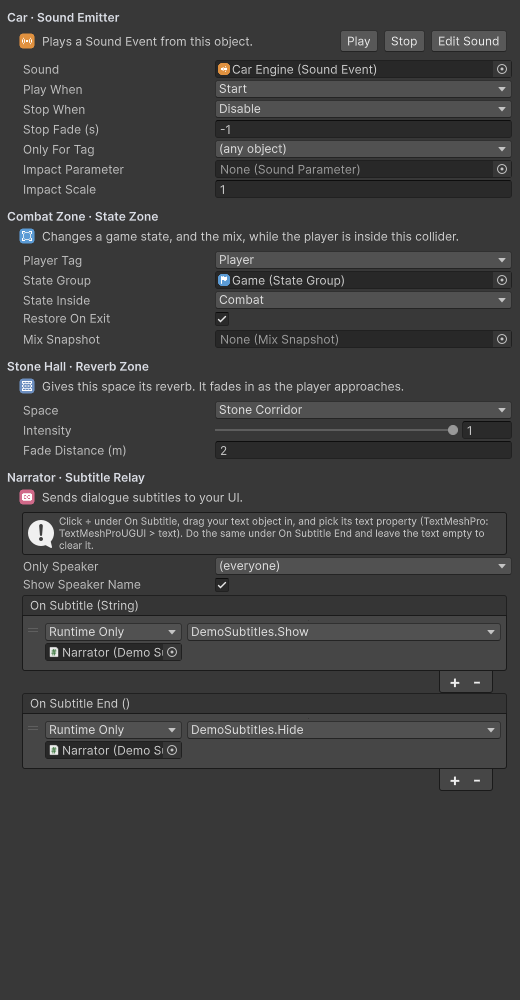
- Menus instead of typing. Switch values, game states, tags, Animator floats and dialogue speakers are picked from lists filled from your project. A value that no longer exists shows in red as "(not found)".
- Warnings that explain and fix. A trigger without a collider, a solid collider where a trigger is needed, a missing sound, a state that is not in its group: the inspector says it in plain words, and a button fixes it when it can.
- Test buttons and live status. Play and Stop on emitters and music sources, Apply on switches and snapshots, and a line that shows what the component is doing in Play Mode.
- Music Track inspector. State links, bridges, "then play" and "start with" are menus of the track's own segments and states.
Fixed
- The Reverb Zone inspector no longer throws on objects without a Mesh Collider.
Verified
- 84 EditMode tests, including one that builds the inspector of every component, zero compiler warnings.
Still a pre-release: the audio has not been reviewed by ear on every setup yet.
Resonance 0.3.0: dialogue, music bridges, binaural and remote profiling
Resonance 0.3.0 closes more of the gap with dedicated audio middleware.
Install or update
https://github.com/Nekuzaky/Resonance.git?path=Packages/com.nekuzaky.resonance#v0.3.0
New
- Dialogue and subtitles. A Dialogue node holds one line per language with its subtitle and a fallback language.
Resonance.Languagepicks the line, andSubtitleStarted/SubtitleEndedevents (or the new Subtitle Relay component, no code) drive your subtitle text. - Music bridges. A state link can play a bridge segment, a riser or a drum fill, before the linked segment. The bridge starts on the transition boundary and the next segment follows exactly at its end.
- Binaural audio. Tick Binaural on an event to render it through the project's spatializer plugin (Steam Audio, Meta XR Audio...). Without a plugin it has no effect, so the same events work everywhere.
- Remote profiling. Development builds stream a snapshot five times a second to the editor. Press Show Player in the Profiler tab to see the player's sounds, voices, cost, reverb and history, on another PC or a phone. Release builds do not include this code.
- Mobile import overrides. The Audit tab suggests Android and iOS overrides: Vorbis at 35% quality for effects, 50% for music, optimized sample rate.
- Demo: the narrator speaks English or French with on-screen subtitles, and the score plays a riser before the combat music.
Verified
- 80 EditMode tests, zero compiler warnings.
- A Windows player of the demo passes 11 smoke checks, including subtitles and the music bridge.
- A development player streamed 80 snapshots to the editor's Profiler (
Tools/Remote-Check.ps1). - Player scripts compile for Android and WebGL.
Still a pre-release: the audio has not been reviewed by ear on every setup yet.
Full list in the changelog.
Resonance 0.2.0: space, memory and workflow tools
Resonance 0.2.0 makes the engine reliable and adds the features a real game needs on top of the 0.1 preview.
Install or update
https://github.com/Nekuzaky/Resonance.git?path=Packages/com.nekuzaky.resonance#v0.2.0
Reliability
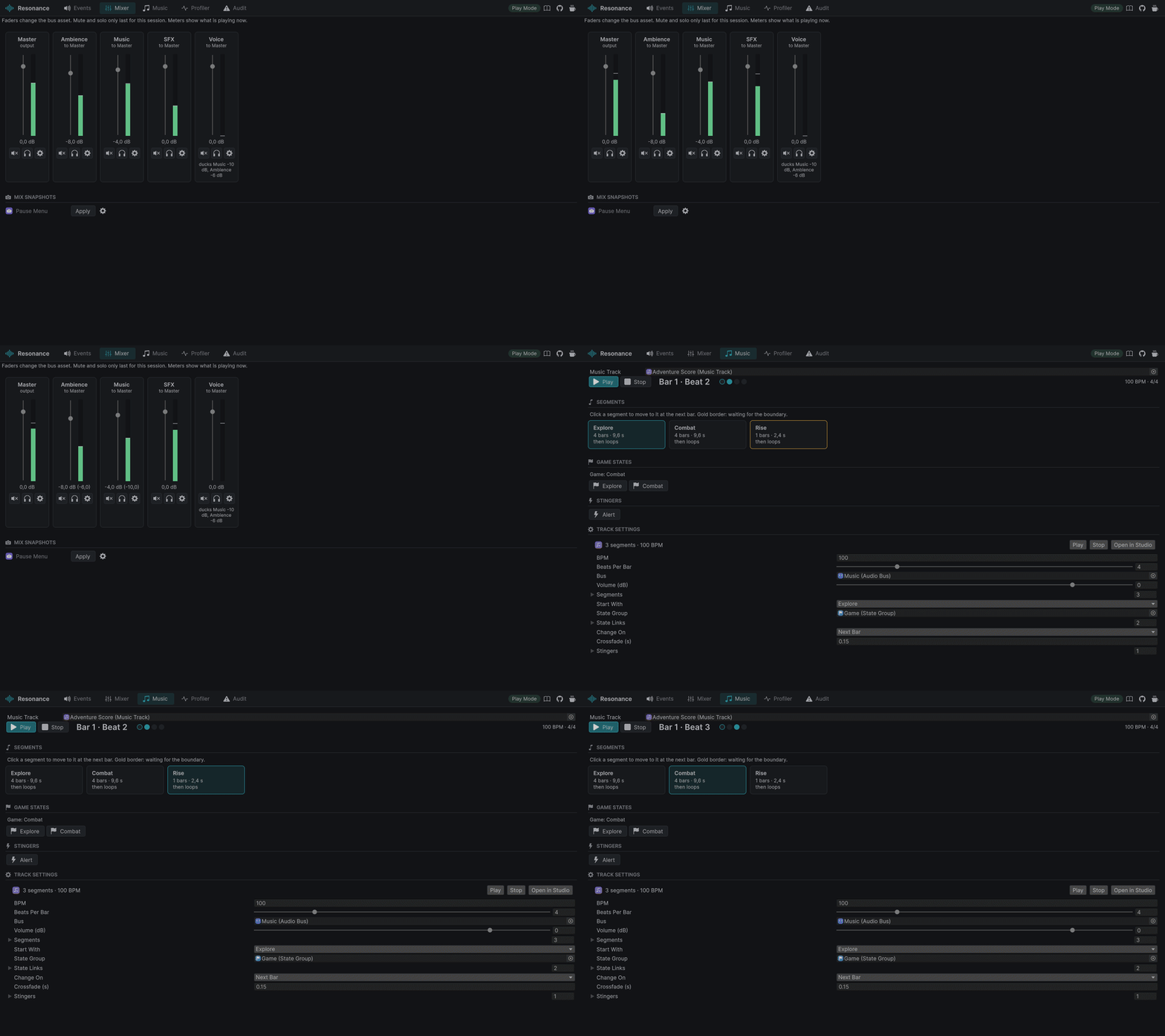
- Accurate meters. Bus meters and levels now come from an RMS envelope of each clip, times the voice's real gain and distance attenuation. They read true dBFS levels, in Edit Mode and in Play Mode.
- Zero allocation per play. Sound instances are pooled and the event log keeps references instead of names. A test checks it with the Unity Test Framework allocation constraint over 500 plays.
- Verified in a player. A Windows build of the demo runs a headless smoke test: sounds play, the narrator ducks the music, the score moves to combat on the bar, the stone hall reverb and the wall occlusion engage. Engine update measured at about 0.005 ms per frame.
- Verified across pipelines and versions. The test suite passes in built-in and URP projects on Unity 6000.3 and in an HDRP project on Unity 6000.5, and the player scripts compile for Android and WebGL.
Space
- Occlusion. Three rays between each sound and the listener: a sound half behind a corner is half muffled. Volume, low pass, smoothing and check interval per event.
- Reverb Zones. Colliders with a reverb preset, intensity and fade distance, blended into a single reverb at the listener. Reverb Send per event.
- Attenuation. Shared Attenuation Presets, custom rolloff curves and a low pass that closes with distance.
Memory
- Sound Banks and the Sound Bank Loader component load and unload audio data with reference counting.
- The Profiler flags clips that were played before they were loaded.
- Optimize Audio Import Settings suggests the right load type for every clip in use.
Workflow
- Audit tab: broken events, missing segments, bus loops, sounds nothing references, and import settings to fix.
- Used By in the Sound Event editor.
- Bulk import: a folder of
step_grass_01,step_stone_01clips becomes a Switch of Randoms in one click. - Timeline: a Resonance Track with Sound Event and Game State clips, compiled only when Timeline is installed.
- Profiler history: the last 60 seconds, scrubbable.
- Playback options: delay with a random part, random start for loops, shuffle without repeats.
Notes
- Media files in the repository are now stored in git instead of Git LFS.
- Still a pre-release: the audio itself has not been reviewed by ear on every setup yet. Feedback is very welcome.
Full list in the changelog.
Resonance 0.1.0, first preview
First public preview of Resonance, game audio middleware that lives inside Unity.
Install
Unity 6000.3 or newer. Window > Package Manager > + > Install package from git URL and paste:
https://github.com/Nekuzaky/Resonance.git?path=Packages/com.nekuzaky.resonance#v0.1.0
Then open Tools > Resonance > Resonance Studio (Ctrl+Alt+R) and import the Resonance Demo sample from the Package Manager.
What is in this version
- Sound Events built from Clip, Random, Sequence (step and continuous), Switch, Blend and Layer nodes, with volume and pitch randomization, 3D settings, fades, instance limits, priority, cooldown and parameter modulation curves.
- Game syncs: parameters (global or per emitter, with seek speed), switch groups and state groups.
- Mixing: bus hierarchy, ducking rules, mix snapshots, session mute and solo, optional Unity Audio Mixer output.
- Voice management: global voice budget, priority stealing, virtual voices that resume in place.
- Interactive music: segments, state links, transitions on the next beat, bar or segment end scheduled on the audio clock, crossfades and stingers.
- Components for code-free setups: Sound Emitter, Sound Listener, Parameter Driver, Switch Setter, State Zone, Music Source, Animation Sounds, Snapshot Trigger.
- Resonance Studio: asset browser with drag and drop of clips, sound tree editor with undo, preview controls, waveform, and Mixer, Music and Profiler tabs.
- Scripting API:
Resonance.Play,SetParameter,SetSwitch,SetState,PlayMusic,ApplySnapshotand more. - Demo sample with procedurally generated audio, no third-party sounds.
Quality
- 44 EditMode tests, zero compiler warnings, NASA Power of 10 inspired code rules (no recursion, bounded loops, short functions).
- Engine update measured at about 0.01 ms per frame in the demo.
Known limitations
This is a preview. Resonance plays through Unity's built-in audio, so it has no DSP plug-ins of its own (route a bus to an Audio Mixer group for effects), no spatial rooms and portals, and no localization pipeline yet. Tested on Windows with the built-in render pipeline; feedback from URP, HDRP, macOS and mobile projects is very welcome.
Documentation: Getting started · Coming from Wwise