Repository navigation
Releases: NonayMete/WindowsSoundRouter
Releases · NonayMete/WindowsSoundRouter
Release list
Sound Router 1.1.0

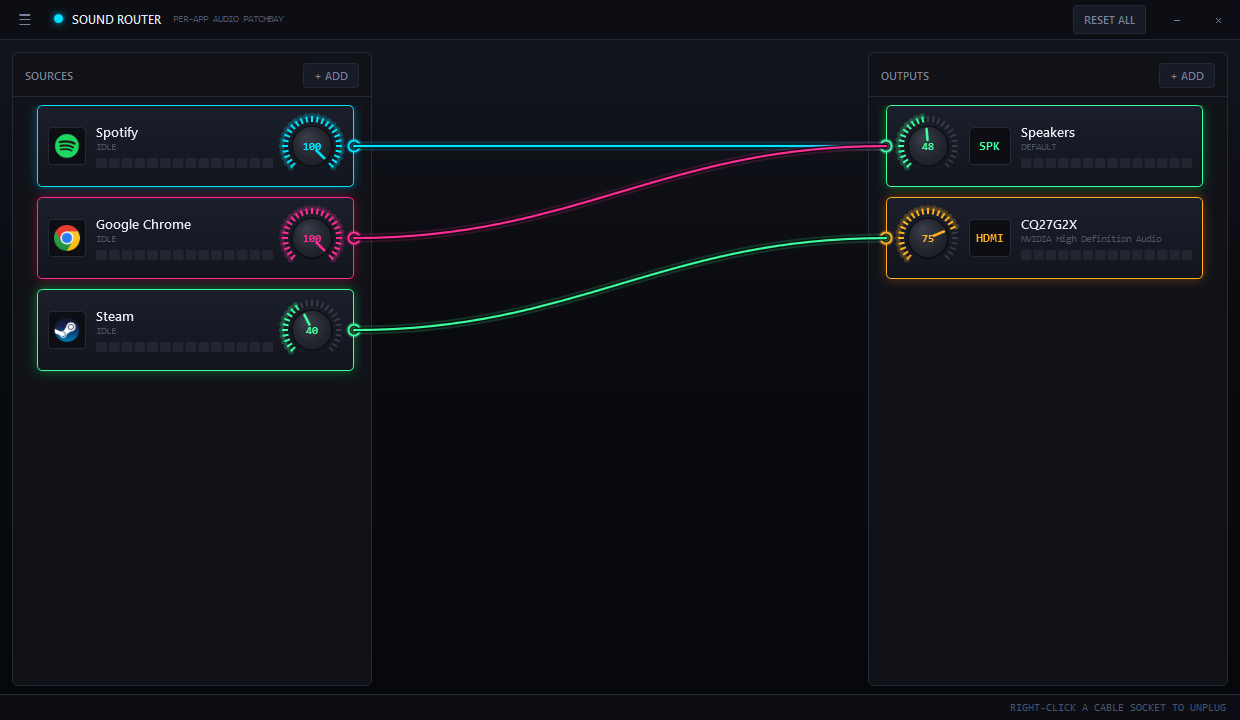
Per-application audio routing for Windows, as a drag-and-drop patchbay.
Download
SoundRouter-1.1.0-Setup.exe |
Recommended. No administrator rights needed, and offers to start Sound Router with Windows. |
SoundRouter-1.1.0-portable.zip |
Extract and run. Nothing written outside %APPDATA%\SoundRouter. |
Both are self-contained — the .NET runtime is not required.
Requires Windows 10 version 1803 or later, or Windows 11.
What's new in 1.1.0
- Settings bar — a ☰ button in the title bar opens toggles for Start with Windows
(boots straight to the tray) and Close to tray (turn it off and the close button
exits instead of hiding). - Installer and portable builds, neither needing the .NET runtime.
- App icon on the taskbar, title bar and Alt-Tab, from a proper multi-resolution icon.
- Meters are now dB-scaled. Previously they mapped raw amplitude linearly, so a device
meter could sit dark while the app feeding it was clearly playing. Device meters read
lower than the source feeding them, which is correct — they are measured after the
volume knob, like a hardware desk.
Getting started
- + ADD under SOURCES — apps currently making noise are sorted to the top.
- + ADD under OUTPUTS — pick a device.
- Drag from the app's socket to the device's socket.
Right-click a socket to unplug it. Full instructions in the
README.
Known limitations
- One device per app. Windows routes an application to a single output; duplicating to
two devices needs a virtual audio driver. - A few apps ignore routing — anything holding a device in exclusive mode. The node is
marked NO SIGNAL PATH rather than pretending it worked; restarting the app usually
fixes it. - Routes are stored by Windows, not by Sound Router, so they persist after uninstall.
Use RESET ALL first for a clean slate.
Windows SmartScreen will warn on first run, as these binaries are unsigned.