Repository navigation
Releases: NoteNerdOfficial/ai-skills-manager
Release list
0.1.21

Fix installs, updates and restores failing with EPERM on Windows when antivirus or the search indexer holds git's files open: the plugin now copies the skill without .git instead of deleting it first. The install dialog also shows progress while it works, disables Install while running, and keeps the full error visible after a failure.
0.1.20
Removed items no longer show up in your library.
- Fixed: skills, agents, commands, rules, and memories that a tool had moved into a
.trashfolder (for example~/.claude/skills/.trash/) were listed as if they were still installed. - Fixed: dead links inside a
.trashfolder no longer appear as broken symlinks. - Fixed: a dot-folder in the Codex plugin cache is no longer mistaken for a marketplace or plugin.
0.1.19
Mods get a real on/off switch, a proper Global, and links into your workspaces.
- On/off that only turns a mod on or off. Every plugin folder and skills folder mod now has a switch. It sets the mod's entry under
enabledPlugins(<name>@inlineor<name>@skills-dir), the same setting Claude Code's/pluginscreen uses, so nothing is moved, unlinked, or taken out ofCLAUDE_CODE_PLUGIN_DIRS. - Global loads a mod in every session. Check Global in a mod's link picker to list it in
CLAUDE_CODE_PLUGIN_DIRS. A mod kept outside~/mods, such as in another repo, is symlinked into~/modsfirst. Mods no longer end up in the global skills folder. - Link mods into a workspace. The link icon on a mod card symlinks it into a project's
.claude/skills/, so it loads only there. The picker warns when a link wouldn't take effect. - Source repo workspaces. Add a repo that keeps skills, agents, commands, or mods at its top level as a workspace, and its page lists everything inside. A symlinked item from a repo that isn't a workspace yet offers to add it.
- Search and tags on the MCP servers and Mods pages.
- Unified previews. MCP and Discover previews use the same header and properties panel as everything else. Environment variables get their own panel, masked until you reveal them, and Discover's Install and Open on GitHub sit in the Source footer.
- Mod cards keep the full name visible and shorten the version first.
- Fixed: deleting a mod that was turned off could leave its folder listed in
CLAUDE_CODE_PLUGIN_DIRS.
0.1.18
Adds Mods: manage the Claude Code mods you build, install, and use, right next to your skills.
- Mods page. Extensions → Mods lists every mod: ones you're building, finished ones in a plugin folder, installed plugins, and mods in a skills folder. Each card shows its version and where it loads from, with a read-only preview of its files.
- Turn mods on and off. The switch on a plugin folder mod takes it out of
CLAUDE_CODE_PLUGIN_DIRSwithout deleting it, and puts it back when you turn it on. - Promote a finished mod. A mod you build in a Claude Code session only loads in that session. Promote moves it to
~/modsand loads it in every new session. - Install mods from GitHub. Discover now finds mods in a repo. Preview the README and the code a mod would run, then install the exact version you previewed.
- Updates and history for mods. Check a mod installed from GitHub for updates, review the changes as a diff, and roll back from History.
- Card menu. Reveal in Finder, Open on GitHub, Check for updates, Promote, and Delete (moves the folder to the Trash).
- Insights. Health flags mods that won't load or load twice. Cleanup lists leftover dev copies and empty session folders.
- Discover cards now show their type next to the name, like other cards.
- Fixed: removing a Discover source while a filter was on showed the wrong number of items in the confirmation.
0.1.17
Fixes adding a GitHub source from a branch whose name contains a slash.
/tree/<branch>/<folder>links now work when the branch name has a slash in it, likefeature/login. Before, only the part before the first slash was used as the branch, so the clone failed with "Remote branch not found".- If a branch or tag really doesn't exist, the error now says so in plain words.
0.1.16
Smoother on Windows, and GitHub sources now work behind work networks.
Windows fixes
- Adding a GitHub source no longer fails with "Couldn't add source" when antivirus or the search indexer briefly holds the temporary clone. Cleanup retries, and a leftover clone never hides a successful scan. (#3, fixes #2)
- Disabling or enabling a skill retries the folder move when Windows briefly locks a file inside it. (#4)
- The test suite now passes on Windows. (#5)
Thanks to @xaghy for all three fixes.
Work networks and self-hosted GitHub
- Git now picks up proxy and certificate settings from your shell, falling back to the macOS system proxy, so cloning works when Obsidian is opened from the Dock.
- New Git proxy setting for networks that only publish a PAC file.
- Sign-in, network, and certificate errors now show a clear message instead of hanging or a raw git error.
/tree/<branch>/<folder>links work on any GitHub host, not just github.com.- The README has a new section on work-network setup.
Contributors

Assets 5
0.1.15
Know which version you're on, and when there's a newer one.
Version and updates
- The installed version now sits under AI Skills Manager in the library sidebar.
- When a newer release is out, it turns into an Update link that opens the plugin's page in Community plugins.
- Settings has a new Version row at the top showing whether you're up to date, with an Update button when you're not and Check for updates when you are.
- If the update check can't reach GitHub, the Version row points you to Community plugins so you can still check yourself.
0.1.14
Clearer update checks: only items that actually changed get flagged, and they're easy to find.
Check for updates
- An item is only marked as having an update when its own files changed. A new commit elsewhere in the same repo no longer flags every item installed from it.
- Items whose files didn't change are quietly moved to the latest commit, so they stop showing as stale.
- After a check from the All page, the items with updates are shown on their own right away. The notice names them when there are only a few.
- Updates available is now a Source filter, nested under GitHub-tracked, so you can get back to that list any time.
Update banner
- Opening an item with an update shows an Update available banner with how many files changed and a Review changes button.
- Review changes opens the same tabbed diff as the item's own Check for updates, without fetching the repo a second time.
0.1.13
Version history for your skills, and a much better way to review updates.
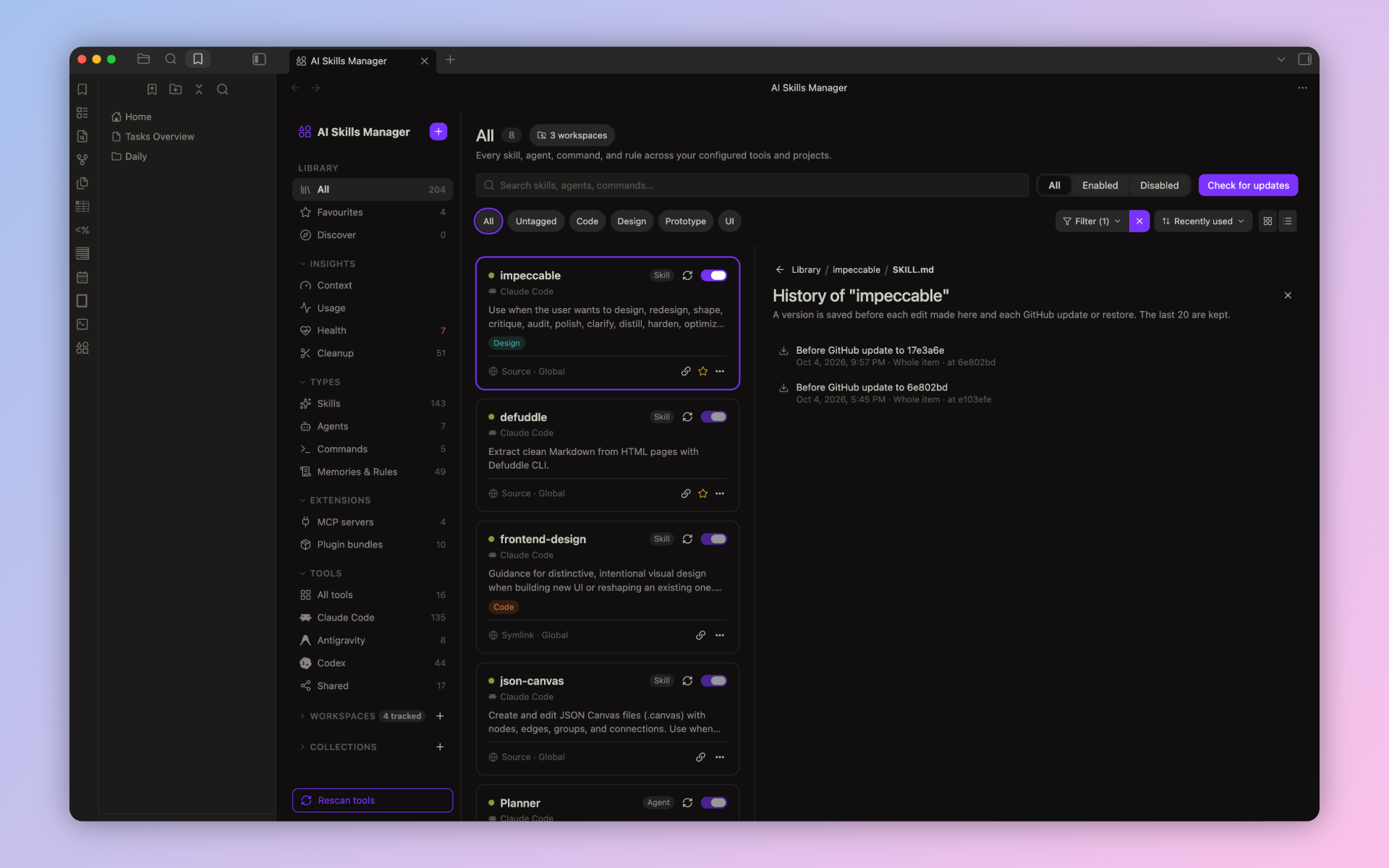
Version history
- A version of an item is saved before every edit you make in the detail panel and before every GitHub update or restore.
- Open History from the detail panel to browse saved versions, named after the change that followed them, with date and commit.
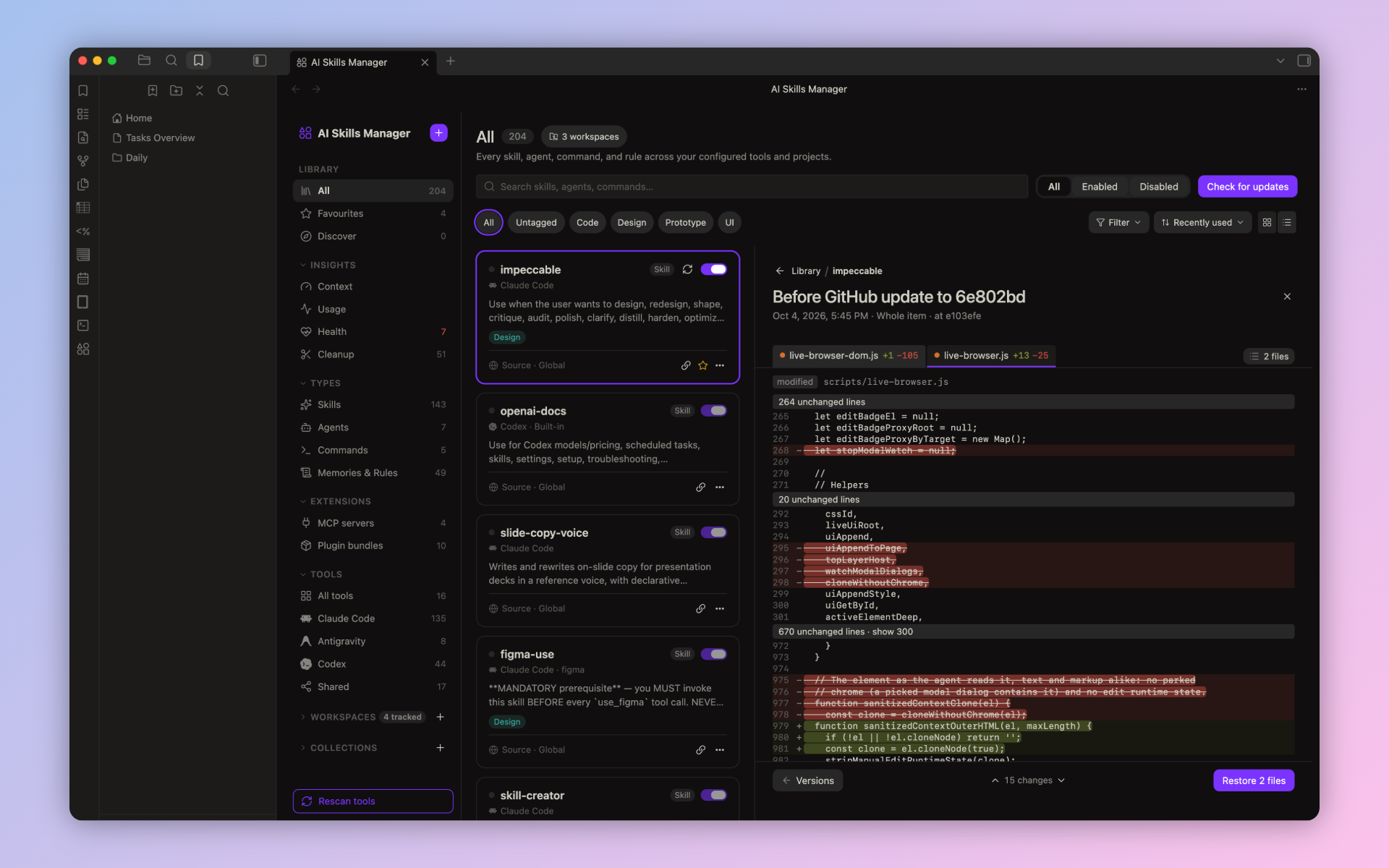
- Open a version to see exactly what restoring it would change, then restore it in one click. Restoring saves the current state first, so it can be undone too.
- Restoring a version of a GitHub-installed item also puts its tracked commit back, so Check for updates stays accurate.
- The last 20 versions of each item are kept.
Reviewing updates
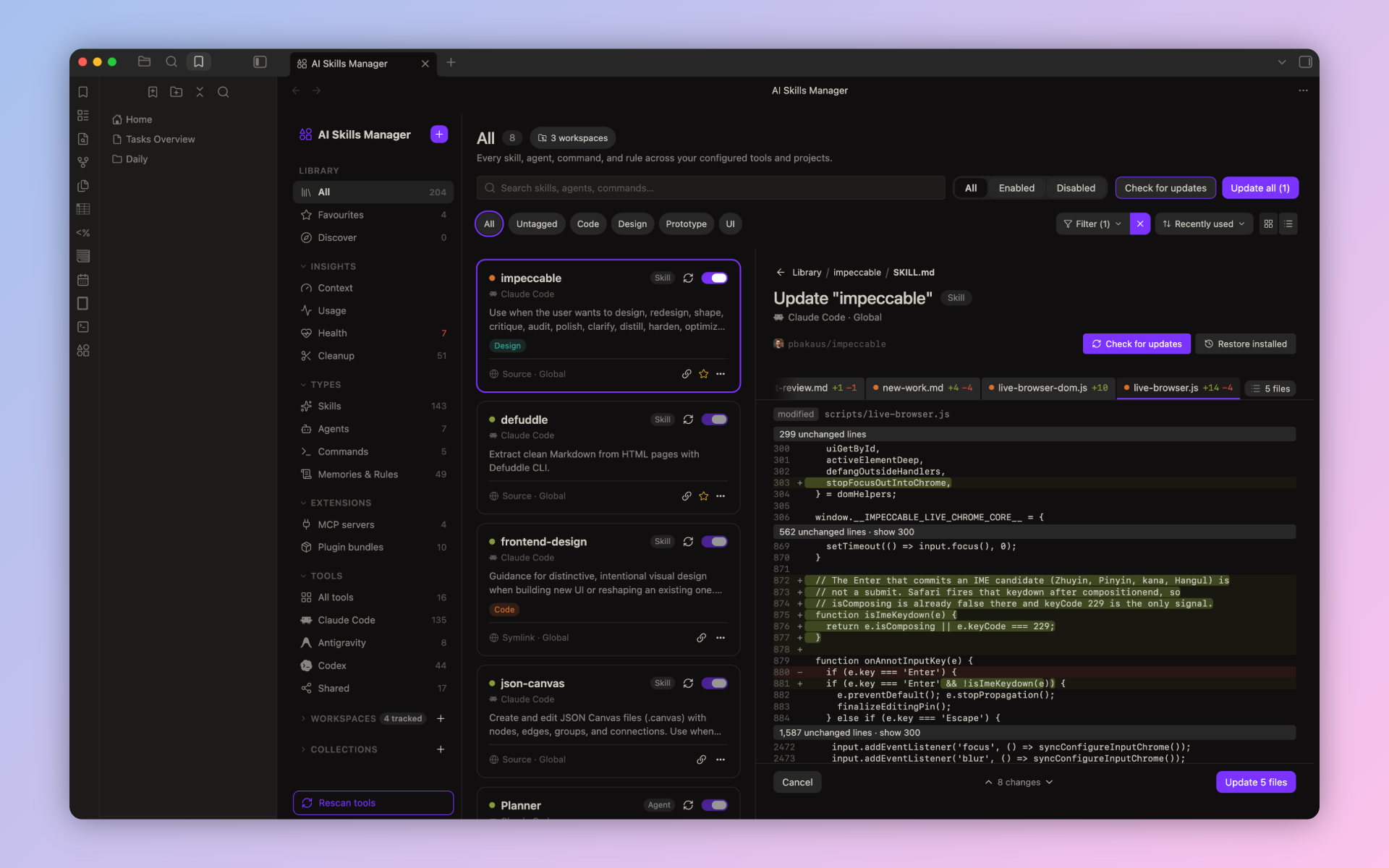
- Check for updates and Restore installed now show every changed file in its own tab, with status and line counts, not just
SKILL.md. - Long unchanged stretches fold away and expand on click.
- A bottom bar keeps Cancel, the change stepper, and Update in reach while you scroll.
- Keyboard:
J/Kstep through changes across every file,[/]switch files. - Very large files (10,000+ lines) open without lag.
Polish
- Tools are now hidden from the library rather than disabled. Hidden tools still count toward Insights.
- Related plugins in Settings show their icons.
0.1.12
Accessibility and polish, plus more accurate usage tracking.
Usage
- Long Claude Code sessions are now included in usage counts. Previously, sessions over 5MB were skipped, so skills used only in them showed as "Never" with 0 runs.
Accessibility
- Sidebar rows, cards, list rows, collapsible sections, and Insights rows work with the keyboard.
- Visible focus rings for keyboard navigation across the view and modals.
- Enable toggles use Obsidian's native toggle and are announced as switches, labeled with the item's name.
Polish
- Plain-language Insights labels and theme-aware error colors.
- Enable confirmations use the accent style instead of a warning.
- Modals use Obsidian's native titles.
- Consistent font sizes and corner radii; bar graphs have square corners again.
- The loading spinner respects reduced motion.
- Truncated names show the full name on hover.
- New commands: Rescan tools, plus Open insights: Context, Usage, Health, and Cleanup.
- The selected Discover card stays visible below the sticky group header.