PRISM 2.6.0 — Browser Extension, Bring-Your-Own LLM & Accessibility

PRISM now lives in your browser.
Browser extension
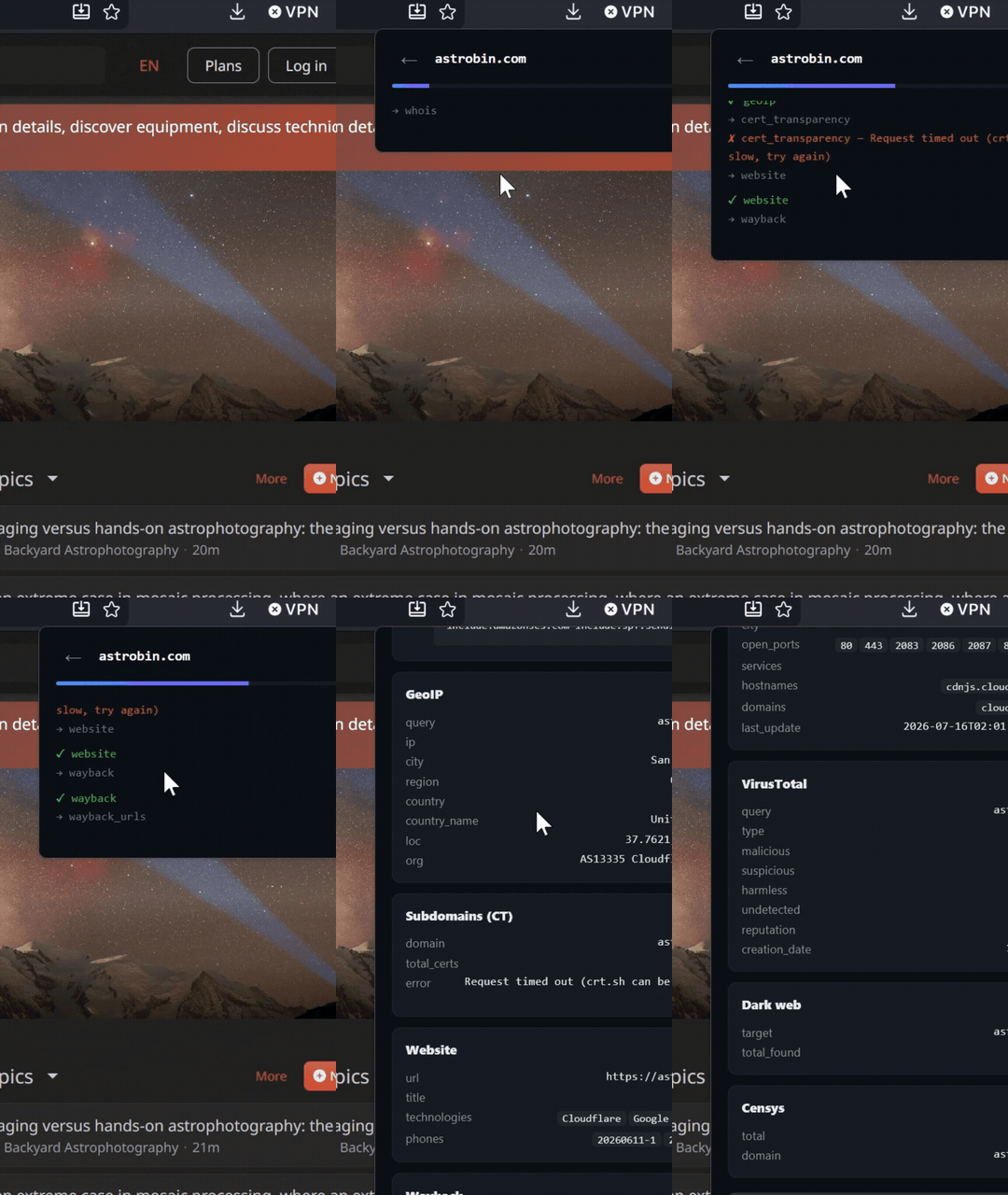
Highlight or right-click any domain, IP, email, phone, or username on a page and a full scan runs inside the extension popup — live module progress, OPSEC score, and result cards, without leaving the page you're on.
It points at your own PRISM instance or the public demo, takes an optional API key, and speaks all 9 languages.
Install it from Firefox Add-ons →
Bring your own LLM
The AI summary and chat are no longer tied to two hardcoded providers. Set these in .env and point PRISM at any OpenAI-compatible endpoint — OpenRouter, Groq, Gemini, a local Ollama, whatever you run:
LLM_BASE_URL=https://your-provider/v1/chat/completions
LLM_API_KEY=...
LLM_MODEL=...
LLM_PROXY=http://user:pass@host:port   # optional
Useful if your host is geo-blocked by a provider, or you simply want a different model.
Accessibility
- Animations and transitions are neutralized when the OS requests
prefers-reduced-motion(#136) - Scan progress is announced to screen readers via an
aria-liveregion (#182) - Scan-type toggles carry proper
aria-label/aria-pressed(#198)
Quality of life
- Copy button on the raw JSON tab (#195) and a
/shortcut to jump to the target field (#196) - Clear button on the target input (#197), legend on the entity graph (#205), "Report an issue" link in the topbar (#202)
- Watchlists: pause/resume, a "Send test webhook" button, JSON/CSV alert export, and readable alert labels
Fixes
- Rate limiting behind a proxy — the limiter now keys on the real client IP instead of collapsing every visitor into the proxy address, which was causing shared 429s
- LLM errors — providers that return an error as a plain string no longer crash the endpoint; non-JSON responses surface a readable message
- Clearer message when an instance requires an API key; spinner on Run Scan while the request is in flight; Watchlists screen fully localized
Full notes in the CHANGELOG. If PRISM is useful to you, a ⭐ helps others find it.