Encoder settings
src/record/recorder.cpp, Recorder::EncoderOptions() and PresetName()
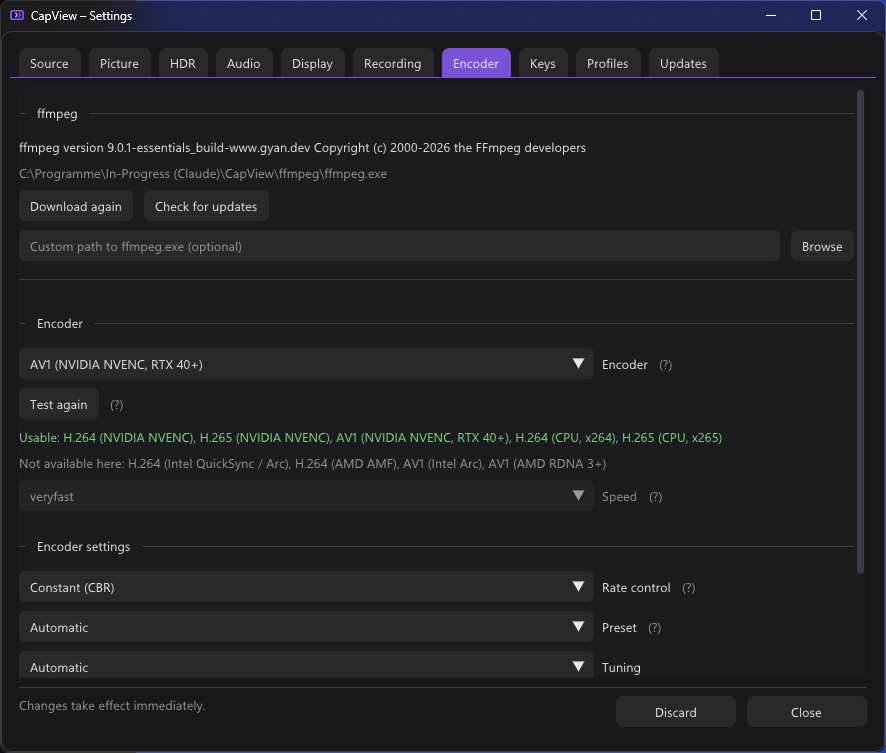
Bitrate alone leaves most of an encoder unused. The settings that matter are
exposed under one set of names and translated into each vendor's own, because
what NVIDIA calls p1–p7, Intel calls veryfast–veryslow and AMD calls
three words; and a quality target is -cq on one, -qp_i on another,
-global_quality on a third and -crf in software.
| NVENC | AMF | Quick Sync | Software | |
|---|---|---|---|---|
| Rate control | CBR, VBR, constant quality | CBR, VBR, constant quality | by which of bitrate or quality is given | CBR, VBR, CRF |
| Preset | seven steps | three, which the seven fold onto | seven steps | seven steps |
| Tuning | quality or low latency | quality or low latency | — | — |
| Look-ahead | yes | yes | yes | — |
| Adaptive quantisation | spatial and temporal | VBAQ | MBBRC | — |
| Multipass | off, quarter, full | — | — | — |
Anything an encoder has no opinion about is greyed out rather than hidden, which says "your card cannot" instead of "CapView cannot".
Recorder::FamilyOf() maps an ffmpeg encoder name onto one of four families by
suffix — _nvenc, _amf, _qsv, and everything else as software.
Everything defaults to automatic, and automatic means nothing is passed at all. That is not the same as passing the encoder's default, and it is the only honest way to leave something alone: encoder defaults change between ffmpeg builds and between driver versions, and hardcoding today's default would silently pin behaviour that was never asked for.
PresetName() returns nullptr for EncoderPreset::Auto, and the caller emits
nothing.
case Family::Nvenc:
  out += cbr ? L" -rc cbr" : vbr ? L" -rc vbr" : L" -rc constqp";
  if (quality) out += L" -cq " + qualityLevel;
case Family::Amf:
  out += cbr ? L" -rc cbr" : vbr ? L" -rc vbr_peak" : L" -rc cqp";
  if (quality) out += L" -qp_i " + qp + L" -qp_p " + qp;
case Family::Qsv:
  if (quality) out += L" -global_quality " + qualityLevel;   // no -rc at all
default:
  if (quality) out += L" -crf " + qualityLevel;
Quick Sync has no -rc: what it does follows from which of bitrate or quality
it is given.
The bitrate side is set in BuildCommandLine():
const int ceiling = cbr ? bitrateKbps : bitrateKbps * 3 / 2;
cmd += L" -maxrate " + ceiling + L"k -bufsize " + (ceiling * 2) + L"k";
Constant bitrate means constant — the ceiling is the bitrate. Variable is allowed to peak at half again, which is what makes it worth choosing over CBR at all.
Constant quality sends no bitrate (-b:v 0). A quality target and a bitrate
are contradictory instructions and ffmpeg resolves them by quietly ignoring one;
better to send only one.
Seven steps, 0 fastest to 6 slowest.
| Step | NVENC | Quick Sync | Software | AMF |
|---|---|---|---|---|
| 0 | p1 |
veryfast |
ultrafast |
speed |
| 1 | p2 |
faster |
veryfast |
speed |
| 2 | p3 |
fast |
faster |
balanced |
| 3 | p4 |
medium |
medium |
balanced |
| 4 | p5 |
slow |
slow |
quality |
| 5 | p6 |
slower |
slower |
quality |
| 6 | p7 |
veryslow |
veryslow |
quality |
AMF has three names, so the seven steps fold onto them. AMF also spells the
option -quality rather than -preset.
Software encoders had a speed setting before presets existed. It still applies,
but only when the new preset is left on automatic:
if (!encoder.hardware && settings.preset == EncoderPreset::Auto)
  cmd += L" -preset " + RecordSpeedName((int)settings.speed);
Nobody's existing configuration changes meaning.
| Quality | Low latency | |
|---|---|---|
| NVENC | -tune hq |
-tune ll |
| AMF | -usage transcoding |
-usage lowlatency |
Nothing for Quick Sync or software.
| NVENC | -rc-lookahead 32 |
| Quick Sync | -look_ahead 1 |
| AMF | -preanalysis 1 |
Look-ahead lets the encoder see future frames before deciding how to spend bits on the current one. It costs latency inside the encoder, which does not matter here — the recording is already a couple of frames behind the screen and the screen is not affected.
Spending bits where the eye looks rather than evenly across the frame.
| NVENC | -spatial-aq 1 -temporal-aq 1 |
| AMF | -vbaq 1 |
| Quick Sync | -mbbrc 1 |
NVENC only.
| Off | -multipass disabled |
| Quarter resolution | -multipass qres |
| Full resolution | -multipass fullres |
Keyframe interval and B-frames. Both are left to the encoder. The encoders' own defaults are sensible for a recording that will be played back linearly, and exposing them would mean explaining GOP structure in a settings tab to solve a problem nobody recording gameplay actually has.
Not a setting. nv12 for SDR — the one format every hardware encoder and every
player agrees on; anything wider would exclude the very cards this is meant for.
p010le when the recording keeps the HDR range, together with the three colour
description flags. See High dynamic range.