High dynamic range
src/render/shaders.h, src/render/video_renderer.cpp, src/render/d3d_context.cpp
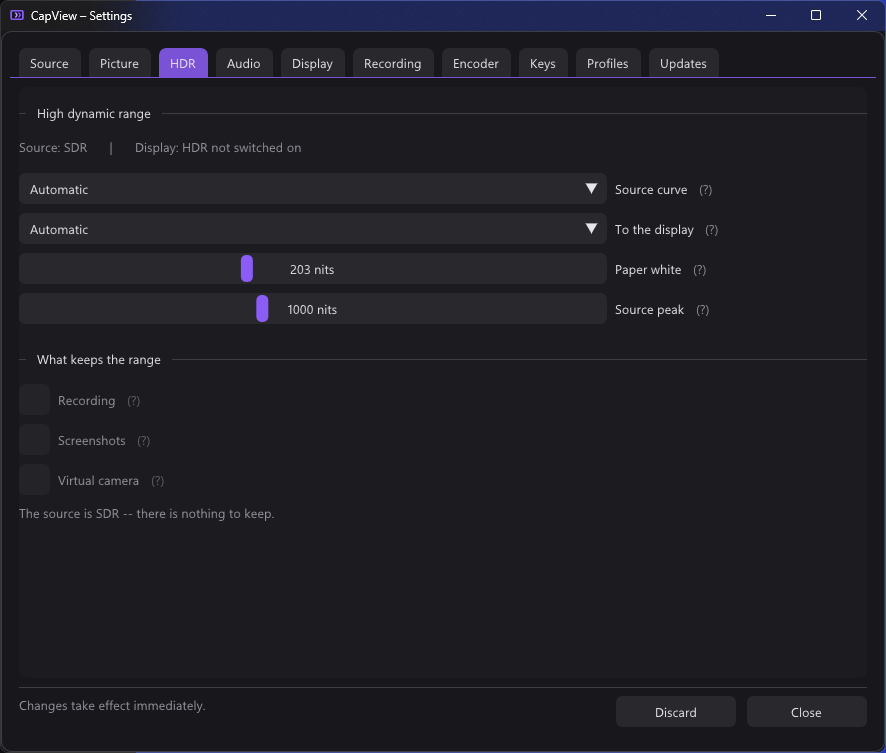
HDR has a tab of its own rather than a section under Display, because it is not a display setting. Its source curve belongs to the card, its tone mapping to the screen, and three of its switches decide what the recorder, the screenshots and the virtual camera write.
A card that can carry HDR sends P010 or P016 — ten or sixteen bits of luma per sample rather than eight — encoded against one of two curves.
P010 puts ten bits in the top of a sixteen bit word, so the bottom six are
zero. That means a full-scale sample reads 65472 rather than 65535, and a naive
divide by 65535 is short by 0.1 %. VideoRenderer::Draw() compensates:
cb.pixelScale = (kind_ == FormatKind::P010 && tenBitContainer_) ? 65535.0f / 65472.0f : 1.0f;PQ (SMPTE ST 2084, what HDR10 uses) states outright how many nits a code means, from nothing up to ten thousand:
float PqToNits(float e) {
  float p = pow(saturate(e), 1.0 / kPqM2);
  return 10000.0 * pow(max(p - kPqC1, 0.0) / max(kPqC2 - kPqC3 * p, 1e-6), 1.0 / kPqM1);
}
HLG (BT.2100) states it relative to whatever the display can manage:
float HlgToScene(float e) {
  const float a = 0.17883277, b = 0.28466892, c = 0.55991073;
  return e <= 0.5 ? (e * e) / 3.0 : (exp((e - c) / a) + b) / 12.0;
}
and needs a system gamma applied on top, which in kCleanPS is 1.2 against the
luminance of the pixel plus a scale to that display's reference white:
rgb *= pow(luma, 0.2);      // system gamma 1.2 applied to luminance
rgb *= 1000.0 / 203.0;      // reference white of that display, in paper whites
Either way the picture ends up as linear light with 1.0 meaning diffuse white. Anything above 1.0 is a highlight, which is the whole point.
The maths was checked against the standards before it was written: PQ 0.5 comes out at 92.246 nits where ST.2084 says 92.245, and HLG lands exactly on its three defined points.
BT.2020 primaries are brought back to BT.709 through XYZ at D65:
float3 Bt2020ToBt709(float3 c) {
  return float3(dot(c, float3( 1.660491, -0.587641, -0.072850)),
                dot(c, float3(-0.124550,  1.132900, -0.008349)),
                dot(c, float3(-0.018151, -0.100579,  1.118730)));
}
Components can come out negative, and are deliberately not clamped here. BT.2020 holds colours BT.709 cannot name; clamping at this point would turn a deep green into a flat one. That is left to the end of the pipeline.
Normally read from the media type — the driver puts it in DXVA_ExtendedFormat,
where transfer function 15 is PQ and 16 is HLG. Most cards put nothing there at
all, so it can be set by hand in the HDR tab. SetHdrInput(Transfer, bool wideGamut)
is told rather than guessing.
Note that the transfer is kept apart from the pixel format: a card can send eight bit PQ, and ten bit says nothing about HDR on its own.
EnsureIntermediate() allocates R16G16B16A16_FLOAT when the source is HDR and
R8G8B8A8_UNORM otherwise.
This was a real bug rather than a design note: the intermediate was fixed at
R8G8B8A8_UNORM, so the entire HDR pipeline was being quantised to eight bits
and clipped at 1.0 between pass 2 and pass 3, and the highlights the whole
exercise exists for were gone before tone mapping ever saw them.
What happens next depends on the screen, not the source.
float3 ToneMapToSdr(float3 rgb) {
  float luma = dot(rgb, float3(0.2126, 0.7152, 0.0722));
  float scale  = NitsToPq(gSourcePeak);
  float e      = NitsToPq(luma * gPaperWhite) / scale;
  float maxLum = NitsToPq(gDisplayPeak) / scale;
  float mapped = PqToNits(saturate(Bt2390Knee(saturate(e), saturate(maxLum)) * scale));
  return rgb * (mapped / gDisplayPeak) / luma;
}
Two decisions here:
Done in the PQ domain. PQ is roughly perceptually even, and that is where a knee belongs. A knee applied to linear light spends almost all of its travel on the top stop.
Brightness is mapped and colour carried along, rather than running the curve per channel. Per channel pulls saturated highlights towards white, which is how a sunset turns into a smear.
The curve itself is BT.2390's:
float Bt2390Knee(float e, float maxLum) {
  float ks = 1.5 * maxLum - 0.5;    // where the straight part gives way
  if (e < ks) return e;
  …Hermite spline…
}
Straight below the knee, so ordinary content passes through untouched; a Hermite spline above it, so highlights compress instead of clipping to a flat white.
D3DContext::SetHdrOutput() switches the swap chain to
DXGI_FORMAT_R16G16B16A16_FLOAT with DXGI_COLOR_SPACE_RGB_FULL_G10_NONE_P709
— half float, linear, 1.0 fixed at eighty nits by definition. Highlights
simply carry on past one; the only work in the shader is a scale.
RefreshDisplayCapability() asks the output's DXGI_OUTPUT_DESC1 whether the
monitor the window is on is actually in HDR mode, and what its peak luminance is
(gDisplayPeak).
Untested. The scRGB output path has never been run against a real HDR monitor. The maths is checked against the standards and the SDR path is verified, but this branch is unproven on hardware.
kUiCompositePS, pass 4, and only when the swap chain is scRGB.
ImGui writes ordinary sRGB bytes. Handing those to a linear target shows them far
too bright — sRGB 0.5 is linear 0.21, and every grey in the interface would be
wrong by that much. So BeginUiLayer() redirects the interface into a buffer of
its own, and CompositeUiLayer() converts it once on the way back over the
picture.
What arrives is premultiplied: ImGui blends over a transparent buffer, which leaves colour already multiplied by coverage. It has to be undone before the curve and redone after, because a curve applied to a premultiplied colour is not the same thing at all — half-covered black text would come out grey.
Both functions do nothing in SDR.
Paper white is how bright ordinary white comes out. 203 nits is what BT.2408 recommends and what most material is graded against.
Source peak is how bright the source gets at its brightest — and DirectShow carries no mastering metadata anywhere, so there is nothing to read it from. It matters more than it sounds: assume 10000 where the content only reaches 1000 and paper white lands at 63 instead of 88 out of 100 nits on an ordinary screen, darkening everything. 1000 is the default because that is where consoles sit.
By default recording, screenshots and the virtual camera get the tone mapped picture — not the linear light the display path works in, and not what an HDR screen is being sent.
That distinction matters. A recording made while watching on an HDR monitor
should still be a recording anyone can play, so the mapping to an ordinary screen
is done for them separately (EnsureSdrCopy() / RenderSdrCopy()) rather than
borrowed from whatever the display happens to be doing. Sharpening is left out of
it, being a property of viewing rather than of the picture.
Each of the three can be told to keep the range instead:
| What it writes | What it needs at the other end | |
|---|---|---|
| Recording | ten bit P010, PQ, BT.2020, with smpte2084 and bt2020nc in the file |
an encoder that does ten bits — usual for HEVC and AV1, rare for H.264 — and a player that reads PQ |
| Screenshots | JPEG XR holding scRGB half floats, or AVIF | the Photos app for .jxr; any browser for AVIF |
| Virtual camera | ten bit P010 offered alongside the ordinary eight bit | a program that asks for it, which today is almost nothing |
The recording and the camera share one readback ring rather than two, because the picture they want is the same: ten bit PQ in BT.2020.
void SetHdrWideWanted(bool recorder, bool camera);
bool hdrWideActive() const {
  return (hdrRecordWanted_ || hdrCameraWanted_) && hdrTransfer_ != Transfer::Sdr;
}
kHdrRecordPS puts the linear light back on the PQ curve and converts BT.709
back to BT.2020 — the pipeline works in BT.709 because that is what a screen
wants, but a PQ file is expected to be BT.2020 and a player will assume so
whatever the file says. The camera has only a colour matrix left to apply on top.
The readback texture is R10G10B10A2, which DXGI packs with red in the low bits.
That is what ffmpeg calls x2bgr10le — a name that looks wrong until you
remember it describes the bytes, not the order they are written in.
JPEG XR costs nothing: Windows ships the encoder and the Photos app reads it, so this is the HDR format that can be written on a machine where nobody has pressed the download button. It holds scRGB half floats, which is exactly what Windows itself writes for an HDR screenshot — and therefore what the Photos app opens as one.
AVIF is read by every browser and by most things that are not Windows, but it goes through ffmpeg. Since ffmpeg is already there for recording, that is not a new dependency, only a newly required one.
A sixteen bit PNG would be neither: nothing would know to read it as HDR.
GrabStillHalf() blocks on the GPU to fetch the linear half-float picture, which
a still is allowed to do — it happens when somebody presses a key, not sixty
times a second.
Something that takes the ten bits without understanding them shows a wrong picture, so the wide format is offered only when asked for.
That switch has to cross from CapView into a DLL running inside a Windows
service, and the media source needs to know before the shared memory exists,
since it builds its list of formats when it is created. So it is the plainest
thing that works across that boundary: a marker file in ProgramData that is
either there or not (SetWideOffered() in src/vcam/virtual_camera.cpp). See
Virtual camera.