Repository navigation
Source and signal
src/capture/dshow_util.cpp, src/capture/video_capture.cpp, src/capture/device_config.cpp
Devices come from CLSID_VideoInputDeviceCategory through
ICreateDevEnum::CreateClassEnumerator. Each moniker's property bag supplies the
friendly name and the device path; the path is what gets written to the
configuration, because friendly names are not unique and change with driver
updates.
Audio devices are enumerated twice over: once through WASAPI
(src/audio/audio_devices.cpp) and once through
CLSID_AudioInputDeviceCategory, because a card's embedded audio is sometimes
only reachable as a DirectShow filter. See Audio.
The capture pin's IAMStreamConfig advertises a list of
(AM_MEDIA_TYPE, VIDEO_STREAM_CONFIG_CAPS) pairs. qBlank shows colour format,
resolution and frame rate as three independent pickers rather than as one list
of combinations, which is what makes forcing possible.
ApplyFormat() in dshow_util.cpp does the work:
-
Pick a template. Every advertised capability is scored: 3 for an exact subtype and resolution match, 2 for the right subtype at a resolution at least as large, 1 for the right subtype at any size, −1 for nothing. The highest scoring media type is copied.
The template matters. A driver's media type carries fields qBlank has no business inventing — palette entries,
pbFormattails that are vendor private,dwControlFlags. Patching a real one keeps all of that intact. -
Patch it.
PatchMediaType()rewritesbiWidth,biHeight,biSizeImageandAvgTimePerFramein theVIDEOINFOHEADERorVIDEOINFOHEADER2, and recomputeslSampleSize. -
Set it. If
SetFormatfails and a frame rate was asked for, the call is retried with the template's ownAvgTimePerFrameand only the resolution changed. Some drivers reject an unusual frame interval but accept the size. -
Read back what actually happened.
GetFormatis called afterwards and parsed into theVideoFormatInforeturned to the caller, so the UI reports the format in force rather than the one requested.
This is what covers the common case of a card advertising only 1080p30 for a mode it will in fact deliver at 1080p60. The driver's list is what it is prepared to state, not the boundary of what it accepts.
The list is also the same list whatever is plugged in. The SA7160 advertises
720×480, 720×576, 1280×720 and 1920×1080, each of them up to 60.00, with a PAL
composite cable in front of it delivering 720×576 at 50. Nothing in the
capability set marks the line that is true, so CapsModel::PickDefault() used to
take the largest area at the highest rate — a console recorded as 1080p, scaled
up inside the card, without one detail gained.
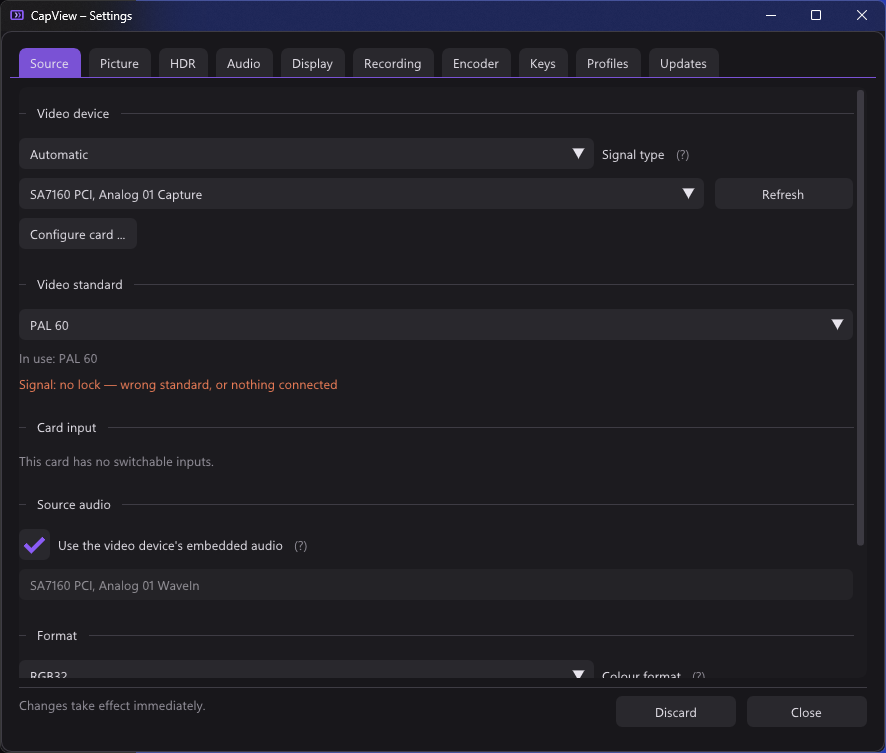
The video standard settles it, and settles two things that do not follow from each other:
- the raster — 625 lines carry 576 visible ones, 525 carry 480;
- the field rate — see the table under the analogue video standard below.
CapsModel::SetNativeStandard() hands both to the model, and PickDefault()
then caps the resolution to that raster. Where nothing is known, or nothing on
offer fits underneath, the largest still wins exactly as it did.
It is worth asking only where the picture goes through the analogue decoder, so
the connector decides whether to ask at all. ConnectorFollowsVideoStandard()
is true for composite, S-Video, tuner, SCART and AUX, false for component, VGA
and everything digital — those carry whatever the source feels like and no
standard describes it. Which connector that is gets answered at the input,
deliberately not at the picture height: the height is what this is supposed to
produce.
The colour format list starts with Automatic, which shows the format it picked in brackets. It is what a new card starts on. Picking a format by hand keeps that format across input changes and re-reads of the card, because the card that offered it still does. Automatic picks again every time the resolution is searched again: after a change of input, a re-read card or a new video standard. Earlier versions only had the first behaviour, so an RGB32 picked on the composite input stayed on HDMI, where YUY2 converts faster.
Older configurations have no subtypeAuto entry. A format already stored in
them counts as chosen, since there is no telling whether someone picked it.
FormatSel::fps holds a rate in Hz, or one of two sentinels from config.h:
| Value | Meaning |
|---|---|
kFpsHighest = 0.0
|
Whatever the card tops out at |
kFpsNative = -1.0
|
Whatever the video standard prescribes |
Neither is written into the profile as a number. Both are resolved in
VideoCapture::Start(), late on purpose: the answer then comes from the card
that is really in front of you, so a console switching from 576i50 to 480p60
survives without anyone editing a profile. A number noted down today is wrong
the moment the mode changes; a mode is not. The settings list shows in brackets
what each currently comes to.
CapsModel::NativeFps() rounds the standard's rate onto what the card actually
advertises for that subtype and size, through the same ReportedRange() helper
the highest available path uses — so it holds for every pixel format rather
than for YUY2 alone, and for a hand-forced resolution it borrows the subtype's
bands the same way. Where the standard is unknown it returns 0 and the highest
available takes over, which is not a failure but the answer qBlank always gave.
Because both are modes rather than values, a standard change no longer collapses
them: App::ReleaseStandardBoundFormat() lets go of the resolution and keeps the
mode, and SettingsWindow::EnsureValidFormat() puts it back after
PickDefault(), which has only numbers to return.
An older CapView reads both sentinels as highest available, because it tests
only fps <= 0. That is precisely the behaviour it always had, so a profile
written here stays readable there.
A standard change releases the size on its own. What is left is a size picked by hand or brought along in an old profile: 720x480 on a PAL source, 720x576 on NTSC, 1080p on composite. The card then scales the lines, and the picture comes out soft or with bars, with nothing saying why.
App::ResolutionMismatchLines() catches that without looking at the picture: it
compares the height against the raster of the locked standard. Full and half
both fit (576 or 288, 480, 486 or 240). It reports only when:
- the input is analogue and the standard is locked, with no search under way;
- the card actually offers a fitting size for the pixel format — otherwise there is nothing to point at.
After three seconds of it, what happens depends on Match the resolution to the video standard in the Source tab. It is on by default and only shown for an analogue input.
-
On:
App::ApplyFittingResolution()sets the fitting size itself and says so in a toast (Resolution matched to the video standard: 720x576). A fixed frame rate goes back to the standard's own, asReleaseStandardBoundFormat()does, because it was picked under the wrong size. - Off: a notice with Fix and Ignore stays on the picture until it is answered. Fix does the same as the automatic path. Ignore takes it off the picture for this size and this standard. Ticking the checkbox while the notice is open counts as Fix.
- Either way, the Source tab shows a note under the resolution with a Use 720x576 (or whatever fits) button, for as long as the size does not fit, Ignore included.
- When the fitting size is already set and the card still delivers another one, no button can fix it. A toast then points to the Source tab once.
The point of the notice is that a wrong size gets noticed on the picture, where it shows, and not by stumbling over it in the settings.
Cards with multiple physical inputs expose an IAMCrossbar, found through
ICaptureGraphBuilder2::FindInterface on the capture filter.
EnumerateCrossbarInputs() walks the input pins, reads
get_CrossbarPinInfo(TRUE, …) for each, and turns the physical type into a name
(PhysicalConnectorName() — Composite, S-Video, SCART, Component, HDMI/SDI and
the rest).
RouteCrossbarInput() routes the chosen video input to whichever output pin
accepts it, and routes the related audio pin alongside it when the card reports
one (relatedAudioIn from the same call).
Switching the crossbar puts a different signal on the same pins without the
media type changing, so every measured verdict — colour range, interlace,
content bounds — is thrown away at that point via
VideoRenderer::ResetAnalysis(). Nothing about the old signal is still true.
The crossbar above answers this where it exists. It frequently does not: the
card qBlank is developed against, a StarTech PEXHDCAP60L on the SA7160 chipset,
exposes no IAMCrossbar at all. Its input selector — HDMI, DVI-D, VGA,
component, composite, SDI — is in the vendor's own property page, behind a
private KS property set with no documented shape. qblank_probe inputs exists
to test whether a driver at least carries the crossbar as
PROPSETID_VIDCAP_CROSSBAR on the filter; this one does not, and the Source tab
says so plainly: this card has no switchable inputs.
So the Source tab asks. Input offers Automatic, Composite, S-Video,
Component / RGB and Digital — one list, not two. Whether the source is analogue
and which cable carries it are two questions on paper, but saying composite
already says analogue, and nobody has ever wanted to answer them separately.
They are still stored separately, in signalKind and connector, so profiles
written before the two were merged keep working; SignalInputIndex() and
SignalInputApply() in config.cpp translate between the pair and the single
list.
Each entry describes the plug rather than the standard, because the person who needs the question answered is the one holding a cable they cannot name:
| Setting | What the plug looks like |
|---|---|
| Composite | a single yellow RCA, usually beside a red and a white one for sound |
| S-Video | a round black plug with four pins, about as thick as a finger — an old PS/2 mouse connector |
| Component / RGB | three RCAs in green, blue and red, often marked Y, Pb, Pr, plus red and white for sound, so five in all. The blue VGA plug belongs here too |
Automatic reads the crossbar's physicalType where there is one — SVideo
becomes S-Video, YRYBY and RGB become component — and otherwise assumes
composite. SCART deliberately resolves to nothing: the same connector carries
composite on one cable and RGB on another, and the physical type does not say
which one is plugged in. Composite is the right thing to assume when nothing is
known, because it is the setting that shows every control; guessing it on a
cleaner input costs a few sliders too many and never costs a picture.
Not cosmetics. Four of the picture controls exist only because composite shares one wire between brightness and colour:
| Control | Composite | S-Video | Component |
|---|---|---|---|
| Colour shimmer, Only where needed | yes | no | no |
| Dot crawl (demodulator) | yes | no | no |
| Restore bandwidth | yes | no | no |
| Extended history | yes | no | no |
| Average what stands still | yes | yes | yes |
| Follow the movement | yes | yes | yes |
| Colour round of the standard search | yes | yes | no |
S-Video puts luma and chroma on separate wires, so neither can leak into the other: dot crawl and rainbow shimmer cannot occur, and the rolloff those filters correct is a consequence of squeezing both into one band. Component goes further — Y, Pb and Pr are baseband on three wires and there is no subcarrier anywhere in the signal.
Two things follow. App::EffectiveImage() zeroes chromaSoft,
adaptiveChroma, dotNotch and bandwidthRestore on anything that is not
composite, and the Picture tab hides the same four. Both are needed: hiding a
control without neutralising the value leaves a saved setting acting where
nothing can turn it off any more, which is a rule this codebase keeps running
into.
The two that stay change what they say about themselves. The section is headed Composite filter on composite and Noise everywhere else, and the help behind Average what stands still, Avoid ghosting and Follow the movement is written twice: once about the subcarrier, once about noise alone. The code is identical either way. Averaging one crawl cycle cancels the carrier, whose phase walks that cycle, and averages the noise out. Only the second half is left when there is no carrier. Without a carrier no cycle is measured, and the average takes four frames. Leaving the composite wording in place made the remaining controls read as a dot-crawl filter with pieces missing, which is what they are not.
And VerifyStandardColour() returns immediately on component. That routine sets
four standards in turn and keeps the one under which the picture shows colour —
it is a question about subcarriers, and component has no subcarrier, so all four
candidates would measure the same colour. Running it would mean a visible walk
through three wrong standards that returns nothing. The standard it is currently
on is marked as checked so nothing asks again, and a manual search gets its
answer there instead of waiting for one that would never come. The rest of the
search is untouched: 50 against 60 Hz and 576 against 480 lines are decided by
the decoder's lock, and the lock works the same on component.
Every analogue measurement in this wiki was taken over composite, from a PAL SNES and from a GameCube. S-Video and component have not been run through qBlank at all. The direction of the uncertainty is worth stating: choosing them only ever removes processing, so nothing gets applied that the signal did not ask for — but that the result is correct follows from how the signals are defined, not from anything measured here.
Cards with an analogue decoder expose IAMAnalogVideoDecoder.
-
get_AvailableTVFormatsgives a bitmask of what the decoder supports. -
put_TVFormat/get_TVFormatset and read the current one. -
get_HorizontalLockedreports whether the decoder has locked to a signal.
The table in dshow_util.cpp (kStandards) holds twenty entries with their
line counts. The index is written to the configuration, so entries may be
appended but never reordered.
This matters more than it looks on a console that can do both 50 and 60 Hz:
| Lines | Field rate | |
|---|---|---|
| PAL B/G/I/D/H/N | 625 | 50 |
| SECAM | 625 | 50 |
| NTSC M, NTSC M (Japan), NTSC 4.43 | 525 | 59.94 |
| PAL M | 525 | 59.94 |
| PAL 60 | 525 | 60 |
Setting the wrong one gives either no picture at all or one with the wrong number of lines in it. A GameCube running a 50 Hz PAL title wants PAL B; the same console running a 60 Hz title wants PAL 60.
The rate belongs to the standard, not to the line count, which is why
VideoStandardFieldRate() is a table and not arithmetic on
VideoStandardLines(). PAL 60 and NTSC M share the 525-line raster and do not
share the rate: everything in the NTSC family runs at 60000/1001 because the
colour subcarrier sits at 3.579545 MHz and the field rate was pulled off it,
and PAL M inherited that timing. PAL 60 is not a broadcast standard at all — it
is a 525-line raster carrying a PAL subcarrier, produced by converters and by
consoles in their 60 Hz mode, and the sources that do it are not agreed on
59.94 against 60. A flat 60 is what qBlank asks for, because the consoles this
is aimed at generate their own timing rather than deriving it from NTSC.
It matters less than it looks: the recorder takes the measured source rate,
not the requested one (RecordSettings::fps defaults to 0), so the choice only
affects the media type asked of a decoder that is genlocked to the incoming
signal anyway.
The setting has three states, encoded in one long in the profile:
| Value | Meaning |
|---|---|
0 |
Leave alone — never call put_TVFormat
|
-1 |
Automatic |
| anything else | That standard, set once when the graph starts |
Two stages, and the reason there are two is that the card answers only one
question — get_HorizontalLocked, which is about line frequency and says
nothing about colour. Several standards lock equally well on the same line
count, and the decoder reports a lock for the wrong one just as confidently as
for the right one.
-
The lock.
StartSignalWatch()polls the standard and the lock flag together, ten times a second, andUpdateVideoStandard()steps through one candidate per line count and colour system until one locks. Measured on the SA7160, a lock takes 0.24–0.26 s. -
The colour round.
VerifyStandardColour()measures the picture rather than asking the card: how much colour there is, and how far the dark areas are tinted. The second number is what catches a misdecode — SECAM-decoding a PAL signal does not produce a grey picture but a strongly tinted one, which the "has colour" test alone would wave through.
Most of the time stage two costs one measurement and no switching: a standard that already shows confident colour with neutral darks is the answer. The full round only runs when that is in doubt, and only when there is enough lit picture for candidates to differ on — on a black screen every standard measures the same zero.
From a wrong standard to a confirmed right one, measured against a GameCube at 60 Hz: 1.7 to 2.4 seconds, where the same sequence used to take 6.3. The lock costs a third of a second; the rest is the colour round, which now measures each candidate only until its reading stops climbing instead of giving all of them the window the slowest one needs.
The details — every threshold, what each one is worth, and the measurements behind them — are on their own page: Automatic video standard.
The only measurement a card offers is whether its decoder has locked, and on this hardware some standards report a lock with nothing connected at all. That is why stage two exists: what settles the colour system is the picture, not the card.
What is left over is a genuine limit rather than a missing feature. A black-and-white source cannot be resolved beyond its line count — there is nothing in the picture to decide with — so after three attempts the region default stands. And NTSC M and NTSC M (Japan) are not distinguished at all: they differ in the setup pedestal, which is a brightness property, not a colour one.
There is a third limit, and it is the one a key exists for: neither measurement can see colour that is simply wrong. A standard that holds its lock and delivers a strongly coloured picture is never doubted, even when every hue in it is off. That is a case a person spots at a glance and no threshold on this page catches, so F7 runs both stages again on demand — see Automatic video standard.
The tab still shows which standard it settled on rather than leaving you to guess, and says so while a search is still running rather than naming a guess as though it were a decision.
VideoStandardSubcarrierSamples() converts the standard into samples per cycle
of the colour subcarrier, against BT.601's 13.5 MHz active-line sampling:
| Standard | Carrier | Samples per cycle |
|---|---|---|
| NTSC M, NTSC M (Japan), PAL M | 3.579545 MHz | 3.77 |
| PAL, PAL 60, SECAM, NTSC 4.43 | 4.43361875 MHz | 3.04 |
This number is handed to the renderer with SetCarrierSamples() and scaled by
the capture width in effectiveCarrierPeriod(). The
composite filter is built around it, which is the reason
the video standard matters even after a picture is on screen.
src/capture/device_config.cpp
The Configure card button opens the driver's own property pages through
ISpecifyPropertyPages and OleCreatePropertyFrame. Whatever the driver keeps
to itself — input selection, decoder tuning, vendor controls, proc-amp settings
qBlank does not expose — lives there.
OleCreatePropertyFrame is modal and does not return until the dialog is
dismissed, so DevicePropertyPages runs it on a thread of its own
(DevicePropertyPages::Run) with its own COM apartment. That is what keeps the
picture running while the pages are open.
Next to it, and a different thing from restarting the capture. A restart takes whatever settings are currently in the profile with it — and on this path those settings are the problem.
A video standard belongs to the analogue decoder, not to the card. Moving between the analogue and the digital input leaves PAL D standing in the profile, where it means nothing over HDMI and pins the card to 720×576 at 50 Hz. The symptom is a card that seems stuck between decoder profiles after re-plugging.
Three separate places had to change, because there were three ways in:
Changing the device forgets it. On this card the analogue and the digital inputs are separate devices, so re-plugging is a device change. That path already cleared the format and the crossbar input — "format belongs to the old card" — and the video standard belongs to the old card for exactly the same reason. It was simply missing.
A declared-digital source never gets one. VideoCapture::Start now checks
signalKind before applying a standard. A card that does both still reports its
analogue standards over a digital input; that report says nothing about what is
on the socket, and someone who set the source to Digital meant it.
And the button, for everything else. It releases the card, re-enumerates the device list — a re-plugged card can appear under a different path — sets the standard and the format back to automatic, and starts over.
What it does not touch is the device and the crossbar input. Those are decisions somebody made; the standard and the format are things qBlank measured or guessed, and measurements are what a reinitialise is entitled to discard.
Verified on the running card: the standard drops to Automatic, the automatic search finds PAL D again on its own, the decoder relocks, and the picture never stops.
A different input is a different source, not just a different route. Until 5.2.1 a change of input only switched the routing, and the old format stayed: HDMI ran at 720×576, the standard search ran on the HDMI input, and composite afterwards stayed black until the card was reinitialised by hand. Now a change of input takes the same path as the button: the resolution is searched again, the standard search starts over and the graph is rebuilt. A standard someone chose by hand is kept.
The driver of the SA7160 sets the card up afresh only once every handle to it is closed, the audio filter included. Before 5.2.1 a rebuild left the card's sound running, so the driver never saw the card close. HDMI after composite could stay green through every reinitialise, and only restarting qBlank helped: it was the only way the sound went down as well.
App::StopCapture now stops the sound first, drops the reference the driver's
own dialog holds (DevicePropertyPages::Reap, once that dialog is closed) and
then the video. The sound comes back with the new graph. How to tell it works:
between input set and capture running the log now shows about 450 ms, as at
program start, where it used to show 16 ms.