Repository navigation
Configuration
Settings for the Burp editions. The MCP edition adds the AI Triage and AI / MCP sub-tabs described at the end.
Open the Secret Sifter tab (SecretSifter MCP in the MCP edition), then Settings.
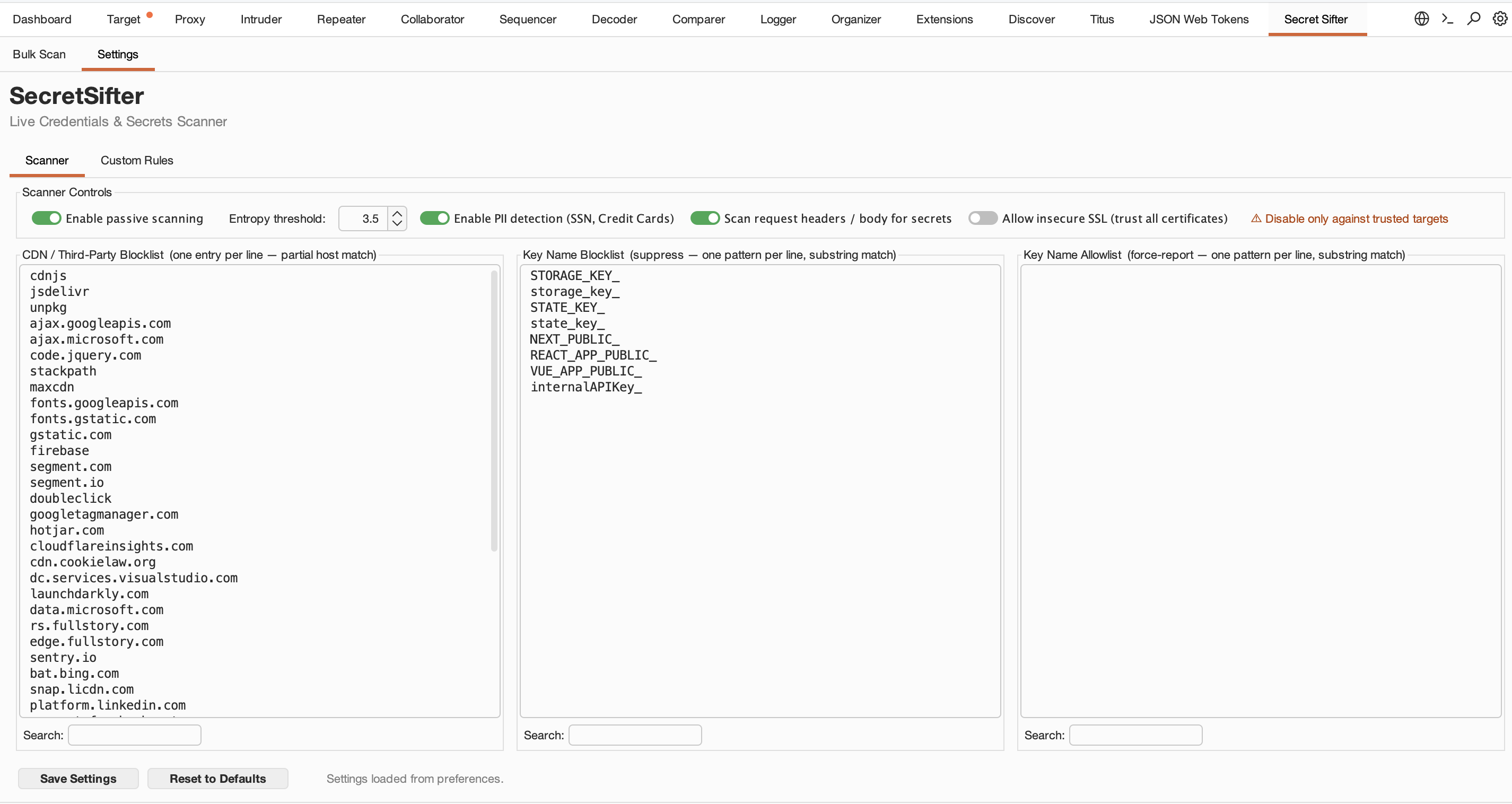
| Setting | Default | Effect |
|---|---|---|
| Enable passive scanning | On | Scan responses as they pass through Burp |
| Entropy threshold | 3.5 | Minimum Shannon entropy for the high-entropy scanner (0.0 to 6.0) |
| Enable PII detection (SSN, Credit Cards) | On | Report SSNs and credit card numbers at the FULL tier |
| Scan request headers / body for secrets | On | Also scan requests, such as custom credential headers |
| Allow insecure SSL (trust all certificates) | Off | Saved for reference only. TLS trust is governed by Burp's project-level TLS settings; for self-signed or internal certificates, add the CA to Burp's trust store. |
| CDN / Third-Party Blocklist | 44 entries | Hosts whose responses are skipped |
| Key Name Blocklist | 7 entries | Findings whose key name contains an entry are suppressed |
| Key Name Allowlist | Empty | Overrides the blocklist and lets the generic key-value scanner accept the key. Other noise filters still apply. |
How the lists match:
-
CDN blocklist: domain-suffix match.
example.commatchesexample.comandcdn.example.com, but notmyexample.com. Any host starting withcdn.is also skipped. - Key name lists: case-insensitive substring match. The allowlist wins over the blocklist.
-
Key name blocklist defaults:
STORAGE_KEY_,storage_key_,STATE_KEY_,state_key_,NEXT_PUBLIC_,REACT_APP_PUBLIC_,VUE_APP_PUBLIC_.
| Setting | Default | Effect |
|---|---|---|
| Custom rules | Empty |
RuleName | regex | severity, one per line. See Detection Rules. |
| Enable custom rules | On | Run custom rules alongside the built-in rules |
| Custom rules only (raw) | Off | Run only custom rules and bypass the noise filters. This turns off all built-in detection for proxy traffic and Bulk Scan. |
Click Save Settings to apply changes. Settings are stored in Burp's preferences.
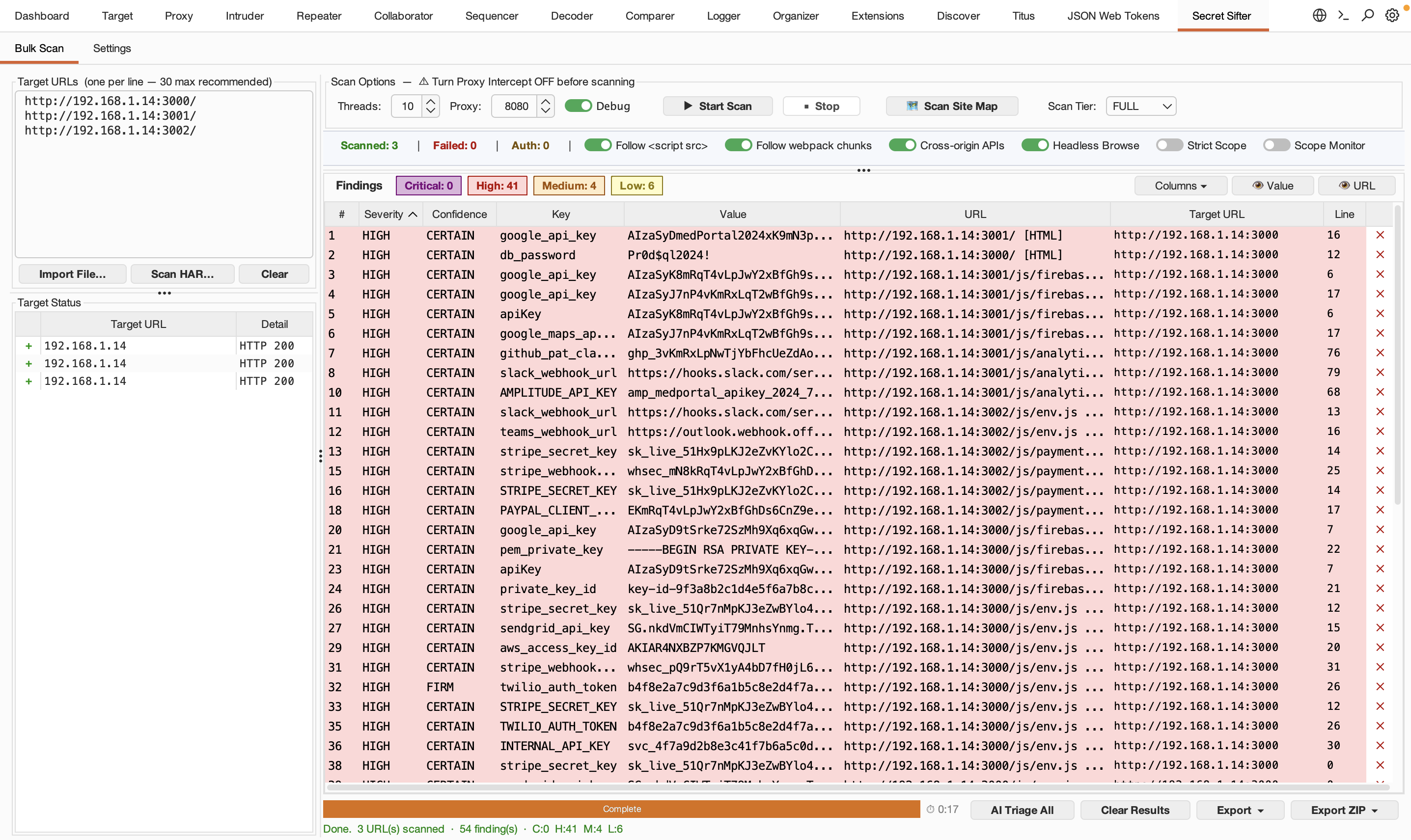
Set on the Bulk Scan tab:
| Option | Default | Effect |
|---|---|---|
| Threads | 10 (1 to 50) | Concurrent URL workers |
Follow <script src>
|
On | Fetch and scan scripts referenced by HTML pages |
| Follow webpack chunks | On | Follow chunk references inside JavaScript bundles |
| Scope Monitor | Off | Also add passive findings from proxy traffic for hosts in the URL list to the results table |
| Cross-origin APIs | On | Capture API calls a watched host's JavaScript makes to other domains |
| Headless Browse | Off | Load pages in Chrome through Burp's proxy to capture dynamic requests |
| Strict Scope | Off | Limit findings to hosts in the URL list (this also turns off cross-origin capture) |
| Proxy | 8080 | Burp proxy port used during scans. Proxy Intercept must be off while scanning. |
| Scan Tier | FULL | FAST, LIGHT or FULL. See How It Works. |
| Debug | Off | Log observed URLs and replay details to Extensions, Output |
Headless Browse asks for consent the first time. It launches the browser with Burp as its proxy, but a list of Google, Facebook and other common third-party domains bypasses the proxy and goes direct. It uses a temporary profile in the system temp folder, which is reset before each launch. It looks for Chrome or Edge on Windows, Chrome, Chromium or Edge on macOS, and Chrome or Chromium on Linux (in standard locations or on your
PATH).
The MCP edition adds two sub-tabs under Settings:
| Sub-tab | Setting | Default |
|---|---|---|
| AI Triage | Provider | Burp AI (Pro) |
| AI / MCP | Enable MCP server on 127.0.0.1:8765 | Off |
See AI Triage and MCP Integration.