Releases: OffbandMesh/meshcore-client
Release list
Offband Meshcore 1.2.0

Offband Meshcore 1.2.0
Our biggest release yet. A ground-up interface redesign, a real database under the
hood, GIFs that work across every MeshCore client, and hands-on control of your
radio's RF front end. This is also the first Offband release built, signed, and
shipped to every platform automatically.
One app, every platform
From this release on, every Offband build ships everywhere at once, signed with
the same key so updates just work:
- Android: install from Google Play or sideload the signed APK
- Windows: desktop build
- Linux: desktop build
- Web: run it right in your browser, no install, at offband.app
Pick your platform below.
A brand-new interface
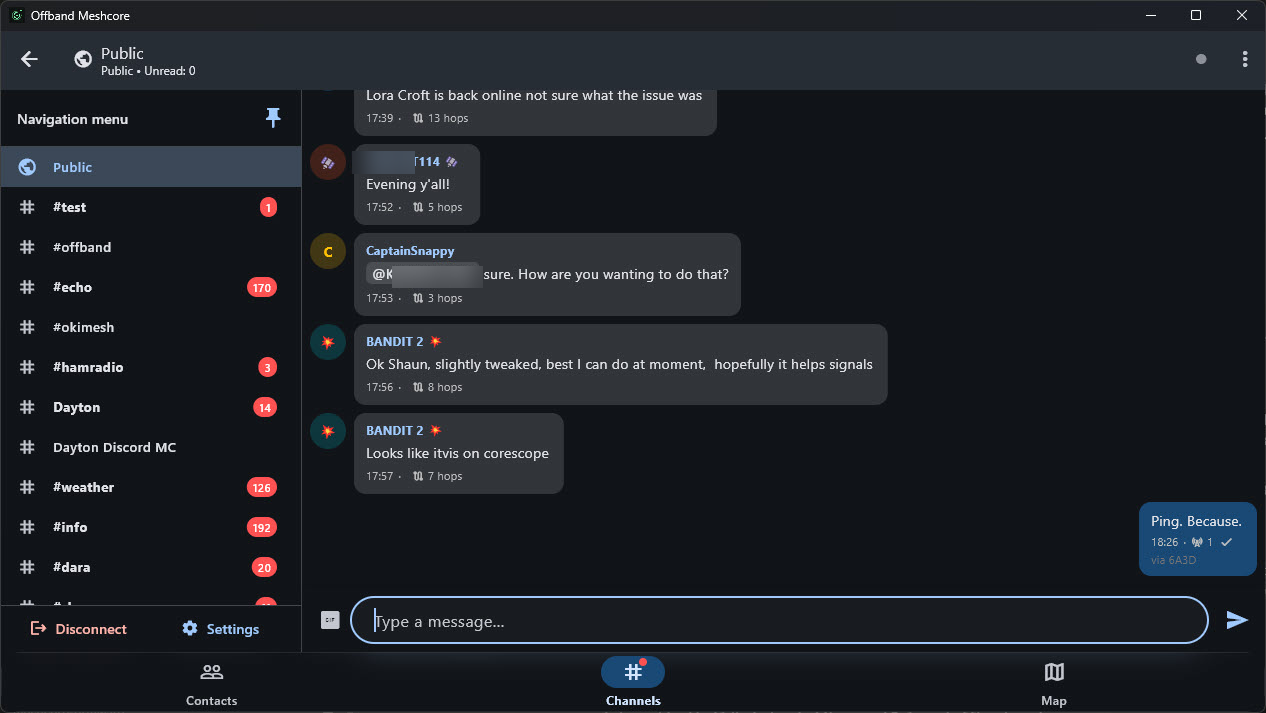
The headline feature. Offband has been rebuilt around a modern navigation shell
that finally gets out of your way.
- A left rail you open from the hamburger button, and can pin open so it
lives right alongside your conversation instead of covering it. - Your channels live in the rail and switch in place, so jumping between
channels never loses your spot or your scroll position. - Map layer toggles, Disconnect, and Settings all found sensible new homes in the
panel, and the back button finally behaves the way it should: it backgrounds
the app instead of killing it, and never knocks you off a connected radio.
Your data, on solid ground
Under the surface, Offband now keeps your messages, contacts, and channels in a
real SQLite database instead of a pile of loose preference files.
- Your existing data migrates automatically the first time you open this
version. Nothing is thrown away, and your full message history is preserved. - Storage problems that used to fail silently now surface, so nothing goes wrong
in the dark. - On desktop, your data no longer gets swept into OneDrive/Documents sync.
GIFs everyone can see
GIFs are no longer an Offband-only party trick.
- Send a GIF and it goes out as a plain Giphy link, so people on stock
MeshCore and other clients can tap it and watch it too, not just Offband
users. - Paste a Giphy or Tenor link and it renders inline, behind a trusted-host
safety allowlist.
Take command of your radio's front end
Power users, this one's for you. On supported hardware, Offband now gives you
direct control of your radio's FEM / LNA (the front-end module and low-noise
amplifier that shape receive sensitivity and transmit path).
- Toggle FEM LNA right from Radio Settings.
- Device Info now reads out your radio's Offband capabilities, so you can see at a
glance what your hardware supports.
Both are gated on firmware capability, so they appear only where the radio
actually supports them.
Deeper diagnostics
More signal, less guesswork when you need to see what your mesh is doing.
- Message arrival time is now logged and persisted separately from the claimed
send time, so you can tell when a message really reached you versus when the
sender says it left (#285). - Path diagnostics report honest, width-aware units instead of mislabeled hop
counts, and path lengths decode exactly per the firmware contract.
Faster across the board
The new storage engine and a round of under-the-hood work add up to a noticeably
snappier app.
- Connecting no longer rewrites your entire preferences file for every channel, so
connect time is quicker and lighter on storage. - Bulk reads and writes go through the database now, which scales far better as
your message and contact history grows.
And a few more
- Desktop remembers your window size and position between launches.
- Reach a contact's settings straight from its long-press menu.
- You can no longer accidentally block your own node.
See the full, itemized changelog in the repository.
Support Offband
Offband is free and open source, built by a very small team. If it is useful to
you, please consider chipping in at
offband.org/donate. Donations go directly toward
keeping the project going and toward getting Offband onto the iOS App Store, which
carries its own ongoing Apple costs. Thank you for being part of it.
Test b59 — path_len decode/encode fix + path diagnostics (#309/#298)

For Bandit: this build targets the 2-byte-net repeater routing failures (#240 / #279). It contains both a real fix and much better diagnostics.
The fix (#309)
MeshCore's path_len byte is packed: high 2 bits = hash size, low 6 bits = hop COUNT, and byte length = count x size (firmware src/Packet.h:79-84). Offband had it wrong in both directions:
- Receiving: it read the hop count as a byte count, so on a 2-byte net it kept half of every path and threw the rest away. A 2-hop route to
DAYTON VAbecame a 2-byte fragment, which is why those repeater logins timed out every single attempt. - Sending: it wrote the hop count raw, leaving the width bits at
00= "1-byte hashes", while handing the radio 2-byte hash data. The radio then routed on a 1-byte reading of 2-byte data. This is the likeliest cause of "routes via c6 and 5c separately" and paths flying off across the map.
Paths now carry their own width, so a stored path can never be re-sliced at the wrong width.
Migration: contacts saved by an older build hold truncated bytes that cannot be recovered, so their paths are dropped on first launch and those contacts fall back to flood until your radio re-supplies the route. That is expected and self-heals.
The diagnostics (#298)
If routing is still wrong, the log now says why. Contact lines read:
hops=2 w=2 bytes=4/4 [C65C,A1B2]
hops = real hop count, w = width, bytes = held/expected, plus TRUNCATED if short. Device info now logs its frame length and warns on any width change (Path hash width: 2 -> 1).
If it is still broken, please send a debug log. The previous capture recorded path lengths but never path bytes, which is why the root cause took so long. This one will show it directly.
Honest caveats
- The doubling is still unexplained. You reported 4 hops becoming 8. The receive-side fix predicts halving, not doubling. The send-side fix is the part expected to actually unbreak your repeaters. If it does not, the new logs should finally show which assumption is wrong.
- Not yet validated on hardware. CI is green on 7 platforms and 495 tests pass, but no radio has confirmed it routes correctly. That is what this build is for.
Also bundled (unrelated in-flight work)
Settings reorganisation (#268), FEM LNA toggle (#304), inline Giphy/Tenor URLs (#283), GIF notification summaries (#284), self-block guard (#250).
Because these ride along, anything odd is not automatically the path fix.
Verification
flutter analyze clean; 495 tests pass; CI green on android, ios, linux, macos, web, windows, analyze. Gemini adversarial review run on the path diff, its one finding fixed (_pathDiag false-TRUNCATED on mixed widths).
Built from dev @ 879523d plus the branches listed above.
Offband Meshcore 1.1.2-rc.3
Offband Meshcore 1.1.2-rc.3
This release brings a full block / mute system, richer path tracing and topology, and per-channel notification control, along with a batch of connectivity and UX fixes. It combines the rc.2 and rc.3 closed-test builds.
Blocking and muting
You can now block a contact or a channel sender from contacts, DMs, discovery, or directly from a channel message. Blocked DMs and adverts are suppressed with a visible marker, a name-only block is promoted to the sender's public key the next time they advert or DM you, and stale blocks age out after 30 days. Everything is managed from Settings → Blocked, and where the radio's firmware supports it, your block list syncs to the device on connect.
Notifications, your way
Each channel gets a three-way notification selector — all messages, mentions only, or muted — applied right at the notification gate and remembered per channel.
Path tracing and topology
Path traces are now width-matched to the mesh, with a topology readout and a route-builder that groups hops the way the network actually addresses them rather than as raw bytes. Channel QR codes let you share a channel or add one by scanning, using the reference-app format.
Fixes worth calling out
- USB no longer wedges ESP32-C6 boards: the open-time DTR pulse is gated by device type, so it only fires where it's needed.
- Outgoing DMs to a blocked contact are dropped at the send path.
- GPS refresh falls back to stock-firmware telemetry when the fork-specific query isn't available, so more radios report position without flooding the link.
See CHANGELOG.md for the full itemized list.
Test b58 — Mesh topology readout (#196)
Topology readout — see whether the passive map is actually filling (#196, epic #186).
You asked "when do path suggestions kick in?" — this makes it visible instead of guessing.
Where: Settings → Debug → Mesh topology.
What it shows:
- nodes / edges / freshness counters up top, plus your own node prefix.
- Nodes — every repeater/relay heard, name-resolved where a contact matches (else hex), with reception SNR for your direct neighbours, seen-count, and last-heard age.
- Edges — observed adjacencies (
A ~ B), times seen, age, failed marker. - Copy button dumps the whole graph to clipboard.
What to look for:
- Leave it connected a few minutes. Counts climb as routed packets arrive → ingestion is live (a missing route suggestion is then just traffic cadence + no persistence yet, not a bug).
- Stuck at 0 while messages are flowing → the ingestion wiring is dead and I fix it. Either way this settles it — paste me the Copy dump or a screenshot.
- Before you trace a repeater, check it actually shows up in the Nodes list — if it isn't in the map yet, there's no route to infer.
Also in this build (from b57): topology-inferred trace routes + the readable/searchable route builder.
Android APK attached. Windows zip to follow — the desktop exe was locked by the running app at build time.
Bundles the full in-flight stack on feat/163-channel-qr. Nothing merged.
Test b57 — readable + searchable route builder (#186)
Two route-builder UX fixes (#186) — addresses the b55/b56 feedback + everything to date.
1. Readable suggested route. When the topology map has a route, the builder now opens with a highlighted "Suggested route (shortest heard)" box rendering the path by name — e.g. "You → HomeRepeater → Backbone → <Target>" — so you can read + confirm the shortest inferred path at a glance instead of squinting at hex.
2. Searchable, sorted builder. When you have to build a route by hand (topology hasn't learned one yet), the repeater list is no longer raw contact-store order:
- Sorted alphabetically by name — coherent, not random.
- Search box at the top — type part of a name (or a hex prefix) to filter. No more scroll-and-hope.
How to test:
- Let it listen a few minutes (map still resets on restart — persistence is Phase D, next; it'll cut down how often you land in the manual builder at all).
- Path Trace a repeater past your own:
- Learned a route → named suggestion in the box → confirm.
- Not yet → the builder is now sorted + searchable — find your first hop fast.
Still noted: the "first run dies, retry works" is RF (dropped LoRa trace packets) — say the word and I'll add an auto-retry so it resends a couple times on timeout.
Supersedes b56 (folds in its readable-routes change). Bundles the full in-flight stack. APK + Windows.
Test b55 — topology-inferred trace routes (#186)
Topology-inferred trace routes (#186, Phase B+C) + everything to date.
The trace now asks a passive topology map — built from the routing path of every packet the radio hears (the same firehose that feeds nearest-repeater detection) — for a route, and pre-fills the route builder with it. The blind strongest-repeater guess is gone.
How to test:
- Let it listen first. The map builds live from received traffic and starts empty on launch (persistence is the next phase). Give it a few minutes on your active mesh so it learns some topology.
- Tap a repeater past your own → Path Trace:
- Learned a route → the builder opens pre-filled with the suggested hops (e.g.
6A3D,E41D); confirm (or edit) → it traces that route. Title shows "via<first hop>". This is the payoff — a route to a node inferred from traffic, no manual topology knowledge. - Hasn't learned one yet → empty builder (build it manually) — never a silent doomed ping.
- Learned a route → the builder opens pre-filled with the suggested hops (e.g.
- Your own repeater / a direct neighbour → plain one-hop ping (unchanged).
Known limits (by design, this build):
- In-memory only — the map resets on restart. Persistence (survives restarts, ready on launch) is Phase D, next.
- Confirm-first is deliberate — you always see/approve the route before it traces. Auto-run is a later opt-in.
Bundles the full in-flight stack (RX-fed nearest-repeater detection, per-hop display, path-hash width, etc.).
Downloads
- Android:
app-release.apk— install on your phone (the one that hears your live mesh). - Windows:
offband-meshcore-b55-windows.zip— unzip the whole folder, runoffband_meshcore.exe. Unsigned → SmartScreen "unknown publisher" → More info → Run anyway. Install the VC++ x64 runtime if a clean machine hits a missing-DLL error.
Test b54 — RX-fed nearest-repeater detection (#150)
RX-fed nearest-repeater detection (#150) + everything to date.
Fixes why b53 fell back to "Ping Repeater": the direct-repeater list was fed only from adverts and hard-expired at 30 min — useless under 12-hour advert cadence.
Now: the nearest/strongest direct repeater is detected from the last hop of every received packet (messages, ACKs, adverts) — not just adverts. The SNR + path were already parsed on every RX; we just stopped throwing them away. A repeater with no committed route now traces through your strongest directly-heard repeater automatically: [hop → target → hop].
How to test:
- Tap a repeater past your own → Path Trace → title should read "Path trace via
<prefix>" and route multi-hop (notSENT → timeout). - Your own repeater (direct neighbour) still does a plain one-hop ping — correct.
- If the app knows no direct repeater, a picker opens so you can choose the first hop instead of a doomed ping.
Mobile side-benefit: as you drive, the list refreshes from whatever traffic you're actually hearing, so it tracks your current location — and the upstream "nearest repeater signal" meter comes alive too (fed by traffic, not 12h adverts).
Under the hood: notify-on-change only (no per-packet UI churn); list stays capped at 5; no hard 30-min drop, so a known repeater stays usable for routing between reads. No new per-packet cost — the parse already ran.
Downloads
- Android:
app-release.apk— install on your phone. - Windows (desktop):
offband-meshcore-b54-windows.zip— unzip the whole folder, then runoffband_meshcore.exe(it will not run on its own — it needs the folder). Unsigned, so Windows SmartScreen shows "unknown publisher" → More info → Run anyway. If a clean machine hits a missing-DLL error, install the Microsoft VC++ x64 runtime (already present on most Win10/11).
Test build — not merged or released. Windows is unsigned; fine for known testers.
Test b53 — Repeater trace via-repeater (#150)
Repeater trace via-repeater fix (#150) + everything to date.
When you Path Trace a repeater that has no committed path, the app now routes it through your strongest direct (one-hop) repeater — building the round-trip [repeater → target → repeater] — instead of a one-hop ping that can't reach anything past your first hop. The screen title shows "Path trace via <prefix>".
Confirmed against firmware (RedCreek): trace has no discovery mode, and a repeater's out_path stays flood (0xFF) by design — you never DM a repeater, so it never commits a route. So the client builds the route itself.
How to test:
- Tap a repeater past your own → Path Trace → should route multi-hop (title "via 6A3D") and return data instead of timing out.
- Your own repeater (a direct neighbour) still does a plain one-hop ping — correct.
- Limitation: the app picks your strongest direct repeater as the first hop; a target behind a different repeater may still miss (use Set Custom Path for those).
Also in this build: per-hop trace display (AC01, not AC,01); the full path-hash + trace stack; and channel-share QR (#161/#163) — test that too (Share QR on a channel → Scan QR to add it).
APK-only (Windows exe unchanged this build).
Test b52 — Channel-share QR (#161) + trace/path-hash
Test b52 — Channel-share QR (#161) + everything to date
Combined binary: the path-hash width sweep (#151/#154/#155/#156), the trace fixes (#150, incl. the b51 origin-strip), and the new channel-share QR (#161).
Channel QR (new):
- Share: tap a channel → "Share QR Code" → shows a scannable QR (
meshcore://channel/add?name=…&secret=…) that the reference MeshCore app and ours can scan to add the channel. - Scan: Add Channel → Scan QR Code now accepts channel QRs (as well as community QRs) → confirms → adds to the next free slot.
- Format verified to round-trip against two real reference examples (
#test,#echo).
Still awaiting your hardware test (unchanged from b51):
- Multi-hop Path Trace (b51 origin-strip): should now complete, or we've hit the mesh return-leg ceiling (RF, not client-fixable).
Artifacts: Windows exe (relaunch shortcut) + Android APK.
Test b51 — Trace excludes our own origin (#150)
Test b51 — Trace excludes our own origin (#150)
Per the firmware trace-path contract (meshcore-firmware/docs/trace-path-format.md): a multi-hop trace route must exclude our own node (it's implicit at both ends). If our stored route started with our own node's prefix, the trace packet couldn't advance — nothing forwards our own hash — so we got RESP_CODE_SENT then a silent timeout. That's the doc's #1, most-common cause.
b51 strips a leading self hop from the route before assembling the round-trip.
What to check (when your device is back up):
- A multi-hop repeater "Path Trace" should now complete (return hops) instead of timing out.
- If it still times out → we've hit the mesh ceiling: a repeater on the return leg not relaying (asymmetric link or a duty-cycled/sleeping repeater). That's RF, not client-fixable — the client is doing it right.
- Direct pings and the b50 flood / error-1 fix are unchanged.
Artifacts: Windows exe (relaunch shortcut) + Android APK.