Reproduction steps:
- Create a new presentation in PowerPoint Web.
- Insert a new add-in, select Mentimeter from the Store tab. This will add the add-in to your first slide.
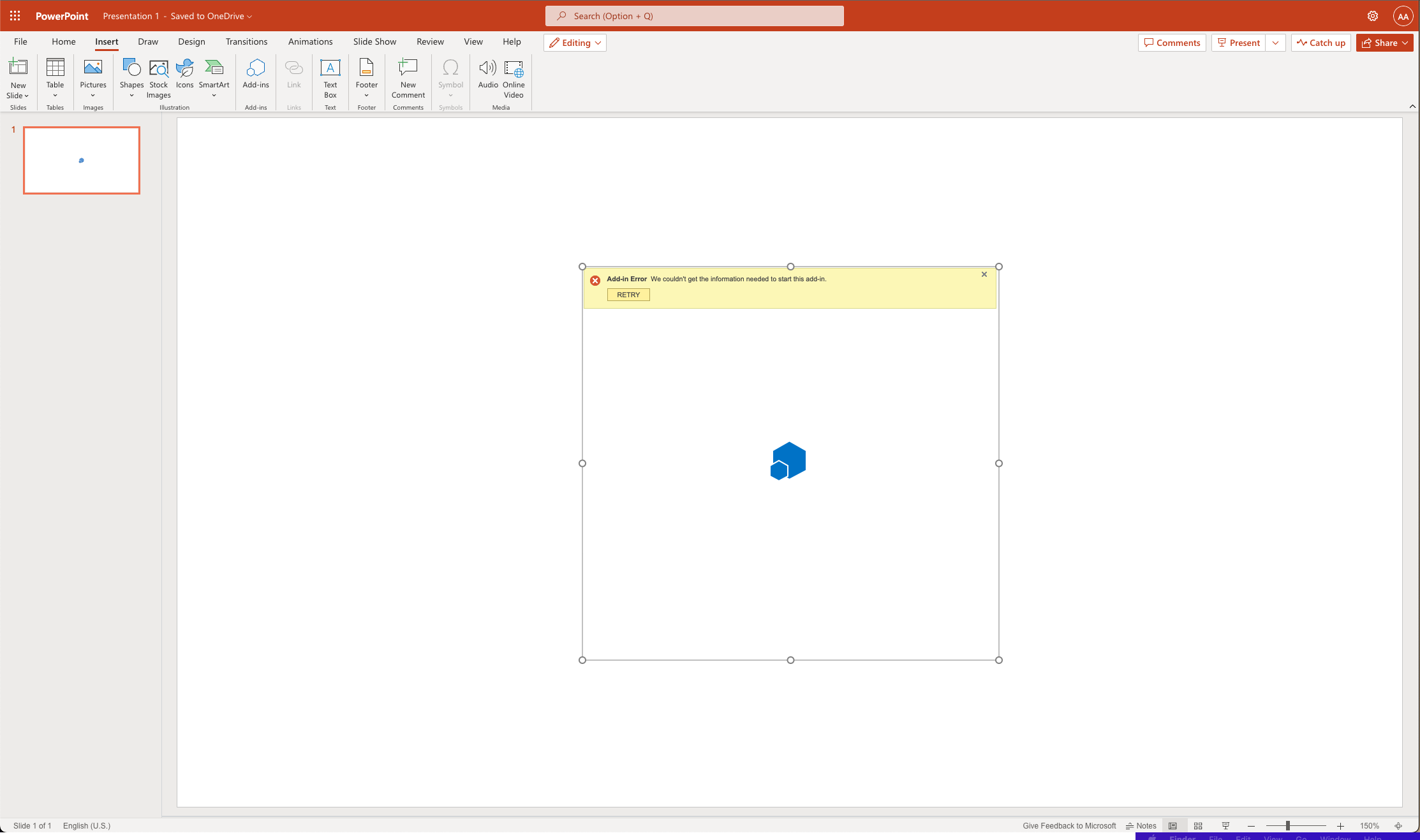
- The add-in will try to load and show this message:
"Add-in Error: We couldn't get the information needed to start this add-in."
Your Environment
- Platform [PC desktop, Mac, iOS, Office on the web]: Office on the web
- Host [Excel, Word, PowerPoint, etc.]: Powerpoint Web
- Operating System: Mac 12.5.1
- Browser (if using Office on the web): Chrome 106.0.5249.119
Expected behavior
The app should show a green spinner and then start loading the target website (the Mentimeter app).
Current behavior
It does not send a request to the target website, it shows the error right away.
It seems to only affect PowerPoint Web and not the desktop app.
Context
I'm an Engineer at Mentimeter. We discovered this issue sometime last week.

Reproduction steps:
"Add-in Error: We couldn't get the information needed to start this add-in."
Your Environment
Expected behavior
The app should show a green spinner and then start loading the target website (the Mentimeter app).
Current behavior
It does not send a request to the target website, it shows the error right away.
It seems to only affect PowerPoint Web and not the desktop app.
Context
I'm an Engineer at Mentimeter. We discovered this issue sometime last week.