Describe the bug
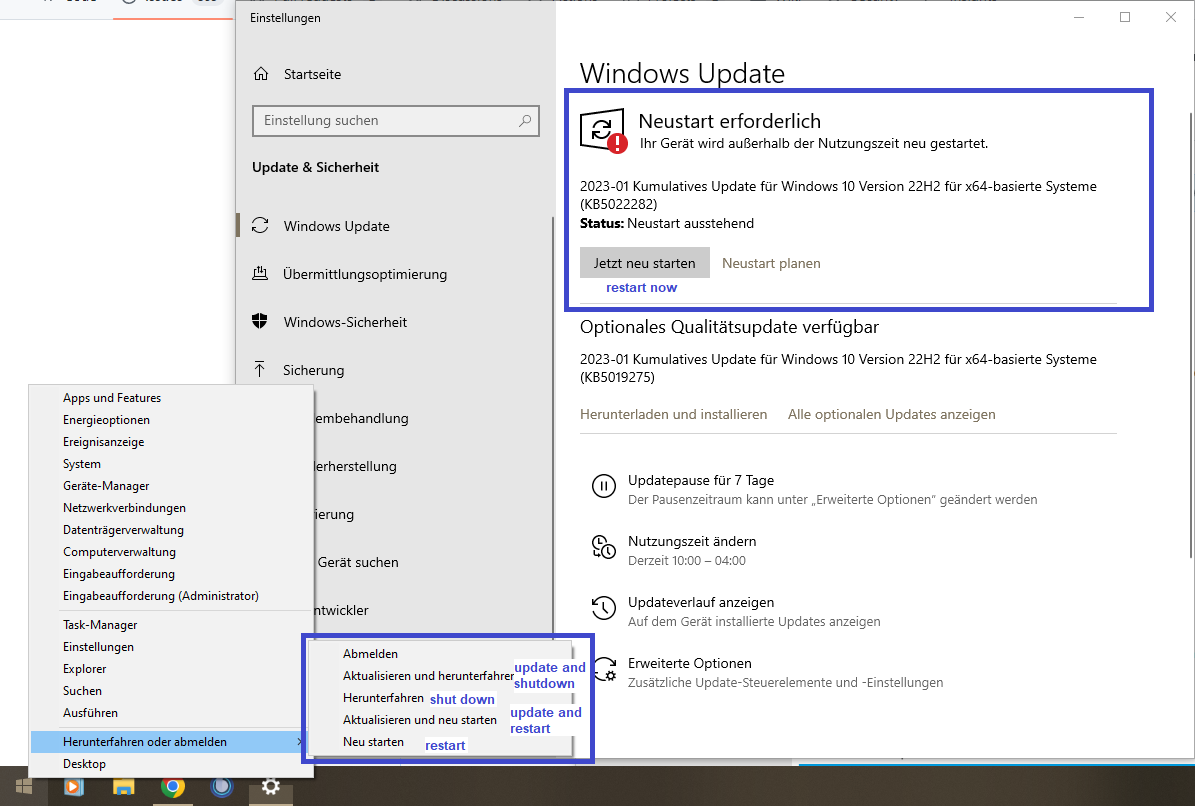
Provided you have activated the corresponding setting, sometimes the Open Shell menu will not detect pending updates and therefore won't show the additional start menu buttons like "update and shutdown" and "update and restart".
As you can see in the attached screenshot below (english labels added) there is currently one pending update: KB5022282
Well at least it doesn't install the pending update if you want to avoid it by using the given buttons, so this part works as intended. Tested this one the last two or three shutdowns and the update is still pending.
Area of issue
Start menu
To reproduce
- Wait for updates requiring a restart of the computer
OR
- search for update KB5022282 via microsoft update catalog (try to remove if already installed)
- install the update(s)
- when prompted to restart computer, check the open shell start menu and look for the missing "update and"-buttons in the shutdown compartment (as seen in the screenshot)

Expected behavior
As with most of the other Windows updates there should be at least two additional buttons labeled "update and shutdown" and "update and reboot" when a restart is required for finishing the update installation process.
Open-Shell version
4.4.186
Windows version
Windows 10 Pro 22H2
Additional context
One additional note: When right clicking on the start menu button Windows itself will still show the "update and"-buttons

Describe the bug
Provided you have activated the corresponding setting, sometimes the Open Shell menu will not detect pending updates and therefore won't show the additional start menu buttons like "update and shutdown" and "update and restart".
As you can see in the attached screenshot below (english labels added) there is currently one pending update: KB5022282
Well at least it doesn't install the pending update if you want to avoid it by using the given buttons, so this part works as intended. Tested this one the last two or three shutdowns and the update is still pending.
Area of issue
Start menu
To reproduce
OR
Expected behavior
As with most of the other Windows updates there should be at least two additional buttons labeled "update and shutdown" and "update and reboot" when a restart is required for finishing the update installation process.
Open-Shell version
4.4.186
Windows version
Windows 10 Pro 22H2
Additional context
One additional note: When right clicking on the start menu button Windows itself will still show the "update and"-buttons