Taskbar Colour Permanantly Stuck #567

Description

When using Open-Shell to change the taskbar colour, the taskbar suddenly stopped responding to any further changes to the taskbar settings, and is permanantly stuck on Taskbar colour #FFFFFF.
The taskbar text colour can still be changed, but the actual colour and transparency of the taskbar is stuck, and cannot be changed.
This issue persists even if Open-Shell menu is quit, Windows is restarted, or Open-Shell is uninstalled.
To Reproduce
- Right-Click Start button
- Click "Settings"
- Check "Show all settings"
- Click "Taskbar"
- Changing the "Taskbar color" and "Taskbar opacity" settings; it worked fine
Screenshots
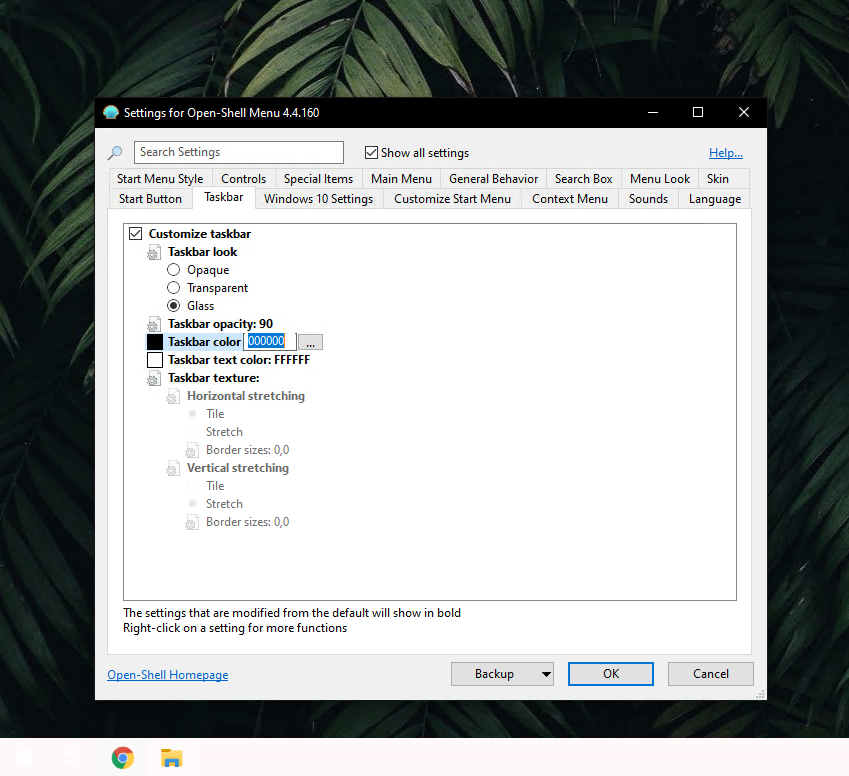
The taskbar should be a plain black colour, but it is stuck on white with no way to change it.
Version:
Open-Shell version 4.4.160
Running on Windows 10 Pro, Build 19041.vb_release.191206-1406