Fixed Start Menu entries steal focus from program shortcuts #984

Description

Describe the bug
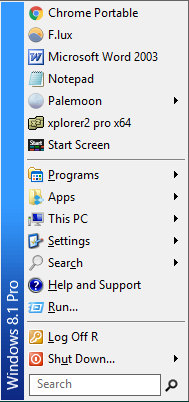
This behavior is completely different from Classic Shell. In Start Menu the standard entries for Programs, Settings, Search, etc. have stolen the shortcut keys p, s, c, etc. so if you add your own program shortcuts and they start with any of those letters, you can't get to them by typing the letter. In other words if you have Chrome in the Start Menu you can't open it by typing because only goes to Search. In Classic Start Menu you could have as many programs starting with C as you want and typing would go through all of them in sequence.
The full list of letters "stolen" by the standard entries is:
p, s, c, h, r, l, u, for Programs, Settings, Search, Help, Run, Log Off, Shut Down
For programs that don't start with those letters there's no problem and you can open them by typing the first letter.
To Reproduce
- Drag any program whose name begins with p, s, c, h, r, l, or u to start menu, for example Chrome.
- Type first letter of program, for example . In this example, focus will not go to Chrome but only to Search.
Expected behavior
Typing first letter of program in start menu takes you to that program
Version:
4.4.160
Win 8.1
``