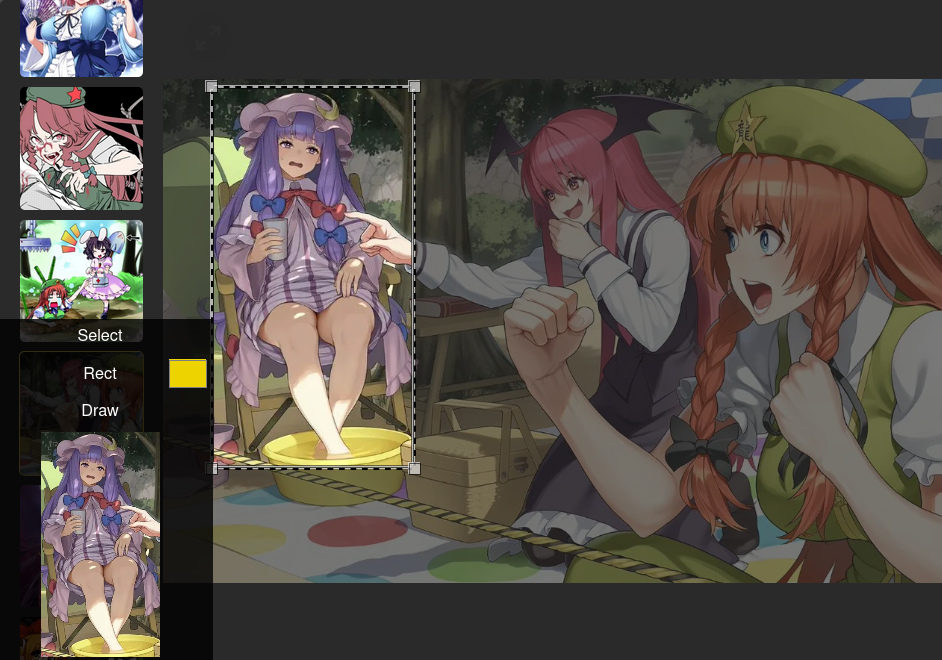
just show source code of this example:
// ==UserScript==
// @name        PasL Example
// @namespace   https://github.com/OpenA/pasL
// @author      OpenA
// @version     1.0
// @match       https://yandex.ru/images/search
// @noframes
// @require     https://github.com/OpenA/pasL/blob/master/pasL.js?raw=1
// @resource    pasL-css https://raw.githubusercontent.com/OpenA/pasL/master/pasL.css
// @grant       GM_getResourceText
// @run-at      document-start
// ==/UserScript==

/* create the `select area` with free aspects and active flat edgies */
const crop = new PasL({ lock: false, figure: 0, edgies: true });
const figures = [];

// canvas element on the left bottom on screenshot
const canvas = _setup('canvas', {
  style: 'max-width: 100%; max-height: 220px; height: 180px;background-color: #000;'
});

const pannel = _setup('div', {
  class : 'expsl-pan',
  html  : getPannelHTML()
}, { click: ({ target }) => {

  let img = document.querySelector('.MMImage-Preview');

  if (!img) return;

  if (target.id === 'Select') {

    const addSelection = () => {
      let start_x = Math.floor(img.width  / 2) - 50;
      let start_y = Math.floor(img.height / 2) - 50;
      // adding the 100x100 selection at center of image
      crop.setZone(img.width, img.height, start_x, start_y, 100, 100);
    };
    img.before(crop.box); // add selection box
    addSelection();
  } else if (target.id === 'Draw') {
    // calculate real image scaling
    const scale = img.naturalWidth / img.width;
    // get rescaled coords of crop area
    const [cx,cy,cw,ch] = crop.getCoords(scale);
    // set cropped canvas size
    canvas.width = cw, canvas.height = ch;

    const ctx = canvas.getContext('2d');
    // just draw it in the canvas
    ctx.drawImage(img, cx, cy, cw, ch, 0, 0, cw, ch);

    for (const rect of figures) {
      // get rescaled coords of rect
      let [rx,ry,rw,rh] = rect.getCoords(scale);
      // set offset from cropped coords
      rx -= cx, ry -= cy;
      // set rectangle color and draw it
      ctx.fillStyle = rect.fill;
      ctx.fillRect(rx,ry,rw,rh);
    }
  } else if (target.id === 'Rect') {
    /* create the `rectangle` with free aspects */
    const rect = new PasL({ lock: false, figure: 1, edgies: false });
    /* set full image as work zone */
    rect.setZone(img.width, img.height, 0, 0, 40, 40);

    rect.fill = target.lastElementChild.value;
    img.before(rect.box);
    figures.push(rect);
    target.firstElementChild.hidden = false;
  } else if (target.id === 'Rrem' && figures.length ) {
    const idx = figures.length - 1, r = figures.pop();
    target.hidden = !idx;
    r.box.remove();
  }
}});

pannel.append( canvas );

crop.bubbles = false; // stop propagate mouse/touch events
crop.box.addEventListener('click', e => {
  e.stopPropagation(); e.preventDefault();
});

if (document.readyState === 'loading') {
  document.addEventListener('DOMContentLoaded', () => document.body.append(pannel));
} else
  document.body.append(pannel);

function getPannelHTML() {
  return `
  <div class="expsl-btn" id="Select"></div>
  <div class="expsl-btn" id="Rect"><span id="Rrem" hidden></span><input type="color"></div>
  <div class="expsl-btn" id="Draw"></div>
  <style>
    ${GM_getResourceText('pasL-css')}
  .expsl-pan {
    position: fixed;
    width: 180px; left: 0; bottom: 0;
    background-color: rgba(0,0,0,.8);
    text-align: center; color: white;
  }
  #Rect [type="color"] {
    position: absolute; right: 5px; margin-top: 2px;
    width: 30px; height: 23px; padding: 0; border: none;
  }
  #Rrem:before {
    content: "X";
    color: brown; cursor: pointer; position: absolute;
    left: 5px; line-height: 30px; padding: 0 7px;
  }
  .expsl-btn:before { content: attr(id); line-height: 30px; }
  .expsl-btn:hover  { background-color: #777; }
  .pasL-box, .expsl-pan { z-index: 99999; }
  .MMImage-Origin { display: none; }
  </style>
`
}