Repository navigation
Ownership and Trusted Players
Turret bases, turrets, camouflage traps and the hardened blocks, walls and fences belong to a player, their owner. Turrets never target their base's owner, its trusted players or members of the owner's scoreboard team, nor the pets of these players.
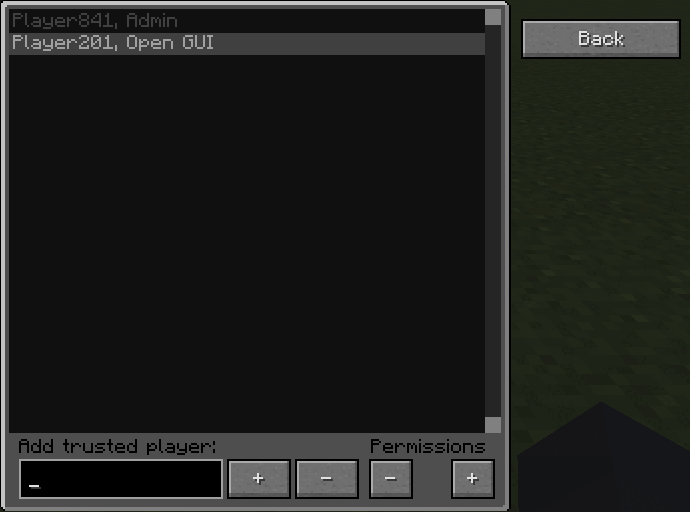
The Trusted Players button in the base GUI opens the trust list. Each trusted player has an access level; each level includes all rights of the levels below it. Add a player by name with +, select them in the list and change their level with the Permissions buttons.
| Level | Rights |
|---|---|
| None | not targeted by the turrets, but no access to the base |
| Open GUI | may open the base GUI and its inventory |
| Change settings | may also change targeting and other settings |
| Admin | may also manage trusted players, change redstone mode and range, drop the base or its turrets, attach turrets, set the camouflage and use the Memory Card |
Camouflage traps have their own trust list (button "Trusted" in the camouflage menu) with the levels trusted (can stand on the trap instead of falling through) and admin (may also open its menus and manage the list).
Trusted players are normally not hurt if a turret hits them by accident; servers can change that with turrets.turretDamageTrustedPlayers.
With general.canOPAccessOwnedBlocks operators may open every base and are never targeted.
Blocks placed without a player, e.g. by /setblock, a structure or a machine, have no owner.
They sparkle green, and Jade shows "Owner: nobody (right-click to claim)".
- Right-clicking such a block claims it, together with all unowned bases, turrets, traps and passive defense blocks connected to it (up to
bases.claimSpreadLimit, default 1024). - Machines' fake players can only claim if
general.fakePlayersCanClaimis enabled. - Unowned bases stay inert until they are claimed, unless
bases.unownedBasesActiveis set (then they shoot everyone). - Turrets can only be attached to an unowned base by players who may use game master blocks (operators, map makers).
The owner of a base (configure screen) or a camouflage trap can disown it after a confirmation; its trust list is cleared and anyone can claim it.
The Ownership Wand is a creative-only item for operators:
- Right-click a block to become its owner.
- Sneak + right-click a block to remove its owner.
- The change spreads to the connected blocks of the same owner; sneak + right-click into the air switches spreading on or off.
- While you hold the wand, turrets still target and fire at you, but their shots, explosions and effects do not affect you, which makes testing defenses easy.