Configuration
🌐 English · Deutsch
All settings are managed in the WebUI and stored in the SQLite database (app_settings table). A .env file is no longer required.
Migration: If a legacy
~/.mediaforge/.envstill exists, its values are imported into the database once on first start (existing DB values are never overwritten). Afterwards the file can be deleted directly from the UI under Settings → Legacy .env.
On startup the app additionally exports all stored DB settings into the process environment (MEDIAFORGE_*), so both paths behave identically internally. Environment variables remain useful for initial configuration via Docker — values saved from the UI take precedence.
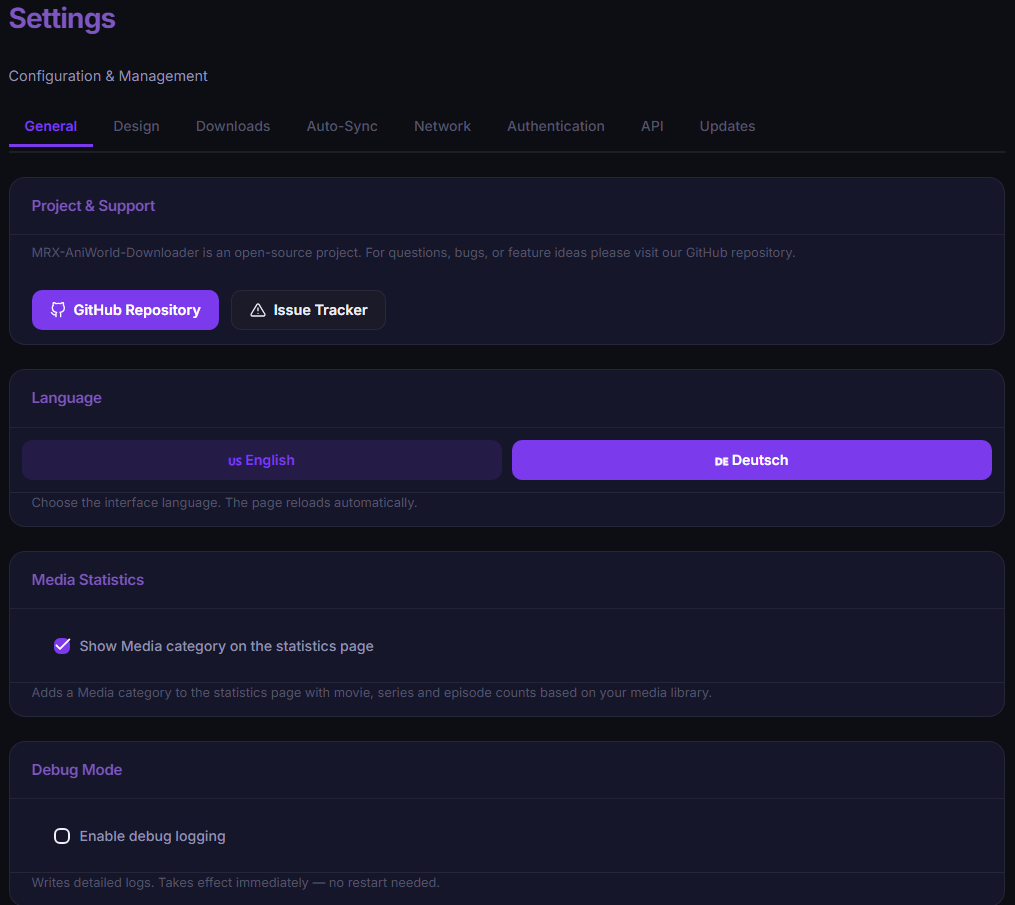
| Setting | DB key | Env variable | Default | Description |
|---|---|---|---|---|
| Download path | download_path |
MEDIAFORGE_DOWNLOAD_PATH |
~/Downloads |
Base folder for all downloads |
| Language separation | lang_separation |
MEDIAFORGE_LANG_SEPARATION |
0 |
One subfolder per language (german-dub, english-sub, …) |
| Disable English Sub | disable_english_sub |
MEDIAFORGE_DISABLE_ENGLISH_SUB |
0 |
Hides English Sub (relevant for "All Languages" sync) |
| FilmPalast subfolder | filmpalast_movie_subfolder |
FILMPALAST_MOVIE_SUBFOLDER |
0 |
Put movies into their own subfolder |
| Default language | download_language |
MEDIAFORGE_LANGUAGE |
German Dub |
Preselection for downloads |
| Default provider | download_provider |
MEDIAFORGE_PROVIDER |
VOE |
Preselection for downloads |
| Naming template | naming_template |
MEDIAFORGE_NAMING_TEMPLATE |
see below | File naming scheme |
| Web base URL | web_base_url |
MEDIAFORGE_WEB_BASE_URL |
empty | Public URL behind a reverse proxy (enables secure cookies for https://) |
| Media statistics | media_stats_enabled |
MEDIAFORGE_MEDIA_STATS_ENABLED |
0 |
Adds a Media category to the statistics page (movie/series/episode counts from the library) |
| Debug mode | debug_mode |
MEDIAFORGE_DEBUG_MODE |
0 |
Verbose logging — takes effect live, no restart (on and off). When the app is started with --debug the toggle is locked on and greyed out (with a note). |
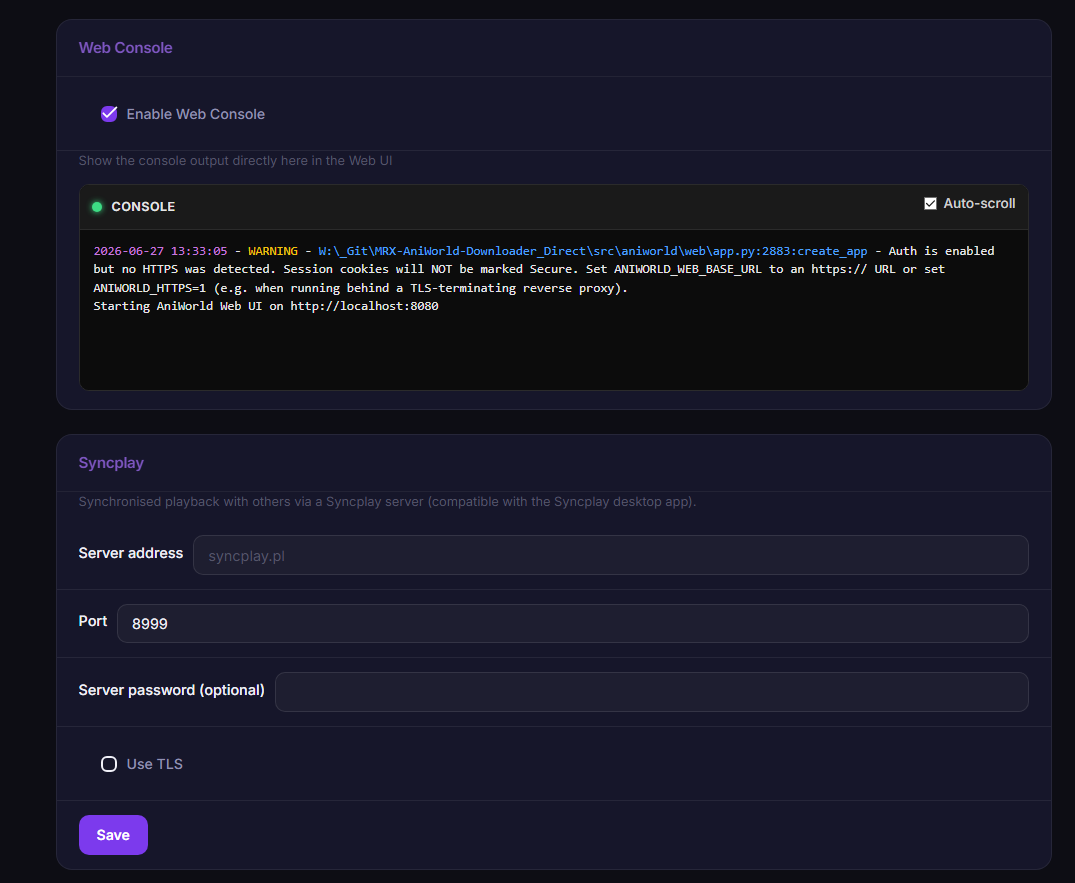
| Web Console | web_console |
MEDIAFORGE_WEB_CONSOLE |
0 |
Shows a read-only, SSH-style console of the live application/FFmpeg output directly in the settings page (admin only) |
Default:
{title} ({year}) [imdbid-{imdbid}]/Season {season}/{title} S{season}E{episode}.mkv
Available placeholders: {title}, {year}, {imdbid}, {season}, {episode}. The scheme is Jellyfin/Plex-compatible (folder per series, Season XX subfolders, SxxExx file names).
The five built-in sources — AniWorld (anime), SerienStream (series), FilmPalast (movies), MegaKino (movies & series) and hanime (adult / 18+, off by default) — can be reordered and toggled from the settings page. All options are stored globally in the database and are admin only. They have no environment variable (DB only).
Under Settings → Design → Source order you decide how the sources appear on the start page — either by dragging the rows or using the up/down arrows. For AniWorld and SerienStream you can additionally:
- toggle the New and Popular sections on or off independently, and
- choose whether New or Popular is shown first.
If both sections of a source are turned off, its whole block is hidden on the start page. MegaKino (New/Popular × Movies/Series) and hanime (New/Trending) can be reordered and toggled the same way.
The Sources tab lets you switch each source on or off. A disabled source is no longer loaded or shown on the start page. The option "Also hide disabled sources from search results" additionally removes disabled sources from the search.
| Setting | DB key | Default | Description |
|---|---|---|---|
| Source order | home_source_order |
aniworld,sto,filmpalast,megakino,hanime |
Order of the source blocks on the start page |
| Section order (AniWorld) | home_section_order_aniworld |
new,popular |
Whether New or Popular is shown first |
| Section order (SerienStream) | home_section_order_sto |
new,popular |
Whether New or Popular is shown first |
| Section order (MegaKino) | home_section_order_megakino |
new_movies,popular_movies,new_series,popular_series |
Order of MegaKino's four sections |
| Section order (hanime) | home_section_order_hanime |
new,trending |
Order of hanime's sections |
| Show New (AniWorld) | source_show_new_aniworld |
1 |
Show/hide the "New Anime" section |
| Show Popular (AniWorld) | source_show_popular_aniworld |
1 |
Show/hide the "Popular Anime" section |
| Show New (SerienStream) | source_show_new_sto |
1 |
Show/hide the "New Series" section |
| Show Popular (SerienStream) | source_show_popular_sto |
1 |
Show/hide the "Popular Series" section |
| Show New Movies (MegaKino) | source_show_new_movies_megakino |
1 |
Show/hide MegaKino's "New Movies" section |
| Show Popular Movies (MegaKino) | source_show_popular_movies_megakino |
1 |
Show/hide MegaKino's "Popular Movies" section |
| Show New Series (MegaKino) | source_show_new_series_megakino |
1 |
Show/hide MegaKino's "New Series" section |
| Show Popular Series (MegaKino) | source_show_popular_series_megakino |
1 |
Show/hide MegaKino's "Popular Series" section |
| Show New (hanime) | source_show_new_hanime |
1 |
Show/hide hanime's "New" section |
| Show Trending (hanime) | source_show_trending_hanime |
1 |
Show/hide hanime's "Trending" section |
| AniWorld enabled | source_enabled_aniworld |
1 |
Show/load AniWorld on the start page |
| SerienStream enabled | source_enabled_sto |
1 |
Show/load SerienStream on the start page |
| FilmPalast enabled | source_enabled_filmpalast |
1 |
Show/load FilmPalast on the start page |
| MegaKino enabled | source_enabled_megakino |
1 |
Show/load MegaKino on the start page |
| hanime enabled | source_enabled_hanime |
0 |
Show/load hanime (18+) — off by default, enabling needs an age confirmation |
| Hide disabled from search | sources_hide_in_search |
0 |
Also skip disabled sources in search results |
| Setting | DB key | Default | Values |
|---|---|---|---|
| Sync interval | sync_schedule |
0 (off) |
1min, 30min, 1h, 2h, 4h, 8h, 12h, 16h, 24h
|
| Schedule mode | sync_mode |
interval |
interval or weekly
|
| Weekdays (weekly) | sync_days |
0,1,2,3,4,5,6 |
Comma list, 0=Mon … 6=Sun |
| Times (weekly) | sync_times |
06:00 |
Comma list HH:MM, one or more |
| Sync language | sync_language |
German Dub |
All languages + All Languages
|
| Sync provider | sync_provider |
VOE |
Active providers |
| Path unavailable action | sync_path_unavailable_action |
skip |
skip or hold
|
| Error retries | sync_error_retries |
0 |
0–10 |
| Retry delay | sync_error_retry_time |
5min |
0min–5min
|
| Adaptive Auto-Sync | sync_adaptive_enabled |
0 |
0 / 1
|
| ↳ Pause after | sync_adaptive_pause_after |
4w |
2w–8w (weeks without a new episode) |
| ↳ Retry after (value) | sync_adaptive_retry_value |
2 |
2–12
|
| ↳ Retry after (unit) | sync_adaptive_retry_unit |
days |
days, weeks, months
|
In weekly mode, sync_days + sync_times replace the fixed interval; a job then runs on the selected weekdays at each configured time (caught up if the app was off at that time). How it all works: AutoSync.
| Setting | DB key | Default | Values |
|---|---|---|---|
| Retention | history_retention_days |
30 |
0 (unlimited), 7, 30, 90, 180, 365 (days) |
History entries older than the selected period are deleted automatically (cleanup runs roughly hourly in the background). Details: Download History.
Named extra paths (e.g. a NAS mount) can be created under Settings. Downloads and AutoSync jobs can then pick a custom path per job. Paths in use by queue entries or sync jobs cannot be deleted.
If your ISP's DNS blocks the streaming sites, an alternative resolver can be selected — takes effect immediately, no restart:
| Mode | Server |
|---|---|
system |
Operating system DNS (default) |
cloudflare |
1.1.1.1 (DoH) |
google |
8.8.8.8 (DoH) |
quad9 |
9.9.9.9 (DoH) |
custom |
Your own server IP |
The switch works on two levels: the app's HTTP requests use DNS-over-HTTPS (niquests), and socket.getaddrinfo is patched so subprocesses like FFmpeg use the chosen server too. A built-in DNS test checks all source sites (aniworld.to, serienstream.to, filmpalast.to, megakino.to, hanime.tv). It verifies not only reachability but that the real site answers: resolved IPs are labelled with their CDN provider (e.g. Cloudflare), and an ISP/CUII block page is flagged as such instead of counting as reachable. The same check powers UpTime monitoring.
Configure a Syncplay server for the Watch Together feature in the player (Web UI → Playback & streaming). The server runs a real Syncplay client per viewer, so playback syncs with desktop mpv/VLC users too.
| Setting | DB key | Env variable | Default | Description |
|---|---|---|---|---|
| Server address | syncplay_server |
MEDIAFORGE_SYNCPLAY_SERVER |
empty | Hostname of the Syncplay server (feature is hidden when empty) |
| Port | syncplay_port |
MEDIAFORGE_SYNCPLAY_PORT |
8999 |
Syncplay server port |
| Use TLS | syncplay_tls |
MEDIAFORGE_SYNCPLAY_TLS |
0 |
Connect over TLS |
| Server password | syncplay_password |
MEDIAFORGE_SYNCPLAY_PASSWORD |
empty | Optional server password |
Under Settings → Updates the app can update itself and switch release channel. The 24 h update check only shows a notice; this is the actual install side.
| Setting | DB key | Default | Description |
|---|---|---|---|
| Auto-update | auto_update_enabled |
0 |
Install an available update automatically |
| Weekdays | auto_update_days |
0,1,2,3,4,5,6 |
Comma list, 0=Mon … 6=Sun |
| Time | auto_update_time |
03:00 |
HH:MM — when the scheduled install runs |
When enabled, an available update is installed automatically at the selected time on the chosen weekdays; the app restarts itself and any running downloads resume afterwards.
Release channel (stable ↔ dev): you can switch between the stable release and the dev channel (latest commits from the models branch — may be unstable). Switching installs the selected version right away.
Which installs can self-update: pip (release & dev) and pipx installs support self-update and channel switching. Docker, frozen (PyInstaller) and unknown installs cannot self-update — the UI shows a hint instead (update Docker via your image/compose, see Docker).
| Setting | DB key / env | Default | Description |
|---|---|---|---|
| Hard timeout |
watchdog_hang_timeout / MEDIAFORGE_HANG_TIMEOUT
|
1800 s |
Maximum total duration of one episode download |
| Stall timeout |
watchdog_stall_timeout / MEDIAFORGE_STALL_TIMEOUT
|
3600 s |
Abort when no progress for this long |
Some options exist only as environment variables (mostly relevant for Docker):
| Variable | Description |
|---|---|
MEDIAFORGE_WEB_ADMIN_USER / MEDIAFORGE_WEB_ADMIN_PASS
|
Auto-create the admin account on first start |
MEDIAFORGE_HTTPS |
1 = force secure cookies (behind a TLS proxy) |
MEDIAFORGE_REDIS_URL |
Redis storage for the login rate limit (in-memory otherwise) |
MEDIAFORGE_VAPID_PRIVATE_KEY / MEDIAFORGE_VAPID_PUBLIC_KEY / MEDIAFORGE_VAPID_CLAIMS_EMAIL
|
Custom Web Push keys (auto-generated otherwise) |
MEDIAFORGE_INSTALL_FOLDER |
Location for auto-downloaded binaries (default ~/.mediaforge) |
Other settings areas have dedicated pages: Authentication (SSO/OIDC), Notifications, Integrations (Jellyfin/Plex/Seerr/MediaScan/CineInfo), Encoding and Anime4K Upscaling.