A modern, modular and secure web dashboard (frontend + BFF) for the PDC Red-DiscordBot.
Counterpart to the companion cog pdc_webdashboard (repo PDC_Redbot_Cogs).
📖 Full documentation: PDC_Redbot_Webapp Wiki (English & Deutsch)
- Repository: https://github.com/PD-Codes/PDC_Redbot_Webapp
- Stack: SvelteKit + TypeScript + TailwindCSS (shadcn-svelte tokens), adapter-node, Chart.js
- Auth: Discord OAuth2 (login in the SvelteKit server / BFF)
- Transport to the bot: JSON-RPC 2.0 via the cog's gateway (HTTP + WebSocket)
- Languages: German & English (switch in the top-right, fully translated UI)
git clone https://github.com/PD-Codes/PDC_Redbot_Webapp.git
cd PDC_Redbot_Webapp
Architecture details: PDC_Redbot_Cogs/pdc_webdashboard/ARCHITECTURE.md.
Step-by-step deployment guide (Discord app setup, Red + cogs, Docker Compose,
reverse proxy, troubleshooting): docs/SELF-HOSTING.md.
Quick start: copy .env.example to .env, fill it in, then docker compose up -d --build.
The web app talks to the bot through the pdc_webdashboard cog (the RPC gateway).
Without it the dashboard has nothing to connect to. Install it on the bot from the
PDC_Redbot_Cogs repo:
[p]repo add pdc-cogs https://github.com/PD-Codes/PDC_Redbot_Cogs
[p]cog install pdc-cogs pdc_webdashboard
[p]load pdc_webdashboard
[p]pdcdashboard token          # copy the token into the web app's .env (GATEWAY_TOKEN)
Optional: install pdc_webdashboard_stats (same repo) to power the /stats page.
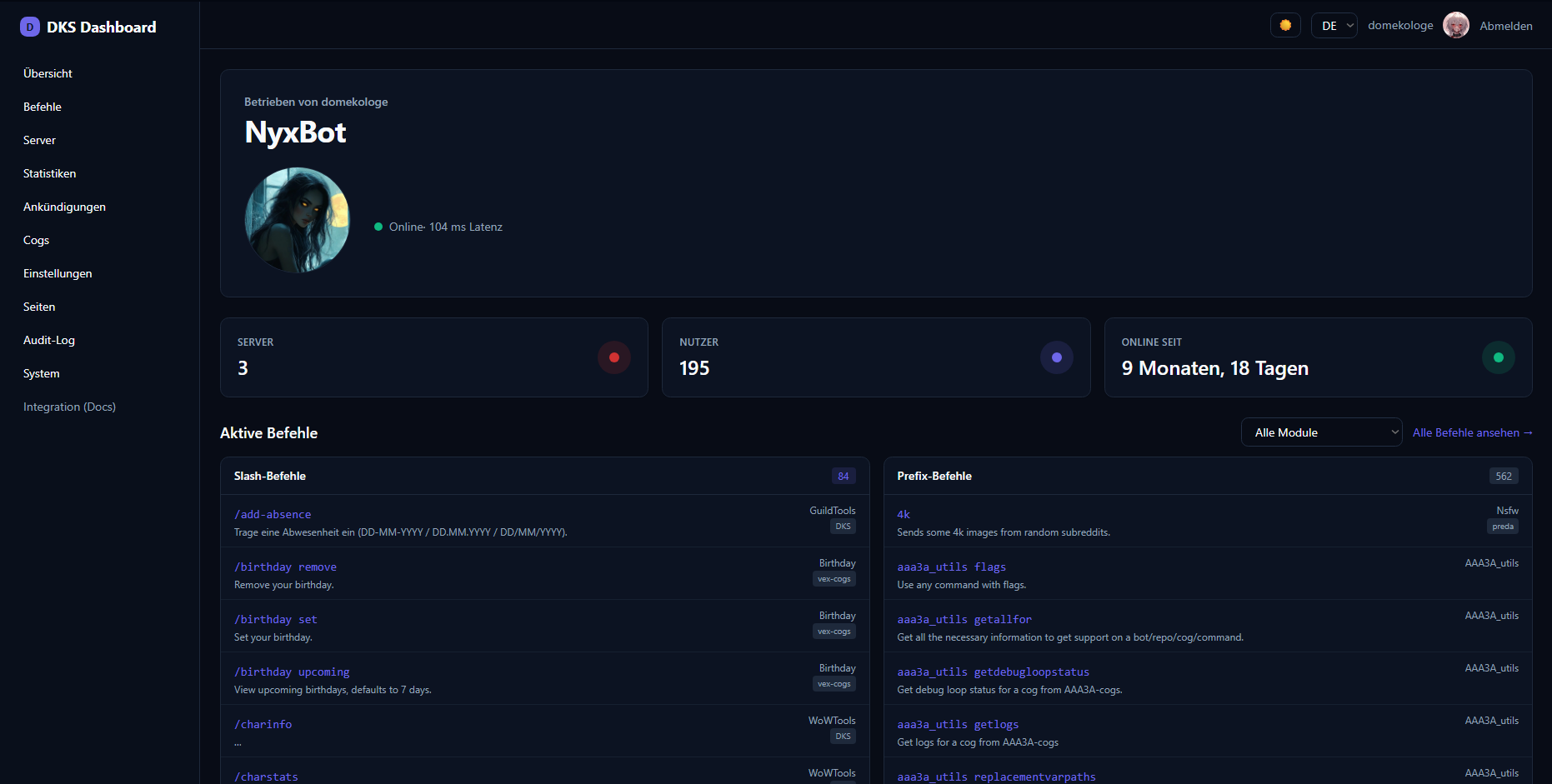
- Public landing/overview + command list (no login; grouped by module, with a category dropdown filter — All / Admin / Moderator / Setup / User, auto-detected from each command's permission level — to show only one category at a time). The overview shows the bot's
Markdown description (GitHub-flavored) and an "Invite me" button (the bot's OAuth
invite, auto-built from the client id with
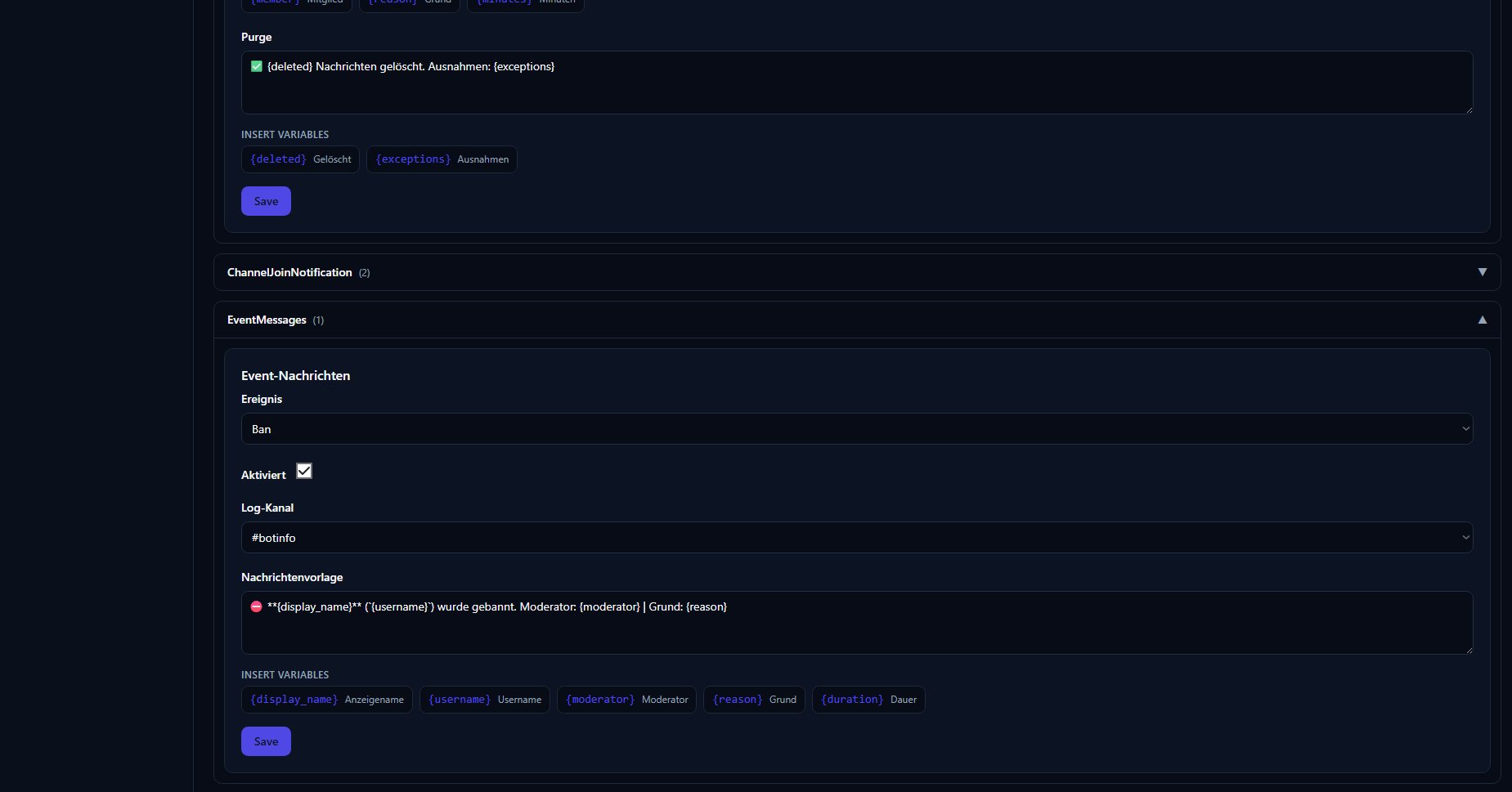
scope=bot+applications.commands&permissions=8, overridable via theinvite_urlbranding field). - After login: server overview, per-guild bot settings, embedded cog widgets, panels & lists – one module-with-tabs per cog (create/view/edit/delete, e.g. reaction roles, WoW profiles).
- Cog pages (
@dashboard_page): cogs can register full standalone pages with a declarative component tree (headings, text, tables, charts, grids) and optional server-driven controls (dropdowns). Global pages appear under the Module (Cog) Sites menu; guild-scoped pages as a button on the server page. - Automatic update check (
/system+ Settings): a server-side scheduler checks the web app's GitHub version on a configurable interval (off / 1h / 2h / 4h / 8h / 16h / 24h). An "update available" badge shows on the System menu entry and page. - Automatic cog-update check + alerts (Settings): the companion cog periodically checks installed cogs for updates (configurable interval); a count badge shows on the Cogs menu entry, and the bot can DM the owner on available cog updates or when memory usage crosses a configurable threshold.
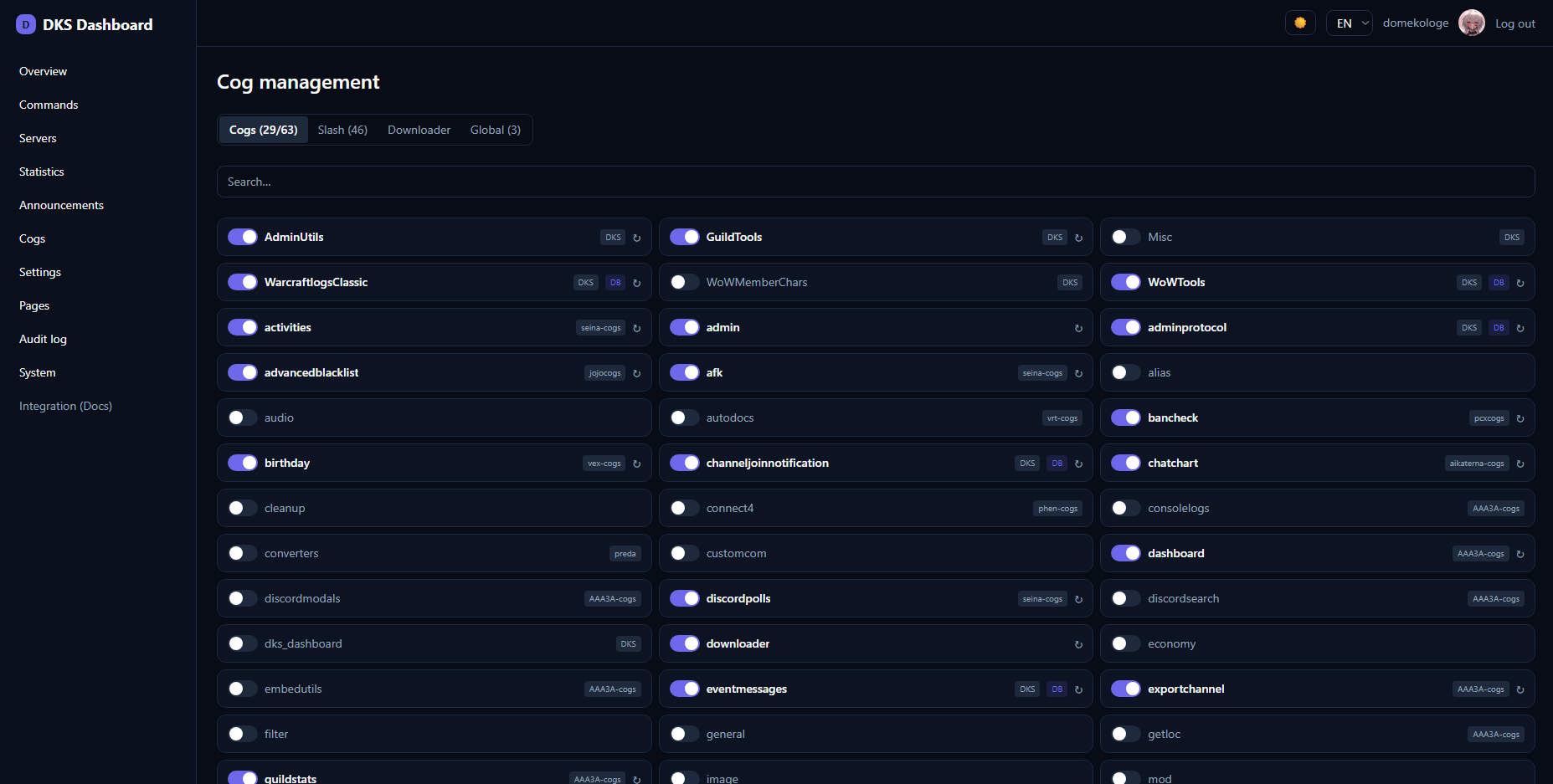
- Cog management (
/cogs): load/unload/reload cogs, Downloader (collapsible repos, update check + per-cog "Update"), Slash (grouped by cog, per-command/ per-cog toggle incl. disabled commands, sync), Global (per-cog owner panels as tabs). - Statistics (
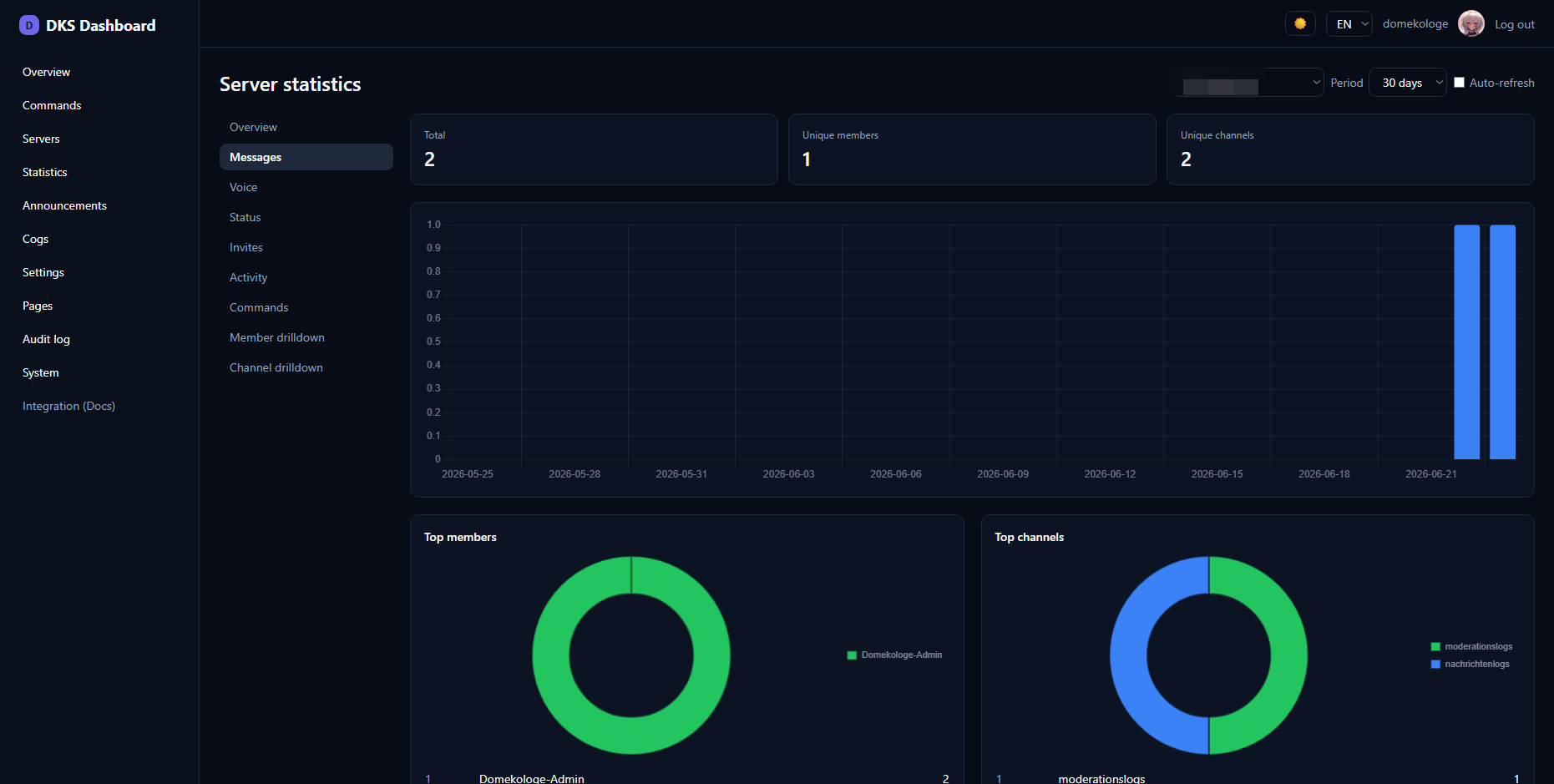
/stats): Statbot-style server analytics (overview, messages, voice, status, invites, activity, heatmaps, live "Now", peaks, leaderboard, retention, member/channel drilldown) with a server dropdown, time filter (up to 365 days) and Chart.js charts. Requires thepdc_webdashboard_statscog (collects the data). - Feature catalog (
/features): a card grid of all PDC cog modules with "replaces bot X" hints (MEE6, VoiceMaster, Ticket Tool, …), loaded/not-loaded status, per-module Open/Setup links and owner-only load/unload toggles; the setup wizard (/features/setup/<cog>) steps through a module's settings panels one by one. - Announcements (
/announce): embed builder with live preview, send to a channel. - Embed builder (
/embeds): visual builder with a live Discord-style preview, sending via the announce gateway (title/description/color/author/footer/image; fields/thumbnail/ timestamp are preview & export only), localStorage drafts and JSON import/export in the Discord API embed format. - Public guild pages (
/public/<guildId>): a login-free server showcase page, powered by public custom pages via the slug conventionguild-<id>(plusguild-<id>-*sub-pages) — nothing auth-gated is ever fetched anonymously. - Settings (
/settings): global bot settings, branding (title/icon/color/theme), a Markdown bot description, a website description (short_desc) used as the HTML<meta name="description">and Open Graph description for SEO/link previews, an optionalinvite_urloverride, lock/refresh. The favicon and OG image come from the bot's avatar. - Navigation: every menu entry has an icon; a bottom section adds external links opening in a new tab — Documentation (the GitHub Wiki), GitHub: Dashboard and GitHub: Cogs — plus an internal Credits link. Mobile gets the same menu via a hamburger drawer.
- Credits (
/credits, public): attribution/licensing (MIT base template; AAA3A & Neuro Assassin#4779 under AGPLv3; Red-DiscordBot by Twentysix under GPLv3) with links to the policy documents indocuments/(Credits.md,Privacy Policy.md,Cookie Policy.md,Third Parties Disclaimer.md). - Custom Pages (
/pages): Markdown editor with preview, public/private per page (private = logged-in only), appear in the navigation immediately. - System (
/system): bot health, versions, an optional GitHub self-updater, and a "Check for updates" button that compares the running version (frompackage.json) with the latest on the git remote and reports "up to date" / "update available". - Logs (
/logs, owner only): live view of the bot's recent log records (in-memory ring buffer attached whilepdc_webdashboardis loaded) with a level filter (INFO/WARNING/ERROR), search and expandable tracebacks. - Live updates: the overview/landing page uses Server-Sent Events (
/api/events, polled server-side so the gateway token stays on the server) to push live server/user counts, uptime and online status — no client polling. - Confirmation dialogs guard destructive actions (cog uninstall, repo remove) with a reusable modal (Esc/Enter, click-outside).
npm install
cp .env.example .env      # fill in values (see below)
npm run dev # http://localhost:5173| Variable | Description |
|---|---|
DISCORD_CLIENT_ID / DISCORD_CLIENT_SECRET |
From the Discord Developer Portal (OAuth2) |
DISCORD_REDIRECT_URI |
Must be registered exactly as a redirect in the portal |
GATEWAY_URL |
Address of the cog gateway (default http://127.0.0.1:6970) |
GATEWAY_TOKEN |
Get it on the bot with [p]pdcdashboard token |
SESSION_SECRET |
Long random secret, e.g. openssl rand -hex 32 |
ENABLE_SELF_UPDATE |
true to enable the GitHub self-updater on /system |
Fastest path – ready-made Linux service via copy/paste:
cp .env.example .env && nano .env     # configure once
sudo bash deploy/install-service.sh   # builds + installs the systemd service + starts it
Details/update script: deploy/README.md. Manual route:
npm ci
npm run build
node -r dotenv/config build      # starts adapter-node (default port 3000)
Important gotchas (learned the hard way):
node builddoes NOT read.env. adapter-node only uses real environment variables. Load them vianode -r dotenv/config build(npm i dotenv),set -a; . ./.env; set +a, or systemdEnvironmentFile=.- Behind an HTTPS reverse proxy also set these (otherwise e.g. 403 on logout):
ORIGIN=https://your-domain
PROTOCOL_HEADER=x-forwarded-proto
HOST_HEADER=x-forwarded-host
- A Tailwind config must exist. Without
tailwind.config.(cjs|js), Tailwind only emits the base layer → the page is (almost) unstyled. Never delete it; commit it to git. With"type":"module",tailwind.config.cjs(CommonJS) is the most robust. - The proxy must pass
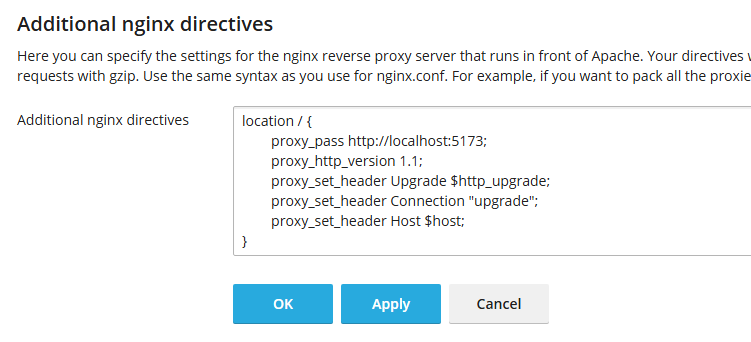
/_app/through. A single catch-alllocation /to the Node port is enough; noroot/try_filesintercepting/_app/.... - CDN cache (e.g. Cloudflare): assets are cached
immutable. While iterating, purge the cache after rebuilds or use "Development Mode".
# /etc/systemd/system/pdc-redbot-webapp.service
[Unit]
Description=PDC Redbot Webapp
After=network.target
[Service]
WorkingDirectory=/opt/pdc/pdc-redbot-webapp
EnvironmentFile=/opt/pdc/pdc-redbot-webapp/.env
ExecStart=/usr/bin/node build
Restart=on-failure
User=pdc
[Install]
WantedBy=multi-user.target
sudo systemctl daemon-reload && sudo systemctl enable --now pdc-redbot-webapp
journalctl -u pdc-redbot-webapp -fcp .env.example .env
docker compose up -d --build # http://localhost:3000If the bot runs on the host: GATEWAY_URL=http://host.docker.internal:6970 (compose maps
host.docker.internal via extra_hosts, also on Linux).
server {
    server_name your-domain;
    location / {
        proxy_pass http://127.0.0.1:3000;
        proxy_http_version 1.1;
        proxy_set_header Upgrade $http_upgrade;
        proxy_set_header Connection "upgrade";
        proxy_set_header Host $host;
        proxy_set_header X-Forwarded-For $proxy_add_x_forwarded_for;
        proxy_set_header X-Forwarded-Proto $scheme;
        proxy_set_header X-Forwarded-Host $host;
    }
}
Using Apache instead of nginx? Set
ProxyTimeout 60/Timeout 60so slow gateway calls don't turn into a 502.
That's done on the bot side (Python), not here. Guide + template:
PDC_Redbot_Cogs/pdc_webdashboard/INTEGRATION.md and the dashboardtemplate cog.
src/
  hooks.server.ts            Session from cookie + epoch check, 404 filter
  lib/server/                Server-side ONLY (secrets!): env, session, auth, rpc
  lib/components/            Widget, PanelForm, ListManager, ModuleTabs, ui/
  lib/components/charts/     Chart.js wrappers (Line/Bar/Donut/SeriesToggle) + Heatmap
  lib/i18n/                  de + en (full UI translation)
  lib/markdown.ts            safe Markdown→HTML renderer (Custom Pages)
  routes/
    +page.svelte             landing/overview (public)
    commands/                public command list
    guilds/ [id]/ settings/  server overview + bot settings (modules with tabs)
    cogs/                    cog management (Cogs/Slash/Downloader/Global)
    stats/                   server statistics (cog pdc_webdashboard_stats)
    announce/                announcement/embed builder
    settings/                global settings + branding
    pages/  p/[slug]/        Custom Pages (Markdown editor + public view)
    audit/  system/          audit log + bot health/self-updater
    auth/… logout            OAuth2 flow
    api/…                    BFF endpoints (call RPC, incl. /api/stats)