Check version
Check for duplicates
What is the expected behaviour/value?
Clicking the "check for update" button results in me being able to automatically update to the latest version (currently 2.13)
What is the actual behaviour/value?
After clicking "Check for Update", it goes through the list (1/61, 2/61, etc), and eventually ends with the message
"Update check failed!
One or more files could not be downloaded.
Check your internet connectivity
or try again later."
How to reproduce the issue
The previous explanation covers the steps I use to reproduce the error.
Steps I've taken to resolve this:
Running as admin
Installing as admin
Disabling my firewall completely
Manually adding PoB and update.exe as exceptions to windows defender
Deleting all saved builds + Uninstall & reinstall + reboot
One thing I noticed that is likely related to this issue:
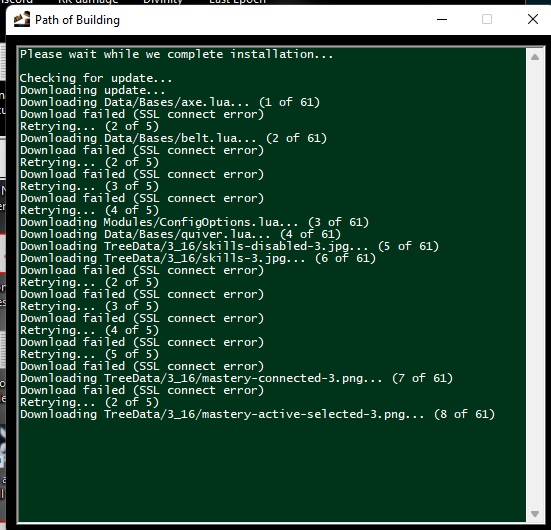
When starting PoB after a fresh install... on the green screen that pops up... several downloads fail and return the error "SSL connect error"
FWIW, PoB installs and updates normally on a separate computer in the house.
Build code
https://pastebin.com/WbMpXdV7
Screenshots

Check version
Check for duplicates
What is the expected behaviour/value?
Clicking the "check for update" button results in me being able to automatically update to the latest version (currently 2.13)
What is the actual behaviour/value?
After clicking "Check for Update", it goes through the list (1/61, 2/61, etc), and eventually ends with the message
"Update check failed!
One or more files could not be downloaded.
Check your internet connectivity
or try again later."
How to reproduce the issue
The previous explanation covers the steps I use to reproduce the error.
Steps I've taken to resolve this:
Running as admin
Installing as admin
Disabling my firewall completely
Manually adding PoB and update.exe as exceptions to windows defender
Deleting all saved builds + Uninstall & reinstall + reboot
One thing I noticed that is likely related to this issue:
When starting PoB after a fresh install... on the green screen that pops up... several downloads fail and return the error "SSL connect error"
FWIW, PoB installs and updates normally on a separate computer in the house.
Build code
Screenshots