A WPF (.NET 8) music jukebox for virtual pinball cabinets — and a capable stand-alone desktop media player. Phosphor plays music videos across a cabinet's screens (playfield, backglass, topper, DMD) with audio-reactive animated visuals and optional DOF cabinet lighting.
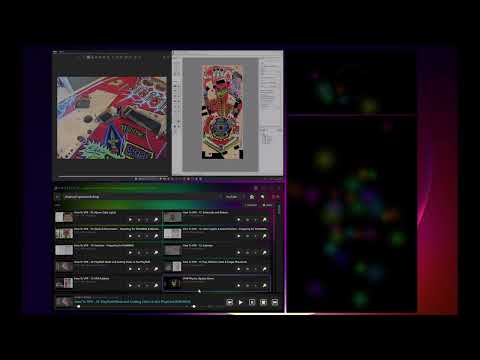
Watch this video for an overview and getting started tips:
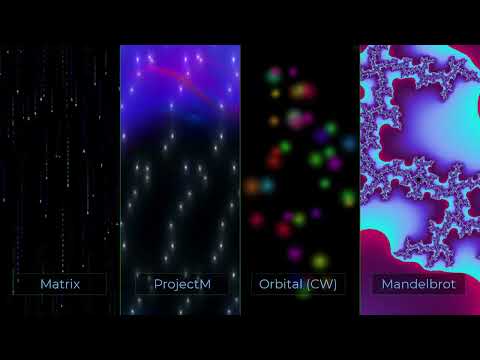
This video surveys the visualizations available in Phosphor:
- Many media sources via plug-ins — Sources are pluggable and configured in Settings. Available plug-ins include YouTube, Plex, Jellyfin, Emby, Vimeo, Dailymotion, SoundCloud, Twitch, SiriusXM, iHeartRadio, and a Local Folder source.
- Extensible — Additional plug-ins can be developed and loaded at runtime. See the Plug-in Authoring Guide for details.
- Multi-screen layout — Independent, individually positioned/sized windows for Playfield, Backglass, Topper, and DMD. Can be used in a single-screen desktop mode as well.
- Audio-reactive visuals — Visualizations driven by audio, driving effects on the visualizations and DOF lighting, if used.
- Customizable icons — Emoji tile icons render from a selectable font set (Segoe, Twemoji, OpenMoji, Fluent Flat) in Color, Desaturated, Silhouette, or Themed styles.
- DOF lighting — Triggers cabinet solenoids/LEDs via DirectOutput Framework through an
isolated .NET Framework 4.8 bridge process (
DofBridge). - Caching — Optional video pre-fetch, thumbnail, playlist, and category caches minimize network round-trips and make seeking reliable.
- Controller input — DirectInput joystick/gamepad support alongside keyboard bindings for button-box navigation.
| Project | Target | Description |
|---|---|---|
Phosphor |
.NET 8, WPF | Main application and plug-in host |
Phosphor.Plugin.Abstractions |
.NET 8 | The plug-in contract (IPhosphorSource, capabilities) |
Phosphor.Plugins.* |
.NET 8 | Source plug-ins (YouTube, Plex, Jellyfin, Emby, Vimeo, Dailymotion, SoundCloud, Twitch, SiriusXM, iHeartRadio, LocalFolder) |
DofBridge |
.NET Framework 4.8 | Out-of-process DOF host |
DofBridge.x86 |
.NET Framework 4.8 | x86 variant for 32-bit DOF drivers |
- Windows 10/11 (x64)
- DirectOutput Framework — optional, for DOF lighting
Everything else is bundled — LibVLC (via the VideoLAN.LibVLC.Windows package), plus
ffmpeg.exe, and projectM in dependencies\. No separate VLC install is required.
- Download the latest release from the release page and extract the ZIP to a folder of your choice.
All settings are stored locally in the folder for portability (primarily
settings.json). First run may take a few seconds to start; this is normal and future runs will be faster. - Open Settings to configure window positions, source plug-ins (add/enable/configure), and optional server details.
AGENTS.md— architecture and component map (authoritative dev/AI context).docs/PLUGIN_AUTHORING_GUIDE.md— how to build a source plug-in.docs/KNOWN_ISSUES.md— tracked issues and workarounds.