Repository navigation
Releases: Piwqust/claude-switcher
Releases · Piwqust/claude-switcher
Release list
Claude Profile Switcher 1.0.0

Download
| Processor | File | Size |
|---|---|---|
| Intel or AMD (almost every PC) | ClaudeProfileSwitcher-x64.exe | 555 KB |
| ARM (Snapdragon, Surface Pro X) | ClaudeProfileSwitcher-arm64.exe | 560 KB |
| Both builds and the docs | ClaudeProfileSwitcher-1.0.0-windows.zip | 578 KB |
Download the exe and run it: it installs itself, no admin rights needed. If Windows says "Windows protected your PC", click More info → Run anyway: the file is not code-signed. You need Claude Desktop installed. The interface is in English, or in Russian when Windows is.
What's new
The first release. Claude Profile Switcher is built on Claude Code Desktop Switcher 2.0 by @PriyanshuGeTRekT, a PowerShell script, and rewrites it from scratch as a native C++ app. Accounts, names, colours and shortcuts from that switcher carry over: just run the new exe.
Faster and lighter
- One native exe (C++, Win32, Direct2D, DirectWrite): about 550 KB with no .NET, PowerShell or other runtime. Builds for x64 and ARM64.
- The picker opens in about 75 ms instead of about 10 s, and the switcher uses about 16 MB of memory instead of about 126 MB (same PC, three accounts).
- No console window and no execution policy: run the exe and it installs itself.
New
- English and Russian interface. Follows the Windows display language; Settings → Language pins either one.
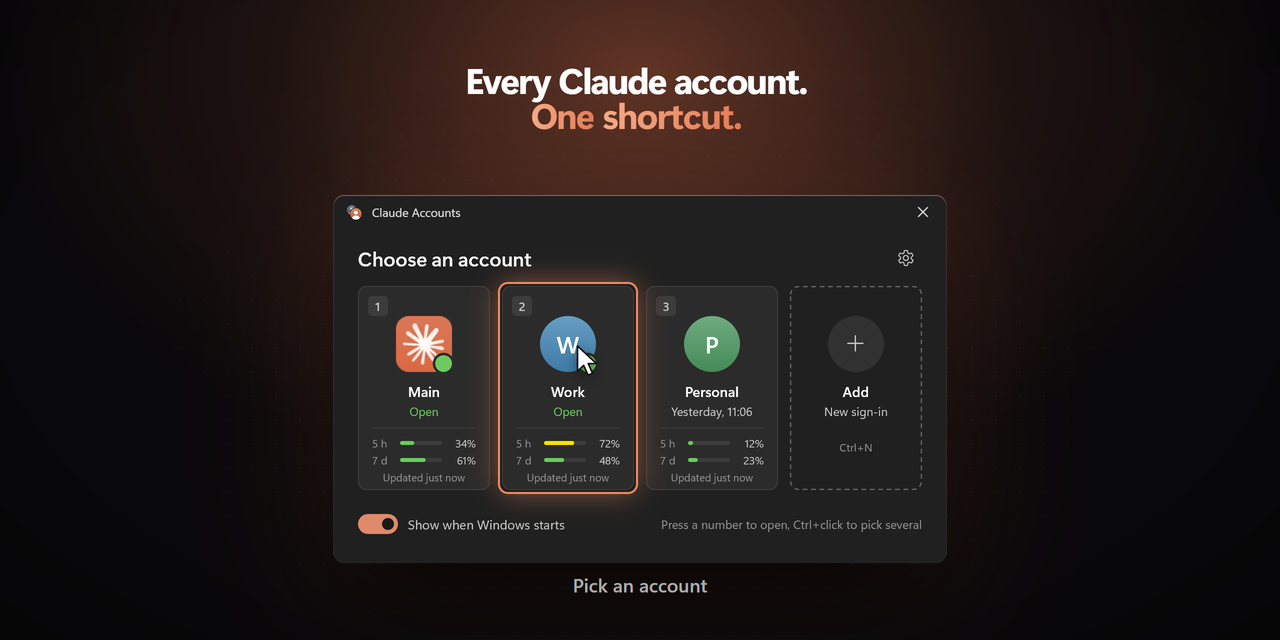
- A card-based picker in the Windows 11 style: dark and light themes from the system setting, Mica, rounded corners, smooth hover and press states.
- Choose at Windows sign-in. The switcher starts with Windows and asks which account to open. Ticked accounts open on their own after a 3, 5 or 10 second countdown that any key stops.
- Several accounts at once: Ctrl+click or Space on the cards, then one button.
- Global shortcuts: Ctrl+Alt+C for the picker (configurable) and Ctrl+Alt+1…9 for accounts.
- Usage on the cards: 5-hour and 7-day usage, shown only while at most 15 minutes old.
- A tray flyout on left-click and a themed system menu on right-click.
- A jump list on the taskbar with every account.
- Separate taskbar buttons per account (experimental).
- New icons: the switcher, the main account, and coloured badges with initials.
- Rename in place on the card with F2.
- Demo mode (
CPS_DEMO,tools\demo.ps1): the interface over made-up accounts, for screenshots and testing.
Changed from the PowerShell switcher
- The original account is called "Main"; new ones are
Account 2,Account 3and so on, and can be renamed. - Start with Windows uses
HKCU\…\Runinstead of a shortcut in the Startup folder. The old shortcut is removed. - Messages appear as notifications and dialogs instead of a status line at the bottom of the window.
SHA-256 checksums
05962d48f3ad55dd85c0f65e9824028bae355069f1c31456ef782f54660e1b44  ClaudeProfileSwitcher-x64.exe
3f59f167ec330572cfd9324f6a0b6544c89e7fe46fdb6b729d7c96baf215c970  ClaudeProfileSwitcher-arm64.exe
aa1a956496706542af83b5aa743fd3e19a559908adb4a7dd434002ef82966095  ClaudeProfileSwitcher-1.0.0-windows.zip
Built by GitHub Actions from commit adac668. · README на русском
Contributors

PriyanshuGeTRekT