Repository navigation
Releases: Pixelgamer4k/graden
Release list
Graden 0.3.0 beta

What's new in 0.3.0
Auto captions
- Tap the CC button in the top bar to caption the whole project, or Captions in a clip's tools for one clip.
- Speech is recognised on your phone with Whisper (Small, quick, or Large v3 Turbo, most accurate), in 99 languages. Captions come sentence by sentence, timed to the word, and laid out like YouTube and Netflix subtitles.
- Optional speaker detection (NVIDIA Nemotron 3 Diarization): each person gets their own captions, and quick replies are stacked as two lines.
- Optional music and lyrics detection (CED): sung lines are marked with 𝄞, and music without singing shows 𝄞 alone.
- Five caption sizes, Normal by default.
- Models are downloaded inside the app from their official sources and checked against their checksums, or added from storage. Nothing is uploaded.
Text and titles
- Captions and texts are the same thing. They sit on visual layers (V1, V2…) in their place among the pictures, and an AI caption stays marked as a caption however much it is edited.
- 28 fonts built in, including Hindi and Bengali ones.
- Style: colour, outline, shadow, background box, decorations, letter and line spacing, bold, italic and ALL CAPS.
- 14 in and out animations, none by default.
- Drag a text on the picture to move it; pinch to resize, twist to turn.
- Ready-made styles in the media box's Text section: tap one to add it, or drag it onto the timeline.
Redesigned screens
- Media box: sections for All, Video, Text, Images, GIFs and Audio, plus MCRAW once you add a RAW recording. Newest first, or sorted by name, size or length. Files from your other projects are below, ready to drag in.
- New project: shape, size and frame rate first. Colour spaces, bit depth, sample rate and loudness are under Advanced, with Rec.709 by default. Clips always fit the canvas.
- Export: a summary of what will be written, presets, then video, audio and file, with encoder and colour under Advanced. Tall exports (9:16) keep their progress in view.
Install
Download Graden-0.3.0-beta.apk below. It is signed with the same key as the earlier betas, so it installs over them and keeps your projects. Needs Android 10 or newer; captions need a 64-bit ARM phone.
Feedback: report a bug · suggest a feature · Discussions
Graden 0.2.1 beta
What's new in 0.2.1
3D camera view
- On the Stabilize page, tap 3D in the Camera motion card. A modelled camera moves exactly as Graden's visual gyro measured, at its real size of motion: the same shake and the same turns as in your footage.
- Switch to Stabilized to watch the same camera glide onto the smoothed path.
- It reads out tilt, pan and roll in degrees. Drag to look around; double-tap to reset.
Stabilisation
- Pressing Stabilize now asks you to Analyse first. Nothing starts on its own.
- Choose the analysis resolution (480p to 4K): lower is quicker, higher follows finer shake.
- The reset button removes stabilisation from the clip.
- While exporting, you can see the stabilisation analysis speed and the stabilised render speed.
New app icon
- An adaptive icon, with a monochrome layer for Android's themed icons.
Install
Download Graden-0.2.1-beta.apk below. It is signed with the same key as 0.1 and 0.2, so it installs over them and keeps your projects. Needs Android 10 or newer.
Feedback: report a bug · suggest a feature · Discussions
Graden 0.2.0 beta
Second beta. Install it over 0.1: it is signed with the same key, so your projects stay.
New
- Visual-gyro stabiliser. Built from scratch: measures the camera's rotation and zoom from the picture itself, row by row (rolling shutter included), and works out the lens on its own. Pick what to hold steadiest: background, balanced or subject.
- Colour matched to DaVinci Resolve. The colour space transform was measured against Resolve 21 itself and now matches it to within about one 10-bit code value: 28 camera and display curves, 20+ gamuts, DaVinci tone mapping, Saturation Compression, and HDR ↔ SDR conversion. Log footage no longer looks washed out.
- MotionCam RAW fixes. Black level no longer tints the shadows green or pink, white level sets where the sensor clips, and highlight recovery is rewritten (no magenta, real highlight detail back).
- S-curve contrast, as Resolve does by default: pushed contrast eases into black and white instead of clipping.
Faster and more reliable export
- HDR export about 3× faster: frames go straight from the GPU into the encoder.
- The encoder that writes HDR10 metadata is picked automatically.
- 10-bit on more MediaTek phones, checked in the file.
- A clear message when a phone cannot export HDR, instead of silently writing SDR.
- HLG footage recognised correctly, shaders cached, and smoother proxies on MediaTek.
Tested
9 Samsung phones and tablets through Samsung Remote Test Lab (Exynos, Snapdragon and Dimensity, flagship to budget): see docs/TESTING.md.
Please report what you find: bugs and ideas.
Graden Benchmark 1
A one-tap video-editing benchmark built from Graden's own engine: install, open, tap a button. No computer, adb or setup needed.
What it does
- It uses a built-in real 4K clip: handheld phone footage in ARRI LogC3.
- It applies a heavy grade: LogC3 colour space transform with DaVinci tone mapping and Saturation Compression, all four wheels, contrast, curves, temporal and spatial noise reduction, sharpening, and halation, bloom, grain and vignette.
- It stabilises the clip with Graden's visual gyro.
- It exports 4K H.265 with the phone's hardware encoder.
You watch the frames render live with their speed. At the end a results card shows:
- export fps
- stabilisation analysis speed
- stabilised render speed
- the encoder used
How to run
- Install Graden-Benchmark-1.apk (Android 10 or newer, 64-bit ARM).
- Open GradenLab and tap Benchmark 1 min (quick) or Benchmark 5 min (the full test).
- Keep the screen on until the results card appears.
Share your result
Please post a screenshot of the results card in Discussions, or open an issue with your phone model. Results from many chips help make Graden faster on every phone.
This is a test tool (package com.graden.lab), separate from the Graden app: it installs alongside Graden without touching your projects.
Graden 0.1.0 beta
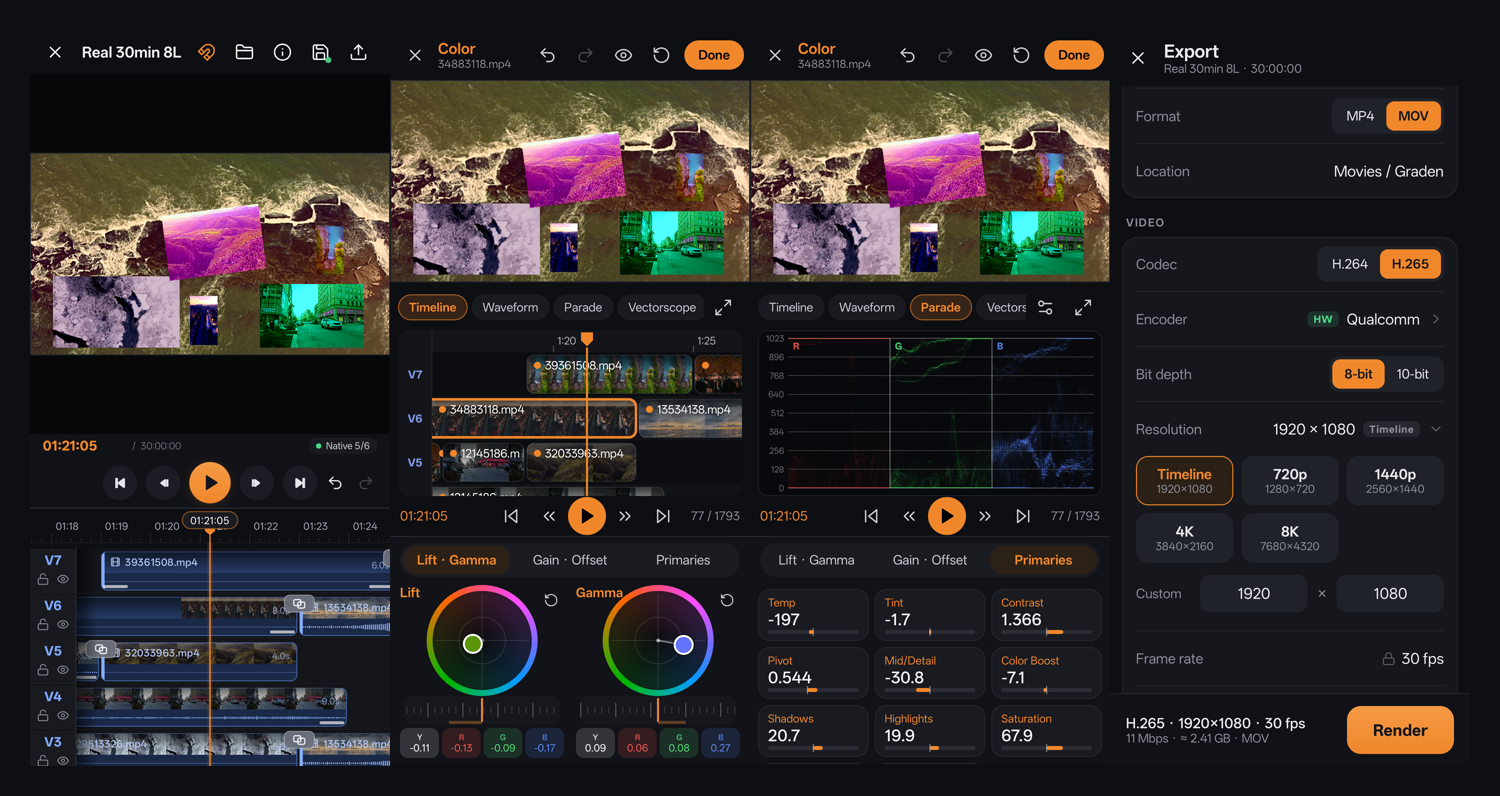
The first public beta of Graden, a multi-layer video editor and colour grading app for Android.
Install
Download Graden-0.1.0-beta.apk below, open it on your phone, and allow installing from this source when asked. Needs Android 10 or newer.
What's in this beta
- Editing: multi-layer timeline (tested with 8 layers of 4K and 1,800 clips), trim, split, crop, placement, speed, reverse, 46 transitions and animations, per-clip sound
- Proxies: automatic background proxies for smooth 4K editing; the original's exact full-resolution frame when paused
- Colour: Lift / Gamma / Gain / Offset wheels with separate Y R G B controls, primaries, and waveform, parade, vectorscope, histogram and CIE scopes
- Export: H.264 / H.265 with the phone's hardware encoders, MP4 or MOV, up to 8K, 10-bit where supported, from the original files at full quality, AAC up to 320 kbps, loudness normalising, presets
Known limitations
- Exporting many 4K layers is slow (full-quality, frame-by-frame rendering)
- 10-bit export is only offered on phones whose encoder supports it
- This is a beta: expect bugs, and please report them
Feedback
🐞 Report a bug · 💡 Suggest a feature · 💬 Discussions
SHA-256 of the APK: 9325874735f318d5ca07879db9a01c37499e519207dce2b579e2c561cb4972c7